It is easy to assume that adding more indicators will make trend-following or mean-reversion decisions clearer. But several indicators can rework the same price information, adding clutter without much independent context. A few well-chosen tools with specific purposes—or a disciplined price-action approach—can be easier to interpret than a crowded chart. Multiple timeframes can help too, when each view has a clear role.
Enter order flow: another dimension of the market. Instead of simply repackaging price movement, it lets you examine the activity accompanying it: the pace of trading, trade size, and classified buying and selling pressure. Price shows the outcome of the auction; order flow adds a view of participation behind that outcome.
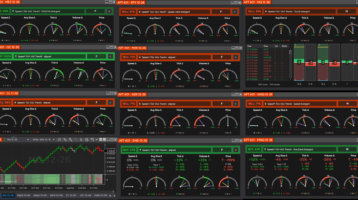
AFT401 makes that extra dimension easier to read. It brings tape speed, average trade size, tick and volume delta, and price trend into one NinjaTrader 8 dashboard and distils their directional readings into OFA Bias %. Choose a compact, at-a-glance summary or a fuller view of the component gauges and tape. The chart also provides OFA Bias % Average as a smoothed reference.
Order flow made simpler: one dashboard, one number: the OFA Bias %
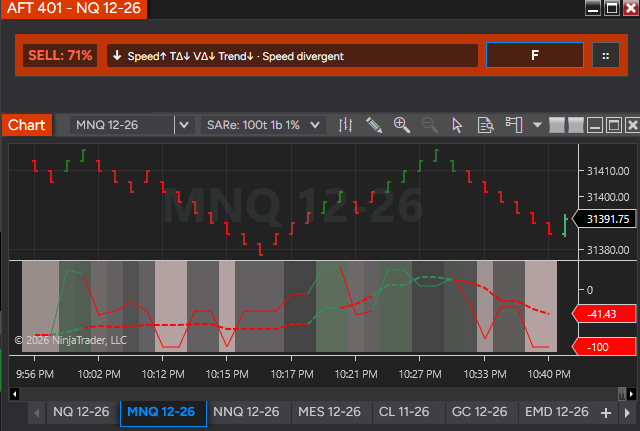
Reading order flow should not require constantly switching between several platforms, subscriptions and displays. AFT401 condenses its core trade-flow measures into one dashboard and one number: the OFA Bias %. Choose the level of detail that suits your trading: a simple, at-a-glance bias reading in the compact view, or a fuller dashboard with component gauges, numerical summaries and the trade tape. Expand or collapse the sections as required to see what supports or contradicts the overall bias.
The OFA Bias Percentage uses a common percentage scale across instruments. This makes the presentation consistent when moving between markets whose prices, trade sizes and activity levels differ. It represents directional agreement within the observed flow—not a probability of a winning trade or a claim that different instruments have identical behaviour.
AFT401 brings this consolidated view into your existing NinjaTrader and AFT8 workspace. You do not need a separate order-flow platform or a Level 2 subscription specifically to use it; normal AFT, platform and applicable Level 1 market-data charges still apply.
A clearer chart reading with smoothing and crossover analysis
The bias also plots on the chart, alongside a configurable smoothed bias. The combined reading brings the observation periods together, while smoothing gives you a steadier reference against which to assess changes. You can examine crossings between the combined bias and its smoothed line, together with direction, persistence and price context, as part of a tested signal method.
Individual order-flow readings can change direction rapidly during a busy auction. The combined and smoothed views are designed to reduce the emphasis on those short-lived flips and make sustained bias easier to follow. Smoothing introduces delay and does not eliminate reversals; the detailed dashboard remains available when you need the immediate flow.
These chart readings support crossover analysis and bias filtering. Automated OFA entry and filter integration is a planned extension, as described below; a crossing by itself is not an automatic trading instruction.
A different dimension of the market
A price-based trend indicator summarizes the path price has taken. Order flow examines the transactions taking place along that path. Two moves of similar size can have different tape speeds, different average trade sizes and different balances of buying and selling activity.
AFT401 classifies trades at or above the ask as buys and trades at or below the bid as sells. Trades between the quotes are neutral. This describes the classified aggressor-side activity: every executed transaction still has a buyer and a seller.
That distinction gives the trader another dimension to examine alongside price structure. Strong buying activity with little upward progress raises a different question from strong buying activity accompanied by a rising price trend. AFT401 puts both measures on screen so you can see the relationship, rather than infer it from a candle alone.
It is a view of executed flow using the available feed’s bid, ask and trade updates. It does not identify individual traders or reveal the entire resting order book. Its value is in showing several aspects of observed market activity together.
AFT401 uses the feed’s bid, ask, and last-trade information to track executed activity. It does not identify the trader behind an order, and a large print alone does not prove institutional involvement. Nor is the dashboard a complete display of resting market depth. Its focus is the observed tape and its relationship with price.
What the AFT401 dashboard adds
- Speed Δ: total trades per second and the balance of buy-side versus sell-side speed. It helps distinguish an active auction from a quieter tape and identify which side is contributing to that activity.
- Avg Size Δ: average buy and sell trade size, using a configurable retained sample. This adds context when one side trades frequently but the other trades in larger size.
- Tick Δ: the directional balance of individual trade prints.
- Volume Δ: the directional balance of traded size. Comparing it with tick delta can reveal disagreement between frequency and volume.
- Price: price direction relative to its configured averages, so you can compare the response of price with the flow.
- Combined BUY / SELL / HOLD bias: a consolidated reading with notes about alignment and divergence. It summarizes the component readings without replacing your trading plan.
Realtime, Fast, Medium and Slow views give context at different horizons. All four continue calculating, so switching the dashboard mode does not discard the other views. The mode button lets you cycle through them without reopening the options panel.
Use the compact header and clocks for a quick check beside your chart. Enable the summaries, ticker and vertical gauges when you want to examine the component readings and individual prints. The display fits the visible sections, and you can save the layout for each instrument.
One engine, an indicator and a dashboard
The indicator owns the live OFA processing service. Incoming events enter a queue; a signal wakes the background worker, which drains the queued data and updates the calculations. Market-data processing is separate from the dashboard’s refresh interval.
That means the engine processes incoming activity without waiting for a dashboard redraw. The default display refresh is 200 milliseconds, configurable from 100 to 3,000 milliseconds. The chart follows its own NinjaTrader Calculate setting: on bar close by default, with on price change or on each tick available.
The architecture is designed for responsive real-time updates, rather than making the UI process every trade individually. It does not remove feed latency, computing time, or the deliberate smoothing introduced by a selected period.
You can run the chart indicator with the dashboard hidden. Pausing the dashboard freezes its display while processing and chart calculations continue. Closing the dashboard also leaves the indicator’s analytics running. During a window drag, dashboard refresh work is deferred so the window can move smoothly.
R, F, M and S: real-time activity alongside context
All four bias modes keep calculating in parallel:
- R — Realtime: the current rolling trade sample and real-time tape-speed sample.
- F — Fast: the configured fast period, default 10 seconds.
- M — Medium: the configured medium period, default 60 seconds.
- S — Slow: the configured slow period, default 300 seconds.
Realtime is not one universal time window. Current deltas and average size use the retained trade sample, while realtime speed uses a separate trailing sample, default five seconds. Fast, medium and slow provide time-based context, with periods configurable across speed, delta and price.
The dashboard defaults to Fast. Click the mode button beside :: to cycle R → F → M → S, or select a mode in the options panel. Changing the view selects the header bias and rolling delta gauges; it does not erase the other modes or restart their calculations. The clock gauges continue to show the different period needles together.
Speed of tape: how busy is the auction, and which side is driving it?
Tape speed measures individual trades per second. The dashboard shows total activity, buy-side speed, sell-side speed and the difference between them.
This lets you distinguish a busy but balanced tape from activity dominated by one side. A rising total rate does not, on its own, say BUY or SELL. The buy/sell speed balance supplies that directional information.
The realtime sample defaults to five seconds and is configurable. Fast, medium and slow rates add context over their configured windows. A burst that dominates the realtime view may remain a small part of the slow view; that difference is useful information about how recently the activity changed.
Average size: the size of the trades behind the tape
Avg Size Δ compares average buy-trade size with average sell-trade size. The sample defaults to 100 retained ticker rows and is configurable.
With aggregation enabled, one row can contain multiple consecutive prints sharing the same feed millisecond, price and classification. Individual trade counts are preserved, so average size is based on the underlying trades rather than treating an aggregated row as one large trade.
Speed and average size answer different questions. A fast tape can consist mainly of small prints. A slower tape can contain larger transactions. Viewing the side averages beside speed and volume delta helps you see that difference without assuming trade size identifies a particular type of participant.
Tick delta and volume delta: participation and size
Tick delta measures the balance of classified buy and sell prints:
Volume delta measures the balance of their traded volume:
Neutral trades remain in the denominators. Tick delta tells you about the balance of individual trades; volume delta tells you about the balance of traded size. They can disagree when one side trades more often but the other trades in larger size.
Both measures provide realtime values and fast, medium and slow time-weighted averages of the rolling delta percentages. Cumulative tick and volume delta add the longer balance since startup or reset, independently of the rolling sample.
The clock gauges show R/F/M/S and cumulative C needles. The longest dashed current needle sits in front, with its direction reflected in its color. Fast is cyan, medium gold and slow purple; cumulative is silver and dotted. Vertical gauges provide a larger numerical readout, with underlying buy/sell components and rolling extremes for further context.
Price: is the market responding to the flow?
The Price gauge provides a comparison with the actual movement of the traded price. Its trend percentage compares the fast and slow price averages, normalized by the rolling price range:
Fast, medium and slow price needles also compare the latest traded price with their respective averages. This helps you examine whether price direction agrees with the observed flow.
For example, positive deltas alongside weak price progress can highlight a disagreement worth investigating at a known level. Positive deltas with positive price trend describe a different state. Neither observation proves the next move; it gives you a more specific account of the current auction.
Combined direction: BUY / SELL / HOLD
AFT401 combines directional evidence across tape activity, trade size, delta, price and cumulative flow. Its percentage summarizes the balance of that evidence; it is not a probability of a profitable trade.
The default no-trade zone is −10% through +10%, including the boundaries. Above it, the dashboard displays BUY; below it, SELL; inside it, HOLD. The threshold is configurable. The percentage expresses the balance of the rules—it is not a forecast probability or an instruction to enter a trade.
The selected display mode determines the period-sensitive votes. Average-size and cumulative votes remain shared. Compact notes identify agreement or divergence, helping you see why a headline bias may be less convincing than it first appears.
Chart history, combined bias and smoothing
The chart has six data series: BiasR, BiasF, BiasM, BiasS, BiasWeighted and BiasWeightedSmoothed. The four period plots are transparent by default and can be made visible in the Plots settings.
The combined line brings the four period readings together:
BiasWeightedSmoothed is a configurable simple moving average of that combined line, default ten chart bars. That is bar-based smoothing, separate from the fast/medium/slow time windows.
Chart trend colors follow the combined bias direction, with configurable background and bar painting, colors, opacity and graduated strength. The dashboard shows the selected mode. A fast dashboard bias and a quieter combined chart reading can therefore coexist: the other periods may still oppose or dilute the newest activity.
For a compact workspace, use the header and clocks. For a detailed view, enable the numerical summaries, ticker and vertical gauges. The window fits the displayed sections, and its layout and mode are saved per instrument. Always on Top is available in the options panel.
A shared historical data aggregator
Optional recording preserves one snapshot per UTC minute for retrieval and analysis. Realtime submissions are limited to at most once per second; they enter a shared concurrent queue. A signalled background consumer updates the current minute and discards stale timestamps.
Every 60 seconds, a background writer appends completed minutes to an instrument-specific daily CSV. The history remains in memory after saving. Root-symbol folders avoid separate paths for each contract expiry, with date-sortable filenames such as ofa/NQ/2026-10-07.csv.
Records contain the instrument, UTC minute ticks, R/F/M/S, combined bias, smoothed bias and XBias (+1 BUY, 0 HOLD, −1 SELL). Double values retain full precision. At startup, the service loads saved histories; chart refreshes can retrieve them to restore the six plotted series.
That restores the recorded view, not the original trades. Live calculations still warm up from fresh market data after a restart. Missing minutes remain missing, and continuous-window retrieval rejects spans containing holes, so later analysis need not silently join disconnected sessions.
Using the view in a realtime trading workflow
Start with the trade location. Your price structure, session levels and entry method establish where a trade might make sense. Order flow adds evidence about the activity occurring there.
Compare the immediate reading with the slower context. A new Fast BUY reading while Slow remains negative can mark a developing change or a temporary counter-move. Inspect the component gauges before treating the headline as confirmation.
Look for participation and price response together. Speed, tick delta and volume delta leaning in the same direction, accompanied by price progress, describe broader agreement. A mismatch between tick and volume delta invites a closer look at trade size. Flow against price can be a reason to wait for clearer evidence.
Use HOLD and divergence to reduce unnecessary decisions. You do not need to turn every change of color into an entry. The configurable neutral zone and compact notes can help identify times when the flow offers little directional agreement.
Review what you saw. Saved chart history lets you revisit how the biases changed around your entries and exits. Keep the feed, sample settings, chart calculation mode and warmup state in mind when comparing sessions. Entry discipline, position sizing and exit management remain part of the trading process.
From discretionary context to AFT8 signal integration
AFT401 gives discretionary traders a consolidated order-flow view they can use alongside their existing technical workspace. The planned next stage is to expose OFA signals and filter bias alongside AFT8 algorithmic entry modules—for example, requiring directional agreement or filtering entries during HOLD conditions.
This signal/entry integration is a planned extension, not a claim that the current dashboard independently executes trades. The available release notes and component guide will describe the supported integration as it is delivered.
How to get AFT401 in NinjaTrader 8
AFT401 is targeted for AFT8 release 202615. Check the release information and your edition’s entitlement before installing. It is supplied through AlgoFuturesTrader; it is not a feature automatically included with a standard NinjaTrader installation.
- Set up your ATS account. Use Get Started with ATS for the account and onboarding path.
- Choose the appropriate AFT edition. Review the AFT plans and pricing, including instrument access and discretionary versus automated features. Confirm AFT401 availability for your release and license.
- Install or update AFT8. Follow the official instructions and obtain the compatible installer from ATS Downloads.
- Connect NinjaTrader to the appropriate data feed. Confirm that the instrument receives bid, ask and last-trade updates.
- Add the indicator to your chart. Open Indicators, locate AlgoFuturesTrader and select AFT 401 OFA – Deltas.
- Choose your view and apply. Review the periods, retained sample, HOLD threshold and chart calculation mode. Enable the dashboard if you want its separate window; it opens in realtime.
- Allow the sample to build. Start with the compact view, then enable detailed sections as needed. Turn on history recording if you want saved snapshots for retrieval.
Release and availability
Target release: AFT8 202615. Final availability and supported signal integration will be confirmed in the release information.
Plan availability: the proposed packaging is to include the indicator and dashboard in AFT Essentials, Premium and Ultimate within each edition’s permitted instruments, with automated entry/filter integration for Premium and Ultimate. Final AFT401 entitlement is to be confirmed before publication.
That approach brings live order-flow analytics into discretionary trading while keeping the automated workflow aligned with the higher editions. The current plan comparison distinguishes manual entry in Essentials, automated entry in Premium/Ultimate, micro futures in Essentials/Premium and broader instrument access in Ultimate.
Read the AFT401 indicator and dashboard guide for parameters, gauge meanings, history storage and troubleshooting. Compare editions on the AFT pricing page, or contact the ATS Help Desk for release and account questions.
Data requirement
Level 1 only: AFT401 uses last-trade price and volume plus best bid/ask quotes. No Level 2 market-depth subscription is required specifically for AFT401. Normal platform, AFT and applicable Level 1 exchange-data charges still apply. It does not provide a full order-book heatmap or depth ladder.
For the broader trading context, read Benefits of Order Flow for Futures Day Trading and Prop Traders.