NinjaTrader Automated Trading by Algo Futures Trader

hybrid algorithmic automated futures trading for prop firm traders, day & swing traders

  • 🚀Get Started
  • NinjaTrader
  • Get Funded
  • Trading Servers
  • Pricing
  • blog
  • Help

Just Give Me an Algo That Works

July 11, 2026 by AFT

The Fully Automated Prop-Firm Trading Robot Myth: Why “Just Give Me an Algo That Works” Is the Wrong Starting Point

Many traders dream of finding one automated futures-trading robot with a 65% to 85% win rate, a risk-to-reward ratio between 1:1.5 and 1:2, minimal drawdown and the ability to trade any market condition without supervision.

The dream is simple: buy a $25K, $50K or even $250K prop-firm account, switch on the robot, walk away and allow the algorithm to pass evaluations and produce payouts.

ATS regularly speaks with traders who want exactly this. They do not want to learn hybrid algo trading, study market conditions, exercise risk control or develop their own statistics. They want to see an impressive performance report, receive a baseline algorithm, activate it and watch it trade.

Unfortunately, this expectation combines several of the biggest myths in retail automated trading.

There is a major difference between an algorithm that can generate profitable historical statistics and an automated system that can survive changing markets, live execution and restrictive prop-firm drawdown rules.

The Dream Robot Specification

The typical request sounds something like this:

  • Give me an automated robot with a 65% to 85% win rate.
  • Give me an average winning trade worth 1.5 to 2 times the average losing trade.
  • Make it work in trending, ranging, volatile and quiet markets.
  • Make it trade correctly during news, holidays and unusual market conditions.
  • Make sure it never requires optimization, intervention or supervision.
  • Keep the drawdown small enough to survive a tightly controlled prop-firm account.
  • Let me trial it immediately and judge it from the published statistics.

Individual systems can produce strong results during suitable periods. A carefully engineered portfolio of automated systems may also become viable when supported by substantial capital, diversification, professional infrastructure and continuous research.

The unrealistic part is expecting one fixed retail algorithm to deliver all these qualities simultaneously, indefinitely and in every market phase while operating unattended within a narrow prop-firm loss allowance.

Myth 1: A $50K Prop Account Gives the Robot $50,000 to Work With

A prop account’s advertised account size is not normally the amount the trader or robot can lose.

The practical risk capital is the permitted drawdown.

For example, a nominal $50K account with a $2,000 maximum drawdown provides approximately 4% of its headline account size as total loss capacity. A nominal $250K account with a $5,000 drawdown provides only approximately 2% of its headline value as loss capacity.

The usable margin may be even smaller after accounting for trailing-drawdown movement, commissions, slippage, previous losses, daily-loss rules and the need to preserve a safety buffer.

A profitable strategy that eventually recovers from a $10,000 drawdown may be acceptable within a sufficiently capitalized live account. The same strategy would have already failed a prop account with a $2,000 or $5,000 loss limit.

The real account is not the number printed in the account name. The real account is the drawdown allowance the strategy must survive.

Myth 2: A High Win Rate Means the Robot Will Not Experience Dangerous Losing Runs

A 65% win rate still means that approximately 35 out of every 100 trades may lose over a sufficiently representative sample.

Those losses will not necessarily arrive in a convenient alternating pattern of one loss followed by two wins. They can cluster into consecutive losing trades, difficult weeks or extended periods in which the strategy is poorly aligned with the current market phase.

A strategy can therefore maintain a positive long-term expectancy while still producing a losing sequence large enough to breach a prop-firm drawdown limit before its statistical edge has time to recover.

The higher win rates and stronger risk-to-reward ratios traders request are not mathematically impossible. The problem is assuming those statistics will remain stable across every instrument, session, volatility condition and market regime.

A strategy reporting an 80% win rate over a selected historical period may behave very differently when:

  • Volatility expands or contracts.
  • Liquidity changes.
  • Market correlations break down.
  • A previously trending market becomes rotational.
  • Execution slippage increases.
  • News produces abnormal price movement.
  • The strategy enters a market phase that was poorly represented in its test data.

A win rate is an average from a particular sample. It is not a promise describing the sequence of future trades.

Myth 3: Impressive Statistics Prove That an Algo Is Suitable for Prop Trading

Statistics are important, but statistics must be interpreted correctly.

A trader who asks only for win rate, net profit and risk-to-reward is ignoring many of the measurements that determine whether a strategy is operationally suitable.

A proper assessment should also consider:

  • Maximum historical and forward-tested drawdown.
  • Length and frequency of losing runs.
  • Maximum adverse excursion.
  • Performance during different market phases.
  • Dependence on a small number of unusually profitable trades.
  • Average trade value after commissions and realistic slippage.
  • Intraday risk and open-trade equity movement.
  • Trade frequency and clustering.
  • Sensitivity to small changes in settings.
  • Performance outside the optimized test period.
  • Whether the system can comply with the selected prop firm’s current rules.

A strategy may show a large net profit while producing drawdowns that are completely unsuitable for a tightly constrained prop account. Even profitable professional strategies can experience drawdowns far beyond typical prop-account limits.

Profitability and prop-account survivability are not the same measurement.

Myth 4: An Algo Baseline Is a Finished Live-Trading Product

ATS Algo Futures Trader can include turnkey algorithmic baseline workspaces. These are valuable reference starting points, but they are not presented as permanent switch-on-and-forget live-trading products.

A baseline can help the trader:

  • Study how the strategy responds to different market phases.
  • Observe natural winning and losing runs.
  • Understand the underlying trading concepts.
  • Compare instruments, sessions and settings.
  • Identify conditions in which the logic performs well or poorly.
  • Begin optimization, replay testing and forward validation.
  • Develop hybrid filters and intervention rules.
  • Create a foundation for an independently researched automated system.

An unoptimized baseline may produce substantial winning runs during favorable conditions and substantial losing runs when conditions change. This is part of what makes it educationally useful: it exposes how a fixed set of rules behaves across different phases without pretending that the market remains constant.

It does not mean that every signal should be traded with real money.

ATS baseline systems are intended to provide a structured foundation for study, testing, optimization and development. Traders pursuing serious full automation remain responsible for research, validation, risk limits and ongoing system management.

What an Algo Baseline Is Not

  • It is not a guaranteed prop-evaluation passing system.
  • It is not a promise of future payouts.
  • It is not permanently optimized for every future market condition.
  • It is not evidence that the trader can ignore drawdown and risk limits.
  • It is not permission to place it immediately into unattended live trading.

Myth 5: A Short Trial Can Prove That a Robot Works

A short trial can demonstrate software features, workflow, execution and how a strategy behaves during the market conditions encountered during the trial.

It cannot prove that a system will remain profitable through every future market phase.

A seven-day trial might occur during an unusually strong trending period and make a trend-following system look exceptional. The same seven days could occur during difficult rotational conditions and make a potentially viable strategy look ineffective.

Neither result provides enough information to establish a permanent edge.

A serious validation process normally requires:

  1. Testing across different historical market environments.
  2. Out-of-sample testing.
  3. Replay and simulation testing.
  4. Forward testing with unchanged settings.
  5. Realistic commissions and slippage.
  6. Clear drawdown and shutdown limits.
  7. Monitoring how live execution differs from theoretical results.
  8. Revalidation as market conditions change.

A trial is an opportunity to understand the technology and methodology. It is not a shortcut around the research process required for unattended automation.

Myth 6: A Profitable Robot Should Work in Every Market

Markets move through different phases. They trend, rotate, compress, expand, accelerate, reverse and become temporarily distorted by news, liquidity and positioning.

A strategy designed to capture sustained directional movement may struggle during a narrow rotational market. A mean-reversion strategy may perform well during balanced conditions and then suffer when the market enters a persistent breakout.

Optimization does not remove this problem permanently. It attempts to align the system with particular characteristics found in the data.

When those characteristics change, the operator may need to:

  • Pause or park the system.
  • Reduce position size.
  • Change the permitted trading session.
  • Restrict the system to long-only or short-only operation.
  • Apply volatility or market-structure filters.
  • Switch to another strategy or instrument.
  • Reoptimize and forward-test new settings.
  • Retire the system if its original edge no longer appears valid.

The belief that one algorithm should trade continuously through every condition is not professional diversification. It is dependency on one fixed set of assumptions.

Myth 7: Fully Automated Trading Means Less Work

Automation may reduce the manual work involved in entering and managing individual trades. It transfers that workload into system research, testing, optimization, infrastructure and supervision.

A serious automated trader may need to operate as:

  • A strategy developer.
  • A quantitative researcher.
  • A software tester.
  • A data and infrastructure operator.
  • A portfolio manager.
  • A real-time risk supervisor.

Developing and cautiously introducing an initial automated system may require approximately six to twelve months. Building a diversified operation with several strategies and asset streams may require one to three years or longer, with no guarantee that the total investment will become profitable.

Professional automation also requires ongoing work because the market does not stop evolving after the first successful backtest.

Why Fully Unattended Automation Is Especially Difficult for Prop Firms

Prop trading combines market risk with account-rule risk.

The algorithm must not only remain profitable over time. It must also survive every individual stage between account activation and a permitted payout.

Depending on the firm and account program, the strategy may need to navigate:

  • Daily-loss limits.
  • Intraday or end-of-day trailing drawdown.
  • Maximum position sizes.
  • Scaling requirements.
  • Consistency rules.
  • Minimum trading days.
  • News-trading restrictions.
  • Holding-time restrictions.
  • Payout buffers and withdrawal rules.
  • Restrictions affecting automated trading or account operation.

Rules vary between firms and programs and may change. Traders must verify the current terms of their selected account before deploying any automated or hybrid system.

An algorithm can execute a technically valid trade that is statistically acceptable for the strategy but inappropriate for the account because the remaining drawdown cannot support the risk.

A human risk controller can reject that trade. A fully unattended robot will continue unless that exact account condition has already been programmed, tested and correctly synchronized with the prop firm’s rules.

A Profitable Algo Can Still Fail the Prop Account

Consider a strategy with positive long-term expectancy that risks $250 per trade.

Four consecutive losses would produce approximately $1,000 of trading loss before commissions and slippage. On a nominal $50K account with a $2,000 drawdown, that sequence could consume approximately half the entire loss allowance.

If the account uses a trailing drawdown, previously accumulated profits may not provide the protection the trader expects. A further losing sequence, execution error or volatile trade could end the account even though the strategy remains profitable over a much larger sample.

The robot may eventually recover statistically. The failed prop account cannot wait for that recovery.

In prop trading, the system must survive the path to profitability. Being profitable eventually is not enough.

Myth 8: Human Control Ruins the Purity of the Algorithm

Poor emotional intervention can certainly damage a trading system. Randomly overriding trades through fear, greed or frustration is not hybrid trading.

Professional hybrid control is different. It applies predefined higher-level decisions that protect the account when the strategy’s immediate signal does not reflect the complete trading environment.

A hybrid trader may use objective controls to:

  • Stand aside during major scheduled economic events.
  • Pause when market structure becomes unclear.
  • Reduce risk when the account approaches a loss threshold.
  • Stop after reaching the session objective or daily-loss limit.
  • Reject signals that do not fit the wider market context.
  • Change directional permissions when higher-timeframe conditions shift.
  • Select the most suitable instrument or workspace.
  • Prevent one system from continuing through an unsuitable market phase.

This is not careless discretionary interference. It is an intelligent control layer above the execution technology.

The ATS Hybrid Man-and-Machine Alternative

ATS is not against automation. ATS develops advanced algorithmic and automated futures-trading technology.

Our position is that most retail, prop-firm and developing live-account traders are better served by using automation within a controlled hybrid framework rather than surrendering the account to one unattended robot.

The ATS ecosystem can combine:

  • AFT — Algo Futures Trader: Algorithmic opportunity identification, assisted entries, automated trade management, configurable strategies and direct real-time control.
  • AWT — Alpha Web Trader: Market intelligence covering direction, structure, volatility, correlations and higher-probability context.
  • AI Group Copilot: Live-market assistance covering risk, economic events, news, conditions, setups and trading-plan context.
  • Turnkey Workspaces: Preconfigured environments that provide structured starting points for futures and prop-firm trading.
  • ATS Fast Track and Mastery: Assisted onboarding, practical development, risk control and help building the trader’s own statistics.

The machine handles speed, calculations, monitoring, structure, order execution and repetitive trade-management tasks.

The trader remains responsible for context, authorization of risk, account protection and the decision to participate or stand aside.

That division of responsibility is the ATS Man-and-Machine edge.

Expectation Versus Reality

The ExpectationThe Professional Reality
One robot should work in every market.Strategies normally depend on particular market characteristics and may need to be paused, rotated, adjusted or replaced.
A high win rate prevents serious drawdown.Losses cluster, market phases change and positive expectancy does not guarantee survival within a small prop-firm loss limit.
A $50K account provides $50,000 of usable capital.The practical risk capital is normally the permitted drawdown, which may be only a small fraction of the headline amount.
Published statistics prove future profitability.Statistics describe a specific historical, hypothetical or live sample and do not guarantee future results.
A baseline algo should be ready for immediate live trading.A baseline provides a reference starting point for learning, testing, optimization and further development.
A successful trial proves a permanent edge.A short trial reflects only the conditions encountered during that period.
Automation removes the need for work.Serious automation requires continuous research, testing, monitoring, infrastructure and risk management.
Human involvement weakens the system.Structured hybrid control can protect the account from conditions that a fixed signal does not fully understand.

Who May Be Suitable for the Fully Automated Route?

The fully automated route may be suitable for an experienced and technically capable trader who:

  • Wants to operate a long-term system-development and research business.
  • Accepts that the process may take months or years.
  • Can backtest, optimize and forward-test responsibly.
  • Understands overfitting, slippage, execution and data limitations.
  • Has sufficient capital and infrastructure.
  • Can develop several diversified systems rather than depending on one robot.
  • Is prepared to monitor systems and apply shutdown limits.
  • Accepts that systems may need to be parked or retired.
  • Does not expect ATS or any software vendor to guarantee future profitability.

Who Is Probably Not Ready for Fully Automated Trading?

The route is unlikely to be suitable for a trader who says:

  • “I have no interest in learning the methodology.”
  • “I only want to see the win rate and profit statistics.”
  • “Just give me the settings that work.”
  • “I want to switch it on immediately inside a prop account.”
  • “I do not want to monitor or control it.”
  • “I expect it to work in every market.”
  • “I want a short trial to prove it will always make money.”
  • “I will not accept guidance about optimization, drawdown or hybrid trading.”

This mindset is not focused on developing an automated-trading operation. It is focused on finding a guaranteed income machine.

That product does not exist.

The Better Question to Ask

Instead of asking, “Can you give me an algo that works?” ask:

How can I use algorithmic technology, market intelligence, automated trade management and disciplined human control to improve my probability of surviving the account and developing repeatable personal results?

That question leads toward a professional process.

It recognizes that the objective is not to find a robot with the most attractive statistics. The objective is to develop a trading framework that can pursue maximum profit, minimum drawdown and the least possible emotional interference while retaining control over every important risk decision.

These are operating objectives, not guarantees.

Conclusion: Do Not Confuse Automation With Abdication

Fully automated trading is possible, but professional automation is not a shortcut around trading knowledge, research, capital requirements or risk management.

A fixed robot does not understand that the trader is close to breaching a prop-firm threshold unless that condition has been correctly programmed. It does not naturally recognize that today’s market is abnormal. It does not care that the account needs one more qualifying day or that protecting a payout buffer is more important than taking another signal.

It simply follows its rules.

For most prop-firm traders, the stronger route is not to eliminate the trader. It is to develop the trader into the intelligent control layer above the algorithms.

Do not look for a robot that promises to replace responsibility. Use technology that helps you exercise responsibility with greater speed, structure, discipline and control.

That is why ATS primarily recommends Hybrid Algo Trading for prop-firm and developing live-account traders.

Further Reading

  • Hybrid Algo Trading Versus Fully Automated Trading: The Time and Effort Required
  • Why We Love Hybrid Algo Trading for Prop-Firm and Live Brokerage Account Trading
  • Why ATS Does Not Recommend Fully Unattended Automated Trading for Prop Firms
  • A Guide to Trading a $50K Futures Prop-Firm Account
  • The Best Path to Getting Funded Trading Futures

Discover the Right ATS Trading Pathway

Book a free, obligation-free ATS Discovery Meeting to discuss your experience, trading goals, preferred account type and whether the self-assisted, Fast Track Mastery, Hybrid Algo Trading or specialist automated-development route is suitable for you.

Book Your Free ATS Discovery Meeting

Risk Disclosure: Futures and prop-firm trading involve a significant risk of loss and are not suitable for every trader. Prop-firm rules, account conditions and permitted trading methods vary and may change. Past, simulated, hypothetical or published performance does not guarantee future results. No algorithm, trading system, pathway, evaluation pass, funded account, payout or return on investment is guaranteed.

Filed Under: automated trading ninjatrader, Hybrid Algo Trading, ninjatrader trading bot Tagged With: AFT, algo futures trader, algo trading, algorithmic trading, ATS trading systems, Automated Trading Myths, Drawdown Management, Fully Automated Trading, futures trading, hybrid algo trading, Prop Firm Accounts, Prop Firm Automation, prop firm trading, Trading Risk Management, Trading Robots


🚀 Get Started 100% FREE!

Why ATS Does Not Recommend Fully Unattended Automated Trading for Prop Firms

July 8, 2026 by AFT

ATS purpose-built prop-trading toolsets combine trader judgement, algorithmic execution and AI-assisted market intelligence to pursue maximum profit potential, minimum drawdown and the least possible emotional interference.

These are trading objectives, not promises or guarantees. Futures and prop-firm trading involve a significant risk of loss.

The Fully Automated Prop-Trading Dream

Many traders come to ATS searching for a completely automated futures-trading system after struggling with hesitation, overtrading, revenge trading, fear, greed or inconsistent execution.

The proposed solution sounds compelling: switch on a robot, allow it to trade without emotion and let it pass prop evaluations, protect funded accounts and generate payouts without continuous trader involvement.

Some traders want one algorithm with a high win rate, an attractive risk-to-reward ratio, low drawdown and the ability to trade every market condition indefinitely. They expect the same settings to operate through trends, ranges, high volatility, low volatility, economic news, holidays and changing liquidity without requiring supervision or adjustment.

The problem is not that automated trading is impossible. Professionally developed automated systems can be effective when they are properly researched, tested, diversified, capitalized, monitored and maintained.

The problem is expecting one fixed retail trading robot to perform every task, survive every market phase and remain safely inside a tightly constrained prop-account drawdown without active oversight.

There is a major difference between an algorithm that can produce attractive historical statistics and an automated trading operation that can survive changing markets, live execution and restrictive prop-firm rules.

The Advertised Prop-Account Size Is Not the Real Risk Capital

A nominal $50,000 prop account does not normally give the trader or algorithm $50,000 of capital that can be lost.

The practical risk budget is the account’s permitted drawdown.

For example, a $50,000 account with a $2,000 maximum-loss allowance provides approximately 4% of its headline account size as total loss capacity. A $250,000 account with a $5,000 loss allowance provides only approximately 2% of its advertised value as usable loss capacity.

The effective allowance may be smaller after commissions, slippage, previous losses, daily-loss rules, trailing-drawdown movement and the safety buffer required to prevent an accidental account failure.

The real account is not the number printed in the account name. The real account is the drawdown allowance that the strategy must survive.

A profitable automated strategy may eventually recover from a significant losing period when operated inside a sufficiently capitalized brokerage account. The same strategy could fail a prop account long before its statistical advantage has enough time to recover.

In prop trading, profitability over a large sample is not enough. The system must survive every stage between account activation and a permitted payout.

Prop Trading Combines Market Risk With Account-Rule Risk

A prop-trading algorithm must do more than identify potentially profitable trades. It must also operate within the exact rules of the selected firm and account programme.

Depending on the provider and account type, these rules may include:

  • Daily-loss limits.
  • Intraday or end-of-day trailing drawdown.
  • Maximum position sizes.
  • Scaling requirements.
  • Consistency rules.
  • Minimum trading days.
  • News-trading restrictions.
  • Holding-time restrictions.
  • Payout buffers and withdrawal requirements.
  • Restrictions affecting automated trading, account access or trade copying.

Rules vary between firms and programmes and may change. Traders remain responsible for verifying and complying with the current terms of every account they trade.

An algorithm can identify a technically valid trade that fits its historical statistics while the trade remains inappropriate for the prop account because the remaining drawdown cannot support the risk.

A human risk controller can reject that trade, reduce its size, stop trading for the day or wait for a higher-quality opportunity. A fully unattended robot will continue unless that precise account condition has already been programmed, tested and correctly synchronized with the firm’s current rules.

Markets Change, but Fixed Rules Do Not Think

Futures markets continually move through trends, ranges, volatility expansion, volatility contraction, changing correlations, liquidity shifts, irregular price behaviour and news-driven movement.

A trend-following system can struggle when the market becomes rotational. A mean-reversion system can suffer when a sustained breakout develops. A strategy calibrated for quiet overnight trading may behave very differently during the New York open.

When market conditions change, a professional system operator may need to:

  • Pause or park the system.
  • Reduce position size.
  • Restrict trading to a selected session.
  • Permit long trades only or short trades only.
  • Apply volatility, liquidity or market-structure filters.
  • Switch to a different strategy or instrument.
  • Reoptimize and forward-test updated settings.
  • Retire the system if its original advantage no longer appears valid.

The belief that one algorithm should trade continuously through every condition is not professional diversification. It is dependence on one fixed collection of assumptions.

This is especially dangerous when the account can be terminated by a relatively small peak-to-trough decline.

What Published Automated-Trading Results Really Show

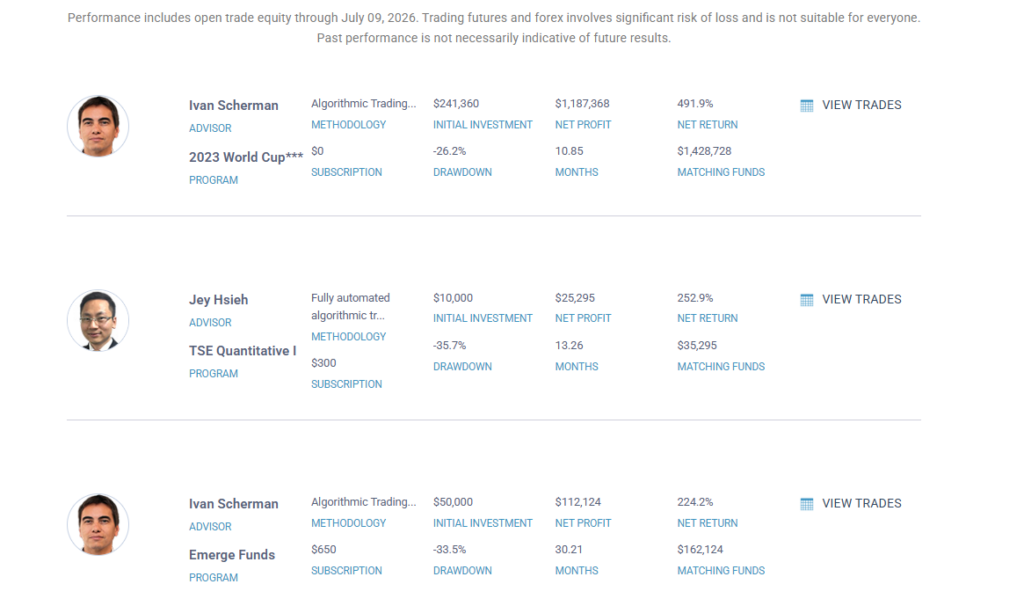
World Cup Advisor publishes performance information from experienced futures and forex traders and offers an automatic leader-follower service through which selected trades can be replicated in subscriber accounts. The organization states that the World Cup Trading Championships has attracted leading traders since 1983. :contentReference[oaicite:0]{index=0}

The ATS screenshot reproduced below records figures displayed after the market close on July 9, 2026:

World Cup Advisor automated trading statistics showing published returns and drawdowns
Examples of automated and systematic trading results published by World Cup Advisor and captured by ATS after the market close on July 9, 2026.
Examples of published automated and systematic trading results.
Featured ProgramMethodologyNet ReturnPublished DrawdownPeriod
Ivan Scherman — 2023 World CupAlgorithmic trading491.9%26.2%10.85 months
Jey Hsieh — TSE Quantitative IFully automated algorithmic trading252.9%35.7%13.26 months
Ivan Scherman — Emerge FundsAlgorithmic trading224.2%33.5%30.21 months
Daniele Sambataro — Momentum SelectionSystematic trend-following and mean reversion202.2%36.17%40.8 months

These are substantial published returns and should not be dismissed as poor trading. The results do not suggest that the advisors are unskilled. They demonstrate what experienced traders and professionally operated systematic programmes may achieve when supported by research, capital, infrastructure and risk tolerance.

However, the drawdowns reveal an equally important part of the performance profile.

A profitable automated strategy can still be completely unsuitable for a tightly constrained prop account.

World Cup Advisor explains that its published peak-to-valley drawdown is based on the greatest cumulative percentage decline in month-end net equity and warns that subscribers can experience a greater percentage drawdown depending on their funding level. It also states that subscriber performance may differ because of execution, slippage, funding and other factors. :contentReference[oaicite:1]{index=1}

Source: World Cup Advisor. The figures above were captured on July 9, 2026, may subsequently change and should be independently verified.

Automated Drawdown Versus Prop-Account Drawdown

The listed automated-system drawdowns range from approximately 26% to 36%.

By comparison, a nominal $50,000 futures prop account with a $2,000 maximum-loss allowance provides approximately 4% of the advertised account size as loss capacity.

Published strategy drawdowns compared with an illustrative 4% prop-account loss allowance.
Published DrawdownCompared With a 4% Loss Limit
26.2%Approximately 6.6 times the limit
35.7%Approximately 8.9 times the limit
33.5%Approximately 8.4 times the limit
36.17%Approximately 9 times the limit

This does not mean that the published strategies are bad or unprofitable.

It means they were not necessarily designed for an account environment in which a relatively small peak-to-trough movement can terminate the trading programme.

Attempting to place a strategy with a historically larger drawdown inside a 4% loss allowance would normally require a substantial reduction in position size. That reduction would also reduce the expected monetary returns, while trailing-drawdown mechanics, commissions, slippage and the sequence of wins and losses could still create additional risk.

A strategy can therefore be profitable over its complete performance history and remain structurally unsuitable for a specific prop account.

The Robot Must Survive the Path to Profitability

Consider a strategy with positive long-term expectancy that risks $250 per trade.

Four consecutive losses would produce approximately $1,000 of trading loss before commissions and slippage. On a nominal $50,000 prop account with a $2,000 maximum drawdown, that sequence could consume approximately half of the entire loss allowance.

A further losing sequence, execution error or volatile trade could terminate the account even though the strategy remains profitable over a much larger statistical sample.

The robot may eventually recover statistically. The failed prop account cannot wait for that recovery.

This is why win rate, net profit and risk-to-reward ratio are not enough to determine whether an automated strategy is suitable for prop trading.

A serious assessment should also consider maximum drawdown, losing-run length, adverse excursion, trade clustering, slippage, commissions, market-regime dependence, parameter sensitivity, open-trade equity movement and compatibility with the account’s current rules.

Fully Automated Trading Does Not Remove the Work

Retail automated trading is often marketed as a way to avoid the effort involved in trading. Professional automation normally transfers the workload from individual trade execution into system development and operation.

A serious automated trader may need to act as:

  • A strategy developer.
  • A quantitative researcher.
  • A software tester.
  • A data and infrastructure operator.
  • A portfolio manager.
  • A real-time risk supervisor.

The work can include historical testing, out-of-sample testing, replay, simulation, forward validation, realistic commissions and slippage, drawdown controls, shutdown procedures, system monitoring, data management, backup connectivity and ongoing revalidation as markets change.

ATS regards approximately six to twelve months as a strong start for developing and cautiously introducing an initial automated system. Building a diversified operation containing multiple systems and return streams may require one to three years or longer, with no guarantee that the total investment will become profitable. :contentReference[oaicite:2]{index=2}

Professional automation is not a one-time software installation. It is an ongoing research, engineering and risk-management operation.

How Fully Automated Trading Is Done Professionally

Professional automated trading is normally built around a portfolio of specialized systems rather than one universal robot.

Each system may be designed for a defined instrument, market condition, session, direction or trading task in which it has demonstrated a measurable advantage.

  • Specialized strategies: Each system performs a clearly defined task rather than attempting to trade every condition.
  • Defined instruments: Systems may be developed for selected equity-index, energy, metal, currency, agricultural or interest-rate futures markets.
  • Defined directions: Some systems may trade long only, short only or both directions according to the market phase.
  • Defined sessions: A strategy may operate only during the European session, New York open, regular trading hours or overnight market.
  • Controlled activation: Systems may be activated, restricted, reduced, paused or parked according to market conditions and predefined risk limits.
  • Portfolio construction: Capital may be distributed across multiple systems and preferably less-correlated instruments, behaviours and return streams.
  • Continuous supervision: Risk, execution, connectivity, slippage, system health and market behaviour remain monitored.
  • Ongoing research: Strategies are reviewed and revalidated as volatility, liquidity, correlations and participant behaviour change.

The machine may place the trades, but people remain responsible for the systems, the risk controls and the financial consequences. :contentReference[oaicite:3]{index=3}

The ATS Alternative: Hybrid Algo Trading

ATS is not built around replacing the trader with a black-box robot.

ATS is built around a Hybrid Man + Machine trading framework in which technology performs the tasks that software handles exceptionally well while the trader remains responsible for the decisions requiring context, adaptability and accountability.

The objective is not merely to automate more trades.

The objective is to improve trade selection, strengthen execution, reduce emotional interference, manage risk and help the trader operate through a structured professional process.

Division of responsibility within the ATS Hybrid Algo Trading framework.
The Machine SupportsThe Trader Controls
Rapid calculations and continuous technical monitoringWider market context and session suitability
Rule-based opportunity identificationTrade approval and opportunity selection
Structured order placementAccount-level risk authorization
Automated stops, targets and trade managementPosition size, scaling and remaining drawdown
Consistent execution without hesitationNews, liquidity and abnormal-market awareness
Alerts, data and market intelligenceThe decision to pause, reduce risk or stand aside

This is not random emotional intervention. Professional hybrid control applies predefined higher-level decisions intended to protect the account when an immediate algorithmic signal does not represent the complete trading environment.

Hybrid trading retains the speed, structure and discipline of automation without surrendering control of the account completely. :contentReference[oaicite:4]{index=4}

The objective is not to become a passenger watching a robot trade. The objective is to become a better pilot.

The ATS Hybrid Algo Futures Trading Ecosystem

ATS combines trading technology, market intelligence, AI-assisted decision support, structured workspaces, trader education and continuing development within one purpose-built futures and prop-trading environment.

AFT — Algo Futures Trader

AFT is the NinjaTrader-based execution and automation platform at the centre of the ATS ecosystem. It supports rule-based opportunity identification, assisted entries, configurable automation, structured execution, automated trade management and direct real-time trader control.

AWT — Alpha Web Trader

AWT provides an additional market-intelligence and confirmation layer, including direction, trend state, volatility, structure, correlations and higher-probability trading context.

AI Trading Copilot

The AI Trading Copilot supports session preparation and live-market decision-making with information covering risk, economic news, earnings, holidays, market conditions, correlations, setups and trading-plan context.

Turnkey Trading Workspaces

ATS turnkey workspaces provide structured starting points for learning, testing and trading selected futures and prop-account methodologies. Baseline algorithms are reference tools for understanding how systems behave through winning, losing and changing market phases; they are not presented as universal set-and-forget live-trading robots.

VIP Trading Group

The VIP Trading Group provides a focused environment for live-market education, trading context, market intelligence, structured discussion and continuing development within the ATS methodology.

ATS Trader Fast Track and Mastery

ATS Trader Fast Track and Mastery help traders install and configure the technology, understand the Hybrid Algo Trading Methodology, build a trade plan, establish risk controls, practise correctly and develop their own statistics through review and repetition.

Maximum Profit Potential. Minimum Drawdown. Least Emotion.

These are the operating objectives behind the ATS Hybrid Algo Trading Methodology.

They are not guaranteed outcomes, and no trading technology can eliminate losses, drawdown, execution risk or human responsibility.

ATS can provide the technology, framework, workspaces, market intelligence, education, support and development pathway.

The trader must still practise, follow the process, control risk, maintain statistics, review mistakes, remain disciplined and trade only when the market and account conditions justify participation.

Technology can make a committed trader more capable. It cannot make an uncommitted trader successful.

For many serious futures and prop-firm traders, this controlled and adaptable approach is more practical than spending months or years attempting to build a fully autonomous quantitative trading operation.

The ATS Solution: Hybrid Algo Trading for Prop Firms

ATS provides a practical Man + Machine trading pathway for traders who want the advantages of automation while retaining control of market selection, trade approval, account risk and the decision to stand aside.

Rather than handing the account to one fixed robot and hoping that its historical assumptions remain valid, the ATS trader can use AFT, AWT, AI Copilot, turnkey workspaces, VIP market intelligence and Mastery support as one coordinated trading process.

The machine provides speed, structure, calculations, monitoring and execution support.

The trader provides judgement, accountability, adaptability and final risk control.

Book a free, obligation-free ATS Discovery Meeting to discuss your experience, trading goals, available time, prop-firm or brokerage plans and whether the ATS Hybrid Algo Trading pathway is the right fit.

🎧 Book Your Free ATS Discovery Meeting

ATS Further Reading

  • The Holy Grail Automated Trading Robot vs. How Automated Futures Trading Is Done Professionally
  • Just Give Me an Algo That Works
  • Hybrid Algo Trading Versus Fully Automated Trading: The Time and Effort Required
  • Why We Love Hybrid Algo Trading for Prop-Firm and Live Brokerage Account Trading
  • World Cup Advisor Published Trading Programmes and Performance Information

Important Risk Disclosure

Futures, leveraged and prop-firm trading involve a significant risk of loss and are not suitable for every trader. Automated, algorithmic and hybrid trading systems can lose money and may experience changing market behaviour, slippage, technical failures, execution differences and extended drawdowns.

Past, hypothetical, simulated, baseline or published performance does not guarantee future results. Performance statistics, account examples, drawdown comparisons and development timelines in this article are provided for educational and illustrative purposes only and are not earnings claims, promises, investment advice or guarantees.

Prop-firm rules, account conditions, drawdown calculations, fees, automation policies and payout requirements vary and may change. Traders must independently verify and comply with the current rules of every prop firm, brokerage, platform and account they use.

Filed Under: AFT8, automated futures trading, automated trading ninjatrader, ninjatrader automated trading, prop firm trading Tagged With: AI Copilot, algo futures trader, Alpha Web Trader, ATS Mastery, Hybrid Trading, prop firm trading, Semi Automated Trading


🚀 Get Started 100% FREE!

ATS Futures Trading Group Rebooted!

May 21, 2026 by AFT

ats vip trading group

VIP Trading Group Rebooted and Expanded so you got it all in 1 place, all you need for day trading prop trading

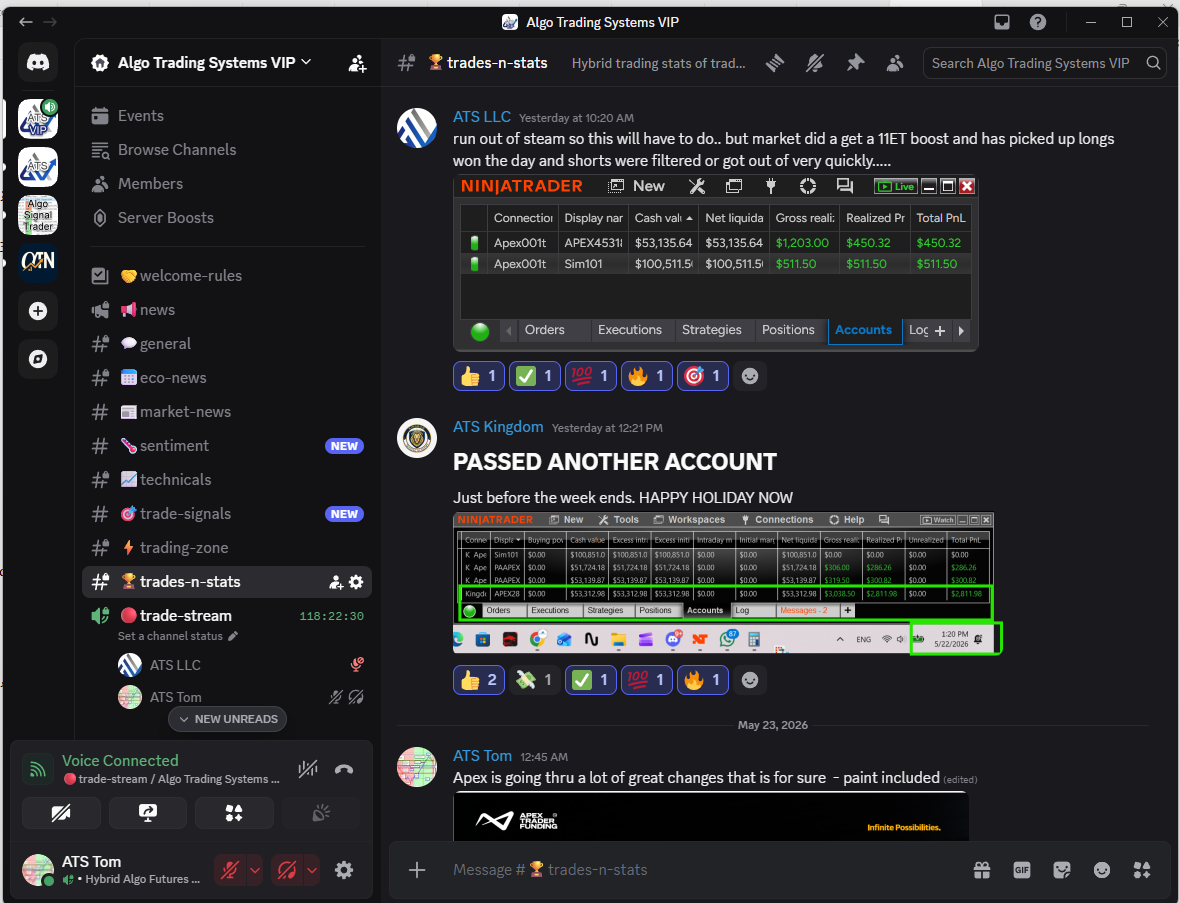
The VIP Trading Group has been rebooted and reorganized to create a cleaner, more focused environment for live market trading. The goal is to bring together live market flow, trader education, AI-assisted insights, technical analysis, trade signals, statistics, and market news in one place for active futures traders.

  • Signup and Link Your Account
  • Get VIP Elite Access
  • VIP Trading Groups

⚡ Trading Zone

Enhanced trade mastery, AI-assisted trader education, and market information are shared in a live trading environment focused on U.S. indices prop and day trading, typically from 8:15 AM CT to 11:00 AM CT, Monday through Friday.

  • The VIP Trade Chat section has moved from the ATS Support & Education Group into the VIP Trading Group, creating a dedicated live market trading environment for VIP traders.
  • Trading Zone hours: Monday to Friday, 8:15 AM CT to 11:00 AM CT is the primary live market session.
  • AI Trade Copilot commentary, pre-session analysis, and intraday market updates focused primarily on U.S. indices.
  • VIP Elite members and trialists may have read-only access depending on membership level.
  • Trade Mastery education and information may be posted by approved traders who have earned the ATS Trade Coach badge through the Zero to Hero process.
  • The objective is straightforward: follow the trade plan, use proven turnkey workspaces, and apply hybrid trading methods for Maximum Profits, Minimum Drawdown, and Least Emotion.
  • Market focus includes S&P 500 (ES), Nasdaq (NQ), Mid Cap (EMD), Small Cap (RTY), and related micro futures contracts.

Trading Education and Information

Additional educational content, trading insights, and trader-development material may be contributed by veteran ATS founders, experienced traders, and approved members who have earned the ATS Trade Coach badge through the Zero to Hero progression.

Topics may include trade planning, market structure, trader psychology, hybrid trading workflows, risk management, platform usage, execution techniques, and practical lessons learned from evaluation, prop firm, and live trading environments.

📰 Market News

The market-news channel provides market-moving news context and catalysts for U.S. indices futures traders.

Content focuses on pre-session preparation and key updates throughout the trading day covering U.S. equities, Treasury markets, oil, gold, economic releases, earnings, Federal Reserve commentary, and major risk events that may influence market direction and volatility.

The objective is to help traders understand the news environment surrounding price action without needing to monitor multiple external news sources.

🌡️ Sentiment

The sentiment channel provides a market sentiment dashboard showing bullish, bearish, and neutral news sentiment across indices, ETFs, commodities, sectors, and major market themes.

Sentiment data is intended to provide additional market context and awareness. It should be used as informational context rather than as a standalone trading signal.

🎯 Trade Signals

The trade-signals channel delivers trade signals, technical alerts, and market opportunities generated from ATS Hybrid Algo Trading systems.

Instrument Focus:

  • Equity Indices: ES, NQ, EMD, RTY
  • Commodities: CL, GC
  • Crypto: BTC

Signal types include ATS Session Breakout and trend-following systems such as DSFG, DSFG Gap, WSFG, MSFG, TR120, and TR720. Traders should use signals as market context and signal flow within their own trade plans, risk management rules, and decision-making processes.

🏆 Trades-n-Stats

The trades-n-stats channel has moved into the VIP Group and is open to VIP Trialists and VIP Elite members.

This channel focuses on hybrid trading statistics from real trade plans — the good, the bad, and the ugly.

VIP Elite members have read/write access. The purpose is to learn how to win by following a process, not by chasing random methods or repeating losing habits.

🔴 Trade Streams

The trade-streams channel has been revamped to focus on ES, NQ, EMD, and RTY, providing a static live market view during real-time trading hours.

The stream provides real-time Algo Server chart views, typically running from Monday 7:00 AM CT through Friday market close. The Discord stream channel itself remains available 24/7.

The primary focus is the ATS Session Breakout flagship trade plan, showing live market algo trading directly on the charts with baseline entries and exits displayed for reference.

Content Lifecycle

To keep information fresh, relevant, and easy to consume in a live trading environment, most VIP Group channels automatically self-delete content daily.

Over weekends, the final trading day’s content remains visible until the next market open, allowing traders to review the most recent market context before the new trading week begins.

Summary

The VIP Trading Group is now structured to provide traders with a complete live market ecosystem that combines market news, sentiment analysis, trade signals, live trading discussion, education, statistics, and real-time chart streams in one focused environment. Whether trading evaluation accounts, prop firm accounts, or live capital, the goal remains the same: build consistency through process, discipline, and hybrid man-plus-machine trading.

Filed Under: AFT8, ATS Trading Community, automated futures trading systems, automated trading ninjatrader, get funded trading, prop firm trading Tagged With: Day Trading Futures Group, trade group


🚀 Get Started 100% FREE!

Anouncing New Fast-Track 7-day Free Trial: Go from Stage 1 to 5 in 5 Days + 1 Full Week of VIP Trading

April 6, 2026 by AFT

🚀 ATS Free Trial Updated: 7 Days – Faster Progress, Real Results

The ATS Free Trial is now 7 days — redesigned for traders who are serious about progression,
execution, and results.

The previous structure slowed traders down. Progression between stages was too spaced out,
and workspace access was restricted — delaying real learning and real trading experience.

Now, everything is streamlined. You can move through Stage 1 to Stage 5 in just a few days,
then spend the majority of your trial where it matters most:
real trading and execution in VIP conditions.


⚡ What’s Changed?

  • ✅ 7-day Fast-Track trial designed for focused progression
  • ✅ All Zero to Hero workspaces unlocked rapidly
  • ✅ Complete Stage 1–5 progression in ~5 days
  • ✅ Maximum time spent in Stage 5 (VIP trading mode)

📈 Why This Is Better for Traders

The objective is simple: build capable traders faster.

  • Accelerated Learning Curve
    No delays between stages — maintain momentum and build skill quickly.
  • Execution-Focused Training
    Spend most of your trial applying the system, not waiting to unlock it.
  • Real Market Application
    Work toward prop firm evaluations, PA accounts, live trading,
    or refine your edge in SIM/demo.
  • Built for Serious Traders
    This structure filters for commitment and progression — not passive trial users.

🧠 Zero to Hero – Fast-Track Structure

Start your journey here:

👉 https://algotradingsystems.net/getstarted

  • ✅ Stage 1: AFT Trade Signals + Automated Exits (WS1) Day 1
  • ✅ Stage 2: AFT Hybrid Auto Trades + Automated Exits (WS2)Day 2
  • ✅ Stage 3: AFT Multi Time Frame + Hybrid Trading (WS3)Day 3
  • ✅ Stage 4: AlphaWebTrader + AFT MTF Hybrid Trading (WS4)Day 4
  • 🏆 Stage 5: VIP Trading (Evaluation, Prop, or Live – NinjaBuddy)Day 5 → Day 7
  • 🏁 End of Trial: Upgrade to VIP or downgrade to Freemium
    Begin Pro Level trading journey

🎯 The Key Advantage: Time in Stage 5

The biggest improvement is simple:
you spend the majority of your trial in VIP trading conditions.

This is where traders:

  • Apply the system in real market conditions
  • Work toward prop firm evaluations
  • Trade PA or live accounts
  • Or stay in SIM/demo to build consistency and confidence

This is where transformation happens — not in theory, but in execution.


⚠️ Important Note

This update applies to new trial users only.
Existing users will continue under their current trial terms.


🏁 Final Thoughts

The 7-day trial isn’t shorter — it’s smarter and more effective.

It removes friction, accelerates learning, and focuses your time where it matters most:
real trading, real decisions, real progress.

If you’re serious about trading, this structure will take you further, faster.

Filed Under: AFT8, automated trading ninjatrader, ninjatrader automated trading systems Tagged With: Get Funded Accelerator, zero to hero


🚀 Get Started 100% FREE!

AFT8 Trading Progression: Stage 1–4 Zero-to-Hero Framework & Stage 5 Go-Live Optimization

February 18, 2026 by AFT

AFT8 Trading Progression: Stage 1–4 Zero-to-Hero Framework & Stage 5 Go-Live Customization


Learn the structured AFT8 Zero-to-Hero progression from Stage 1 through Stage 5.
Master the framework first, then personalize risk and execution for evaluation and live trading.

All traders should begin with Stage 1 through Stage 4 in
order to properly learn the system’s features in both breadth and depth.

During these stages, nothing should be changed. We do not
tempt or distract traders with alternative settings optimized to someone
else’s preferences. Stage 1–4 settings are intentionally
vanilla and generic — a clean foundation that can later
serve as a base for personal customization.

There is no “one size fits all.” Personalized optimization belongs in
Stage 5 and beyond. That process can become an endless pursuit
unless a workable compromise is accepted. In trading, progress comes faster
through structured discipline than constant tweaking.

Stages 1–4: Learn the Framework (Do Not Change Settings)

The goal in Stages 1–4 is to build understanding, structure, and consistency.

  • Learn how the system works end-to-end
  • Understand signal concepts
  • Understand trade manager concepts
  • Learn trade controls and interactive / hybrid entry concepts
  • Understand what each control does — and why it exists
  • Manage trades using the provided structure
  • Build consistency without modifying core settings

We do not want to muddy the water by suggesting configuration changes at this stage.
The turnkey workspaces are intentionally designed to teach the framework exactly as it is.

The structure is guided by over 20 years of research, development, and statistical
validation of these methods. As the framework evolves, refinements may occur —
but the learning path remains structured.

Stage 1–4 = Skill Development, Not Optimization.

Stage 5: Evaluation / Performance / Live (Customization Becomes Appropriate)

Stage 5 is where traders may begin personalizing execution
and risk parameters — particularly during prop firm evaluations or live performance accounts.

At this stage, traders should:

  • Choose a defined trade plan and instrument
  • Select a VIP Workspace
  • Use baseline defaults and manage trades interactively using the control sets
  • Adjust settings only when necessary

    • Adjust targets and stops to suit personal risk tolerance
    • Modify breakeven, trail triggers, and profit lock-in logic
    • Save adjustments as a new setting and new workspace

Stage 5 is not random experimentation — it is structured refinement.

How to Personalize Targets & Stops (Stage 5 Only)

Targets and stops should be adjusted using the Fib Grid structure.
This ensures changes are based on statistically normalized market structure
rather than arbitrary tick or candle assumptions.

Examples of structured adjustments:

  • Move targets nearer or further using Grid percentages
  • Use a wider or tighter stop based on Grid normalization
  • Example: Change stop from 20% of the Grid to
    10%, and adjust T1 accordingly
    (e.g., 10% instead of 20%)

This allows a workspace to be configured tighter or looser based on psychology,
account size, and risk profile — while remaining structurally consistent.

Static Tick Stops or Adaptive Grid Stops?

When modifying, we use adaptive Grid-based stop and target structures that
normalize to market range. For example: a 10% stop instead of 20%, or
a 5–10% target — rather than arbitrary candle- or tick-based levels.

The AFT approach avoids static tick or candle stops because markets expand
and contract. Grid-based normalization adapts dynamically to volatility.

Traders may elect their own path and experiment on SIM or replay,
but structured adaptive logic remains the core philosophy.

Learn more here:

AFT8 – Setting Stops and Targets

Additional Trade Management Controls (Stage 5 Only)

  • Adjust breakeven triggers
  • Modify trailing stop behavior
  • Accelerate or delay risk lock-in logic
  • Configure advanced features such as Target Lock-In % and 5-stage trailing stops

Progression Summary

Stages 1–4 = Learn the framework exactly as provided.
Stage 5 = Tailor risk and execution within the framework —
or continue using the VIP workspace as designed.

Mastery comes from progression — not from skipping steps.

© 2026 AlgoTradingSystems — Hybrid Automated Futures Trading Framework

Filed Under: AFT8, automated trading ninjatrader, ninjatrader automated trading Tagged With: live trading micro futures, zero to hero


🚀 Get Started 100% FREE!

AFT8 Risk Control Practical Ways to Reduce Risk

February 18, 2026 by AFT

Managing Risk to Reduce Exposure and risk of ruin

Risk can be controlled in multiple ways inside the AFT8 framework. One or more of the approaches below can
significantly reduce and manage exposure, especially during evaluation or performance phases.

1) Increase the Account Size (Capital Allocation)

A larger account (for example, 100K vs 50K in prop environments) automatically reduces
percentage-based drawdown pressure and allows more flexibility in stop placement and trade management.

2) Use Fewer Lots Per Trade (Lower % Risk Per Trade)

Reducing position size is the most direct way to control risk. If a default turnkey workspace uses
3 lots, you may choose to use 1–2 lots based on your account size and risk tolerance.

3) Reduce Risk After Entry (R50 / E50 / I50)

Once the Trade Manager has placed stops:

  • Click R50% on the Algo Trade Manager Controller to reduce stop size by 50%.
  • Or click E50 / I50 on the NinjaBuddy UI to reduce risk by 50%.

This immediately compresses exposure without needing to manually adjust the stop.

4) Wait for Efficient Entry Prices

Avoid chasing signals. Instead:

  • Wait for pullbacks.
  • Enter at technically efficient prices.
  • Avoid entries that are extended far from structure.

Better price = smaller stop required = lower risk.

5) Use Smaller Bars for Entry Triggers

Smaller timeframe bars often allow the entry trigger to occur closer to the actual market price.
This reduces the distance between entry and stop placement.

6) Use Order Types at Technical Levels

Instead of market entries:

  • Use an Algo Entry limit order price when appropriate.
  • Use manual limit orders at technical levels.
  • Allow pullbacks to enter you.
  • Reduce slippage risk.
  • Use stop or OCO entry types at levels for efficient entry.

7) Reduce Stop Size in Settings

Inside AFT8 Trade Manager settings, you can reduce stop size.

Example (Session Breakout):

  • Default stop: 20% grid (wider structure stop)
  • Reduced stop: 10% grid (tighter stop)

Smaller grid percentage = smaller initial risk.

8) Use Dynamic Lots

Enable the Dynamic Lots feature to allocate a defined percentage of the account as maximum exposure.
This helps prevent over-sizing relative to account equity.

9) Use Partial Exit (PX1)

Use PX1 to close one lot without moving the stop.

Click PX on the Algo Trade Manager Controller or NinjaBuddy to reduce open exposure without changing
the stop structure.

  • Reduces open exposure
  • Lowers emotional pressure
  • Allows the remaining position to run

10) Monitor Liquidity and Slippage

Always consider:

  • Market liquidity
  • Time of day
  • News volatility

Poor liquidity increases slippage and can widen effective risk beyond the intended stop.

Final Notes

Risk management is not a single setting — it is a layered structure.

The most professional approach is to:

  • Control size
  • Control stop structure
  • Control entry efficiency
  • Control execution

Multiple small improvements combined create a meaningful reduction in total risk.

Filed Under: AFT8, automated trading ninjatrader, fully automated trading system, ninjatrader automated trading Tagged With: risk control, risk management


🚀 Get Started 100% FREE!

  • 1
  • 2
  • 3
  • 4
  • Next Page »

Recent Posts

  • Automated Futures Trading: What Retail Traders Need to Know
  • Dispelling Prop Trading Myths and Misleading Funded-Account Claims
  • Does Trading 20 × $100K Prop Accounts Really Mean You Have $2 Million in Funding?
  • The Holy Grail Automated Trading Robot vs. How Automated Futures Trading Is Done Professionally
  • Just Give Me an Algo That Works
  • Facebook
  • RSS
  • Twitter
  • YouTube


  • NinjaTrader Automated Trading
  • automated futures trading
  • automated trading systems
  • Day Trading Futures
  • Get Started Day Trading Futures
  • VIP Trading Group Live Market Trade Along
  • Secret to Day trading futures success
  • AFT8 for NinjaTrader 8
  • Futures Algo Trading Systems
  • Market News
  • NinjaTrader Free Trading Platform
  • Legal Notices
  • AFT Legal Info
  • Terms
  • FULL RISK DISCLOSURE
  • Privacy Policy
  • Cookie Usage
  • About AlgoFuturesTrader
  • Connect to AFT
  • Blog
  • Videos
  • Support
  • Contact
  • My account
  • Sitemap
  • Affiliates

Ninja Futures Trading
Algo Futures Trader Copyright Algo Trading Systems© 2026 ·
AlgoFuturesTrader.com is owned & operated by Algo Trading Systems LLC. By using this website or products & services, you are bound by our Terms & subject to US legal jurisdiction only. Errors & omissions excluded.
AFT made in England, powered by MicroTrends NinjaTrader development

Disclaimer: Trading & investment carry a high level of risk. AlgoFuturesTrader does not make recommendations for buying or selling any financial instruments, nor do we offer trading or investment advice. We are a software company, and we only provide educational information on ways to use our sophisticated Algo Futures trading tools. It is up to our customers & readers to make their own trading & investment decisions, or consult with a registered investment advisor.

Risk Disclosure: Futures, CFDs, & forex trading carry substantial risk and are not suitable for every investor. An investor could potentially lose all or more than the initial investment. Risk capital is money that can be lost without jeopardizing one's financial security or lifestyle. Only risk capital should be used for trading, and only those with sufficient risk capital should consider trading. Past performance is not necessarily indicative of future results. Please read the full risk disclosure here.

Hypothetical performance results have many inherent limitations, some of which are described below. No representation is made that any account will or is likely to achieve profits or losses similar to those shown. In fact, there are frequently sharp differences between hypothetical performance results and the actual results subsequently achieved by any particular trading program. One of the limitations of hypothetical performance results is that they are generally prepared with the benefit of hindsight. In addition, hypothetical trading does not involve financial risk, and no hypothetical trading record can completely account for the impact of financial risk in actual trading. For example, the ability to withstand losses or adhere to a particular trading program despite trading losses are material points that can adversely affect actual trading results. Numerous other factors related to the markets or the implementation of any specific trading program cannot be fully accounted for in the preparation of hypothetical performance results and can adversely affect trading results.

Testimonials appearing on this website may not be representative of other clients or customers and are not a guarantee of future performance or success.

NinjaTrader® is a registered trademark of NinjaTrader Group, LLC. No NinjaTrader company has any affiliation with the owner, developer, or provider of the products or services described herein, nor do they endorse, recommend, or approve any such product or service.

We use cookies on our website to give you the most relevant experience by remembering your preferences and repeat visits. By clicking “Accept All”, you consent to the use of ALL the cookies. However, you may visit "Cookie Settings" to provide a controlled consent.
Cookie SettingsAccept All
Manage consent

Privacy Overview

This website uses cookies to improve your experience while you navigate through the website. Out of these, the cookies that are categorized as necessary are stored on your browser as they are essential for the working of basic functionalities of the website. We also use third-party cookies that help us analyze and understand how you use this website. These cookies will be stored in your browser only with your consent. You also have the option to opt-out of these cookies. But opting out of some of these cookies may affect your browsing experience.
Necessary
Always Enabled
Necessary cookies are absolutely essential for the website to function properly. These cookies ensure basic functionalities and security features of the website, anonymously.
CookieDurationDescription
cookielawinfo-checkbox-analytics11 monthsThis cookie is set by GDPR Cookie Consent plugin. The cookie is used to store the user consent for the cookies in the category "Analytics".
cookielawinfo-checkbox-functional11 monthsThe cookie is set by GDPR cookie consent to record the user consent for the cookies in the category "Functional".
cookielawinfo-checkbox-necessary11 monthsThis cookie is set by GDPR Cookie Consent plugin. The cookies is used to store the user consent for the cookies in the category "Necessary".
cookielawinfo-checkbox-others11 monthsThis cookie is set by GDPR Cookie Consent plugin. The cookie is used to store the user consent for the cookies in the category "Other.
cookielawinfo-checkbox-performance11 monthsThis cookie is set by GDPR Cookie Consent plugin. The cookie is used to store the user consent for the cookies in the category "Performance".
viewed_cookie_policy11 monthsThe cookie is set by the GDPR Cookie Consent plugin and is used to store whether or not user has consented to the use of cookies. It does not store any personal data.
Functional
Functional cookies help to perform certain functionalities like sharing the content of the website on social media platforms, collect feedbacks, and other third-party features.
Performance
Performance cookies are used to understand and analyze the key performance indexes of the website which helps in delivering a better user experience for the visitors.
Analytics
Analytical cookies are used to understand how visitors interact with the website. These cookies help provide information on metrics the number of visitors, bounce rate, traffic source, etc.
Advertisement
Advertisement cookies are used to provide visitors with relevant ads and marketing campaigns. These cookies track visitors across websites and collect information to provide customized ads.
Others
Other uncategorized cookies are those that are being analyzed and have not been classified into a category as yet.
SAVE & ACCEPT