NinjaTrader Automated Trading by Algo Futures Trader

hybrid algorithmic automated futures trading for prop firm traders, day & swing traders

🚀 Get Started 🔴LIVE
  • 🚀Get Started
  • NinjaTrader
  • Get Funded
  • Trading Servers
  • Pricing
  • blog
  • Help

Archives for June 2025

As of 2025 why are these economic releases more relevant Jobs report and personal income than inflation news?

June 10, 2025 by AFT

1. Why we watch these two reports as traders and market participants?

ReportWhen it’s releasedWhy it matters
Jobs Report (average weekly pay, number of workers)Early each monthShows how much people earn and how many are employed.
Personal Income & Spending (income, spending, savings)End of each monthReveals whether consumers are still opening their wallets.

Because consumer spending makes up roughly two-thirds of America’s economy, these two reports are crucial for both markets and the Fed.


2. What the latest jobs data (May 25 release) tells us

  • Paychecks are rising for all workers, including supervisors and non-supervisors.
  • More people are working. Total employment is up about 2 percent from a year ago.
  • With pay rising and more people employed, overall household income is still growing, even after accounting for inflation.

Translation: The Fed sees no emergency to slash rates—the labor market is strong enough to keep spending afloat.


3. But people don’t necessarily feel rich

  • Year-over-year pay growth per person (about 1 percent) is much smaller than total payroll growth (over 2 percent).
  • Consumers remember last year’s soft patch and worry that new import tariffs could drive prices up again.
  • That combination makes shoppers cautious—they’ll buy mid-priced items or only replace what’s worn out.

4. A quick look at U.S. factory output

Industrial production indexes (2000 = 100)

Sector2000Dec 2019Apr 2025Take-away
Food & drink100109106Slightly above 2000, but down from the pre-COVID peak.
Textiles1004335Long-term decline.
Apparel1001815Even steeper slide.
Plastics & rubber1009191Flat.
Metals1008582till below 2000.
Furniture1006854Down sharply since 2000.

Big picture:

  • Offshoring: Much U.S. manufacturing has moved abroad.
  • Tariffs backfire: Broad import taxes can raise prices without boosting domestic jobs.

5. Implications for the Fed and markets

  1. No rush to cut rates: Strong jobs and income growth don’t justify an emergency rate cut.
  2. Tariff concerns: Higher import taxes could fuel inflation, reducing real incomes if rates stay high.
  3. Consumer caution: Spending continues, but savers are rebuilding buffers, which keeps equity gains in check.
  4. Supply-chain strain: Trade tensions risk inflating costs, denting exports and tax revenues.
  5. High public debt: Elevated debt levels constrain the Fed’s ability to cut rates without undermining bond demand.

Bottom line:

  • Consumers remain the economy’s backbone—but they’re spending more cautiously.
  • Inflation is no news, locked in with tariffs affecting domestic production costs, tax revenues, and GDP reduced,
  • public debt at record highs – bond auctions must be attractive Fed Rates need to be high to bail out debt
  • Expect steady, measured growth rather than a big boom, or stagflation, especially if tariff-driven inflation flares up.
  • Equity rallies or sell-offs are likely to be muted until there’s greater clarity on trade policy and rate paths.
Filed Under: Algo Futures Trader


🚀 Get Started 100% FREE!

Introducing ATS Help Bot: 24/7 AI-Assisted Support for Traders

June 9, 2025 by AFT

ATS Help Bot support request reply

🤖 ATS Help Bot: 24/7 AI-Assisted Support for Traders

ATS Help Bot provides traders with direct messaging to our AI Support Agent, available 24/7 via Discord or email/help-desk chat.

What makes this truly powerful is that ATS Help Bot has access to all ATS product information and services—websites, blogs, videos, help guides, and Discord channels—so you don’t have to hunt across each resource. Use the ATS Help Bot as your universal search and expert in one place, always online and ready!

To access the ATS Help Bot, visit the Help Center or the Discord Group 24/7:

  • https://algotradingsystems.net/Help
  • https://algotradingsystems.net/TradingGroup

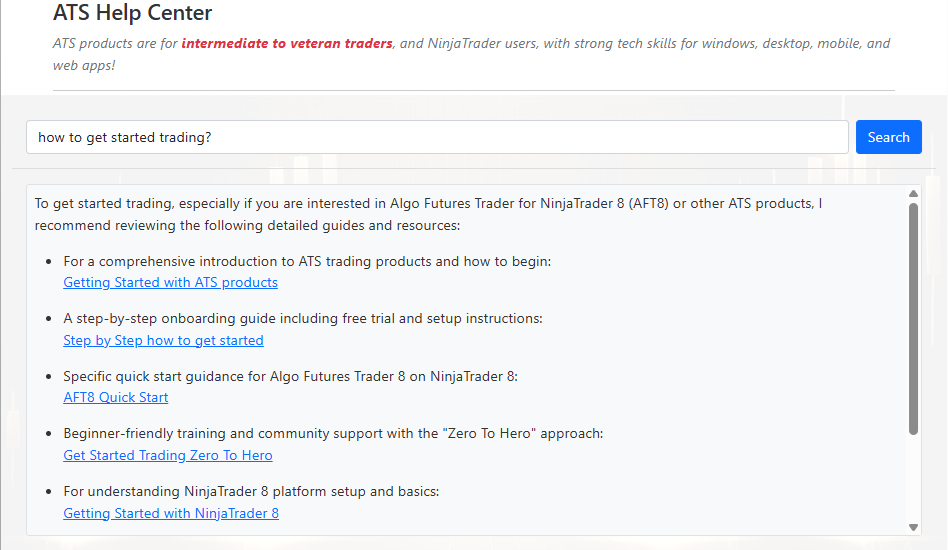
Help Desk AI Assisted Support Search

AI-powered ad hoc universal searching across all ATS products, websites, help desk, Discord, blog, videos, and resources- all in 1 place

ATS Help Bot - AI Agent Assisted Search
ATS Help Bot – AI Agent Assisted Search – universal search for all topics and resources about ATS products

Help Desk AI-Assisted Support via Email

The ATS Help Bot is also available through our Help Desk and Knowledge Base, covering topics beyond Discord, including the website, blog, pricing, videos, and online guides. You can even ask it to search Discord-only if you prefer, or to search all ATS topics as a universal support assistant.

  • Via email: [email protected]
  • Help Center
  • Submit a Support Request
  • 24/7 AI assistance for articles, tutorials, and guided chat
  • Fast expert follow-up—check your spam/junk folders if you don’t see a reply within 5 minutes

Help Desk Support Email Lifecycle

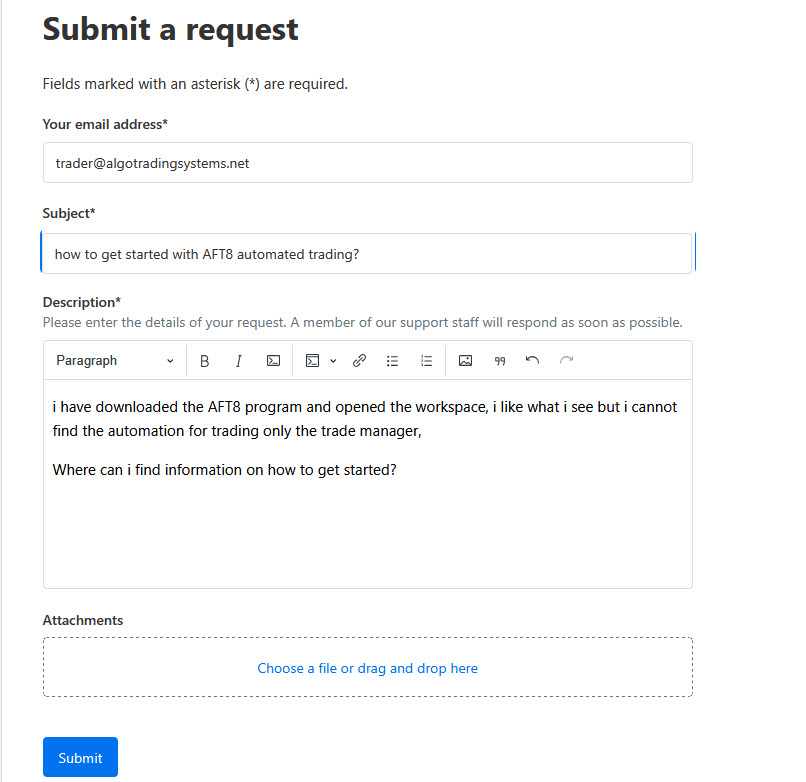
ATS Help bot Support Request Form from the ATS Help Center
  • Upon submitting a new ticket, you will receive an immediate acknowledgement from the help desk.
  • ATS Help Bot will read the ticket, fill any gaps, and correct ambiguity or spelling errors.
  • It will provide a list of best-fitting articles and guidance via email.
  • You can reply to the ticket to add more information or continue the conversation.
  • If needed, you can mark the ticket as resolved or escalate to a human agent.
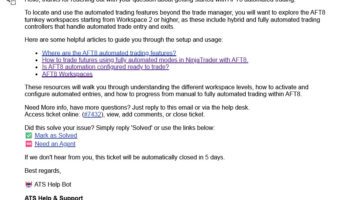
ATS Help Bot support request reply
ATS Help Bot support request reply – set as solved or refer and escalate to a human agent if required.

Discord AI Chat Help

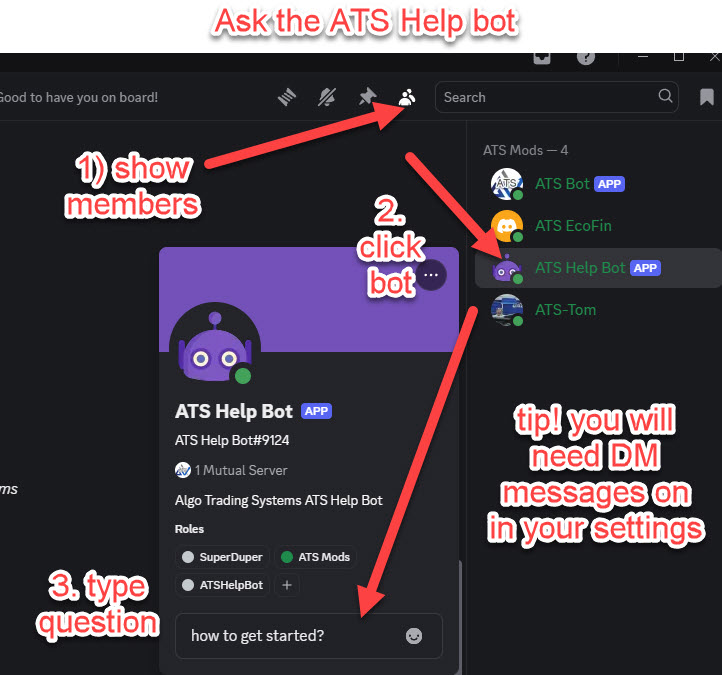
Chat directly by clicking the robot icon in the top-right moderator list, then send your message and select your search mode:

  • Choose a mode:
    1. Chat Discord Topics
    2. Chat All ATS Topics
  • This sets the AI Agent context to:
    • Discord only – topics and posts within Discord
    • Universal – all ATS products, services, and resources (Discord, blogs, videos, help-desk articles, websites, etc.)
  • When using Chat Discord Topics, all links will point to Discord channels, posts, forums, etc.
  • When using Chat All ATS Topics, links may point to Discord or external resources.

Getting Started

ATS Help Bot Direct Messaging in Discord Group
  • Sign up for the ATS universal Account and link your account to discord
  • Make sure you have Discord direct messaging switched on! Settings – Social and content – Direct Messaging
  • Enter your query in the pop-up box.
  • Your chosen mode (Discord only or All ATS Topics) will remain active for your session.
  • Switch modes at any time by clicking the buttons.
  • You can converse directly with @ATSHelpBot in your Discord inbox Simply click the robot icon ATSHelpBot and send a message

Filed Under: AFT8, ATS Trading Community, NinjaTrader 8, ninjatrader automated trading Tagged With: ATS Help Bot


🚀 Get Started 100% FREE!

Flexible Position Sizing & Scaling with AFT8

June 4, 2025 by AFT

AFT8 offers three distinct ways to size and scale positions, allowing traders to manage entries and exits in stages rather than all at once. These modes are:

  1. All-In, Scale-Out
  2. All-In, All-Out
  3. Scale-In, Scale-Out

Each method breaks trades into tranches—entering or exiting partial positions—so you can control how much capital is at risk at different points. This incremental approach helps lock in profits or curb losses as the market moves. While all three are available, most traders use “All-In, Scale-Out” or “All-In, All-Out” for simplicity. “Scale-In, Scale-Out” is reserved for experienced traders comfortable with building into a position and managing multiple exit levels. AFT8’s Algo Trade Manager handles all scaling once you’ve chosen your mode, though scaling in must be initiated manually to keep risk in check.


1. All-In, Scale-Out

  • How You Enter: As soon as your entry conditions trigger, AFT8 commits the entire intended position at once. You receive your full number of contracts or shares in a single fill.
  • How You Exit: Rather than closing everything at once, you set predetermined exit points. For example, you might take 50% off at the first profit target, 25% at a second level, and allow the remaining 25% to ride to the final objective. AFT8 automatically submits the staggered exit orders behind the scenes.
  • Why Use It: This technique secures partial profit early while still leaving room to catch larger trends. As the price moves in your favor, you shave off risk rather than waiting for a single exit signal. It’s particularly useful when you believe in a strong trend but want to lock in gains gradually.

2. All-In, All-Out

  • How You Enter: Identical to “All-In, Scale-Out,” you buy or sell the full position immediately upon signal.
  • How You Exit: You close out 100% of the position in one go when your exit parameters are met—no partial exits, no staggered targets.
  • Why Use It: For traders who prefer the cleanest possible execution, this mode keeps things simple. You commit all capital up front and exit on a single signal, eliminating the complexity of managing multiple orders. It’s ideal when you want a straightforward, no-nonsense entry and exit.

3. Scale-In, Scale-Out

Also known as position compounding, this method is best suited for advanced traders.

  • How You Enter: Instead of jumping in at full size, you build your position over multiple steps. For instance, you might initiate 25% of your total allocation when the first momentum threshold is met, then add another 25% if price confirms strength at a higher level, and continue until you’re fully invested. You decide the increments and price levels in AFT8’s position size settings.
  • How You Exit: Your exits are also staggered. You might take 20% off at an early profit point, another 30% if the market retests a key level, and then let the final 50% ride until your maximum target or stop is hit. AFT8’s Algo Trade Manager automatically places these exit orders according to your rules.
  • Why Use It: By scaling in, you reduce the risk of entering on a false breakout or sudden pullback. Scaling out then locks in gains in stages, so a reversal can’t erase all your profits. This dual-stage approach gives you maximum control over both entry and exit risk.

How AFT8 Manages Scale-In/Scale-Out:
Once your initial signal fires, AFT8 handles each tranche automatically. If you prefer to add manually, you can still use NinjaTrader 8’s Chart Trader, order tickets, or DOM to increase your position; AFT8 will immediately queue up the corresponding exits. Note that scaling in is disabled by default to prevent inexperienced traders from overleveraging. Only advanced users who fully understand the risks should enable it.


How to Choose Between Them

  • All-In, Scale-Out is ideal if you have very high conviction in your signal but still want to lock in profits gradually.
  • All-In, All-Out works best when you want a clear, unambiguous entry and exit—no partials.
  • Scale-In, Scale-Out is for highly dynamic markets where you’re uncertain about the signal’s strength; it lets you dial into the position as confirmation builds and peel off profits in stages.

In AFT8, you configure these modes under the “Position Sizing and Scaling” section of your strategy. Position amounts are defined in the Algo Entry settings, while exit tranches are set up in the Algo Trade Manager.

Filed Under: AFT8, automated futures trading system, automated trading ninjatrader, ninjatrader automated trading Tagged With: automated futures trading, NinjaTrader 8, risk management


🚀 Get Started 100% FREE!

AFT8 Risk Management Position Sizing Introduction

June 4, 2025 by AFT

Position sizing is fundamentally a risk‐management technique, though it’s often grouped under the broader umbrella of money management, because it determines how much capital is exposed to the market on each trade. In AFT8, static position sizing sets a fixed number of contracts (Lots) regardless of market conditions. In contrast, dynamic position sizing uses a fixed-fractional method to adjust the number of contracts based on factors such as volatility, account equity, or predefined risk parameters.

By configuring and calibrating trade size to the amount you’re willing to lose, based on your stop size and the number of lots per trade, total trade risk is directly controlled. If the market moves against you, position sizing enforces consistent per‐trade risk limits. In that sense, while it informs your overarching money‐management plan (i.e., how much capital you allocate overall), its primary role is to enforce consistent risk limits, making position sizing a cornerstone of effective risk management; stop‐loss/risk management is the complementary component.

Why use dynamic position sizing instead of a static lot size?
Instruments differ in point/tick value or volatility, so, for example, 3 lots on NQ might equate to 12 lots on RTY to achieve the same trade‐risk exposure. To maintain equal weighting when trading multiple instruments, the lot size must be adjusted so that each trade carries the same risk in cash or as a percentage of trade‐risk capital. By tracking volatility, a system can maintain a constant risk per trade: position size decreases when volatility is high and increases when volatility is low.

Ways to Change Position Size with AFT8

It’s very easy to view, edit, set, change, and configure position size and risk management within AFT8 after some exploration. Settings can be configured and saved along with workspaces.

  1. NinjaTrader 8: Use Chart Trader, Order Ticket, or DOM to set the quantity for manual entries. This is static position sizing and can be adjusted at any time, up or down in real-time.
  2. AFT8 Algo Entry Module: In the Market Analyzer column, parameters for the Algo Entry Module, you can define static or fixed‐fractional position sizing. Templates can be viewed, edited, and saved under a unique name, usually for set-and-forget settings.
  3. AFT8 Algo Entry Controller: The pop‐up controller can be configured for static, fixed lots per trade or to leverage advanced risk‐management features such as fixed‐fractional sizing and institutional money‐management patterns like fund‐of‐funds for trading with asset streams- settings can be changed in real-time on the fly.

Note: Turnkey Workspaces 1 provides only the Trade Manager module, so quantity is configured via the NinjaTrader components. From Turnkey Workspace 2 onward, the Algo Entry Module/Controller allows quantity to be set and saved directly in the AFT8 settings.

TIP: Remember to save your settings templates and workspace under a unique name to prevent losing changes during updates!

For full details, please visit this ATS Help Desk article  on AFT8 Risk Management Position Sizing

Filed Under: Algo Futures Trader, NinjaTrader 8, ninjatrader algorithmic trading, ninjatrader automated trading


🚀 Get Started 100% FREE!

  • « Previous Page
  • 1
  • 2

Help & Information

  • ninjatrader automated trading
  • Automated Trading Systems
  • Support Center
  • Help Desk Articles
  • Trading Group & Forum
  • Videos

Recent Posts

  • A Guide to Trading a $50K Futures Prop-Firm Account
  • The Best Path to Getting Funded Trading Futures
  • AFT8 Performance Tweaks for NinjaTrader 8.1.7
  • AFT Lifetime (One-Time Purchase) License Terms Updated
  • ATS Futures Trading Group Rebooted!
  • Facebook
  • RSS
  • Twitter
  • YouTube


  • NinjaTrader Automated Trading
  • automated futures trading
  • automated trading systems
  • Day Trading Futures
  • Get Started Day Trading Futures
  • VIP Trading Group Live Market Trade Along
  • Secret to Day trading futures success
  • AFT8 for NinjaTrader 8
  • Futures Algo Trading Systems
  • Market News
  • NinjaTrader Free Trading Platform
  • Legal Notices
  • AFT Legal Info
  • Terms
  • FULL RISK DISCLOSURE
  • Privacy Policy
  • Cookie Usage
  • About AlgoFuturesTrader
  • Connect to AFT
  • Blog
  • Videos
  • Support
  • Contact
  • My account
  • Sitemap
  • Affiliates

Ninja Futures Trading
Algo Futures Trader Copyright Algo Trading Systems© 2026 ¡
AlgoFuturesTrader.com is owned & operated by Algo Trading Systems LLC. By using this website or products & services, you are bound by our Terms & subject to US legal jurisdiction only. Errors & omissions excluded.
AFT made in England, powered by MicroTrends NinjaTrader development

Disclaimer: Trading & investment carry a high level of risk. AlgoFuturesTrader does not make recommendations for buying or selling any financial instruments, nor do we offer trading or investment advice. We are a software company, and we only provide educational information on ways to use our sophisticated Algo Futures trading tools. It is up to our customers & readers to make their own trading & investment decisions, or consult with a registered investment advisor.

Risk Disclosure: Futures, CFDs, & forex trading carry substantial risk and are not suitable for every investor. An investor could potentially lose all or more than the initial investment. Risk capital is money that can be lost without jeopardizing one's financial security or lifestyle. Only risk capital should be used for trading, and only those with sufficient risk capital should consider trading. Past performance is not necessarily indicative of future results. Please read the full risk disclosure here.

Hypothetical performance results have many inherent limitations, some of which are described below. No representation is made that any account will or is likely to achieve profits or losses similar to those shown. In fact, there are frequently sharp differences between hypothetical performance results and the actual results subsequently achieved by any particular trading program. One of the limitations of hypothetical performance results is that they are generally prepared with the benefit of hindsight. In addition, hypothetical trading does not involve financial risk, and no hypothetical trading record can completely account for the impact of financial risk in actual trading. For example, the ability to withstand losses or adhere to a particular trading program despite trading losses are material points that can adversely affect actual trading results. Numerous other factors related to the markets or the implementation of any specific trading program cannot be fully accounted for in the preparation of hypothetical performance results and can adversely affect trading results.

Testimonials appearing on this website may not be representative of other clients or customers and are not a guarantee of future performance or success.

NinjaTraderÂŽ is a registered trademark of NinjaTrader Group, LLC. No NinjaTrader company has any affiliation with the owner, developer, or provider of the products or services described herein, nor do they endorse, recommend, or approve any such product or service.

We use cookies on our website to give you the most relevant experience by remembering your preferences and repeat visits. By clicking “Accept All”, you consent to the use of ALL the cookies. However, you may visit "Cookie Settings" to provide a controlled consent.
Cookie SettingsAccept All
Manage consent

Privacy Overview

This website uses cookies to improve your experience while you navigate through the website. Out of these, the cookies that are categorized as necessary are stored on your browser as they are essential for the working of basic functionalities of the website. We also use third-party cookies that help us analyze and understand how you use this website. These cookies will be stored in your browser only with your consent. You also have the option to opt-out of these cookies. But opting out of some of these cookies may affect your browsing experience.
Necessary
Always Enabled
Necessary cookies are absolutely essential for the website to function properly. These cookies ensure basic functionalities and security features of the website, anonymously.
CookieDurationDescription
cookielawinfo-checkbox-analytics11 monthsThis cookie is set by GDPR Cookie Consent plugin. The cookie is used to store the user consent for the cookies in the category "Analytics".
cookielawinfo-checkbox-functional11 monthsThe cookie is set by GDPR cookie consent to record the user consent for the cookies in the category "Functional".
cookielawinfo-checkbox-necessary11 monthsThis cookie is set by GDPR Cookie Consent plugin. The cookies is used to store the user consent for the cookies in the category "Necessary".
cookielawinfo-checkbox-others11 monthsThis cookie is set by GDPR Cookie Consent plugin. The cookie is used to store the user consent for the cookies in the category "Other.
cookielawinfo-checkbox-performance11 monthsThis cookie is set by GDPR Cookie Consent plugin. The cookie is used to store the user consent for the cookies in the category "Performance".
viewed_cookie_policy11 monthsThe cookie is set by the GDPR Cookie Consent plugin and is used to store whether or not user has consented to the use of cookies. It does not store any personal data.
Functional
Functional cookies help to perform certain functionalities like sharing the content of the website on social media platforms, collect feedbacks, and other third-party features.
Performance
Performance cookies are used to understand and analyze the key performance indexes of the website which helps in delivering a better user experience for the visitors.
Analytics
Analytical cookies are used to understand how visitors interact with the website. These cookies help provide information on metrics the number of visitors, bounce rate, traffic source, etc.
Advertisement
Advertisement cookies are used to provide visitors with relevant ads and marketing campaigns. These cookies track visitors across websites and collect information to provide customized ads.
Others
Other uncategorized cookies are those that are being analyzed and have not been classified into a category as yet.
SAVE & ACCEPT