NinjaTrader Automated Trading by Algo Futures Trader

hybrid algorithmic automated futures trading for prop firm traders, day & swing traders

  • 🚀Get Started
  • NinjaTrader
  • Get Funded
  • Trading Servers
  • Pricing
  • blog
  • Help

Fully Automated Algo Trading Prop Firm Accounts

July 12, 2026 by AFT

Fully Automated Algo Trading for Prop Firm Accounts: Reality Versus Hype

The dream is simple: activate a profitable trading robot, allow it to trade a prop-firm account unattended and collect regular payouts without emotion, discretion or ongoing work.

The reality is considerably more complicated. A fully automated trading system can be profitable over time and still be completely unsuitable for the restrictive drawdown rules, trailing-loss limits and operational conditions commonly associated with retail futures prop accounts.

What Is a Fully Automated Trading System?

A fully automated trading system normally makes every major trading decision according to its programmed rules:

  • When to enter the market.
  • Whether to trade long or short.
  • Which instrument to trade.
  • How many contracts to use.
  • Where to place the stop loss and profit target.
  • How to manage the position after entry.
  • When to exit the trade.
  • Whether to continue trading as market conditions change.

Once activated, the system follows its instructions until its internal rules tell it to stop or a human operator intervenes.

World Cup Advisor describes an AutoTrade service through which followers can select professional traders and have corresponding trades executed automatically in their accounts. It also states that its performance records include trade-by-trade histories and detailed performance reports.

A Trading Robot Is Usually Built Around a Specialized Edge

A credible automated system is not normally a magical machine that performs equally well in every market, instrument, trading session and volatility environment.

Most systems are designed around a particular trading premise, such as:

  • Trend following.
  • Mean reversion.
  • Momentum continuation.
  • Session breakouts.
  • Volatility expansion.
  • Statistical relationships between instruments.
  • Long-only or short-only market behavior.

When market conditions align with the system’s rules, the strategy may perform well. When those conditions disappear, the same system may enter a losing sequence or an extended drawdown.

The long-term premise is that profitable periods will eventually outweigh losing periods over the trader’s chosen measurement period, whether that is monthly, quarterly, annually or over several years.

However, the system must survive long enough to reach those profitable periods.

A Fully Automated System is a Blunt Instrument

A robot does not naturally understand that the market feels unusual, liquidity has deteriorated, correlations have broken down or an unexpected event has changed the trading environment unless those conditions have been anticipated and programmed into its logic.

It simply executes the rules it has been given.

This can make a fully automated system comparable to a blunt instrument. It may require substantial capital, sufficient margin, a large safety buffer and enough drawdown capacity to continue operating through unfavorable market phases.

A trader never knows whether a newly activated system will move immediately into profit or begin with its worst historical losing sequence.

The system may:

  • Enter drawdown immediately after activation.
  • Produce a strong profit before giving part of it back.
  • Remain stagnant for weeks or months.
  • Experience a market phase that was poorly represented in its historical testing.
  • Reach a new maximum drawdown before recovering.

One of the most common mistakes is stopping a system after accepting most of its losses, only to miss the profitable sequence that follows. Conversely, continuing to trade a deteriorating system indefinitely can create even greater losses.

Knowing the difference requires experience, research, monitoring and judgment. Fully automated trading does not remove the need for professional decision-making; it moves many of those decisions from individual trades to system selection, allocation, supervision and risk management.

Automation Does Not Remove Trading Psychology

Automation may reduce hesitation, impulsive entries, revenge trading and manual execution errors, but it does not eliminate psychology.

The emotional pressure simply changes form.

The operator must decide whether to:

  • Continue after several consecutive losses.
  • Reduce position size during a drawdown.
  • Pause the system when market conditions change.
  • Restart a previously paused strategy.
  • Accept that a system may have permanently lost its edge.
  • Trust a black-box model that the operator may not fully understand.

Many traders discover that they cannot remain committed to a system during a significant drawdown, particularly when they do not understand why the strategy is winning or losing.

Becoming proficient in fully automated trading can take months or years. The trader must find or create a model that fits the available capital, risk tolerance, operational infrastructure and personal psychology while accepting that the market phase supporting the system may eventually change.

The Mule Carrying Gold Up the Mountain

Imagine a mule carrying a sack of gold to a hut at the top of a mountain.

The mule must travel through forests, narrow paths, steep slopes, dead ends, falling rocks, snow, rain, wind and predators. It must reach the summit without losing its load or falling into a crevice from which it cannot recover.

Sending one mule along one path creates a concentrated risk of failure.

A professional operator might instead send several mules along different routes. Some may fail, some may be delayed and only a few may reach the summit. The successful journeys must produce enough value to outweigh the unsuccessful ones.

In systematic trading, this is known as diversification.

Rather than relying on one supposed “Holy Grail” robot that claims to work in all market conditions and across every instrument—an unrealistic and fundamentally flawed premise—professional automated portfolios may combine:

  • Multiple trading strategies.
  • Different instruments and markets.
  • Long-biased and short-biased models.
  • Trend-following and mean-reversion systems.
  • Different holding periods and timeframes.
  • Different volatility profiles.
  • Uncorrelated or less-correlated markets and strategies.

This approach requires deeper pockets, more sophisticated infrastructure, extensive research and significantly greater ongoing management than simply activating one robot on one small account.

The Advertised Prop-Account Size Is Not the Real Risk Capital

A nominal $50,000 prop account does not normally provide $50,000 of usable loss capacity.

The practical account size is determined by the permitted drawdown.

For example, a nominal $50,000 account with a $2,000 maximum-loss allowance gives the trader approximately 4% of the headline account value as total loss capacity.

The usable drawdown is the real account.

The effective allowance may be even smaller after accounting for:

  • Commissions and exchange fees.
  • Slippage.
  • Previous trading losses.
  • Daily-loss limits.
  • Trailing-drawdown movement.
  • Open-trade equity calculations.
  • The safety buffer required to prevent an accidental rule breach.

A robot designed for a normally capitalized brokerage account may therefore be completely unsuitable for a tightly constrained prop account.

What Published Automated-Trading Results Really Show

World Cup Advisor publishes performance information for selected professional traders and allows qualified subscribers to follow certain lead accounts automatically.

The following figures were recorded in the ATS source material after the market close on July 9, 2026:
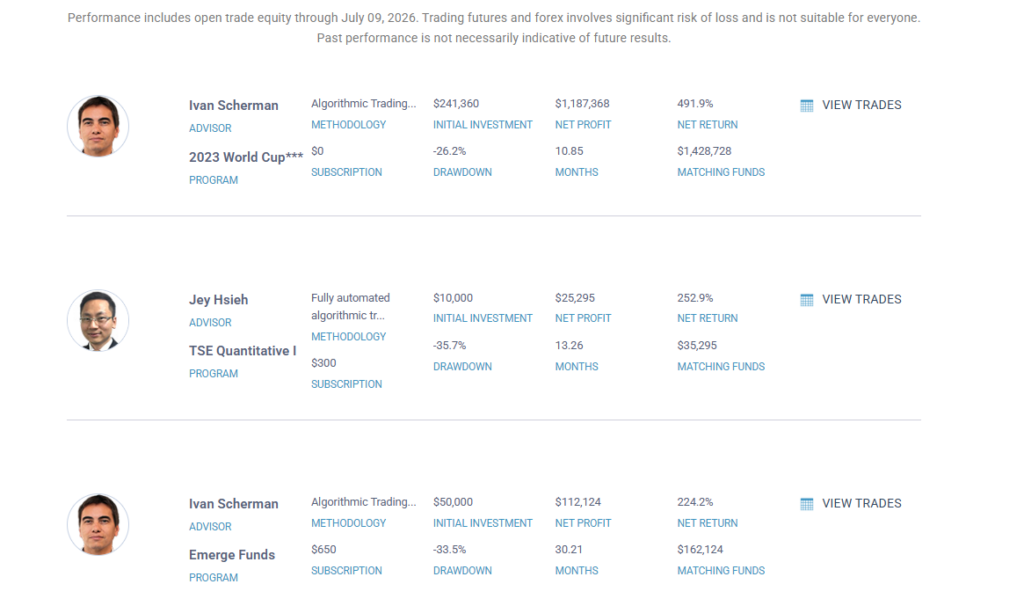
World Cup Advisor fully automated trading statistics showing returns and published drawdowns

Examples of published automated and systematic trading results recorded on July 9, 2026.
Featured ProgramMethodologyNet ReturnPublished DrawdownPeriod
Ivan Scherman — 2023 World CupAlgorithmic trading491.9%26.2%10.85 months
Jey Hsieh — TSE Quantitative IFully automated algorithmic trading252.9%35.7%13.26 months
Ivan Scherman — Emerge FundsAlgorithmic trading224.2%33.5%30.21 months
Daniele Sambataro — Momentum SelectionSystematic trend following and mean reversion202.2%36.17%40.8 months

These are substantial published returns and should not be dismissed as poor trading, quite the opposite. The figures demonstrate that profitable professional systematic trading can still involve material drawdowns.

World Cup Advisor states that its published peak-to-valley drawdown represents the greatest cumulative percentage decline in month-end net equity during the life of the account. It also warns that followers may experience a larger percentage drawdown depending on their funding level, entry date, execution, and other factors.

The World Cup Trading Championships states that traders have participated in its events since 1983 and that competitors may use discretionary methods or computerized trading programs.

A profitable automated strategy can still be completely unsuitable for a tightly constrained prop account.

Performance figures are historical, may have changed since July 9, 2026 and should be independently verified before being relied upon for any trading decision.

Automated Drawdown Versus Prop-Account Drawdown

The published automated-system drawdowns in the examples range from approximately 26% to 36%.

By comparison, a hypothetical $50,000 prop account with a $2,000 maximum-loss allowance provides approximately 4% of the advertised account value as usable loss capacity.

Comparison with a hypothetical 4% maximum-loss allowance.
Published DrawdownCompared with a 4% Loss Limit
26.2%Approximately 6.6 times the allowance
35.7%Approximately 8.9 times the allowance
33.5%Approximately 8.4 times the allowance
36.17%Approximately 9 times the allowance

This does not mean the professional strategies are bad.

It means they were not necessarily designed for an environment in which a relatively small peak-to-trough movement can terminate the account.

To fit a strategy with a historical 30% drawdown inside a 4% maximum-loss allowance, the position size would normally have to be reduced substantially and an additional safety margin would still be required.

Reducing position size also reduces expected monetary returns. Trailing-drawdown mechanics may create additional path-dependent risk that cannot be solved by position sizing alone.

Return Without Drawdown Is Only Half the Story

Retail marketing frequently concentrates attention on:

  • Percentage returns.
  • Profit screenshots.
  • Winning months.
  • Smooth backtested equity curves.
  • High win rates.
  • Short prop-evaluation passes.

A percentage return has little meaning without understanding the risk, capital and time required to produce it.

A strategy producing a 100% return with a 35% drawdown might be acceptable to one properly capitalized investor and completely unusable for a prop trader with a 4% maximum-loss allowance.

The most important question is not:

“How much did the robot make?”

More useful questions include:

  • What maximum drawdown did the system experience?
  • How was the drawdown calculated?
  • Did it include real-time open equity or only closed trades?
  • How long did recovery take?
  • What happened during unfavorable market phases?
  • What was the longest losing sequence?
  • How much capital and margin were required?
  • Would the system survive the intended prop-firm rules?
  • How frequently must it be reviewed, paused or reoptimized?
  • Could the operator financially and psychologically continue trading it?

A strategy can eventually recover and still destroy a prop account long before that recovery occurs.

Why Trailing Drawdown Can Be Especially Dangerous

A trailing drawdown may move upward as the account reaches new equity highs.

Depending on the firm’s rules, the threshold may be calculated using the closed balance, end-of-day balance or intraday unrealized equity.

Under an intraday trailing model, a trade can move strongly into profit, raise the drawdown threshold, retrace and then fail the account even if the original trade would ultimately have closed profitably.

A robot designed around normal live-account fluctuations may therefore be unsuitable unless it has been developed and tested specifically around the exact drawdown mechanics of the intended account.

The system must not merely produce an eventual net profit. It must survive every step of the equity path required to reach that profit.

Prop-Firm Rules Can Restrict Professional Diversification

Professional systematic traders may reduce portfolio risk by combining multiple models, markets, parameter sets, timeframes and directional biases.

A prop firm may restrict or impose conditions on practices such as:

  • Fully unattended automated trading.
  • Account-copying technology.
  • Replicating identical trades across multiple accounts.
  • Holding opposing positions.
  • Hedging between related accounts or instruments.
  • Using different long-only and short-only models across allocations.
  • Trading during specified news events.
  • Holding positions outside permitted sessions.
  • Using third-party signals or shared systems.

These restrictions can prevent an automated trader from using the diversification normally required to operate a robust systematic portfolio.

The trader may instead be forced to run one concentrated strategy inside a very small drawdown allowance.

Rules vary between firms, account types, and trading platforms, and they may change. Traders must verify the current policy before using automation, multiple accounts, hedging, opposing positions, trade copiers, or third-party technology.

What Fully Automated Prop Trading Would Require

A trader considering fully automated trading on prop accounts should realistically expect to need:

  • A prop firm that expressly permits the intended form of automation.
  • A system developed around the firm’s exact drawdown rules.
  • Position sizing small enough to accommodate historical and unseen drawdowns.
  • A substantial safety buffer above the official loss threshold.
  • Accurate modeling of commissions, slippage, and rejected orders.
  • Controls for internet, platform, data-feed, and server failures.
  • Emergency shutdown and daily-loss controls.
  • Continuous performance monitoring.
  • A process for pausing, reviewing, and restarting systems.
  • Potentially several complementary systems rather than one robot.
  • Enough capital to tolerate failed evaluations and account resets.
  • Extensive forward testing under realistic execution conditions.
  • Extensive effort and time, monitoring, and hours spent on R&D

The strategy would need to perform materially better on a risk-adjusted basis than many professionally operated systems while remaining inside a much smaller drawdown envelope.

That is an exceptionally demanding objective.

Why the Failure Risk Can Be Extremely High

A generic automated strategy placed onto a typical, tightly constrained prop account without specific adaptation faces a high probability of breaching the account rules.

The risk increases when:

  • The strategy has not been designed for the account’s drawdown calculation.
  • The trader relies on one robot and one market.
  • The historical drawdown is close to the account’s entire loss allowance.
  • The system begins with a losing sequence.
  • The trader uses excessive contract size to pursue rapid payouts.
  • The system trades through unsuitable volatility or news conditions.
  • The operator cannot intervene when execution or technology fails.
  • The trader repeatedly stops systems after losses and restarts them after profits.

It would be misleading to assign a universal percentage to the probability of failure because the result depends on the strategy, position sizing, prop-firm rules and market conditions.

However, when an automated strategy with double-digit drawdown expectations is forced into an account offering only a small single-digit loss allowance, the structural risk of failure can become extremely high.

Why ATS Prefers Hybrid Algo Trading for Prop Accounts

ATS does not believe that automation is bad. ATS develops and uses algorithmic trading technology extensively.

The distinction is between using automation as a professional tool and expecting one unattended robot to replace the trader completely.

Hybrid algo trading combines:

  • Algorithmic market analysis.
  • Automated or assisted entries.
  • Automated trade management.
  • AI-supported market context.
  • Human control over risk and participation.
  • The ability to pause, reduce or adapt when conditions change.

This man-and-machine approach allows the trader to benefit from speed, consistency and structured execution while retaining control over conditions that are difficult to model reliably.

For tightly constrained prop accounts, the ability to decline a trade, reduce exposure, stop for the session or intervene during abnormal conditions can be more valuable than attempting to automate every decision.

Conclusion

  • Fully automated algo trading is not a shortcut to effortless prop-firm payouts, regardless of the hype promoted online or within trading groups.
  • A robot may perform well for a period without breaching the account rules, but every trading system will eventually experience losing trades, unfavorable market phases and drawdowns.
  • Credible automated trading generally requires significant research, suitable capital, sufficient drawdown capacity, ongoing monitoring, diversification and a professional operating process. These requirements can be extremely difficult to accommodate within a prop account offering only a 2% to 5% effective drawdown allowance.
  • A system can be profitable over the long term and still fail a prop account during an ordinary losing sequence. The central question is not whether the robot eventually makes money, but whether it can survive the restrictive path between activation and that eventual profit.
  • A retail trader must realistically ask whether they can produce better risk-adjusted results than experienced systematic traders while operating within substantially tighter drawdown constraints. For most traders, the answer is likely to be no.
  • An ATS robot could potentially be operated successfully by a highly skilled, properly capitalized trader within a suitable brokerage environment, particularly when the operator understands the system and uses the hybrid controls. That does not mean the same system can reliably survive the restrictive rules of a typical retail prop account.
  • When fully automated trading is permitted, the risk of an eventual rule breach can remain extremely high unless the system, position sizing, account structure and operating process have been designed specifically for that prop-firm environment.
  • Developing such a system would require extensive experimentation, testing, monitoring, time and ongoing refinement. ATS does not provide an off-the-shelf, ready-to-trade robot that can be expected to operate indefinitely within such restrictive drawdown rules.
  • A robot may experience a profitable run before eventually breaching the account rules, but that does not make the approach reliable or sustainable. When the drawdown allowance is extremely small, the long-term probability of failure can become unacceptably high.
  • These limitations explain why ATS uses a more practical hybrid trading system and methodology rather than promoting fully unattended automation as a dependable solution for prop-firm accounts.

A prop account does not give the robot room to be eventually right. It must remain within the rules at every stage of the journey.

What Is a More Viable Trading Solution for a Prop-Firm Account?

For many retail futures traders, a structured hybrid approach offers a more realistic pathway by combining automation, AI intelligence and human risk control instead of relying on a single unattended black-box system.

Book a Free ATS Discovery Meeting

Further Reading

  • Automated Futures Trading: What Retail Traders Need to Know
  • Dispelling Prop-Trading Myths and Misleading Funded-Account Claims
  • The Holy Grail Automated Trading Robot Versus How Automated Futures Trading Is Done Professionally
Risk Disclosure: Futures and prop-firm trading involve a significant risk of loss and are not suitable for every trader. Automated and hybrid systems can lose money. Past performance, hypothetical results and published third-party results do not guarantee future performance. Prop-firm rules, fees and account conditions vary and should be independently verified before trading. World Cup Advisor states that futures trading involves significant risk, that past performance is not necessarily indicative of future results and that there are no guarantees of profit.

Filed Under: AFT8, automated futures trading, prop firm trading Tagged With: algo trading, algorithmic trading, automated futures trading, Automated Trading Risk, Black Box Trading, Fully Automated Trading, futures prop firms, Futures Trading Systems, hybrid algo trading, man and machine trading, Prop Firm Drawdown, prop firm trading, Prop Trading Rules, risk management, systematic trading, Trading Algorithms, trading automation, Trading Robots, Trading System Drawdown, Trailing Drawdown

Automated Futures Trading: What Retail Traders Need to Know

July 11, 2026 by AFT

Automated futures trading can improve execution, consistency and discipline, but a robot does not create a trading edge by itself. Successful automated trading still requires a sound strategy, realistic risk, sufficient capital, reliable technology and ongoing supervision.

What Is Automated Futures Trading?

Automated futures trading uses software to identify trading opportunities, place orders or manage open positions according to predefined rules.

Automation can be used at different levels:

  • Fully automated trading: The system selects, enters, manages and exits trades.
  • Semi-automated trading: The system identifies or prepares a trade, while the trader authorizes the direction, entry or risk.
  • Automated trade management: The trader enters manually, while the system manages stops, targets, trailing rules and exits.
  • Hybrid algo trading: The trader and technology work together, combining automated execution with human market awareness and risk control.

The Most Common Automated Futures Strategies

Trend Following

Trend-following systems attempt to participate in sustained market moves. They often have a moderate or low win rate but aim for larger winning trades that compensate for frequent smaller losses.

Breakout and Momentum

Breakout systems enter when price moves beyond a defined session range, opening level, volatility band or recent high or low. They can work well during directional markets but may experience repeated losses during choppy conditions.

Mean Reversion

Mean-reversion systems expect price to return toward an average or fair-value area. These systems may produce a higher win rate, but occasional large losses can erase many smaller winners if risk is not controlled.

Scalping

Scalping systems target small price movements and may trade frequently. Their results can be highly sensitive to commissions, slippage, spread, latency and realistic order fills.

Portfolio Automation

Professional operations may run several strategies across different instruments and market conditions. This can reduce dependence on one system, but it requires significantly more capital, infrastructure, testing and monitoring.

Win Rate Does Not Determine Profitability

A high win rate can sound impressive, but it does not prove that a system is profitable.

A system that wins 40% of its trades can be profitable when its average winning trade is substantially larger than its average loss. A system that wins 80% of its trades can still lose money when one large loss eliminates many small winners.

The more important measurement is expectancy:

Expectancy = Average profit from winning trades − Average loss from losing trades − Trading costs.

Traders should evaluate the complete statistical profile, including:

  • Average winner and average loss.
  • Maximum drawdown.
  • Profit factor and expectancy.
  • Largest losing streak.
  • Recovery time after drawdown.
  • Commissions, fees and realistic slippage.
  • Out-of-sample, simulation and live results.

Popular Futures Markets for Automated Trading

Retail automated traders commonly focus on liquid electronically traded futures markets, particularly those available in Micro and E-mini contract sizes.

  • MES and ES: S&P 500 futures.
  • MNQ and NQ: Nasdaq-100 futures.
  • M2K and RTY: Russell 2000 futures.
  • MYM and YM: Dow Jones futures.
  • MCL and CL: Crude oil futures.
  • MGC and GC: Gold futures.
  • Treasury futures: Interest-rate and bond markets.
  • Currency futures: Centralized exchange-traded currency markets.

No instrument is automatically better than another. The correct market depends on liquidity, volatility, tick value, transaction costs, session availability and how well the market suits the trading strategy.

Minimum Margin Is Not a Safe Account Size

One of the most dangerous mistakes in retail futures trading is treating broker day-trading margin as the amount of capital required to trade safely.

Day-trading margin is only the collateral required to open a position. It is not a risk budget, stop-loss amount or recommended account balance.

A broker may permit a Micro futures position with a relatively small amount of intraday margin, but the trade can still lose substantially more than that margin requirement.

Account size should instead be based on:

  • The dollar loss at the protective stop.
  • The percentage of account equity risked per trade.
  • The historical and expected drawdown of the strategy.
  • The number of simultaneous positions.
  • Slippage, commissions and unexpected execution problems.
  • A reserve for volatility and margin increases.

Micro futures can make sensible position sizing more accessible, but they do not remove the need for adequate trading capital.

Why Backtests Can Be Misleading

An attractive historical equity curve does not prove that a system will perform similarly in live trading.

Backtests can be distorted by:

  • Over-optimizing settings to past market data.
  • Ignoring commissions and realistic slippage.
  • Assuming trades were filled at unavailable prices.
  • Using future information that would not have been known at the time.
  • Selecting only the best-performing market period.
  • Testing hundreds of variations and presenting only the winner.

A robust system should be tested on unseen data, across different market phases and through forward simulation before meaningful live capital is placed at risk.

Even after live deployment, performance must be compared with the expected statistical range. A system should be reduced, paused or retired when its behaviour materially exceeds predefined risk limits.

Fully Automated Trading Is Not Set and Forget

The internet often presents automated trading as an easier alternative to active trading: find a robot, switch it on and allow it to generate income without further involvement.

Professional automated trading works differently.

The work moves away from manually clicking orders and into:

  • Strategy research and development.
  • Data management and testing.
  • Software and server maintenance.
  • Execution and slippage monitoring.
  • Portfolio and correlation management.
  • Risk controls and emergency procedures.
  • Ongoing adaptation to changing market conditions.

Markets change. A system that performs well in one market phase may struggle when volatility, liquidity, correlations or participant behaviour changes.

Professional traders may operate several independent systems, pause strategies that enter unsuitable phases and continue developing replacement systems. This can require years of work, considerable capital and ongoing research.

The Case for Hybrid Algo Trading

For many retail futures traders, hybrid algo trading offers a more practical route than completely unattended automation.

The technology can handle:

  • Market calculations and setup detection.
  • Consistent order placement.
  • Stops, targets and trade management.
  • Position scaling and repetitive monitoring.
  • Mechanical risk and execution rules.

The trader can remain responsible for:

  • Market context and session selection.
  • Economic news and abnormal event risk.
  • Trade direction and authorization.
  • Position sizing.
  • Choosing when not to trade.
  • Pausing or disengaging the system.

This man-and-machine approach seeks to combine the speed and consistency of automation with the awareness, flexibility and accountability of an actively involved trader.

Automated Futures Trading Due Diligence

Before using an automated futures system, ask the following questions:

  1. What exact trading logic is expected to create the edge?
  2. Are the results backtested, simulated or live?
  3. Were commissions and realistic slippage included?
  4. How many trades and market conditions were tested?
  5. What were the maximum drawdown and recovery time?
  6. How sensitive are the results to small setting changes?
  7. Has the system been tested on unseen data?
  8. What happens during news events and volatility shocks?
  9. What happens if the platform, data feed or broker connection fails?
  10. What objective limits will cause the system to be paused?

Systems promising guaranteed returns, permanent performance, no drawdown or success in every market condition should not be treated as credible automated-trading solutions.

Final Perspective

Automation is a tool rather than a shortcut. It can improve the execution of a valid trading process, but it can also execute a poor strategy more quickly and consistently.

Robust automated futures trading requires realistic expectations, controlled position sizing, positive expectancy, dependable technology, active risk management and the willingness to stop trading when market evidence changes.

For many retail traders, the strongest starting point is one liquid Micro futures market, one clearly defined strategy and supervised hybrid execution rather than a completely unattended robot.

Judge a system by its expectancy, drawdown, execution quality and long-term stability—not by win rate alone.

Explore Hybrid Futures Trading With Algo Futures Trader

Algo Futures Trader is designed to support a hybrid approach in which the trader remains in control while technology assists with analysis, execution, trade management and risk.

Discover Hybrid Algo Trading

Risk Disclosure

Futures and leveraged trading involve a substantial risk of loss and are not suitable for every trader. Historical, hypothetical and simulated results do not guarantee future performance. All examples and statistical references are provided for educational purposes and are not earnings claims, guarantees, personalized financial advice or recommendations to trade a particular strategy or futures contract.

Condensed and adapted from the supplied research draft.

Filed Under: Algo Futures Trader, NinjaTrader 8, ninjatrader automated trading Tagged With: algo trading, algorithmic trading, automated futures trading, Backtesting, E-mini Futures, Futures Risk Management, Futures Trading Software, Futures Trading Systems, hybrid algo trading, Micro Futures, Retail Futures Trading, trade management, trading automation, Trading System Development

The Holy Grail Automated Trading Robot vs. How Automated Futures Trading Is Done Professionally

July 11, 2026 by AFT

The retail trading dream is one automated robot that trades every market, survives every condition, produces consistent profits and requires no further involvement. Switch it on, go and play golf and retire forever. Professional automated trading looks very different.

The Automated Trading Dream

Many traders search for a single automated trading robot with an impressive win rate, an attractive risk-to-reward ratio and a smooth historical equity curve. They want one set of settings that can trade long and short, operate on any futures instrument, work throughout every market phase and continue indefinitely without intervention.

The assumption is that once this robot has been discovered, the difficult work is finished. The trader can switch it on, leave it unattended and watch the profits accumulate.

This is the retail trading version of the “holy grail.” It is also one of the most persistent myths surrounding fully automated trading.

Why One Robot Cannot Excel in Every Market Condition

Futures markets continually move between different conditions, including trends, ranges, high volatility, low volatility, expanding volume, contracting volume, news-driven movement and irregular price behaviour. A strategy designed to exploit one condition can perform poorly when the market changes into another.

A trend-following robot can struggle in a sideways market. A mean-reversion robot can be damaged by a powerful breakout. A long-biased strategy may perform well during a sustained bullish phase but become unsuitable when the wider structure turns bearish. A strategy calibrated for quiet overnight trading may behave very differently during the volatile New York open.

The more conditions one robot attempts to cover, the more compromises are usually introduced. It can become a blunt instrument that is average at many tasks but excellent at none.

How Automated Trading Is Done Professionally

Professional automation is normally approached as a portfolio of specialised systems rather than one universal robot. Each system is designed for a defined task, market, direction, session or market condition in which it has demonstrated an identifiable advantage.

  • Specialised strategies: A robot is created to perform a specific task that it can execute consistently rather than being expected to trade everything.
  • Defined instruments: A system may be developed specifically for an equity index, energy, metal, currency, agricultural or interest-rate futures market.
  • Defined directions: Some systems may trade long only, short only or both directions according to the market phase.
  • Defined sessions: A strategy may operate only during selected periods, such as the European session, New York open, regular trading hours or overnight market.
  • Controlled activation: Systems may be switched on, reduced, paused or parked when conditions become unsuitable or predefined drawdown limits are reached.
  • Portfolio construction: Capital is distributed across different systems and preferably less-correlated instruments, behaviours and return streams.
  • Continuous supervision: Performance, execution quality, slippage, risk limits, infrastructure and market behaviour remain under observation.
  • Ongoing research: Systems are repeatedly tested, reviewed and adjusted as markets, volatility, liquidity and participant behaviour change.

The Holy Grail Robot vs. Professional Automated Trading

The Holy Grail MythProfessional Reality
One robot trades everything.Multiple specialised systems perform clearly defined tasks.
One set of parameters works forever.Parameters and system suitability must be monitored as market behaviour changes.
The robot trades continuously.Systems can be activated, restricted, reduced, paused or parked.
The robot always trades long and short.Some strategies operate long only, short only or only during selected market phases.
Automation removes the need for risk management.Professional automation depends on strict position, order, account and portfolio-level controls.
A strong backtest is sufficient.Development normally includes backtesting, replay, simulation, forward testing, pre-production and carefully controlled live deployment.
Automation means less work.Reliable full automation requires substantial development, infrastructure, monitoring and ongoing research.
A small account can run many systems.Each system requires sufficient risk allocation, margin capacity and drawdown tolerance.

The Real Holy Grail Is Diversification, Not One Robot

Ray Dalio describes his investment “holy grail” as striving to hold “15 good uncorrelated investments that are risk balanced.” His principle is not to find one perfect investment or prediction, but to combine multiple quality return streams so that the portfolio is not dependent on one concentrated bet.

The same principle can be applied conceptually to automated trading. Instead of searching for one robot that must always be correct, the professional objective is to build a collection of specialised systems whose risks, market dependencies and periods of strength are not identical.

Owning five robots does not automatically create diversification. Five strategies trading similar logic on ES, NQ and other closely related equity-index futures may all lose together. Genuine diversification requires attention to instrument correlation, strategy logic, timeframe, market regime, trade direction and the underlying source of each system’s returns.

Professional Automation Requires Controls and Infrastructure

Professional automation is not simply a trading strategy connected to a brokerage account. It is an operating environment containing development controls, risk controls, monitoring, records, recovery procedures and human responsibility.

National Futures Association guidance for automated order-routing systems addresses security, capacity, stress testing, pre-execution limits, post-execution monitoring, alerts, contingency planning and redundant systems. This illustrates how seriously automated execution must be treated when real orders and financial exposure are involved.

A more complete automated trading operation may require historical tick data, backtesting and replay environments, simulation accounts, forward-testing servers, pre-production systems, live-production systems, monitoring, alerts, logs, backup connectivity and procedures for immediately disabling a malfunctioning strategy.

The robot may place the trade, but people remain responsible for the system, its behaviour and the financial consequences.

Be Prepared for Significant Capital Requirements

There is no universal account size that makes fully automated trading safe or viable. Capital requirements depend on the futures contracts being traded, volatility, contract size, margin, strategy frequency, expected drawdown, number of systems and the amount of correlation between them.

CME Group explains that futures risk should be managed through the contract selected, the number of contracts traded and stops aligned with the trader’s risk tolerance. It also warns traders to size positions according to realistic risk scenarios rather than simply trading the maximum quantity allowed by broker margin.

A professional automated portfolio needs sufficient capital to allocate risk across several strategies while allowing each strategy to survive normal losing periods. Attempting to place numerous automated systems inside one small account with a tight maximum-loss or trailing-drawdown rule can create a structural mismatch between the portfolio design and the available risk budget.

Micro futures can improve position-sizing flexibility, but they do not remove market risk, strategy risk, correlation risk, slippage, technical failures or drawdown.

Be Prepared for Months or Years of Work

Fully automated trading is frequently marketed as a way to save time. Building it properly can require considerably more time than learning to trade one structured hybrid methodology.

At ATS, we regard six to twelve months as a strong start for serious automated system development. A professional multi-system operation can take one to three years to research, develop, test, forward test and prepare for carefully controlled live deployment.

The work does not finish when a system reaches the market. Strategies must continue to be reviewed because liquidity, volatility, correlations, contract behaviour and market participants change. A successful strategy may later need to be reduced, modified, transferred to another instrument or parked until its preferred conditions return.

Professional automation is an ongoing research and risk-management operation, not a one-time software installation.

The Hybrid Algo Trading Alternative

Most individual futures and prop-firm traders do not have the capital, infrastructure, technical resources or development timeline required to build a professionally diversified fully automated operation.

Hybrid algo trading provides a more practical route by combining human market awareness with algorithmic execution, structured risk management and real-time decision-support technology.

The trader remains responsible for deciding whether the market conditions, direction, timing and risk are suitable. The technology assists with identifying opportunities, executing repeatable processes, managing orders and reducing emotional interference.

This man-and-machine approach allows the algorithm to perform the tasks at which software excels while the trader retains control over the areas where changing context, judgement and adaptability remain important.

The ATS Hybrid Algo Futures Trading Solution

ATS is designed to provide a faster and more accessible route to market for serious futures and prop-firm traders, including traders working with smaller accounts and micro futures on suitable $25K prop-account programmes.

  • Algo Futures Trader: Provides semi-automated and automated trading tools, structured entries, trade management, exits and real-time control.
  • Alpha Web Trader: Provides market context, confirmation, correlations, trend information and decision-support intelligence.
  • AI Trading Copilot: Assists with market preparation, risk, news, context, setups and live-session awareness.
  • Turnkey workspaces: Give traders structured starting points for learning, testing and developing their own repeatable process.
  • ATS Trader Fast Track: Provides assisted onboarding, platform setup, hybrid methodology, workspace guidance, trade planning and a structured pathway towards prop or live-trading readiness.
  • VIP Trading Group: Provides live-market education, instruction, context and continuing development within the ATS trading framework.

ATS baseline algorithms are reference starting points for understanding market phases, testing ideas and learning how systems win and lose. They are not presented as universal set-and-forget robots or guaranteed live-trading solutions.

The objective is to help traders pursue maximum profit, minimum drawdown and least emotion through a controlled hybrid process. These are trading goals, not promises or guarantees.

Which Path Is Right for You?

Fully automated trading may suit experienced, technically capable and well-capitalised traders who are prepared to commit to extensive research, infrastructure, portfolio construction and ongoing system management.

Hybrid algo trading may provide a more realistic route for traders who want to reach the futures or prop-firm market sooner, retain direct control and use automation without depending on an imaginary robot that must work in every market condition forever.

The most important decision is not which robot has the most attractive historical statistics. It is whether your chosen approach is compatible with your capital, available time, technical ability, risk tolerance and long-term commitment.

Discuss Your ATS Trading Pathway

Book a free, obligation-free ATS Discovery Meeting to discuss your current experience, trading goals, available time, account plans and whether the self-assisted, Fast Track or longer-term automated development route is the most suitable fit.

🎧 Book Your Free ATS Discovery Meeting

Sources and Further Reading

  1. Ray Dalio: Investment Principles — What Should You Do Under Existing Conditions?
  2. National Futures Association: Supervision of the Use of Automated Order-Routing Systems
  3. CME Group: Position and Risk Management for Futures Traders

Risk Disclosure: Futures and prop-firm trading involve a significant risk of loss and are not suitable for every trader. Automated, algorithmic and hybrid trading systems can lose money and may experience slippage, technical failures, changing market behaviour and extended drawdowns. Historical, hypothetical, simulated or baseline results do not guarantee future performance. Prop-firm rules, account conditions and permitted automation vary by provider and can change. Traders must review and comply with all applicable rules before using any automated or semi-automated technology.

Filed Under: AFT8, automated futures trading, fully automated trading system, NinjaTrader 8, ninjatrader trading bot Tagged With: algo futures trader, algorithmic trading, ATS Trader Fast Track, automated futures trading, automated trading, Fully Automated Trading, futures trading, hybrid algo trading, Micro Futures, professional trading systems, prop firm trading, Trading Risk Management, Trading Robots, trading system diversification, uncorrelated strategies

Hybrid Algo Trading Versus Fully Automated Trading: The Time and Effort Required

July 11, 2026 by AFT

Fully automated trading is often promoted as the easiest route to the market. In reality, serious automation can require months or years of research, development, testing, infrastructure management and ongoing optimization. ATS Hybrid Algo Trading offers a more practical route for traders who want advanced technology without operating a full-time quantitative research business.

The Myth That Fully Automated Trading Requires Less Work

One of the most common retail-trading sales pitches is that a trader can purchase an automated robot, switch it on and allow it to generate profits with little or no involvement.

Professional fully automated trading rarely works that way.

Automation does not eliminate the workload. It moves the workload away from daily trade execution and into system development, data management, backtesting, optimization, forward testing, infrastructure, monitoring and portfolio management.

Fully automated trading may reduce manual trade execution, but it can dramatically increase the research, engineering and system-management work required behind the scenes.

The Fully Automated Trading Route

A trader pursuing the fully automated route may only require the ATS Algo Futures Trader platform, AFT, but the software is only one part of the operation.

AFT can provide five turnkey algorithmic baseline workspaces that may be used as reference starting points. A technically experienced trader can study, test, optimize and forward-test these baselines or use AFT to develop and configure an independent automated approach.

The baseline systems are not presented as permanent switch-on-and-forget live-trading products. They provide a structured foundation from which a committed automated trader can begin the research and validation process.

Typical Fully Automated Development Work

  • Studying the strategy logic, market behavior and system configuration.
  • Testing the system across multiple market phases and historical periods.
  • Optimizing settings without excessively fitting them to historical data.
  • Conducting replay, simulation and forward testing.
  • Comparing theoretical backtest results with realistic execution, commissions and slippage.
  • Defining maximum drawdown, daily-loss and system shutdown limits.
  • Monitoring connectivity, data feeds, orders, positions and platform performance.
  • Pausing or parking systems when their performance or drawdown limits are reached.
  • Reactivating systems when suitable market conditions return.
  • Developing additional systems to reduce dependence on one strategy or market phase.
  • Maintaining separate testing, pre-production and live-trading environments.
  • Continuing research and development as volatility, liquidity, correlations and market structure change.

How Long Can Fully Automated Trading Take?

A serious automated trader may require approximately six to twelve months to develop, optimize, validate and cautiously introduce an initial system to the market.

Building a more complete automated-trading operation with several diversified systems may take one to three years or longer. A return on the total software, infrastructure, data, research and capital investment may also take one to three years, and there is no guarantee that the operation will become profitable.

These are practical planning estimates rather than promises. The actual timeline depends on the trader’s experience, available capital, technical ability, strategy complexity, data quality, market conditions and acceptable level of risk.

Who Is the Fully Automated Route Suitable For?

This route is most suitable for highly experienced and technically capable traders who are prepared to commit for the long term. It may require working throughout the week for months or years to reach the required level of development, diversification and operational maturity.

A fully automated trader may need to act as:

  • A system developer.
  • A quantitative researcher.
  • A data and infrastructure operator.
  • A software tester.
  • A portfolio manager.
  • A real-time risk supervisor.

ATS does not currently offer a standard mastery course for building a complete professional fully automated trading business. Traders taking this route are expected to study the subject independently through specialist books, professional resources and suitable technical education.

ATS support can assist with the installation, operation and configuration of supported AFT turnkey workspaces, but it cannot perform the trader’s continuous research, optimization, validation and portfolio-management responsibilities.

The Cost of a Professionally Managed Automated Operation

A professionally supported fully automated operation can require specialist servers, historical data, testing environments, monitoring systems, backup procedures, ongoing development and experienced technical personnel.

An institutional-style managed research, infrastructure and system-support service could reasonably cost several thousand dollars per month. A comprehensive ATS-managed package of this nature would potentially need to be priced from approximately $5,000 per month, depending on the required systems, infrastructure, research and support responsibilities.

Such an operation would generally be more appropriate for an established professional trader or investment operation with substantial risk capital, potentially around $1.5 million or more, rather than a new retail trader seeking a quick route into automated futures trading.

Capital requirements vary significantly, and having substantial capital does not remove the risk of loss. Automated systems can fail, suffer prolonged drawdowns or lose their original market advantage.

Due to the potentially unlimited demand for development, optimization and support, ATS would only consider this level of managed automated service for established professional traders with demonstrated experience, adequate capitalization and a realistic understanding of the commitment involved.

Why Fully Automated Trading Is Not the Main ATS Focus

ATS understands the complexity of automated trading through years of trading-system research, development and market experience.

Fully automated trading is possible, but supporting it properly can become a black hole of time, development effort and technical resources. Every system creates new questions involving optimization, changing markets, drawdowns, diversification, infrastructure and live execution.

For this reason, ATS primarily focuses on Hybrid Algo Trading. We believe hybrid trading provides a more realistic and efficient route for most serious retail, prop-firm and live-account traders.

Instead of attempting to replace the trader completely, hybrid trading combines the speed, consistency and precision of technology with the adaptability, judgment and risk control of an informed human operator.

The ATS Hybrid Algo Trading Route

ATS Hybrid Algo Trading is designed to help traders reach structured market practice faster without first spending months or years developing an independent automated-trading operation.

The trader receives an established ecosystem that can include:

  • AFT: Algo Futures Trader for assisted entries, automated trade management, configurable systems and direct real-time control.
  • AWT: Alpha Web Trader for market intelligence, direction, structure, volatility, correlations and higher-probability context.
  • AI Group Copilot: Live-market assistance covering risk, news, economic events, market conditions, setups and trading-plan context.
  • Turnkey Workspaces: Preconfigured futures and prop-trading environments that provide a structured starting point.
  • Fast Track Zero to Hero: Assisted setup, onboarding and practical training through the ATS trading framework.
  • ATS Mastery: Continued guidance designed to help the trader develop personal statistics, discipline, consistency and risk control.

Illustrative ATS Hybrid Development Timeline

  • One to seven days: Complete ATS Fast Track Zero to Hero and establish the technical, platform and methodology foundation.
  • One to three months: Work toward stable personal statistics, prop-firm progress, potential payouts or suitable live-brokerage objectives through continued practice and ATS Mastery.
  • One to three hours per trading day: Follow a focused routine rather than operating a full-time system-development and research department.

These timelines are development targets, not guarantees. Progress depends on the individual trader, previous experience, discipline, available trading time, account conditions and market behavior. Evaluation passes, funded accounts, payouts, live profits and recovery of the trader’s ATS investment are never guaranteed.

Hybrid Trading Can Adapt as the Market Changes

A fixed automated robot may gradually become less suitable when volatility, liquidity, correlations or market structure change. The operator may then need to redesign, reoptimize, replace or permanently park the system.

ATS Hybrid Algo Trading is designed differently. AFT, AWT and the AI Group Copilot provide multiple layers of technology, intelligence and human control that can be adapted to current conditions.

The trader can:

  • Pause trading during unsuitable or unclear market conditions.
  • Reduce position size when risk increases.
  • Switch between suitable instruments, sessions or workspaces.
  • Adjust filters and confirmation requirements.
  • Restrict trading to long or short opportunities.
  • Use assisted, semi-automated or selected automated functions.
  • Control entries, exits, scaling and account risk in real time.
  • Use current AWT and Copilot intelligence instead of relying exclusively on historical system settings.

The ATS framework still requires monitoring, discipline and appropriate configuration, but it is not dependent on one fixed algorithm remaining suitable forever.

Fully Automated Trading Versus ATS Hybrid Algo Trading

Illustrative comparison of the time, effort and operating requirements.
AreaSerious Fully Automated TradingATS Hybrid Algo Trading
Starting platformAFT with algorithmic baseline workspaces used for research, optimization and developmentAFT, AWT, turnkey workspaces, AI Group Copilot and the ATS methodology
Initial pathwayIndependent research, testing, optimization and forward validationFast Track Zero to Hero with a target foundation period of one to seven days
Typical development periodApproximately six to twelve months for an initial system and potentially one to three years for a diversified operationOne to three months may provide an initial development and mastery target
Daily or weekly workloadPotentially full-time research, testing, monitoring and system management throughout the weekOften structured around approximately one to three focused trading hours per day
Human roleDeveloper, researcher, infrastructure operator, portfolio manager and risk supervisorTrader, pilot and risk controller supported by automation and market intelligence
Market changesMay require reoptimization, redevelopment, replacement or system rotationTrader can adapt instruments, direction, size, filters and execution using current market context
InfrastructureMay require servers, data storage, testing environments, monitoring, backups and specialist supportPrimarily built around the ATS software ecosystem, trading platform and brokerage connection
Capital suitabilityMore appropriate for experienced and well-capitalized professional operationsDesigned for suitable retail, prop-firm and live-account traders following controlled risk parameters
Primary challengeEngineering and maintaining a portfolio of systems that can survive changing marketsDeveloping judgment, discipline, consistency, execution skill and personal statistics
Potential return on investmentMay take one to three years or longer, with no guarantee of successTraders may target earlier prop-firm or live-account progress, but results are not guaranteed

Conclusion: Hybrid Trading Is the More Practical Route for Most Traders

Fully automated trading is not automatically easier, faster or less demanding. When approached professionally, it can require years of dedicated research, substantial capital, specialist infrastructure and continuous system development.

It may be suitable for an experienced technical trader who wants to operate a long-term algorithmic research and portfolio-management business. It is generally not the most practical starting point for a trader who wants to progress toward prop-firm payouts or controlled live trading within a realistic timeframe.

ATS Hybrid Algo Trading offers a more efficient alternative. It combines AFT execution technology, AWT market intelligence, AI Copilot assistance, turnkey workspaces and human judgment within one adaptable trading framework.

The goal is not to remove the trader. The goal is to develop a more capable trader who can use technology to pursue maximum profit, minimum drawdown and the least possible emotional interference while retaining control of every important risk decision.

Fully automated trading attempts to replace the trader with a portfolio of engineered systems. ATS Hybrid Algo Trading develops the trader into the intelligent control layer above the technology.

Discover the Right ATS Trading Pathway

Book a free, obligation-free ATS Discovery Meeting to discuss your experience, trading goals, available time, preferred markets and whether the self-assisted, Fast Track Mastery or specialist automated-development route is suitable for you.

We will help you understand the realistic time, effort, technology, support and capital requirements before you commit to a pathway.

🎧 Book Your Free ATS Discovery Meeting

Trading futures involves a significant risk of loss and is not suitable for every trader. Past or hypothetical performance does not guarantee future results. ATS development timelines, payout objectives and return-on-investment targets are illustrative only and should not be interpreted as promises or financial advice.

Filed Under: Hybrid Algo Trading, ninjatrader automated trading Tagged With: AFT, AI trading copilot, algo futures trader, algorithmic trading, Alpha Web Trader, ATS Fast Track, ATS Trade Mastery, automated futures trading, AWT, Fully Automated Trading, futures trading, hybrid algo trading, Live Futures Trading, prop firm trading, Semi Automated Trading, trading automation, Trading Risk Management, Trading System Development, Trading System Optimization, Trading Technology

How to get started with AFT8 Automated Trading for NinjaTrader 8

March 5, 2026 by Tom Leeson

How to Get Started with AFT8 Automated Trading for NinjaTrader 8 (Day Traders & Prop Traders)

AFT8 is built for hybrid trading (man + machine) and can also be used for
fully automated execution. Unlike classic NinjaTrader “strategies” you attach to charts,
AFT8’s hybrid algorithms run primarily through Market Analyzer columns plus dedicated
Algo Controllers. This means your “control surface” is the workspace, Market Analyzer rows/columns,
and controller state—not a strategy list.

This guide is a practical, day-trader and prop-trader focused walkthrough to get you up and running safely,
avoid the most common first-week failures, and understand the key AFT8 concepts that matter when money and rules
are on the line.

What You Need Before You Start

  • NinjaTrader 8 installed and running.
  • AFT8.NinjaTrader installed (AFT8 add-in for NT8).
  • AFT.Desktop installed and logged in (required to sync licenses, updated files, and settings to your PC).
  • ATS Desktop Apps (recommended all-in-one installer path that includes Workspaces 1 as part of the install bundle).
  • Correct workspace stage for your goal (manual → hybrid → automated).

Download the official installers from the ATS downloads hub and then install in a clean sequence:

  1. Install/Update NinjaTrader 8 (follow NinjaTrader’s official installer flow).
  2. Install ATS Desktop Apps (recommended for default installs).
  3. Install AFT8.NinjaTrader.
  4. Install and run AFT.Desktop to sync licenses/workspaces/settings.
  5. Install additional Workspaces 2–5 if your access level includes them.

Tip: If Windows Defender SmartScreen blocks a newly updated workspace installer, verify the installer path
and proceed only if it’s the official installer from the ATS downloads source.

AFT8 Architecture (Why Market Analyzer Matters)

AFT8 hybrid algos are designed to operate inside NinjaTrader via Market Analyzer.
You control and configure behavior using:

  • Market Analyzer columns (AFT Algo Entry and AFT Trade Manager modules)
  • Market Analyzer templates and saved workspaces
  • Algo Controllers (the control panel that commands the rows/columns)

This is the reason many “classic strategy expectations” don’t apply. Your first job is to ensure the workspace
loads the correct Market Analyzer components and the controllers are visible and populated.

The Two Settings That Break Most Automated Trading Setups

Most automation issues come from time settings and contract symbology.
Fix these early so your sessions, filters, and instrument lookups behave correctly.

1) Time / Region Settings

  • Windows: Region = United States, Language = English (United States).
  • TimeZone: Central US is commonly recommended; some traders use Eastern if troubleshooting date-time issues.
  • NinjaTrader: Language = English, TimeZone = Central (or Eastern if required for your environment).

2) Contract Symbology (Critical)

In NinjaTrader, set Symbology: Numeric. This is called out as critical for AFT8 compatibility.

Choose the Right Workspace Stage

AFT8 workspaces are staged so you can progress from manual skill-building to hybrid and then to more advanced modes.
The key practical rule for automation is:
automated entry requires Workspace 2 or higher (or an equivalent workspace that includes the AFT Algo module).

  • Workspace 1: Manual entry with automated exits (best for day traders learning trade management).
  • Workspace 2: Hybrid automated entry + exits (common starting point for day traders and prop evals).
  • Workspaces 3–4: Additional hybrid variants (including MTF in Workspace 4).
  • Workspace 5: VIP baselines for pure automated trading plus hybrid chart algos.

Best practice: Start in Workspace 1 to validate platform stability and exits, then move to Workspace 2+ once you
can confidently control AutoStart, account selection, and controller state.

First Run Checklist (Day Trader Friendly)

Step 1 — Confirm the AFT8 Control Surface Is Loaded

  • Open a turnkey workspace (Workspace 1 for training, Workspace 2 for automated entry).
  • Confirm Market Analyzer includes the AFT columns/modules.
  • Confirm the Algo Controllers are visible and populated with rows.

Step 2 — Use AutoStart as a Safety Switch

Turnkey workspaces can auto-start and can trade automatically once NinjaTrader is connected.
Before you go live, learn how to control AutoStart.

  1. Open the workspace.
  2. In Market Analyzer, right-click → Columns.
  3. Select the AFT Algo Column.
  4. Find TradeEntryAutoStart and set it:
    • OFF while you validate instruments, accounts, filters, and session timing.
    • ON only when you are ready to allow automated entries.
  5. Save the template under a new name and save the workspace under a new name (so updates don’t overwrite your changes).

Step 3 — Paper Trade / Sim First

Run your first sessions in Sim (or demo) to confirm:

  • Signals appear as expected
  • Trades place when conditions are valid
  • Exits and trade management work correctly
  • Time filters and max trade limits behave the way you expect

Prop Trader Setup (Evaluation & Funded Accounts)

Step 1 — License & Sync (Non-Negotiable)

For live or prop firm trading, you must have the correct AFT8 license and your PC must be synced.
Keep AFT.Desktop logged in and confirm you accepted the EULA inside AFT.Desktop so NinjaTrader can see your license.

Step 2 — Account Hygiene (Avoid the #1 Prop Mistake)

Many workspaces default to Sim101. Before you trade evaluation/live:

  • Open Market Analyzer and change the account in all relevant columns/modules to your evaluation/funded account.
  • Save the workspace under a new name.
  • Confirm the controller state is set intentionally (don’t let auto-start surprise you).

Step 3 — Controller State = Your “Kill Switch”

AFT8 can start with NinjaTrader and trade automatically if you don’t set the Algo Entry Controller to a safe state.
Make it a habit: connect → verify → then enable trading.

10-Second Quick Check (Most Issues Are Solved Here)

If AFT8 is running but no trades are being taken, these are the most common causes:

  • Wrong workspace stage: automated entry generally needs Workspace 2+.
  • AFT Algo module missing from the workspace/Market Analyzer template.
  • AutoStart / Long / Short states are OFF, or semi-auto “one shot” has stopped trading.
  • Max trades/session reached (common for day and prop traders).
  • Time/session filters are blocking entries or exits.
  • Contract rollover/expiry protection is preventing trading (roll your contracts forward in NT8 database management).
  • Wrong account selected (Sim101 vs evaluation vs funded).
  • Wrong license for live trading or license not synced (AFT.Desktop not logged in / EULA not accepted).
  • Data lag filter is detected and trading is paused.
  • Prerequisites not applied (timezone/region/symbology).

If you’re stuck, the fastest recovery method is:
close the workspace → open Workspace 2 or 3 → confirm it trades with filters off → add filters back one-by-one.

Best Practices for Day Traders & Prop Traders

1) Treat AFT.Desktop Sync as Pre-Flight

Before every session: open AFT.Desktop, confirm you’re logged in, confirm EULA accepted, and confirm licenses synced.
If NinjaTrader was already running, refresh/restart after syncing if needed.

2) Use “Automation Level” as a Risk Control

Start conservative (AutoStart OFF, controller paused), then increase automation only when the session context,
account selection, and filters are verified.

3) Don’t Assume Classic Strategy Analyzer Workflow

AFT8 hybrid algos are Market Analyzer-based. For hybrid systems, official guidance emphasizes replay/paper/live
operation for statistics rather than classic Strategy Analyzer optimization.

Official Resources

  • ATS Downloads hub (AFT.Desktop, AFT8.NinjaTrader, ATS Desktop Apps)
  • AFT8 prerequisites & recommended settings (timezone/region + Numeric symbology)
  • AFT.Desktop login & license sync steps
  • Workspaces 1–5 installers and stage descriptions
  • Enable live/prop trading checklist
  • AutoStart setup procedure
  • No trades taken diagnostic guide

Risk Disclaimer: Futures trading involves substantial risk of loss and is not suitable for all investors. This article is for educational purposes only and does not constitute financial advice.

Filed Under: AFT8, automated futures trading, ninjatrader automated trading Tagged With: AFT8, automated futures trading, fully automated trading system

AFT8 update 20260123 Trade System Copier and Self Optimizing bar enhancements

January 23, 2026 by AFT

AFT8 Update Released – Version 2026.01.23

The AFT8 hot-fix update (v2026.01.23) has been released and is now ready for installation.


AFT8 Hot-Fix Update Features

  • Internal white-box optimization for Trade Plan Goals data
    Fixes a rare display error in the Algo Trade Manager.
  • Trade System Copier safety enhancement (primary ↔ sub-account sync)
    In fast markets or sharp reversals, an additional verification layer now runs after a short
    cool-down period to ensure all accounts are correctly balanced and fully synchronized.
  • Self-Optimizing Bar improvements
    White Box Code Enhancements to prevent a very rare NinjaTrader 8 chart freeze during busy tick periods.

How to Install the Latest AFT8 Version

You can update AFT8 using any of the following methods:

  1. In-App Update
    AFT8 will automatically display a pending update notification with install buttons.
  2. ATS Universal Account Downloads
    Download and run the “AFT Secondary Installer” from:
    https://account.algotradingsystems.net/
  3. Local Installer (if already downloaded)
    Check your PC downloads folder for:

    \Downloads\AlgoTradingSystems\AlgoFuturesTrader8-Installer-Setup.exe
    

Tip: After updating, restart NinjaTrader 8 and AFT8 to ensure all components load cleanly.

Filed Under: AFT8, Algo Futures Trader, NinjaTrader 8, ninjatrader automated trading systems, ninjatrader trading bot Tagged With: AFT8 Release, AFT8 update, AFT8Update, automated futures trading

  • 1
  • 2
  • 3
  • …
  • 9
  • Next Page »
  • NinjaTrader Automated Trading
  • automated futures trading
  • automated trading systems
  • Day Trading Futures
  • Get Started Day Trading Futures
  • VIP Trading Group Live Market Trade Along
  • Secret to Day trading futures success
  • AFT8 for NinjaTrader 8
  • Futures Algo Trading Systems
  • Market News
  • NinjaTrader Free Trading Platform
  • Legal Notices
  • AFT Legal Info
  • Terms
  • FULL RISK DISCLOSURE
  • Privacy Policy
  • Cookie Usage
  • About AlgoFuturesTrader
  • Connect to AFT
  • Blog
  • Videos
  • Support
  • Contact
  • My account
  • Sitemap
  • Affiliates

Ninja Futures Trading
Algo Futures Trader Copyright Algo Trading Systems© 2026 ¡
AlgoFuturesTrader.com is owned & operated by Algo Trading Systems LLC. By using this website or products & services, you are bound by our Terms & subject to US legal jurisdiction only. Errors & omissions excluded.
AFT made in England, powered by MicroTrends NinjaTrader development

Disclaimer: Trading & investment carry a high level of risk. AlgoFuturesTrader does not make recommendations for buying or selling any financial instruments, nor do we offer trading or investment advice. We are a software company, and we only provide educational information on ways to use our sophisticated Algo Futures trading tools. It is up to our customers & readers to make their own trading & investment decisions, or consult with a registered investment advisor.

Risk Disclosure: Futures, CFDs, & forex trading carry substantial risk and are not suitable for every investor. An investor could potentially lose all or more than the initial investment. Risk capital is money that can be lost without jeopardizing one's financial security or lifestyle. Only risk capital should be used for trading, and only those with sufficient risk capital should consider trading. Past performance is not necessarily indicative of future results. Please read the full risk disclosure here.

Hypothetical performance results have many inherent limitations, some of which are described below. No representation is made that any account will or is likely to achieve profits or losses similar to those shown. In fact, there are frequently sharp differences between hypothetical performance results and the actual results subsequently achieved by any particular trading program. One of the limitations of hypothetical performance results is that they are generally prepared with the benefit of hindsight. In addition, hypothetical trading does not involve financial risk, and no hypothetical trading record can completely account for the impact of financial risk in actual trading. For example, the ability to withstand losses or adhere to a particular trading program despite trading losses are material points that can adversely affect actual trading results. Numerous other factors related to the markets or the implementation of any specific trading program cannot be fully accounted for in the preparation of hypothetical performance results and can adversely affect trading results.

Testimonials appearing on this website may not be representative of other clients or customers and are not a guarantee of future performance or success.

NinjaTraderÂŽ is a registered trademark of NinjaTrader Group, LLC. No NinjaTrader company has any affiliation with the owner, developer, or provider of the products or services described herein, nor do they endorse, recommend, or approve any such product or service.

We use cookies on our website to give you the most relevant experience by remembering your preferences and repeat visits. By clicking “Accept All”, you consent to the use of ALL the cookies. However, you may visit "Cookie Settings" to provide a controlled consent.
Cookie SettingsAccept All
Manage consent

Privacy Overview

This website uses cookies to improve your experience while you navigate through the website. Out of these, the cookies that are categorized as necessary are stored on your browser as they are essential for the working of basic functionalities of the website. We also use third-party cookies that help us analyze and understand how you use this website. These cookies will be stored in your browser only with your consent. You also have the option to opt-out of these cookies. But opting out of some of these cookies may affect your browsing experience.
Necessary
Always Enabled
Necessary cookies are absolutely essential for the website to function properly. These cookies ensure basic functionalities and security features of the website, anonymously.
CookieDurationDescription
cookielawinfo-checkbox-analytics11 monthsThis cookie is set by GDPR Cookie Consent plugin. The cookie is used to store the user consent for the cookies in the category "Analytics".
cookielawinfo-checkbox-functional11 monthsThe cookie is set by GDPR cookie consent to record the user consent for the cookies in the category "Functional".
cookielawinfo-checkbox-necessary11 monthsThis cookie is set by GDPR Cookie Consent plugin. The cookies is used to store the user consent for the cookies in the category "Necessary".
cookielawinfo-checkbox-others11 monthsThis cookie is set by GDPR Cookie Consent plugin. The cookie is used to store the user consent for the cookies in the category "Other.
cookielawinfo-checkbox-performance11 monthsThis cookie is set by GDPR Cookie Consent plugin. The cookie is used to store the user consent for the cookies in the category "Performance".
viewed_cookie_policy11 monthsThe cookie is set by the GDPR Cookie Consent plugin and is used to store whether or not user has consented to the use of cookies. It does not store any personal data.
Functional
Functional cookies help to perform certain functionalities like sharing the content of the website on social media platforms, collect feedbacks, and other third-party features.
Performance
Performance cookies are used to understand and analyze the key performance indexes of the website which helps in delivering a better user experience for the visitors.
Analytics
Analytical cookies are used to understand how visitors interact with the website. These cookies help provide information on metrics the number of visitors, bounce rate, traffic source, etc.
Advertisement
Advertisement cookies are used to provide visitors with relevant ads and marketing campaigns. These cookies track visitors across websites and collect information to provide customized ads.
Others
Other uncategorized cookies are those that are being analyzed and have not been classified into a category as yet.
SAVE & ACCEPT