NinjaTrader Automated Trading by Algo Futures Trader

hybrid algorithmic automated futures trading for prop firm traders, day & swing traders

🚀 Get Started FREE
  • 🚀Get Started FREE
  • NinjaTrader
  • Get Funded
  • Trading Servers
  • Pricing
  • blog
  • Help

Onboarding trading with AFT

June 18, 2021 by AFT

Get Started and Onboard Trading with AFT

  • Summary of how to get started and oriented with AFT for new and veteran traders.
  • Simply plug and trade – download, connect, and trade with ready-to-use turnkey workspaces.
  • Real deal trading tools for day trading futures, 100% free for simulation, demo, replay, and back-testing.
  • Use it, master it for free, and then when ready, go live or use a prop firm and pay for a live trading license.

Install NinjaTrader 100% Free

  • FREE trading platform, free demo account, free real-time data, no risk, no funds required!
  • Get NinjaTrader & a data feed

Install AFT 100% Free

  • Download & install AFT

View and Watch the Video Guidance to Get Setup

  • Getting started trading with AFT

AFT Support FAQ

  • 24/7 Help Center Articles
  • Support Request
  • AFT Support Model
  • Algo Futures Trader FAQ

Help Guides

  • All users should read the help guides for an overview of the system.
  • NinjaTrader and AFT Quick Start Guidance

Connect to AFT

  • Follow the blog, social media, and video channels for tips, tricks, weekly videos, and futures webinars.
  • Get connected to AFT and get the latest updates & info

AFT Free Futures Day Trading Group

  • 9 AM EST, Monday to Friday, live market trading of US Equity Index Futures.
  • FREE trading group access: Live market trading commentary, calls, and mentoring.

FREE Alpha Web Trader (AWT)

  • FREE Alpha Web Trader Access: Real-time day trading tools for futures, ETFs, and FAANG.

Accelerate with 1 to 1 Assistance

For traders who want assistance, we offer coaching packages.

  • AFT Get Started Trading
  • AFT Remote Assistance

Trading and Practice

  • Use the system for simulation/replay. The NinjaTrader demo is free forever.
  • The system can be used on unlimited accounts for simulation, demo, replay, and back-testing.

Licensing Info

  • 100% Free forever for simulation, replay, back-testing, and NinjaTrader demo trading.
  • Only requires a live real money trading license for live and prop firm use.
  • AFT Licensing

Trading & Risk 101

Trading is simple to understand but difficult to master. Do not rush. Consistent trading requires practice, discipline, emotional control, risk management and the ability to remain stoic through both winning and losing cycles.

Five Essential Trading Tips

  1. Avoid Impatience and FOMO: Never rush into live-money trading because you fear missing an opportunity. Build a repeatable routine and demonstrate consistent simulator results across different market conditions before deciding whether to attempt a prop-firm evaluation or trade a funded or personal live account.
  2. Protect Your Trading Capital: Learn and practise in simulation first. A prop-firm evaluation may provide an alternative route to funded trading, but evaluation fees, drawdown limits, consistency rules, prohibited practices and payout conditions still create genuine financial risk.
  3. Start with Nano Futures/Micro Futures: Begin with the smallest practical position size, commonly one Micro futures contract. Increase size only when your measured results, discipline, account limits and written trade plan justify it.
  4. Control Risk on Every Trade: Define the maximum acceptable loss before entering. Use protective stops, conservative position sizing, daily loss limits and a risk level that allows you to withstand normal losing streaks without creating unacceptable financial or emotional pressure.
  5. Trade a Written Plan: Do not chase the market, revenge trade or overtrade. Follow a defined setup, record every trade, review your statistics and judge performance over a meaningful series of trades rather than one winning or losing result.

Learn and Practise Before Risking Trading Capital

Use NinjaTrader simulation, market replay, backtesting and supported demo environments to practise execution and become familiar with the ATS trading tools.

Create your free ATS Universal Account and follow the self-assisted Trader Launchpad. Use eligible AFT Freemium applications, turnkey workspaces, structured Zero-to-Hero education, AI-assisted guidance, the ATS Help Bot, knowledge-base resources, Market IQ and trading groups to develop your trading process at your own pace.

Eligible traders can also request an available full-feature ATS trial through their personal Trader Launchpad. Training, software, automation and AI-assisted tools cannot guarantee profits, evaluation success, funding or payouts. Their purpose is to help you develop a repeatable process, manage risk, reduce avoidable mistakes and make better-informed trading decisions.

Expect Winning and Losing Cycles

Market conditions continually change. Trending, ranging, volatile, quiet, news-driven and seasonal conditions can each produce different results. A trader who begins during a favourable period may develop recency bias and incorrectly assume that trading will always feel easy.

A difficult cycle can include consecutive losing trades, losing sessions, drawdowns and occasionally losing weeks. Equally, one strong session or short winning sequence does not prove that a method will continue performing under different conditions.

Follow your predefined risk limits during both favourable and unfavourable periods. Stop trading when a daily loss limit, account rule or safety threshold is reached. Never continue trading simply to recover a loss or because you believe a winning cycle must be due.

There Are No Shortcuts

Build a routine, practise consistently, maintain accurate statistics, review your mistakes and allow enough time to experience different market conditions. Consider progressing beyond simulation only when your execution, risk control, discipline and results across a meaningful period demonstrate that you are ready.

Whether you use a simulator, prop-firm evaluation, funded account or personal live account, every decision and trade remains your responsibility. Use only risk capital you can afford to lose, understand all applicable account rules and never assume that past, hypothetical or simulated performance guarantees future results.


Get Started Day Trading Futures 100% FREE with AFT & NinjaTrader

Start with the NinjaTrader desktop platform, create your free ATS Universal Account and follow the self-assisted Trader Launchpad to unlock AFT Freemium, Market IQ, eligible trader resources and available full-feature trials. No payment card is required to get started. Begin with simulation, replay or a supported demo account while you learn the platform, explore the supplied turnkey workspaces and develop a structured trading routine. Progress toward prop-firm evaluations, funded accounts or personal live trading only when your experience, performance and risk control demonstrate that you are ready.

Plug and Trade Turnkey Futures Trading Systems

Install, connect and begin practising with ready-to-use ATS settings and workspaces for Session Open Breakout, trend reversal, pullback continuation, momentum and Hybrid Algo futures trading. Start NinjaTrader, connect to a supported futures data feed, open an ATS workspace and practise trading Micro or E-mini futures using trader-controlled entry, automated trade management, risk-management and exit tools available with the applicable AFT access level.

Download the NinjaTrader desktop trading platform and explore demo data

1. Download the NinjaTrader Desktop Trading Platform

NinjaTrader provides advanced charting, market analysis, strategy development, backtesting, market replay and simulated trading. Download NinjaTrader Desktop and connect to a supported demo, simulation, prop-firm or live futures account. Download NinjaTrader & Explore Demo Data

Get started free with the ATS Universal Account and AFT Freemium

2. Create Your ATS Universal Account 100% FREE

Create your free ATS Universal Account using a supported social account or a verified email address and password. No payment card or purchase is required. Your Universal Account provides access to your personal Trader Launchpad and unlocks Freemium-level access to eligible ATS applications and trader resources, including AFT Freemium and free Market IQ services. Get Started with ATS 100% FREE

3. Follow Your Self-Assisted Trader Launchpad

Sign in and follow the guided Trader Launchpad to verify and configure your account, review the onboarding information, access your Freemium applications and connect with the ATS products and services available to you. Eligible traders can request an available full-feature trial directly through their personal Launchpad. The self-assisted pathway brings together structured Zero-to-Hero education, turnkey workspaces, AI-assisted guidance, the ATS Help Bot, knowledge-base resources, Market IQ, trading groups and the VIP Mastery Trade Group Copilot. Begin with AFT Freemium and upgrade to Essentials, Premium, Ultimate or a complete ATS Trading Package only when you decide that you need additional instruments, trade-management features or Hybrid Algo and automated-trading capabilities. Open the Trader Launchpad & Get Started FREE

Training & Help Resources

Learn and progress at your own pace using the self-assisted Trader Launchpad, structured Zero-to-Hero education, AI-assisted help, knowledge-base articles, video guides, technical support and ATS trading groups.

Open the self-assisted ATS Trader Launchpad

Trader Launchpad

Ask the ATS AI Help Bot

AI Help Bot

Search the ATS knowledge base and help guides

Knowledge Base

Watch AlgoFuturesTrader installation and training videos

Video Guides

Explore ATS futures trading groups and Trade Zone resources

Trading Groups & Trade Zone

Access the ATS VIP Mastery Trade Group Copilot

VIP Mastery Trade Group Copilot

Submit an ATS account, licensing or technical support request

Technical Support

Read AlgoFuturesTrader product news, guides and updates

AFT Blog

Connect to AlgoFuturesTrader

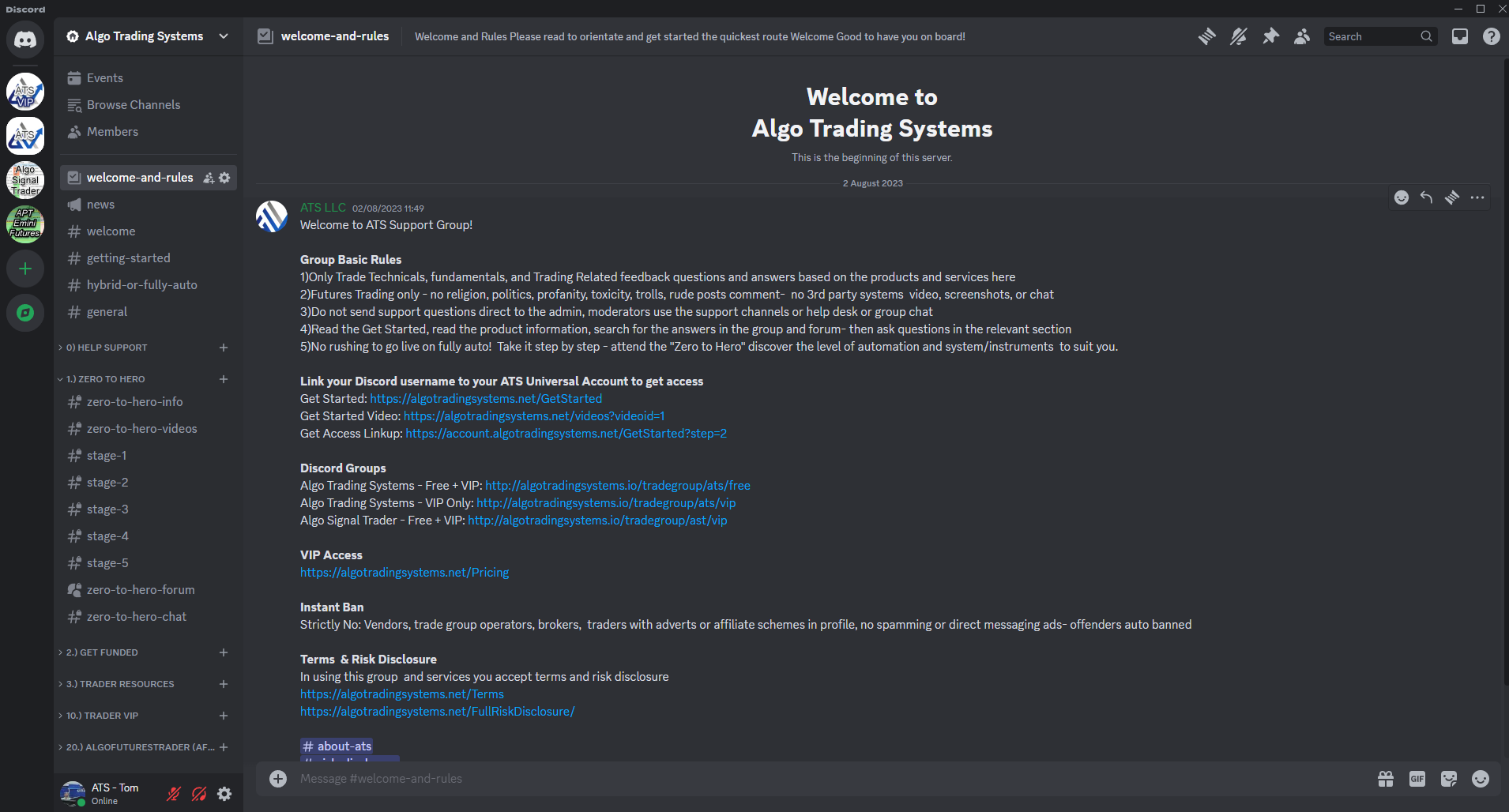
Connect to AFT For webinars, free trading tips, tricks, videos guides, news & product updates and upgrades for AFT8, please connect to us below for announcements

  AlgoFuturesTrader Discord Group

AFT Discord

AlgoFuturesTrader Facebook Page

AFT Facebook

AlgoFuturesTrader Twitter

AFT Twitter

AlgoFuturesTrader YouTube

AFT YouTube

AlgoFuturesTrader News Letter

AFT News

Filed Under: Algo Futures Trader Tagged With: AFT&, Get Started Trading, onboarding with aFT

AFT Trader John Weekly Trade Video Episode 5 – Session Breakout filters Advanced modes and Settings

June 13, 2021 by AFT

https://youtu.be/wlRQvdF0DPo

In this week’s Algo Futures Trading Live Update, AFT John examines some of the different market types observed on Thursday and Friday, and how the opening breakouts could be filtered depending on the market type. Later, John goes beyond the turnkey settings to demonstrate how the system parameters can be adjusted to fit one’s trading style, contract sizes, daily goals, and more for the session breakout system and beyond for live market trading Micro E-mini Futures, Nasdaq, S&P 500, Dow, Russell 2000 micro futures with Algo Futures Trader automated trading.

AFT Trader John Weekly Trade Roundup Information. Each week, AFT Trader John will present a summary of the trades, futures trading systems, and methods with Algo Futures Trader on the live market using the NinjaTrader Platform. Expect more depth and coverage each week as this new series begins to take shape.

Filed Under: AFT Trading Videos, Algo Futures Trader, automated trade entry, automated trade management, Automated Trading Videos, Micro EMini Equity Futures, NinjaTrader 7 Tagged With: AFT John Weekly Trading Video, AFT Trader John, Futures Live market Trading, live market micro futures, NYSE Trading the open

Emini Futures Rollover for September 2021 contract

June 10, 2021 by AFT

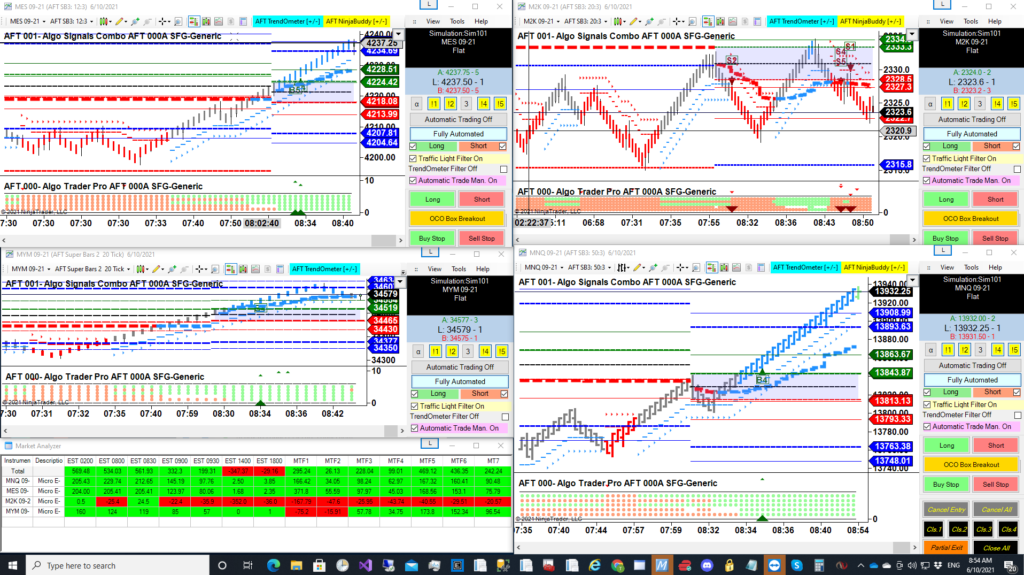
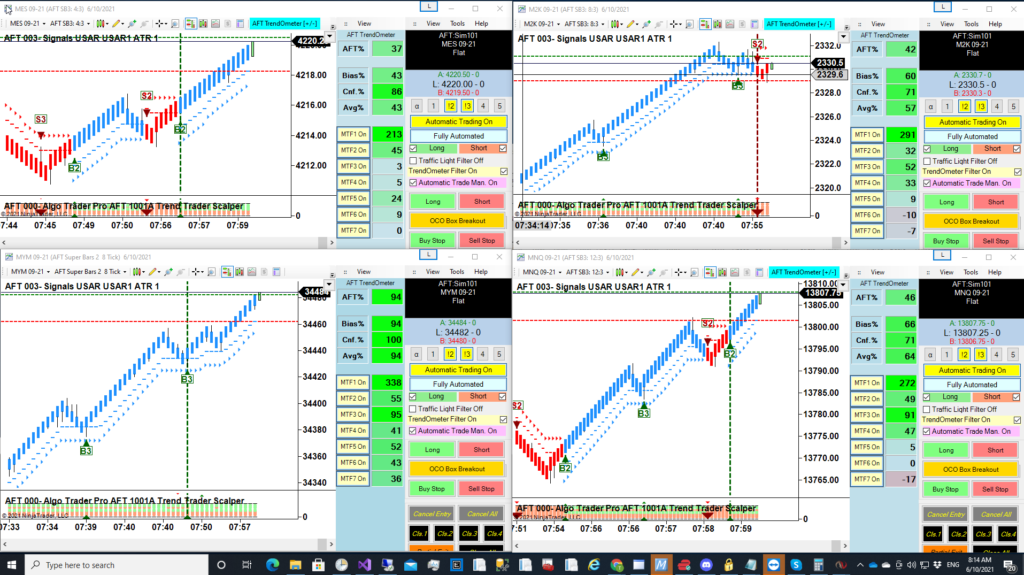
AFT turnkey workspaces have been updated. For NinjaTrader 7 users, you will need to roll over your contracts manually within the Control Center instrument lists. Visit this link for more information: Rolling Futures Contract in NinjaTrader 7. AFT8 NinjaTrader users will be presented with a popup dialog that allows you to click to roll over and then save the workspace.

  • For AFT7, you will see four Turnkey Workspaces updated as follows:
    • AFT SFG Breakout Trader-0000A-Generic-Micros
    • AFT Trend Reversal Trader-1000A-Generic-Micros
    • AFT Trend Trader Scalper-1001A-Generic-Micros
    • AFT Trend Trader Scalper-1001BA-Generic-Micros
  • AFT SFG Breakout Trader
  • AFT Trend Reversal Trader
  • AFT Trend Trader Scalper
  • AFT Trend Trader Scalper
AFT7 Turnkey trading system workspaces

The latest AFT7 Workspace version is now 2021.6.10.2. The main program AFT7 version is now 2021.5.25.4 and in most cases should automatically update when NinjaTrader 7 is restarted. However, some antivirus software might prevent this from occurring. To manually update your AFT7 to the latest version, simply visit the AFT downloads, download & run the AFT7 Universal Installer, or you can simply run the AFT7 Templates Installer to select additional options.

WARNING: Please note that running the universal installer will close all NinjaTrader platforms running on your PC, including NinjaTrader 8, if running. Running the AFT7 Settings installer can be done with NinjaTrader running; it will not affect it.

For installation help for AFT7, please visit the AFT Quick Start help guide.

Filed Under: Algo Futures Trader Tagged With: AFT7, Futures rollover

Automated Futures Day Trader Trend Scalper Turnkey Workspace for AFT7

June 7, 2021 by AFT

Automated TrendOmeter Trade Filter day trading futures trend scalping

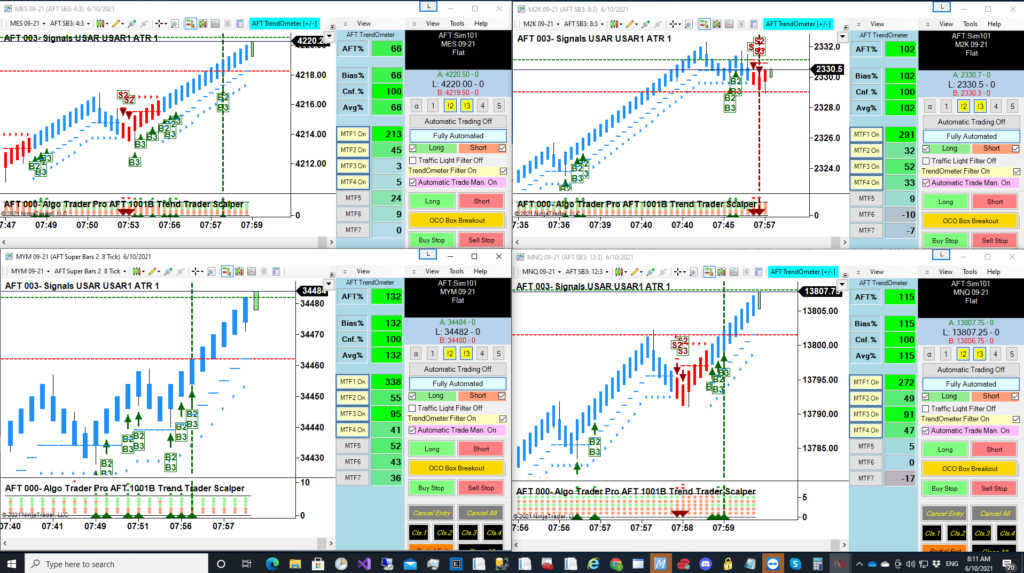
Announcing a new workspace: “AFT Trend Trader Scalper-1001A-Generic-Micros” and “AFT Trend Trader Scalper-1001B-Generic-Micros” for trend scalping with the TrendOmeter filter system to allow many signal opportunities. This was in response to demand for a turnkey workspace that fits better with multi-time frame filter directional bias and TrendOmeter usage. The AFT Session Breakout System may have too few trade signals and miss out on too many good trades for some traders. This new day trading futures trend scalper setup will provide many signals per session and allow trading anywhere on the chart, up or down, without restriction. All filters are off—no traffic light filters, no trading zone filter—only the optional TrendOmeter filter, or the user can set long or short bias in real-time. Here is the initial draft, and it will be added to the Templates Installer. Consider it experimental and aimed at experienced traders who want to use the real-time interactive controls and trade man and machine hybrid automated trading.

Automated future day trading trend scalper trade system
Automated future day trading trend scalper trade system turnkey setting – ready to sim trade out of the box

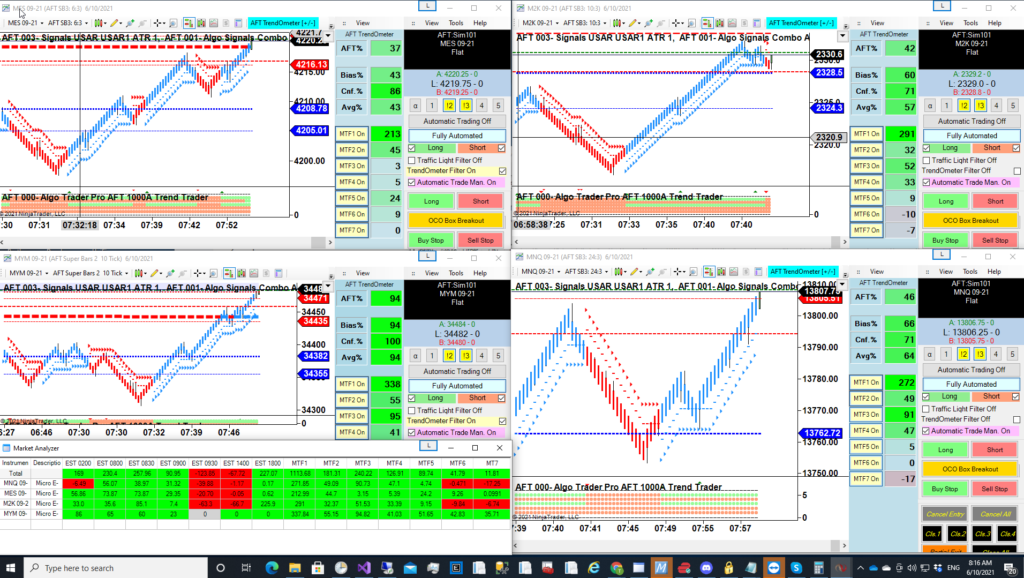
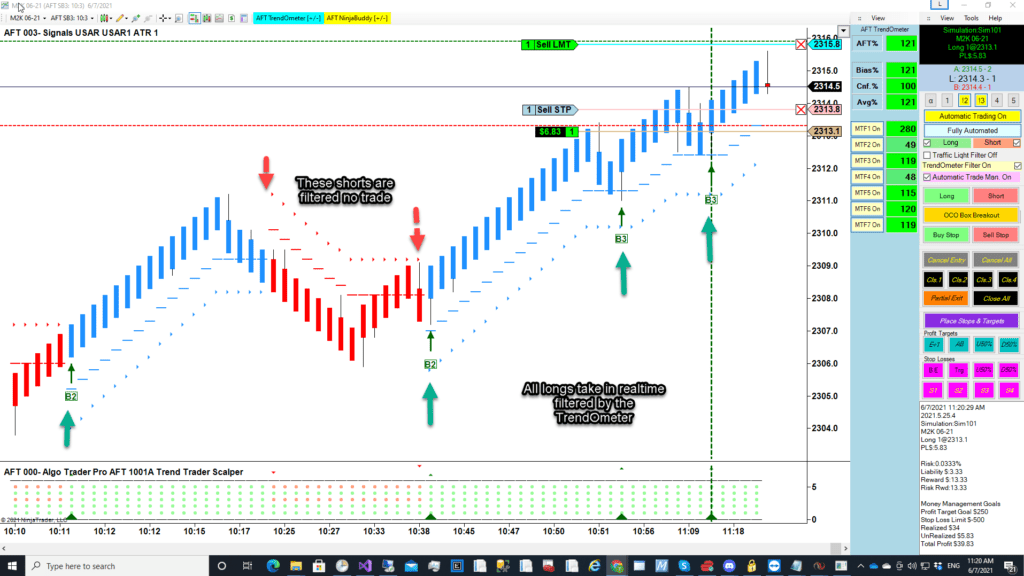
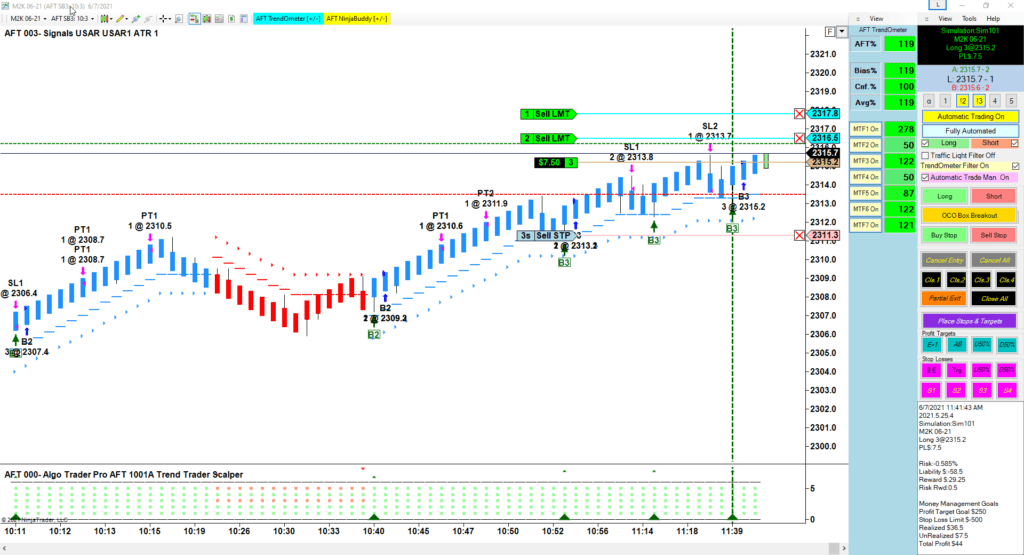
AFT Scalper is set up as a very clean chart to show the USAR On chart signals below. Here in this screenshot, we can see the real-time live market trades taken on the sim in a real-time test.

AFT Trend Trader longs all winners
AFT Trend Trader longs all winners – no shorts taken – TrendOmeter in action – super clean chart look and feel for trend scalpers
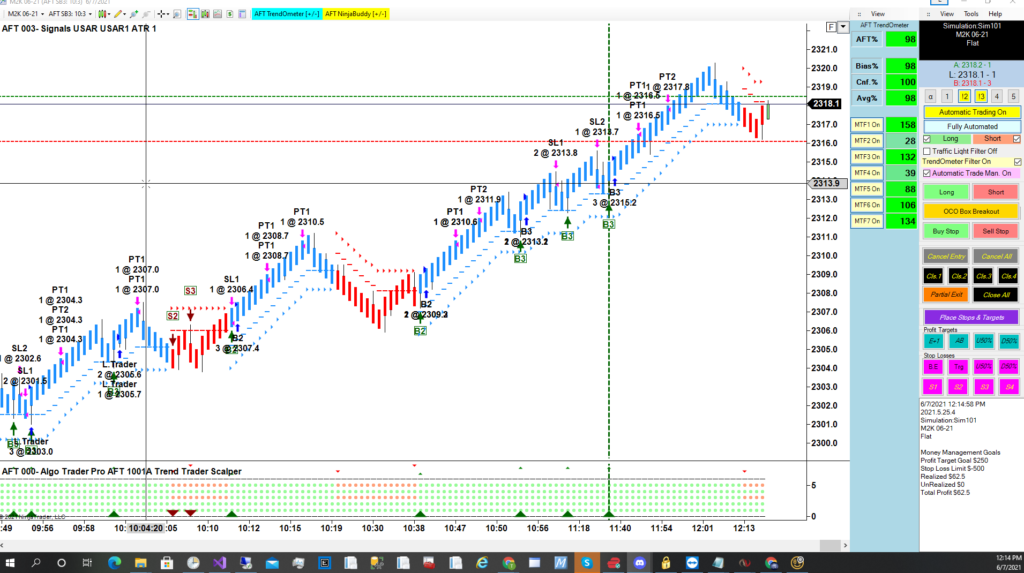
AFT Trend Trader Scalper all long winners
AFT Trend Trader Scalper all long winners, no loser demo day trading equity micro e-mini futures

The latest AFT7 Workspace version is now 2021.6.7.1. The main program AFT7 version is now 2021.5.25.4 and in most cases should automatically update when NinjaTrader 7 is restarted. However, some antivirus software might prevent this from occurring. To manually update your AFT7 to the latest version, simply visit the AFT downloads, download and run the AFT7 Universal Installer, or you can simply run the AFT7 Templates Installer to select additional options.

WARNING: Please note running the universal installer will close all NinjaTrader platforms running on your PC, including NinjaTrader 8, if running. Running the AFT7 Settings installer can be done with NinjaTrader running; it will not affect it.

AFT7 Futures Automated Trend Trader Scalper Trading System
AFT7 Futures Automated Trend Trader Scalper Trading System Turnkey Workspace “AFT Trend Trader Scalper-1001A-Generic-Micros”

For installation help for AFT7, please visit the AFT Quick Start help guide.

Filed Under: AFT7 Turnkey Workspaces, Algo Futures Trader, automated trade entry, automated trade management, NinjaTrader 7, TrendOmeter Tagged With: AFT7, AFT7 Update, AFT7 workspaces, day trading scalper

AFT Trader John Weekly Trade Video Episode 4 – Trendometer with session breakout

June 6, 2021 by AFT

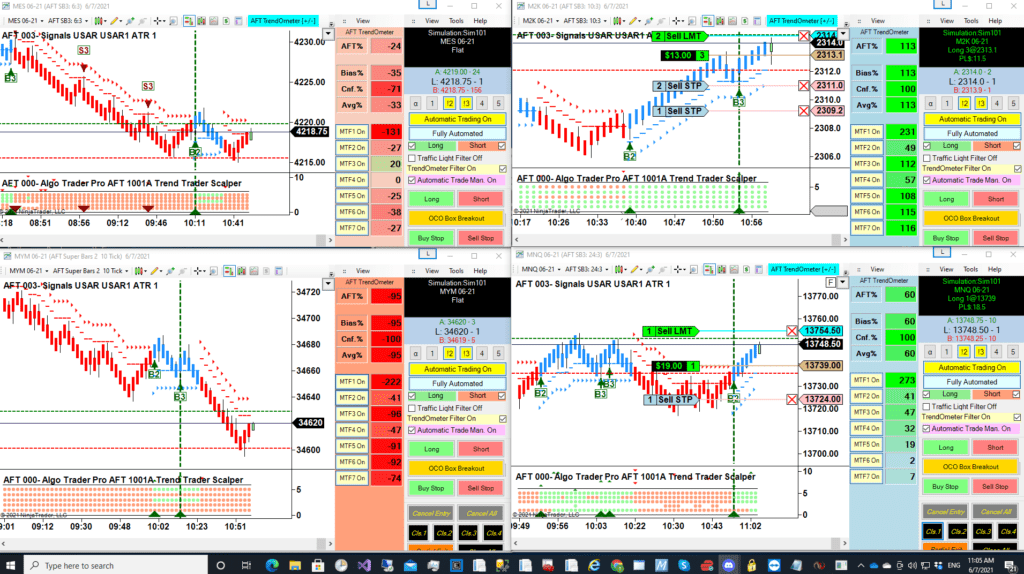
In this week’s Algo Futures Trading Live Update, AFT John demonstrates how to use the TrendOmeter and AlphaBias trend correlation system as a trade filter for both long and short trades. This is done using AFT7 trading in demonstration mode on the live futures market with the NinjaTrader Platform, trading the NYSE session open.

Please visit the link for TrendOmeter.

Note that the TrendOmeter settings filtered out bad trades and allowed through good trades as it was set tight at 50%. This is a stringent setting when used with a session breakout system and can be easily altered in real-time and saved. With session open breakout trading, the number of trade signals and opportunities will be less than when used in a trend reversal and pullback continuation scenario, which allows trades to be taken further away or anywhere on the chart using a smaller time frame.

As you can see, we don’t cherry-pick or edit videos. As John recollected, “The system still made money overall that day using the TrendOmeter, and there will be days where it will filter out lots of bad trades and some days where it filters out good ones.”

AFT Trader John Weekly Trade Roundup Info: Each week, AFT Trader John will be showing a summary of the trades, futures trading systems, and methods with Algo Futures Trader on the live market using the NinjaTrader Platform. Expect more depth and coverage each week as this new series starts to take shape.
Filed Under: AFT Trading Videos, Algo Futures Trader, Micro EMini Equity Futures, NinjaTrader 7, TrendOmeter Tagged With: AFT John Weekly Trading Video, AFT Trader John, Futures Live market Trading, live market micro futures, NYSE Trading the open, TrendOmeter

AFT7 Trend reversal pullback and continuation day trading turnkey workspace update for June 2021

June 2, 2021 by AFT

AFT USAR Trend Reversal Pullback Continuation Futures Day Trading System

Due to popular demand, amidst working on AFT8, we have found time to revamp the AFT7 Trend Reversal Turnkey workspace “AFT Trend Reversal Trader-1000A-Generic-Micros.” This can be installed and accessed from the NinjaTrader 7 control center > File > Workspaces.

Enhancements for entry signals include trend reversal or a pullback price break at any point on the chart without restriction, except for session time filters. This means you can set a bias long and short or trade with a directional bias filter using the TrendOmeter AlphaBias system. A Higher Time Frame Price Analysis workspace is also available in the templates installer.

The latest AFT7 Workspace version is now 2021.6.2.5. The main program AFT7 version is now 2021.5.25.4 and in most cases should automatically update when NinjaTrader 7 is restarted. However, some antivirus software might prevent this from occurring. To manually update your AFT7 to the latest version, simply visit the AFT downloads, download and run the AFT7 Universal Installer, or you can simply run the AFT7 Templates Installer to select additional options.

WARNING: Please note that running the universal installer will close all NinjaTrader platforms running on your PC, including NinjaTrader 8, if running. Running the AFT7 Settings installer can be done with NinjaTrader running; it will not affect it.

AFT USAR Trend Reversal Pullback Continuation Futures Day Trading System
AFT7 Turnkey Workspace – AFT Trend Reversal Trader-1000A-Generic-Micros

For installation help for AFT7, please visit the AFT Quick Start help guide.

Filed Under: AFT7 Turnkey Workspaces, Algo Futures Trader, NinjaTrader 7 Tagged With: AFT7, AFT7 Update, AFT7 workspaces

  • « Previous Page
  • 1
  • …
  • 14
  • 15
  • 16
  • 17
  • 18
  • …
  • 23
  • Next Page »
  • NinjaTrader Automated Trading
  • automated futures trading
  • automated trading systems
  • Day Trading Futures
  • Get Started Day Trading Futures
  • VIP Trading Group Live Market Trade Along
  • Secret to Day trading futures success
  • AFT8 for NinjaTrader 8
  • Futures Algo Trading Systems
  • Market News
  • NinjaTrader Free Trading Platform
  • Legal Notices
  • AFT Legal Info
  • Terms
  • FULL RISK DISCLOSURE
  • Privacy Policy
  • Cookie Usage
  • About AlgoFuturesTrader
  • Connect to AFT
  • Blog
  • Videos
  • Support
  • Contact
  • My account
  • Sitemap
  • Affiliates

Ninja Futures Trading
Algo Futures Trader Copyright Algo Trading Systems© 2026 ·
AlgoFuturesTrader.com is owned & operated by Algo Trading Systems LLC. By using this website or products & services, you are bound by our Terms & subject to US legal jurisdiction only. Errors & omissions excluded.
AFT made in England, powered by MicroTrends NinjaTrader development

Disclaimer: Trading & investment carry a high level of risk. AlgoFuturesTrader does not make recommendations for buying or selling any financial instruments, nor do we offer trading or investment advice. We are a software company, and we only provide educational information on ways to use our sophisticated Algo Futures trading tools. It is up to our customers & readers to make their own trading & investment decisions, or consult with a registered investment advisor.

Risk Disclosure: Futures, CFDs, & forex trading carry substantial risk and are not suitable for every investor. An investor could potentially lose all or more than the initial investment. Risk capital is money that can be lost without jeopardizing one's financial security or lifestyle. Only risk capital should be used for trading, and only those with sufficient risk capital should consider trading. Past performance is not necessarily indicative of future results. Please read the full risk disclosure here.

Hypothetical performance results have many inherent limitations, some of which are described below. No representation is made that any account will or is likely to achieve profits or losses similar to those shown. In fact, there are frequently sharp differences between hypothetical performance results and the actual results subsequently achieved by any particular trading program. One of the limitations of hypothetical performance results is that they are generally prepared with the benefit of hindsight. In addition, hypothetical trading does not involve financial risk, and no hypothetical trading record can completely account for the impact of financial risk in actual trading. For example, the ability to withstand losses or adhere to a particular trading program despite trading losses are material points that can adversely affect actual trading results. Numerous other factors related to the markets or the implementation of any specific trading program cannot be fully accounted for in the preparation of hypothetical performance results and can adversely affect trading results.

Testimonials appearing on this website may not be representative of other clients or customers and are not a guarantee of future performance or success.

NinjaTrader® is a registered trademark of NinjaTrader Group, LLC. No NinjaTrader company has any affiliation with the owner, developer, or provider of the products or services described herein, nor do they endorse, recommend, or approve any such product or service.

We use cookies on our website to give you the most relevant experience by remembering your preferences and repeat visits. By clicking “Accept All”, you consent to the use of ALL the cookies. However, you may visit "Cookie Settings" to provide a controlled consent.
Cookie SettingsAccept All
Manage consent

Privacy Overview

This website uses cookies to improve your experience while you navigate through the website. Out of these, the cookies that are categorized as necessary are stored on your browser as they are essential for the working of basic functionalities of the website. We also use third-party cookies that help us analyze and understand how you use this website. These cookies will be stored in your browser only with your consent. You also have the option to opt-out of these cookies. But opting out of some of these cookies may affect your browsing experience.
Necessary
Always Enabled
Necessary cookies are absolutely essential for the website to function properly. These cookies ensure basic functionalities and security features of the website, anonymously.
CookieDurationDescription
cookielawinfo-checkbox-analytics11 monthsThis cookie is set by GDPR Cookie Consent plugin. The cookie is used to store the user consent for the cookies in the category "Analytics".
cookielawinfo-checkbox-functional11 monthsThe cookie is set by GDPR cookie consent to record the user consent for the cookies in the category "Functional".
cookielawinfo-checkbox-necessary11 monthsThis cookie is set by GDPR Cookie Consent plugin. The cookies is used to store the user consent for the cookies in the category "Necessary".
cookielawinfo-checkbox-others11 monthsThis cookie is set by GDPR Cookie Consent plugin. The cookie is used to store the user consent for the cookies in the category "Other.
cookielawinfo-checkbox-performance11 monthsThis cookie is set by GDPR Cookie Consent plugin. The cookie is used to store the user consent for the cookies in the category "Performance".
viewed_cookie_policy11 monthsThe cookie is set by the GDPR Cookie Consent plugin and is used to store whether or not user has consented to the use of cookies. It does not store any personal data.
Functional
Functional cookies help to perform certain functionalities like sharing the content of the website on social media platforms, collect feedbacks, and other third-party features.
Performance
Performance cookies are used to understand and analyze the key performance indexes of the website which helps in delivering a better user experience for the visitors.
Analytics
Analytical cookies are used to understand how visitors interact with the website. These cookies help provide information on metrics the number of visitors, bounce rate, traffic source, etc.
Advertisement
Advertisement cookies are used to provide visitors with relevant ads and marketing campaigns. These cookies track visitors across websites and collect information to provide customized ads.
Others
Other uncategorized cookies are those that are being analyzed and have not been classified into a category as yet.
SAVE & ACCEPT