NinjaTrader Automated Trading by Algo Futures Trader

hybrid algorithmic automated futures trading for prop firm traders, day & swing traders

🚀 Get Started 🔴LIVE
  • 🚀Get Started
  • NinjaTrader
  • Get Funded
  • Trading Servers
  • Pricing
  • blog
  • Help

Flexible Position Sizing & Scaling with AFT8

June 4, 2025 by AFT

AFT8 offers three distinct ways to size and scale positions, allowing traders to manage entries and exits in stages rather than all at once. These modes are:

  1. All-In, Scale-Out
  2. All-In, All-Out
  3. Scale-In, Scale-Out

Each method breaks trades into tranches—entering or exiting partial positions—so you can control how much capital is at risk at different points. This incremental approach helps lock in profits or curb losses as the market moves. While all three are available, most traders use “All-In, Scale-Out” or “All-In, All-Out” for simplicity. “Scale-In, Scale-Out” is reserved for experienced traders comfortable with building into a position and managing multiple exit levels. AFT8’s Algo Trade Manager handles all scaling once you’ve chosen your mode, though scaling in must be initiated manually to keep risk in check.


1. All-In, Scale-Out

  • How You Enter: As soon as your entry conditions trigger, AFT8 commits the entire intended position at once. You receive your full number of contracts or shares in a single fill.
  • How You Exit: Rather than closing everything at once, you set predetermined exit points. For example, you might take 50% off at the first profit target, 25% at a second level, and allow the remaining 25% to ride to the final objective. AFT8 automatically submits the staggered exit orders behind the scenes.
  • Why Use It: This technique secures partial profit early while still leaving room to catch larger trends. As the price moves in your favor, you shave off risk rather than waiting for a single exit signal. It’s particularly useful when you believe in a strong trend but want to lock in gains gradually.

2. All-In, All-Out

  • How You Enter: Identical to “All-In, Scale-Out,” you buy or sell the full position immediately upon signal.
  • How You Exit: You close out 100% of the position in one go when your exit parameters are met—no partial exits, no staggered targets.
  • Why Use It: For traders who prefer the cleanest possible execution, this mode keeps things simple. You commit all capital up front and exit on a single signal, eliminating the complexity of managing multiple orders. It’s ideal when you want a straightforward, no-nonsense entry and exit.

3. Scale-In, Scale-Out

Also known as position compounding, this method is best suited for advanced traders.

  • How You Enter: Instead of jumping in at full size, you build your position over multiple steps. For instance, you might initiate 25% of your total allocation when the first momentum threshold is met, then add another 25% if price confirms strength at a higher level, and continue until you’re fully invested. You decide the increments and price levels in AFT8’s position size settings.
  • How You Exit: Your exits are also staggered. You might take 20% off at an early profit point, another 30% if the market retests a key level, and then let the final 50% ride until your maximum target or stop is hit. AFT8’s Algo Trade Manager automatically places these exit orders according to your rules.
  • Why Use It: By scaling in, you reduce the risk of entering on a false breakout or sudden pullback. Scaling out then locks in gains in stages, so a reversal can’t erase all your profits. This dual-stage approach gives you maximum control over both entry and exit risk.

How AFT8 Manages Scale-In/Scale-Out:
Once your initial signal fires, AFT8 handles each tranche automatically. If you prefer to add manually, you can still use NinjaTrader 8’s Chart Trader, order tickets, or DOM to increase your position; AFT8 will immediately queue up the corresponding exits. Note that scaling in is disabled by default to prevent inexperienced traders from overleveraging. Only advanced users who fully understand the risks should enable it.


How to Choose Between Them

  • All-In, Scale-Out is ideal if you have very high conviction in your signal but still want to lock in profits gradually.
  • All-In, All-Out works best when you want a clear, unambiguous entry and exit—no partials.
  • Scale-In, Scale-Out is for highly dynamic markets where you’re uncertain about the signal’s strength; it lets you dial into the position as confirmation builds and peel off profits in stages.

In AFT8, you configure these modes under the “Position Sizing and Scaling” section of your strategy. Position amounts are defined in the Algo Entry settings, while exit tranches are set up in the Algo Trade Manager.

Filed Under: AFT8, automated futures trading system, automated trading ninjatrader, ninjatrader automated trading Tagged With: automated futures trading, NinjaTrader 8, risk management


🚀 Get Started 100% FREE!

AFT8 Risk Management Position Sizing Introduction

June 4, 2025 by AFT

Position sizing is fundamentally a risk‐management technique, though it’s often grouped under the broader umbrella of money management, because it determines how much capital is exposed to the market on each trade. In AFT8, static position sizing sets a fixed number of contracts (Lots) regardless of market conditions. In contrast, dynamic position sizing uses a fixed-fractional method to adjust the number of contracts based on factors such as volatility, account equity, or predefined risk parameters.

By configuring and calibrating trade size to the amount you’re willing to lose, based on your stop size and the number of lots per trade, total trade risk is directly controlled. If the market moves against you, position sizing enforces consistent per‐trade risk limits. In that sense, while it informs your overarching money‐management plan (i.e., how much capital you allocate overall), its primary role is to enforce consistent risk limits, making position sizing a cornerstone of effective risk management; stop‐loss/risk management is the complementary component.

Why use dynamic position sizing instead of a static lot size?
Instruments differ in point/tick value or volatility, so, for example, 3 lots on NQ might equate to 12 lots on RTY to achieve the same trade‐risk exposure. To maintain equal weighting when trading multiple instruments, the lot size must be adjusted so that each trade carries the same risk in cash or as a percentage of trade‐risk capital. By tracking volatility, a system can maintain a constant risk per trade: position size decreases when volatility is high and increases when volatility is low.

Ways to Change Position Size with AFT8

It’s very easy to view, edit, set, change, and configure position size and risk management within AFT8 after some exploration. Settings can be configured and saved along with workspaces.

  1. NinjaTrader 8: Use Chart Trader, Order Ticket, or DOM to set the quantity for manual entries. This is static position sizing and can be adjusted at any time, up or down in real-time.
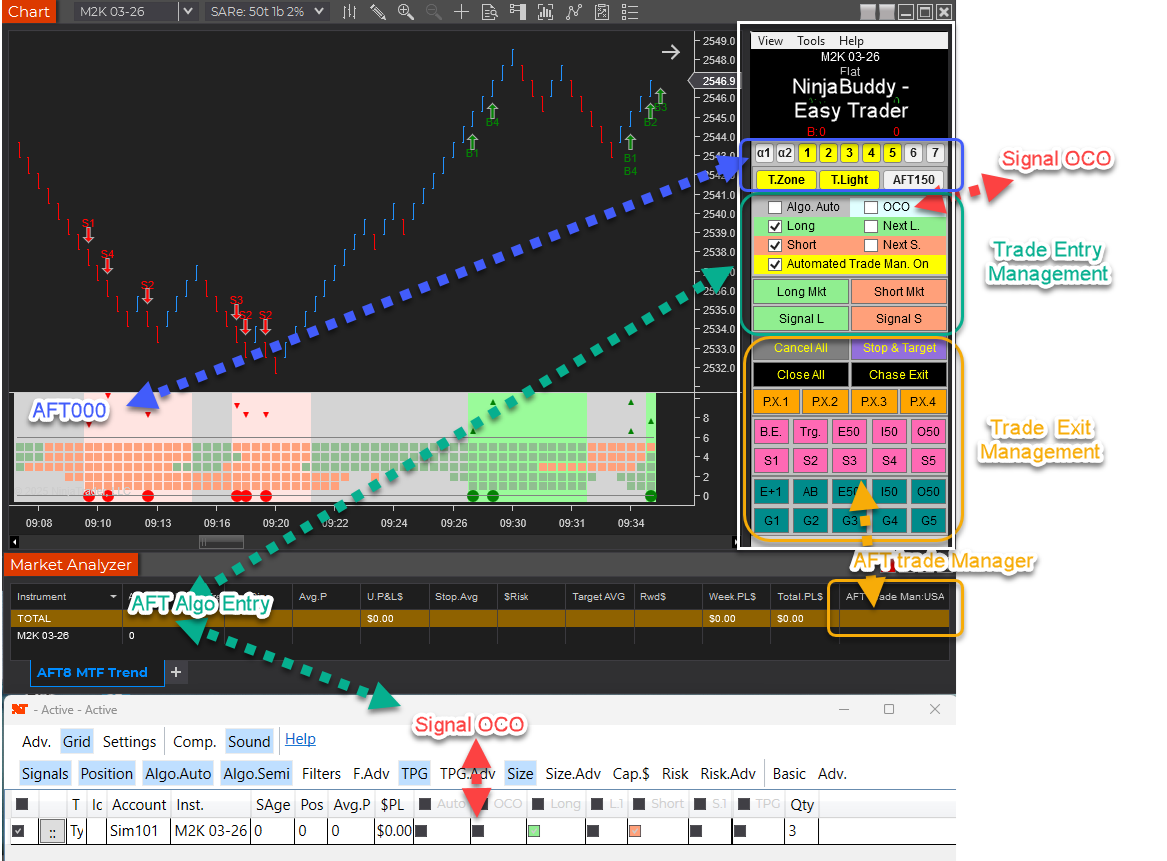
  2. AFT8 Algo Entry Module: In the Market Analyzer column, parameters for the Algo Entry Module, you can define static or fixed‐fractional position sizing. Templates can be viewed, edited, and saved under a unique name, usually for set-and-forget settings.
  3. AFT8 Algo Entry Controller: The pop‐up controller can be configured for static, fixed lots per trade or to leverage advanced risk‐management features such as fixed‐fractional sizing and institutional money‐management patterns like fund‐of‐funds for trading with asset streams- settings can be changed in real-time on the fly.

Note: Turnkey Workspaces 1 provides only the Trade Manager module, so quantity is configured via the NinjaTrader components. From Turnkey Workspace 2 onward, the Algo Entry Module/Controller allows quantity to be set and saved directly in the AFT8 settings.

TIP: Remember to save your settings templates and workspace under a unique name to prevent losing changes during updates!

For full details, please visit this ATS Help Desk article  on AFT8 Risk Management Position Sizing

Filed Under: Algo Futures Trader, NinjaTrader 8, ninjatrader algorithmic trading, ninjatrader automated trading


🚀 Get Started 100% FREE!

AFT8 new trade copier feature 21 account multi-shot trade entry

February 24, 2025 by AFT

Trade Copier System 21 Multi Shot

Introducing the Next Generation of Trade Copier for NinjaTrader

Tired of slippage and unreliable trade copiers that clog up your trading for prop firm trading multiple accounts? We’ve got a breakthrough solution for you!

Most third-party trade copiers are plagued by:

  • Inefficient order listening: They must listen for each fill or update, then copy, create, and submit new orders—introducing lag and slippage.
  • Poorly written, multithreaded code: Race conditions, locks, and jams can bring NinjaTrader to a halt, forcing frequent restarts.
  • Low-latency limitations: The serial, one-order-at-a-time approach delays execution and can lead to missed opportunities and slippage.

Trade copiers available as NinjaTrader 8 add-ins are often poor in quality—they tend to jam, slow down NT8, and suffer from high latency. This is because they have to wait, listen, filter orders, and then act by copying the orders and sending them to each account round-robin… yawn… how slow can you go?—about as efficient as waiting for a bus. Frankly, that’s not impressive.

As always, we’re ahead of the curve, setting trends that the ecosystem eventually follows—hybrid trading, Fib Grid, ATR bars/self-adapting bars, just to name a few. Now, our latest breakthrough is the Multi-Shot system: a revolutionary 21-shot trader that fires trades simultaneously into 21 accounts at the same time with ultra-low latency. This system takes the fastest route, eliminates NT8 jams, avoids waiting for the bus, and minimizes slippage to the absolute minimum. All orders are instantaneous in parallel—firing all at once is now possible with AFT8.

The Multi-Shot Entry Advantage – Simplicity + Lowest Latency Fills

Trade Copier System 21 Multi Shot

Our new Multi-Shot Entry feature takes an entirely different, more efficient approach:

  • Single Trigger: Pull the trigger once, and all selected sub-accounts fire orders simultaneously.
  • Low Latency and Reliability: No waiting on a round-robin approach—think of it like a multi-barrel shotgun firing every chamber at once.
  • Scale Easily: Trade one “leader” account (e.g., on SIM) and instantly replicate the same trades across up to 20 sub-accounts without the usual trade copier overhead.
  • 21 Parallel Accounts: One leader account and 20 sub-accounts with instant order submission in each in parallel—20 times quicker than a trade copier!
  • Simple Config: Simply select your accounts in the Trade entry algo “Trade System MultiShot” section and enable “IsTradeMultiShotOn” trades will be mirrored.

Flexible Exit Management

We’re also developing two styles of trade exit management:

  1. Per-Account Trade Managers
    • Each account can have a dedicated “Algo Trade Manager”, allowing fully symmetrical or asymmetrical rules and profit targets.
  2. Leader/Follower Exit Management
    • A single manager/mirror that controls all 20 accounts uniformly, just like a traditional trade copier—only vastly more efficient.

Release and Availability

  • We will begin rolling out Community Technology Previews (CTPs) to our VIP members—those in the “CTP” role—very soon this week.
  • The Multi-Shot Entry feature will be released first, followed by the enhanced exit control system.
  • These features will be available to monthly/annual subscribers and to lifetime members (within their first year), or those who renew their yearly maintenance subscription for AFT or ATS.
  • Subscription levels: Algo Trading premium or ultimate on AFT or ATS universal combo.
  • Optional Annual Renewal: For traders who let their annual renewal lapse Click here for price details

Stay tuned for more details on how you can dramatically reduce latency and trade more efficiently across multiple accounts—all without slowing down NinjaTrader or dealing with trade copier headaches.

But let’s be clear—this isn’t just another trade copier. This is a Multi-Shot Trader. We’ve redefined the traditional leader-follower model from the trade copier world into a concept of a primary account with sub-accounts—a complete shift from how copying trades has worked until now. In the race of the tortoise and the hare, the hare finally wins. In trading, faster is better, and less is more.

Questions or Feedback?
If you’d like to learn more about the upcoming CTP program for VIP members or have any questions about multi-account trade management, feel free to reach out to our support team. We’re excited to bring you these new capabilities and look forward to improving your trading experience!

Filed Under: AFT8, automated trade management, automated trading ninjatrader, NinjaTrader 8 Tagged With: AFT8 Release, AFT8 update, aft8release, AFT8Update, Multi Shot Trader, Trade Copier


🚀 Get Started 100% FREE!

ATS Desktop Apps major update for all desktop apps v20250220

February 21, 2025 by AFT

ATS Desktop Apps is an update for all desktop applications as it moves from cloud-based ClickOnce deployment to local installation. This applies to:

  • AFT-Desktop
  • AWT-Desktop
  • NT-BootStrapper

AFT8 for NinjaTrader now communicates with these apps on a locally installed basis instead of cloud launch and run, which provides a far better experience. Going forward, we will be updating to the latest Windows UI technology ahead of any future NinjaTrader desktop move from WPF to WinUI. This allows us to embrace the latest cutting-edge technology and stay ahead of the curve. New installers and updating methods will replace the now legacy WPF desktop and MSI installer technology.

ATS Desktop Apps version 2025.2.20 will fetch all the latest updates for the ATS/AFT/AWT suite of desktop trading systems and tools. The ATS Desktop Apps installer will download the following installers to your “downloads/algotradingsystems” folder:

  • Net Desktop Runtime
  • ATS.AlphaWebTrader.Desktop
  • ATS.AlgoFutureTrader.Desktop
  • ATS.AFT8.BootStrapper.Desktop
  • AFT8 for NinjaTrader 8 Desktop
  • AFT8 Settings & Workspaces 01
  • AFT8 Settings & Workspaces 02
  • ATS AlgoFuturesTrader Downloads.pdf

Each installer will be run and installed. If your system requires .NET 8.0, it will be installed, but there are caveats to look for!

.NET 8 Desktop Runtime

The ATS Desktop Apps installer will also install .NET 8.0.13, which is the latest long-term supported technology from Microsoft that we use to power the desktop apps. During installation, Windows will display a UAC warning when installing the .NET 8 package. Due to a Windows bug with MSI, this can hide the “Shield” minimized on the taskbar and can be easily missed. You will need to click to accept the installation of .NET 8, or the installers will wait and cycle until canceled, as they cannot complete until the UAC permission is received by the user or declined.

Filed Under: AFT8, NinjaTrader 8 Tagged With: AFT8 Release, AFT8 update, aft8release, AFT8Update


🚀 Get Started 100% FREE!

Why is the ADP employment report crucial in the market context of 2025 Feb?

February 5, 2025 by AFT

The ADP employment report is crucial because it provides an early look at labor market conditions, influencing expectations for the official jobs report and shaping the Fed’s policy outlook.

Key Takeaways from the ADP Report:

  • Strong Headline (+183K): The surface-level strength in job growth at the start of 2025 suggests resilience. However, a sectoral imbalance paints a different picture.
  • Consumer-Facing Job Growth: Retail, hospitality, and other service-related jobs drove hiring, indicating continued spending by consumers.
  • Weakness in Business Services & Production: This signals structural headwinds, potentially tied to shifting economic policies and technological disruptions.

Trade Policy & Its Effect on Production

  • Tariffs on China & Canada: These duties disrupt supply chains, making imported goods more expensive. However, instead of reshoring, businesses appear to be absorbing higher costs or seeking alternative sources.
  • No Job Growth in Production: This reinforces the idea that domestic manufacturing is not expanding to replace imports, suggesting firms see no economic advantage in localizing production.
  • Inflation Pipeline Impact:
    • PPI (Producer Price Index) rises first: Higher import costs pressure producer margins.
    • CPI (Consumer Price Index) follows: As companies pass on costs, consumer inflation remains sticky.

AI & Service Sector Slowdown

  • The slowdown in business services employment suggests a reality check on AI-driven business expectations.
  • High development costs and uncertain ROI signal a disconnect between AI hype and real economic benefits.
  • This challenges the market’s pricing of AI-related stocks and growth assumptions.

Market Sentiment: A System in Doubt

  • Seesaw Patterns in Markets: Lack of clear direction reflects uncertainty about the macro landscape.
  • The Fed & Institutions Stay Silent on Rate Cuts: The absence of explicit confirmation on rate-cut timing keeps traders guessing.
  • Repricing Risk: Markets are forced to react in real-time without clear guidance, increasing volatility and whipsaw price action.

Conclusion: A Market on Edge

  • The real economy does not confirm a production-led recovery.
  • Inflation may remain persistent due to trade policy impacts on costs.
  • AI optimism is being re-evaluated.
  • The lack of Fed clarity fuels market indecision.

This environment fosters a high-volatility, range-bound market where short-term trades dominate over clear trends—until we get a more decisive policy signal.

For more market insights and context, consider the ATS Trading groups where every day we present AI Copilot market radar fundamentals, sentiment, and econews commentary as well as technicals.

AFT System Approach

  • This favors taking profits, not betting on trend breakout days but more trends within the range.
  • Looking out for seesaws around the open DSFG Zone!
  • Using the higher time frame structure of near to medium terms weekly session fib grid as the general trend.
  • Turnkey Systems
    • Trend Scalper compo session breakout.
    • Session breakout with 50% and lock on the runner.
  • Trading Hybrid at the wheel in attendance, not out in the garden! In full control.

Filed Under: AFT8, automated futures trading system, ninjatrader automated trading


🚀 Get Started 100% FREE!

AFT8 version 2025.2.4.1 update released prior AFT8 versions expire in 7 days

February 3, 2025 by AFT

AFT8 version 2025.2.4.1 installer

AFT8 Version 2025.2.4.1 Update Released

Please note:

  • This is an emergency release to resolve some threading issues with the AWT API link. The loading of historical data affected some machines, but not all.
  • The AWT 150 indicator is disabled in this version.
  • License rules now enforced

Prior Version 2024.6

  • If you are still on the old version 2024.6, this version adds new functions and features and is slicker and smoother.
  • The prior version will expire on Sunday, 9th, and will auto shutdown NT8 on startup to install the new version.

More details will be released and available in the Discord group.

1) Upgrade from Your Existing Downloads

  1. Close down NinjaTrader.
  2. Go to your downloads folder: “Downloads\AlgoTradingSystems”.
  3. Locate and run the setup installer: AlgoFuturesTrader8-Installer-Setup.
  4. This will get the latest version from the cloud and install it correctly, as long as your NinjaTrader path has not changed.
  5. Start NT8 and open the workspace as usual.

2) ATS Account Downloads

  • Log in to your account and view downloads here: https://account.algotradingsystems.net/Secure/Downloads
  • Download and run the primary installer: AlgoFuturesTrader8-Installer-Setup.

3) AFT8 Update Pop-Up

  • Wait for a pop-up and click install.

Any Issues? Please Contact Us at the Help Desk!

  • https://algotradingsystems.net/Help

Subscription Upgrades!

  • Buy Now, Pay Later: ATS works with Affirm and Klarna, offering interest-free installment payment plans—available on annual and one-time lifetime licenses.
  • Limited Slots Available: Subscribers affected are invited to upgrade and get a discounted slot to become a VIP Full Member.

Trader Success Team!
To get more information on pricing and payment methods, simply book a FREE pricing discovery meeting with Trader Success VIP with no obligation to purchase!
👉 TO Book Your Spot CLICK HERE!

Filed Under: Algo Futures Trader, NinjaTrader 8 Tagged With: AFT8, AFT8 update, AFT8Update


🚀 Get Started 100% FREE!

  • « Previous Page
  • 1
  • …
  • 6
  • 7
  • 8
  • 9
  • 10
  • …
  • 32
  • Next Page »

Help & Information

  • ninjatrader automated trading
  • Automated Trading Systems
  • Support Center
  • Help Desk Articles
  • Trading Group & Forum
  • Videos

Recent Posts

  • A Guide to Trading a $50K Futures Prop-Firm Account
  • The Best Path to Getting Funded Trading Futures
  • AFT8 Performance Tweaks for NinjaTrader 8.1.7
  • AFT Lifetime (One-Time Purchase) License Terms Updated
  • ATS Futures Trading Group Rebooted!
  • Facebook
  • RSS
  • Twitter
  • YouTube


  • NinjaTrader Automated Trading
  • automated futures trading
  • automated trading systems
  • Day Trading Futures
  • Get Started Day Trading Futures
  • VIP Trading Group Live Market Trade Along
  • Secret to Day trading futures success
  • AFT8 for NinjaTrader 8
  • Futures Algo Trading Systems
  • Market News
  • NinjaTrader Free Trading Platform
  • Legal Notices
  • AFT Legal Info
  • Terms
  • FULL RISK DISCLOSURE
  • Privacy Policy
  • Cookie Usage
  • About AlgoFuturesTrader
  • Connect to AFT
  • Blog
  • Videos
  • Support
  • Contact
  • My account
  • Sitemap
  • Affiliates

Ninja Futures Trading
Algo Futures Trader Copyright Algo Trading Systems© 2026 ¡
AlgoFuturesTrader.com is owned & operated by Algo Trading Systems LLC. By using this website or products & services, you are bound by our Terms & subject to US legal jurisdiction only. Errors & omissions excluded.
AFT made in England, powered by MicroTrends NinjaTrader development

Disclaimer: Trading & investment carry a high level of risk. AlgoFuturesTrader does not make recommendations for buying or selling any financial instruments, nor do we offer trading or investment advice. We are a software company, and we only provide educational information on ways to use our sophisticated Algo Futures trading tools. It is up to our customers & readers to make their own trading & investment decisions, or consult with a registered investment advisor.

Risk Disclosure: Futures, CFDs, & forex trading carry substantial risk and are not suitable for every investor. An investor could potentially lose all or more than the initial investment. Risk capital is money that can be lost without jeopardizing one's financial security or lifestyle. Only risk capital should be used for trading, and only those with sufficient risk capital should consider trading. Past performance is not necessarily indicative of future results. Please read the full risk disclosure here.

Hypothetical performance results have many inherent limitations, some of which are described below. No representation is made that any account will or is likely to achieve profits or losses similar to those shown. In fact, there are frequently sharp differences between hypothetical performance results and the actual results subsequently achieved by any particular trading program. One of the limitations of hypothetical performance results is that they are generally prepared with the benefit of hindsight. In addition, hypothetical trading does not involve financial risk, and no hypothetical trading record can completely account for the impact of financial risk in actual trading. For example, the ability to withstand losses or adhere to a particular trading program despite trading losses are material points that can adversely affect actual trading results. Numerous other factors related to the markets or the implementation of any specific trading program cannot be fully accounted for in the preparation of hypothetical performance results and can adversely affect trading results.

Testimonials appearing on this website may not be representative of other clients or customers and are not a guarantee of future performance or success.

NinjaTraderÂŽ is a registered trademark of NinjaTrader Group, LLC. No NinjaTrader company has any affiliation with the owner, developer, or provider of the products or services described herein, nor do they endorse, recommend, or approve any such product or service.

We use cookies on our website to give you the most relevant experience by remembering your preferences and repeat visits. By clicking “Accept All”, you consent to the use of ALL the cookies. However, you may visit "Cookie Settings" to provide a controlled consent.
Cookie SettingsAccept All
Manage consent

Privacy Overview

This website uses cookies to improve your experience while you navigate through the website. Out of these, the cookies that are categorized as necessary are stored on your browser as they are essential for the working of basic functionalities of the website. We also use third-party cookies that help us analyze and understand how you use this website. These cookies will be stored in your browser only with your consent. You also have the option to opt-out of these cookies. But opting out of some of these cookies may affect your browsing experience.
Necessary
Always Enabled
Necessary cookies are absolutely essential for the website to function properly. These cookies ensure basic functionalities and security features of the website, anonymously.
CookieDurationDescription
cookielawinfo-checkbox-analytics11 monthsThis cookie is set by GDPR Cookie Consent plugin. The cookie is used to store the user consent for the cookies in the category "Analytics".
cookielawinfo-checkbox-functional11 monthsThe cookie is set by GDPR cookie consent to record the user consent for the cookies in the category "Functional".
cookielawinfo-checkbox-necessary11 monthsThis cookie is set by GDPR Cookie Consent plugin. The cookies is used to store the user consent for the cookies in the category "Necessary".
cookielawinfo-checkbox-others11 monthsThis cookie is set by GDPR Cookie Consent plugin. The cookie is used to store the user consent for the cookies in the category "Other.
cookielawinfo-checkbox-performance11 monthsThis cookie is set by GDPR Cookie Consent plugin. The cookie is used to store the user consent for the cookies in the category "Performance".
viewed_cookie_policy11 monthsThe cookie is set by the GDPR Cookie Consent plugin and is used to store whether or not user has consented to the use of cookies. It does not store any personal data.
Functional
Functional cookies help to perform certain functionalities like sharing the content of the website on social media platforms, collect feedbacks, and other third-party features.
Performance
Performance cookies are used to understand and analyze the key performance indexes of the website which helps in delivering a better user experience for the visitors.
Analytics
Analytical cookies are used to understand how visitors interact with the website. These cookies help provide information on metrics the number of visitors, bounce rate, traffic source, etc.
Advertisement
Advertisement cookies are used to provide visitors with relevant ads and marketing campaigns. These cookies track visitors across websites and collect information to provide customized ads.
Others
Other uncategorized cookies are those that are being analyzed and have not been classified into a category as yet.
SAVE & ACCEPT