NinjaTrader Automated Trading by Algo Futures Trader

hybrid algorithmic automated futures trading for prop firm traders, day & swing traders

🚀 Get Started 🔴LIVE
  • 🚀Get Started
  • NinjaTrader
  • Get Funded
  • Trading Servers
  • Pricing
  • blog
  • Help

AFT8 Risk Control Practical Ways to Reduce Risk

February 18, 2026 by AFT

Managing Risk to Reduce Exposure and risk of ruin

Risk can be controlled in multiple ways inside the AFT8 framework. One or more of the approaches below can
significantly reduce and manage exposure, especially during evaluation or performance phases.

1) Increase the Account Size (Capital Allocation)

A larger account (for example, 100K vs 50K in prop environments) automatically reduces
percentage-based drawdown pressure and allows more flexibility in stop placement and trade management.

2) Use Fewer Lots Per Trade (Lower % Risk Per Trade)

Reducing position size is the most direct way to control risk. If a default turnkey workspace uses
3 lots, you may choose to use 1–2 lots based on your account size and risk tolerance.

3) Reduce Risk After Entry (R50 / E50 / I50)

Once the Trade Manager has placed stops:

  • Click R50% on the Algo Trade Manager Controller to reduce stop size by 50%.
  • Or click E50 / I50 on the NinjaBuddy UI to reduce risk by 50%.

This immediately compresses exposure without needing to manually adjust the stop.

4) Wait for Efficient Entry Prices

Avoid chasing signals. Instead:

  • Wait for pullbacks.
  • Enter at technically efficient prices.
  • Avoid entries that are extended far from structure.

Better price = smaller stop required = lower risk.

5) Use Smaller Bars for Entry Triggers

Smaller timeframe bars often allow the entry trigger to occur closer to the actual market price.
This reduces the distance between entry and stop placement.

6) Use Order Types at Technical Levels

Instead of market entries:

  • Use an Algo Entry limit order price when appropriate.
  • Use manual limit orders at technical levels.
  • Allow pullbacks to enter you.
  • Reduce slippage risk.
  • Use stop or OCO entry types at levels for efficient entry.

7) Reduce Stop Size in Settings

Inside AFT8 Trade Manager settings, you can reduce stop size.

Example (Session Breakout):

  • Default stop: 20% grid (wider structure stop)
  • Reduced stop: 10% grid (tighter stop)

Smaller grid percentage = smaller initial risk.

8) Use Dynamic Lots

Enable the Dynamic Lots feature to allocate a defined percentage of the account as maximum exposure.
This helps prevent over-sizing relative to account equity.

9) Use Partial Exit (PX1)

Use PX1 to close one lot without moving the stop.

Click PX on the Algo Trade Manager Controller or NinjaBuddy to reduce open exposure without changing
the stop structure.

  • Reduces open exposure
  • Lowers emotional pressure
  • Allows the remaining position to run

10) Monitor Liquidity and Slippage

Always consider:

  • Market liquidity
  • Time of day
  • News volatility

Poor liquidity increases slippage and can widen effective risk beyond the intended stop.

Final Notes

Risk management is not a single setting — it is a layered structure.

The most professional approach is to:

  • Control size
  • Control stop structure
  • Control entry efficiency
  • Control execution

Multiple small improvements combined create a meaningful reduction in total risk.

Filed Under: AFT8, automated trading ninjatrader, fully automated trading system, ninjatrader automated trading Tagged With: risk control, risk management


🚀 Get Started 100% FREE!

NinjaTrader Automated Trading and Non-Correlated Asset Streams

October 28, 2025 by AFT

Selection process for Automated Trading Non-Correlated Asset Streams

A practical guide to portfolio construction, position sizing, and the Zero-to-Hero path from hybrid to fully automated trading.

Contents

  1. What Is an Asset Stream?
  2. Position Sizing Across Asset Streams
  3. Fund-of-Funds Sizing & Expectancy
  4. The Purpose of Zero-to-Hero Stages
  5. Market Phases, Instrument Choice & Bias
  6. Building a Non-Correlated Automated Portfolio
  7. System Selection for Automation
  8. Selection Criteria & Market Phase Awareness
  9. From Hybrid to Fully Automated
  10. Conclusion

What Is an Asset Stream?

An asset stream is the combination of a system and an instrument, typically operated in its own account. Thinking in asset streams (rather than instruments alone) clarifies risk, correlation, behavior, and scaling. In practice, this often means one account per base system to keep execution and performance cleanly isolated.

Position Sizing Across Asset Streams

Position sizing should be weighted or dynamic by volatility, tick value, and stop distance—never flat across the board. Normalization examples like NQ × 3 ≈ RTY × 12 help align exposure and risk across diverse markets.

Fund-of-Funds Sizing & Expectancy

Use a fund-of-funds approach: treat each supported system/instrument stream as a sub-allocation within the portfolio.

  • Supported instruments (with AFT Cloud Data): use dynamic position sizing (lot size adapts to volatility and stop distance), which yields a normalized profit/risk view.
  • Unsupported/outlier instruments (no AFT Cloud Data): use static lot sizing. Here, do not judge by raw $ P&L across a basket—this is not normalized. Evaluate via expectancy (win rate, average win, average loss) to understand true edge.

Key takeaway: Static-lot testing is fine if you judge by expectancy, not dollars. Dynamic sizing provides the cleaner, comparable lens across streams.

The Purpose of Zero-to-Hero Stages

Zero-to-Hero is not a shortcut to full automation. Stages are designed for hybrid trading first. The DSFG baseline is intentionally unfiltered: no brakes, no optimization, no selective logic. Its job is to reveal raw system behavior across market phases—not to be run fully automated in live accounts.

Market Phases, Instrument Choice & Bias

DSFG shows phase and cycle. A winning streak can seduce you into overconfidence; a losing run can provoke abandonment—both are recency bias. Low-probability instruments are excluded from baselines for a reason: they can shine in favorable phases, but lack consistency across regimes. Reserve them for hybrid operation where you control when and why to engage.

Building a Non-Correlated Automated Portfolio

A basket of non-correlated Asset streams could consist of 4–5 high-probability instruments to 8, for example:

  • RTY
  • FDAX
  • CL
  • GC
  • ZC or ZS

BTC and NQ are highly volatile—best used in hybrid or gap-aware strategies. Instruments with severe gap risk—e.g., NG, FDAX, HG—should be run session-only and flattened pre-close. Others can run Sunday to Friday with relatively lower gap exposure.

System Selection for Automation

Better candidates for automation include WSFG and DSFG + GAP. Plain DSFG is best for hybrid learning unless you add brakes/filters/optimizations.

Due diligence: Run any candidate system in SIM for 6–12 months. One-month tests invite curve-fitting and recency bias. Prefer diversity of systems across high-probability instruments rather than chasing uncorrelated instruments on a single setup.

Selection Criteria & Market Phase Awareness

The other critical caveat is having a selection criteria or quant model—a basic guide such as ATR, volume behavior, or news-cycle impact. Without it, you risk adding low-probability instruments that can gap violently, especially when using a system baseline intended for hybrid trading or as a metric benchmark to compare your optimized variants against.

Short-term tests—such as one month—only reflect the current price cycle and phase, leading again to recency bias. Proper evaluation requires 6 to 12 months of runtime to reveal how each system and instrument behaves through full rotations of market conditions.

Low-probability instruments can appear high-probability for a time due to fundamental shifts, seasonals, or policy cycles. For example, Gold (GC) has transitioned from a mean-reversion instrument to a breakout-trading contender following policy-driven macro changes. Such shifts highlight the need to understand why an asset stream is performing and when to deploy or shelve it.

Guidance: Always define when to use and when not to use an asset stream. Outliers can remain part of your portfolio but should be activated under the right conditions—a form of strategic “launch control.”

From Hybrid to Fully Automated

All traders should complete the Zero-to-Hero stages before unlocking automated baselines:

  • First 90 days: operate in hybrid mode, compare variants to baselines, and formalize a trade plan.
  • After 90 days: unlock Automated Trading Baseline Workspaces (Level 5) and begin a 6–12 month automation journey.
Hybrid day traders
50–80% automated; human discretion for pauses, direction filters, and session management.
Swing traders
80–90% automated; ~10% human oversight for drawdown brakes, rollovers, or tech caveats.

Conclusion

Automation shouldn’t remove the trader; it should elevate the trader. By mastering hybrid operation first, you’ll know what to optimize, when to pause, and how to size intelligently. A portfolio of non-correlated asset streams—backed by dynamic sizing, expectancy awareness, quant-driven selection, and multi-system diversity—offers the most reliable path to long-term consistency.

↑ Back to top

Filed Under: AFT8, Algo Futures Trader, automated futures trading, fully automated trading system Tagged With: NinjaTrader 8, ninjatrader automated trading, ninjatrader trading bot, ninjatrader trading systems


🚀 Get Started 100% FREE!

AFT8 Releasd version 2025.10.3.1 for NinjaTrader 8 – Short Trail Trigger Fix + Intelli-Stop Enhancements

October 3, 2025 by AFT

aft intellistop min distance to price governor

AFT 2025.10.3.1 — Short Trail Trigger Fix + IntelliStop Enhancements

Release date: 3 Oct 2025 • Version: 2025.10.3.1

This update fixes a rare trailing-stop issue in choppy/fast markets and upgrades IntelliStop so profitable runners can breathe past 100% of the Session Fib Grid and reach 150–200% on strong moves.

Quick Summary

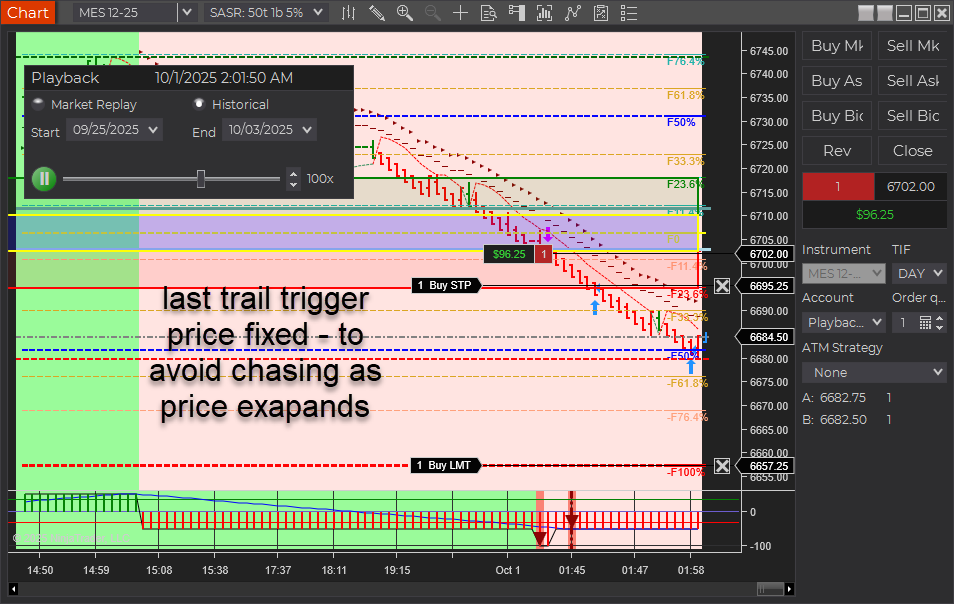
  • Short Trail Trigger: Fixed. Prior behavior could “chase” price and miss the trigger around the T2 (~50%) zone when USAR bands skewed wider in fast markets. Also applies to longs.
  • IntelliStop: Minimum % margin corrected and behavior refined. Trails engage noticeably above ~75% profit of a 100%-equivalent move and hold up to a ~20% offset, avoiding premature stop-ins.
  • Outcome: More consistent trails and better probability of capturing extended moves beyond 100% (e.g., 150–200% runs).
aft8 short trail last optimized triggers
aft intellistop min distance to price governor

What Was Fixed

In earlier builds, the stop trail reference included the full width of the dynamic USAR band. During choppy/fast conditions, the band could expand, causing the trail trigger to drift from the intended target area. Practically, this showed up around the T2 target (~50%) region stretching out toward 60%+, so the trail often didn’t trigger in time. This behavior affected both short and long positions. The new logic decouples the trigger from that skew so it fires reliably.

IntelliStop: Smarter Trailing Behavior

  • Minimum % Margin Fix: Ensures the trail doesn’t crash into price when profit accelerates.
  • Engages Above ~75% Profit: On a 100% Fib Grid–equivalent move, the IntelliStop now trails in noticeably above ~75%, not earlier.
  • Holds a ~20% Offset: The trail will maintain up to ~20% distance from current price, allowing healthy continuation through 100% and into 150–200% extensions when momentum persists.
Why this matters: Early, overly tight trails frequently cut winners short. This refinement keeps risk contained while letting strong trends do the work.

Trader Impact

  • Consistency: Trails trigger as expected in volatile/choppy phases.
  • Profit Capture: Higher odds of catching extended runs beyond the 100% level.
  • Smoother Management: Less micromanagement needed during fast markets.

Behavior Example

Before: In a fast, two-sided session, the USAR band widens. The short trail “chases” the expanding band near T2 (~50%), drifting toward 60%+ and failing to arm the trail in time.

Now: The trigger is stable. Once profit reaches ~75% of a 100% move, IntelliStop begins to trail with breathing room (up to ~20% offset), often letting the position push through 100% and into 150–200% when trend pressure continues.

Changelog (2025.10.3.1)

  • Fix: Short trail trigger corrected for dynamic USAR band skew (also improves longs).
  • Fix: IntelliStop minimum % margin and trail engagement logic refined.
  • Improve: Trailing offset behavior capped (~20%) to avoid price collision while preserving extension potential.

Update Notes

  • Recommended: Restart NinjaTrader after installing the update.
  • Best practice: Verify your stop/target templates and instrument tick sizes are correct for your account and prop-firm rules.
  • Reminder: Settings and methods are for educational purposes. Markets carry risk; trade your plan.

Disclaimer

Trading futures and derivatives involves substantial risk and is not suitable for every investor. Performance is not guaranteed. Examples are for illustration only and are not financial advice. Use proper risk controls and follow your prop firm or broker rules.

Filed Under: AFT8, automated futures trading, fully automated trading system, NinjaTrader 8 Tagged With: AFT8, AFT8 Release, AFT8 update, aft8release, AFT8Update, ninjatrader automated trading systems


🚀 Get Started 100% FREE!

Emini Indices Futures Rollover for period 202512 – beware AFT8 will filter and close out expiry contracts within the algo systems

September 15, 2025 by AFT

The E-mini indices (ES, NQ, YM, RTY) are rolling over on September 15, 2025 into the new December 2025 (12-25) contracts.

E-mini Indices Rollover – September 15, 2025

The E-mini indices (ES, NQ, YM, RTY) are rolling over on September 15, 2025 into the new December 2025 (12-25) contracts.

⚠️ Important Notice for AFT Traders

If you are using the AFT Algo Entry module, please be aware:

  • The system may filter out new trades on the expiring September 2025 (09-25) contract.
  • Trades could be closed automatically by the AFT Algo Trade Manager if rollover is flagged in NT8 for ES, NQ, and other E-mini futures.

📊 Tip: Keep Historical Data Updated

For the most accurate results with self-adapting charts, make sure to download historical data regularly:

  • Shortcut: Select a chart and press Ctrl + Shift + R.
  • Best Practice: Use the Historical Data module to download tick, minute, and daily data.
  • Recommendation: Refresh 7–7 days of history weekly (e.g., Sunday/Monday session start).
  • Pro Tip: Download 2 days of data daily to keep your charts consistent and error-free.

Staying on top of data downloads ensures that your adaptive indicators and AFT modules perform at their best during contract rollovers.

Filed Under: AFT8, automated futures trading systems, fully automated trading system, ninjatrader trading bot Tagged With: automated futures trading, Futures rollover


🚀 Get Started 100% FREE!

Why Don’t You Just Trade Fully Automated Trading Systems?

January 5, 2025 by AFT

In the modern trading landscape, the allure of fully automated trading systems is strong. With promises of hands-free profits and sophisticated algorithms, it’s easy to understand why traders might gravitate toward this approach. However, the reality of fully automated trading systems (ATS) is more complex. Let’s explore why traders often favor hybrid automated trading systems, such as those leveraging AFT (Algo Futures Trading) and AWT (AlphaWebTrader), for a more robust, adaptable trading strategy.

The Reality of Fully Automated Trading Systems

Lack of Market Adaptability

Fully automated systems rely on preprogrammed rules and historical data. While these rules can be effective in specific market conditions, they often fail to adapt to unforeseen changes, such as major economic events, news catalysts, or shifts in market sentiment. Markets are dynamic, and rigid systems can struggle to keep up.

Prop Firm Constraints

Prop firms, which offer traders access to funded accounts, typically prohibit 100% automated trading. This restriction exists because fully automated systems can quickly breach drawdown limits due to their inability to pause or recalibrate during volatile phases. Hybrid systems provide a manual override capability, aligning better with these rules.

The Drawback of Black Box Systems

Many fully automated systems are “black boxes,” offering no transparency into their logic. Traders using these systems are left to trust algorithms they don’t understand, making it challenging to diagnose issues or improve performance during losing streaks.

Risk of Over-Optimization

Fully automated systems often fall victim to over-optimization, tailoring their strategies to fit historical data too precisely. This can lead to poor performance in live markets where conditions deviate from the backtested scenarios.

Why Hybrid Automated Trading Systems Are Superior

Dynamic Decision-Making

Hybrid systems empower traders to leverage automated signals for consistency while retaining the ability to intervene based on market context. For instance, with AFT and AWT, traders can follow algo signals while using their judgment to adjust trades during pivotal moments.

Enhanced Control

Hybrid trading blends the precision of automation with the control of manual trading. Systems like AFT + AWT allow traders to configure algo signals, filters, and exits or even inject their own logic into the framework. This flexibility makes hybrid systems adaptable to diverse trading styles and market conditions.

Compliance with Prop Firm Rules

Hybrid trading aligns well with prop firm guidelines. A trader can combine systematic signals with manual execution, reducing the risk of breaching drawdown limits and ensuring compliance with firm regulations.

Improved Risk Management

Hybrid systems enable traders to manage risks more effectively by manually overriding or modifying trades in response to unforeseen events. Automation handles repetitive tasks, while traders focus on high-level decision-making.

Scalability and Growth

Hybrid systems, like those powered by AFT and AWT, provide a pathway for traders to evolve. Beginners can start with semi-automated setups, manually taking systematic signals, and progressively transition to fully automated strategies for specific markets or sessions.

How AFT + AWT Combine the Best of Both Worlds

  • Algo Signals + Human Insight: AFT provides systematic trading signals, while AWT offers tools like TradeViewPoint and Trendo to monitor market conditions and correlations.
  • Customizable Automation: Traders can build and refine their strategies by adding filters, adjusting parameters, or incorporating custom logic into the baseline settings.
  • Learning Through Execution: Hybrid trading encourages traders to learn market behavior through hands-on experience, fostering a deeper understanding of when to trade and when to step aside.

Conclusion

While fully automated trading systems may seem like the ultimate solution, their limitations in adaptability, transparency, and risk management often make them unsuitable for long-term success. 80% of traders lose at day trading manually, and up to 95% of day traders lose at fully automated trading!

Hybrid automated trading systems, such as those utilizing AFT + AWT, provide the perfect balance of automation and human intelligence, offering flexibility, control, and scalability. Our VIP Trading group can surpass 66% winners versus losers, compared to the standard retail world of 20% wins. Need we say more? AFT + AWT were purpose-built for hybrid trading specifically as we want the maximum profit with the least drawdown systems.

By combining the best of both worlds, traders can harness the power of automation while retaining the discretion to navigate the complexities of modern markets. Whether you’re seeking consistency, compliance, or growth, a hybrid approach paves the way for sustainable trading success.

Filed Under: AFT8, Algo Futures Trader, automated futures trading, automated trading ninjatrader, fully automated trading system, ninjatrader automated trading Tagged With: automated futures trading, automated futures trading software, automated futures trading strategies, automated futures trading system, automated futures trading systems, Automated Trading NinjaTrader, automated trading with ninjatrader, best automated futures trading software, fully automated trading system, futures algo trading, futures algorithmic trading, futures automated trading, futures trading algorithms, ninjatrader algorithmic trading, ninjatrader automated trading, ninjatrader automated trading systems, ninjatrader trading bot, ninjatrader trading systems


🚀 Get Started 100% FREE!

Unveiling the Path to Success hybrid automated day trading

November 28, 2024 by Tom Leeson

Key Questions Every Trader Should Ask

  1. What is your capital size? Your starting capital plays a crucial role in determining position sizing, risk management, and overall strategy feasibility.
  2. What is your risk percentage? Define a clear risk percentage per trade or portfolio, e.g., 1-2%. This ensures you survive losing streaks and avoid catastrophic drawdowns.
  3. What system and rules are you using?
    • Trade Frequency: Are you taking 1-2 trades a week or several trades daily?
    • Win Rate: What percentage of your trades are winners?
    • Risk-Reward Ratio: How much are you risking for every unit of potential profit?
    • Risk of Ruin: Have you assessed the likelihood of blowing up your account?
    • Drawdown vs. Net Profit: Can you stomach the drawdowns required to achieve your profit goals?
  4. What are your commission fees? Costs, including commissions and slippage, significantly impact profitability, especially for high-frequency traders.
  5. Are you trading with prop firm capital or personal funds? Prop trading comes with constraints like daily loss limits and stricter risk rules. Real-money trading requires a cushion for slippage and psychological endurance.

Hybrid vs. Fully Automated Trading

Hybrid trading, a blend of automation and manual oversight, adapts to market conditions in ways machines cannot replicate. While fully automated systems can deliver results like 100% in 3 months or 250% annually, they come with high drawdowns and emotional detachment.

In contrast, hybrid trading offers:

  • Personalized decision-making.
  • Enhanced control over drawdowns.
  • A balance between consistency and adaptability.

Results from Our VIP Group

Real traders, real stats—our community showcases diverse outcomes:

  • $15,000 in a single day.
  • $1,000 consistently per week and more.
  • Mixed days/weeks/months of wins and losses.

The key takeaway? Focus on your journey rather than comparing yourself to others. The real question is: Can you master the method and technology to fit your trading style?

Winning Mindset: A Structured Path

  1. Commitment to Learning: Traders in our VIP group prioritize education over quick wins.
  2. Process Over Stats: Focusing on improving your execution and decision-making ultimately leads to consistent results.
  3. Quality Over Quantity: Only 20% of retail traders succeed, but our structured approach filters for the top winning mindset committed traders.
  4. High Trading IQ Community: Low attrition rates, no noise or nonsense, no one-eye kings in the valley of the blind, trader group success peaks over 66% per month.

Performance Expectations

  • Gold Standard: >25% monthly returns (akin to Goldman Sachs-level trading).
  • Great Returns: 5-10% per month for a retail trader.
  • Good Performance: Breaking even with <10% monthly drawdown.

Cutting-edge Technology and AI

We pioneered Hybrid Automated Trading with tools that maximize control and minimize drawdowns.

  • Remove emotional bias.
  • Improve decision-making in live markets.
  • Focus entirely on market dynamics rather than ego-driven trading.
  • Minimize over-trading and drawdown to maximize results.

Now, We Integrate AI Copilots in the Discord Trading Group to Provide:

  • Fundamentals
  • Econews
  • Earnings
  • Signals
  • Higher Time Frame Price Analysis
  • Pre-session and session analysis of ATS tools
  • Providing trading context and education on the systems
  • This means you get it all in one place – all you need.

Deep Learning AI

  • Cloud Data Lake for training
  • AI predictive real-time probability
  • Pending release 2025… Q1 we hope to work alongside the AFT and AWT

The Trading Journey

Think of trading like mastering a Formula 1 car. The Ferrari’s lap time is irrelevant if you’re not trained to handle its power. Consistent success requires thousands of hours of chart time, trade plan rules, stats, and a diary, learning from every step of the journey.

We provide the tools and framework to build winners, but the final results depend on your dedication.

Why Choose Us?

  • Real Trading, No Gimmicks: No retail tricks or stat manipulation.
  • High IQ Community: Learn alongside serious traders focused on growth.
  • Proven Technology: Leverage cutting-edge tools for real deal traders.
  • Realtime Live Market: Signals, technicals, news, and commentary!

Try our system for free and decide if it fits your style and goals. Focus on the process—the profits will follow. Join the revolution.

Filed Under: AFT8, aft8 turnkey workspaces, Algo Futures Trader, automated futures trading system, automated trade management, best automated futures trading software, fully automated trading system, futures automated trading, ninjatrader automated trading Tagged With: automated futures trading, automated futures trading software, automated futures trading strategies, automated futures trading system, automated futures trading systems, Automated Trading NinjaTrader, automated trading with ninjatrader, best automated futures trading software, fully automated trading system, futures algo trading, futures algorithmic trading, futures automated trading, futures trading algorithms, ninjatrader algorithmic trading, ninjatrader automated trading, ninjatrader automated trading systems, ninjatrader trading bot, ninjatrader trading systems


🚀 Get Started 100% FREE!

  • 1
  • 2
  • 3
  • Next Page »

Help & Information

  • ninjatrader automated trading
  • Automated Trading Systems
  • Support Center
  • Help Desk Articles
  • Trading Group & Forum
  • Videos

Recent Posts

  • AFT8 Performance Tweaks for NinjaTrader 8.1.7
  • AFT Lifetime (One-Time Purchase) License Terms Updated
  • ATS Futures Trading Group Rebooted!
  • AFT8 version 20260518 released for compatibility with NinjaTrader 8 .1.7
  • What Algos Are Included in AFT8? Complete Guide to Signals, Hybrid Trading & Automation
  • Facebook
  • RSS
  • Twitter
  • YouTube


  • NinjaTrader Automated Trading
  • automated futures trading
  • automated trading systems
  • Day Trading Futures
  • Get Started Day Trading Futures
  • VIP Trading Group Live Market Trade Along
  • Secret to Day trading futures success
  • AFT8 for NinjaTrader 8
  • Futures Algo Trading Systems
  • Market News
  • NinjaTrader Free Trading Platform
  • Legal Notices
  • AFT Legal Info
  • Terms
  • FULL RISK DISCLOSURE
  • Privacy Policy
  • Cookie Usage
  • About AlgoFuturesTrader
  • Connect to AFT
  • Blog
  • Videos
  • Support
  • Contact
  • My account
  • Sitemap
  • Affiliates

Ninja Futures Trading
Algo Futures Trader Copyright Algo Trading Systems© 2026 ¡
AlgoFuturesTrader.com is owned & operated by Algo Trading Systems LLC. By using this website or products & services, you are bound by our Terms & subject to US legal jurisdiction only. Errors & omissions excluded.
AFT made in England, powered by MicroTrends NinjaTrader development

Disclaimer: Trading & investment carry a high level of risk. AlgoFuturesTrader does not make recommendations for buying or selling any financial instruments, nor do we offer trading or investment advice. We are a software company, and we only provide educational information on ways to use our sophisticated Algo Futures trading tools. It is up to our customers & readers to make their own trading & investment decisions, or consult with a registered investment advisor.

Risk Disclosure: Futures, CFDs, & forex trading carry substantial risk and are not suitable for every investor. An investor could potentially lose all or more than the initial investment. Risk capital is money that can be lost without jeopardizing one's financial security or lifestyle. Only risk capital should be used for trading, and only those with sufficient risk capital should consider trading. Past performance is not necessarily indicative of future results. Please read the full risk disclosure here.

Hypothetical performance results have many inherent limitations, some of which are described below. No representation is made that any account will or is likely to achieve profits or losses similar to those shown. In fact, there are frequently sharp differences between hypothetical performance results and the actual results subsequently achieved by any particular trading program. One of the limitations of hypothetical performance results is that they are generally prepared with the benefit of hindsight. In addition, hypothetical trading does not involve financial risk, and no hypothetical trading record can completely account for the impact of financial risk in actual trading. For example, the ability to withstand losses or adhere to a particular trading program despite trading losses are material points that can adversely affect actual trading results. Numerous other factors related to the markets or the implementation of any specific trading program cannot be fully accounted for in the preparation of hypothetical performance results and can adversely affect trading results.

Testimonials appearing on this website may not be representative of other clients or customers and are not a guarantee of future performance or success.

NinjaTraderÂŽ is a registered trademark of NinjaTrader Group, LLC. No NinjaTrader company has any affiliation with the owner, developer, or provider of the products or services described herein, nor do they endorse, recommend, or approve any such product or service.

We use cookies on our website to give you the most relevant experience by remembering your preferences and repeat visits. By clicking “Accept All”, you consent to the use of ALL the cookies. However, you may visit "Cookie Settings" to provide a controlled consent.
Cookie SettingsAccept All
Manage consent

Privacy Overview

This website uses cookies to improve your experience while you navigate through the website. Out of these, the cookies that are categorized as necessary are stored on your browser as they are essential for the working of basic functionalities of the website. We also use third-party cookies that help us analyze and understand how you use this website. These cookies will be stored in your browser only with your consent. You also have the option to opt-out of these cookies. But opting out of some of these cookies may affect your browsing experience.
Necessary
Always Enabled
Necessary cookies are absolutely essential for the website to function properly. These cookies ensure basic functionalities and security features of the website, anonymously.
CookieDurationDescription
cookielawinfo-checkbox-analytics11 monthsThis cookie is set by GDPR Cookie Consent plugin. The cookie is used to store the user consent for the cookies in the category "Analytics".
cookielawinfo-checkbox-functional11 monthsThe cookie is set by GDPR cookie consent to record the user consent for the cookies in the category "Functional".
cookielawinfo-checkbox-necessary11 monthsThis cookie is set by GDPR Cookie Consent plugin. The cookies is used to store the user consent for the cookies in the category "Necessary".
cookielawinfo-checkbox-others11 monthsThis cookie is set by GDPR Cookie Consent plugin. The cookie is used to store the user consent for the cookies in the category "Other.
cookielawinfo-checkbox-performance11 monthsThis cookie is set by GDPR Cookie Consent plugin. The cookie is used to store the user consent for the cookies in the category "Performance".
viewed_cookie_policy11 monthsThe cookie is set by the GDPR Cookie Consent plugin and is used to store whether or not user has consented to the use of cookies. It does not store any personal data.
Functional
Functional cookies help to perform certain functionalities like sharing the content of the website on social media platforms, collect feedbacks, and other third-party features.
Performance
Performance cookies are used to understand and analyze the key performance indexes of the website which helps in delivering a better user experience for the visitors.
Analytics
Analytical cookies are used to understand how visitors interact with the website. These cookies help provide information on metrics the number of visitors, bounce rate, traffic source, etc.
Advertisement
Advertisement cookies are used to provide visitors with relevant ads and marketing campaigns. These cookies track visitors across websites and collect information to provide customized ads.
Others
Other uncategorized cookies are those that are being analyzed and have not been classified into a category as yet.
SAVE & ACCEPT