NinjaTrader Automated Trading by Algo Futures Trader

hybrid algorithmic automated futures trading for prop firm traders, day & swing traders

🚀 Get Started
  • 🚀Get Started
  • NinjaTrader
  • Get Funded
  • Trading Servers
  • Pricing
  • blog
  • Help

How to get started with AFT8 Automated Trading for NinjaTrader 8

March 5, 2026 by Tom Leeson

How to Get Started with AFT8 Automated Trading for NinjaTrader 8 (Day Traders & Prop Traders)

AFT8 is built for hybrid trading (man + machine) and can also be used for
fully automated execution. Unlike classic NinjaTrader “strategies” you attach to charts,
AFT8’s hybrid algorithms run primarily through Market Analyzer columns plus dedicated
Algo Controllers. This means your “control surface” is the workspace, Market Analyzer rows/columns,
and controller state—not a strategy list.

This guide is a practical, day-trader and prop-trader focused walkthrough to get you up and running safely,
avoid the most common first-week failures, and understand the key AFT8 concepts that matter when money and rules
are on the line.

What You Need Before You Start

  • NinjaTrader 8 installed and running.
  • AFT8.NinjaTrader installed (AFT8 add-in for NT8).
  • AFT.Desktop installed and logged in (required to sync licenses, updated files, and settings to your PC).
  • ATS Desktop Apps (recommended all-in-one installer path that includes Workspaces 1 as part of the install bundle).
  • Correct workspace stage for your goal (manual → hybrid → automated).

Download the official installers from the ATS downloads hub and then install in a clean sequence:

  1. Install/Update NinjaTrader 8 (follow NinjaTrader’s official installer flow).
  2. Install ATS Desktop Apps (recommended for default installs).
  3. Install AFT8.NinjaTrader.
  4. Install and run AFT.Desktop to sync licenses/workspaces/settings.
  5. Install additional Workspaces 2–5 if your access level includes them.

Tip: If Windows Defender SmartScreen blocks a newly updated workspace installer, verify the installer path
and proceed only if it’s the official installer from the ATS downloads source.

AFT8 Architecture (Why Market Analyzer Matters)

AFT8 hybrid algos are designed to operate inside NinjaTrader via Market Analyzer.
You control and configure behavior using:

  • Market Analyzer columns (AFT Algo Entry and AFT Trade Manager modules)
  • Market Analyzer templates and saved workspaces
  • Algo Controllers (the control panel that commands the rows/columns)

This is the reason many “classic strategy expectations” don’t apply. Your first job is to ensure the workspace
loads the correct Market Analyzer components and the controllers are visible and populated.

The Two Settings That Break Most Automated Trading Setups

Most automation issues come from time settings and contract symbology.
Fix these early so your sessions, filters, and instrument lookups behave correctly.

1) Time / Region Settings

  • Windows: Region = United States, Language = English (United States).
  • TimeZone: Central US is commonly recommended; some traders use Eastern if troubleshooting date-time issues.
  • NinjaTrader: Language = English, TimeZone = Central (or Eastern if required for your environment).

2) Contract Symbology (Critical)

In NinjaTrader, set Symbology: Numeric. This is called out as critical for AFT8 compatibility.

Choose the Right Workspace Stage

AFT8 workspaces are staged so you can progress from manual skill-building to hybrid and then to more advanced modes.
The key practical rule for automation is:
automated entry requires Workspace 2 or higher (or an equivalent workspace that includes the AFT Algo module).

  • Workspace 1: Manual entry with automated exits (best for day traders learning trade management).
  • Workspace 2: Hybrid automated entry + exits (common starting point for day traders and prop evals).
  • Workspaces 3–4: Additional hybrid variants (including MTF in Workspace 4).
  • Workspace 5: VIP baselines for pure automated trading plus hybrid chart algos.

Best practice: Start in Workspace 1 to validate platform stability and exits, then move to Workspace 2+ once you
can confidently control AutoStart, account selection, and controller state.

First Run Checklist (Day Trader Friendly)

Step 1 — Confirm the AFT8 Control Surface Is Loaded

  • Open a turnkey workspace (Workspace 1 for training, Workspace 2 for automated entry).
  • Confirm Market Analyzer includes the AFT columns/modules.
  • Confirm the Algo Controllers are visible and populated with rows.

Step 2 — Use AutoStart as a Safety Switch

Turnkey workspaces can auto-start and can trade automatically once NinjaTrader is connected.
Before you go live, learn how to control AutoStart.

  1. Open the workspace.
  2. In Market Analyzer, right-click → Columns.
  3. Select the AFT Algo Column.
  4. Find TradeEntryAutoStart and set it:
    • OFF while you validate instruments, accounts, filters, and session timing.
    • ON only when you are ready to allow automated entries.
  5. Save the template under a new name and save the workspace under a new name (so updates don’t overwrite your changes).

Step 3 — Paper Trade / Sim First

Run your first sessions in Sim (or demo) to confirm:

  • Signals appear as expected
  • Trades place when conditions are valid
  • Exits and trade management work correctly
  • Time filters and max trade limits behave the way you expect

Prop Trader Setup (Evaluation & Funded Accounts)

Step 1 — License & Sync (Non-Negotiable)

For live or prop firm trading, you must have the correct AFT8 license and your PC must be synced.
Keep AFT.Desktop logged in and confirm you accepted the EULA inside AFT.Desktop so NinjaTrader can see your license.

Step 2 — Account Hygiene (Avoid the #1 Prop Mistake)

Many workspaces default to Sim101. Before you trade evaluation/live:

  • Open Market Analyzer and change the account in all relevant columns/modules to your evaluation/funded account.
  • Save the workspace under a new name.
  • Confirm the controller state is set intentionally (don’t let auto-start surprise you).

Step 3 — Controller State = Your “Kill Switch”

AFT8 can start with NinjaTrader and trade automatically if you don’t set the Algo Entry Controller to a safe state.
Make it a habit: connect → verify → then enable trading.

10-Second Quick Check (Most Issues Are Solved Here)

If AFT8 is running but no trades are being taken, these are the most common causes:

  • Wrong workspace stage: automated entry generally needs Workspace 2+.
  • AFT Algo module missing from the workspace/Market Analyzer template.
  • AutoStart / Long / Short states are OFF, or semi-auto “one shot” has stopped trading.
  • Max trades/session reached (common for day and prop traders).
  • Time/session filters are blocking entries or exits.
  • Contract rollover/expiry protection is preventing trading (roll your contracts forward in NT8 database management).
  • Wrong account selected (Sim101 vs evaluation vs funded).
  • Wrong license for live trading or license not synced (AFT.Desktop not logged in / EULA not accepted).
  • Data lag filter is detected and trading is paused.
  • Prerequisites not applied (timezone/region/symbology).

If you’re stuck, the fastest recovery method is:
close the workspace → open Workspace 2 or 3 → confirm it trades with filters off → add filters back one-by-one.

Best Practices for Day Traders & Prop Traders

1) Treat AFT.Desktop Sync as Pre-Flight

Before every session: open AFT.Desktop, confirm you’re logged in, confirm EULA accepted, and confirm licenses synced.
If NinjaTrader was already running, refresh/restart after syncing if needed.

2) Use “Automation Level” as a Risk Control

Start conservative (AutoStart OFF, controller paused), then increase automation only when the session context,
account selection, and filters are verified.

3) Don’t Assume Classic Strategy Analyzer Workflow

AFT8 hybrid algos are Market Analyzer-based. For hybrid systems, official guidance emphasizes replay/paper/live
operation for statistics rather than classic Strategy Analyzer optimization.

Official Resources

  • ATS Downloads hub (AFT.Desktop, AFT8.NinjaTrader, ATS Desktop Apps)
  • AFT8 prerequisites & recommended settings (timezone/region + Numeric symbology)
  • AFT.Desktop login & license sync steps
  • Workspaces 1–5 installers and stage descriptions
  • Enable live/prop trading checklist
  • AutoStart setup procedure
  • No trades taken diagnostic guide

Risk Disclaimer: Futures trading involves substantial risk of loss and is not suitable for all investors. This article is for educational purposes only and does not constitute financial advice.

Filed Under: AFT8, automated futures trading, ninjatrader automated trading Tagged With: AFT8, automated futures trading, fully automated trading system

Futures Trading Risk Appetite, Reward, and Style

February 19, 2026 by AFT

Every trader has a “risk personality.” Some prefer tight risk with frequent decisions.
Others prefer wider structure with fewer interruptions. Neither is “right” or “wrong”—
but each style has predictable tradeoffs in win rate, trade frequency, and drawdown shape.

AFT8 note: AFT8 provides generic turnkey workspaces for session breakout trading that support
scaling out and the ability to capture a larger portion of the daily range move. The default structure is
intentionally looser by design to survive normal volatility and give trades room to develop.
Traders can manage risk “in-flight” using hybrid controls, or (in Stage 5 of the Zero-to-Hero process)
save personalized settings for evaluation, performance, and going onto prop trading eval, perf or brokerage real money account live.

Two Common Trading Personalities

1) Tight Risk Trader: Small Stops / Smaller Targets

This style tries to keep losses small and get paid quickly. It can feel clean and controlled,
but it typically comes with more stop-outs and more trades.

  • Trade frequency: Higher
  • Stop-outs: More frequent
  • Win rate: Often lower
  • Reward-to-risk (R:R): Often higher on a trade-by-trade “ideal” basis
  • Emotional profile: “Death by 1000 cuts” (many small losses)

2) Structure Trader: Larger Stops / Larger Targets

This style gives the trade more breathing room around structure (swings, zones, session levels).
It often creates fewer stop-outs and fewer trades, but losses can be larger when wrong.

  • Trade frequency: Lower
  • Stop-outs: Less frequent
  • Win rate: Often higher
  • Reward-to-risk (R:R): Often lower per trade (unless targets are expanded)
  • Emotional profile: “Death by a few large blows” (rare but heavier hits)

Stop Size vs Trade Frequency (The Hidden Tradeoff)

Stop size isn’t just a risk number—it controls how often you get “interrupted” by normal market noise.
A smaller stop gets hit by ordinary volatility more often. A larger stop can survive noise,
but you must pay for that survival with either reduced position size or fewer attempts.

  • Smaller stops tend to require more attempts to capture moves, which increases
    trade frequency and decision load.
  • Larger stops tend to reduce trade frequency, but a losing trade costs more in dollars
    unless position size is reduced.

The practical takeaway: stop size, win rate, and trade frequency are linked. If you change one,
you affect the others.

Targets: Small vs Large

Smaller Targets

Smaller targets get hit more often, which can support confidence and smooth equity when the market is choppy.
The downside is you may cap the upside on strong trend days unless you keep a runner.

  • Pros: Higher hit rate, faster feedback, less time exposed
  • Cons: Can miss big moves; drawdown recovery may require multiple trades to climb back to breakeven;
    risk-reward can be diminished if the system needs frequent “re-entries.”

Larger Targets

Larger targets fit trending conditions and can create big winners, but you will naturally have more “almost hit”
outcomes and more partial wins turning into break-evens.

  • Pros: Captures trend expansion, fewer trades needed for meaningful gains, stronger expectancy when conditions align
  • Cons: Lower hit rate, more patience required, more time exposed to reversals

Technical Stops: When Stops Should Be Big or Small

The best stop size is often dictated by structure, not preference.
A technical stop is placed where your trade idea is invalidated—below/above a swing, outside a zone,
or beyond a session level. Sometimes that stop is naturally tight. Sometimes it must be wider.

When technical structure demands a larger stop, the solution is usually not to force a tighter stop.
The solution is to scale position size dynamically so the dollar risk stays consistent.

  • If the stop must be wider: reduce lots/contracts
  • If the stop can be tight: you may add size (within your max risk rules)
  • Goal: keep risk per trade consistent even when stop distance changes

Choosing Your Style (A Practical Checklist)

  • If you dislike frequent stop-outs and prefer fewer, calmer decisions:
    lean toward structure stops and lower trade frequency.
  • If you prefer quick feedback and don’t mind “many small cuts”:
    lean toward tighter stops and higher trade frequency.
  • If you want balance:
    use technical stops + dynamic position sizing, and consider
    partial exits (take something off early, keep a runner for expansion).
  • Regardless of style: focus on high probability trades where the projected move justifies the risk.
    Better selection reduces the need for constant setting changes.

Your best style is the one you can execute consistently without emotional spirals.
Consistency beats intensity.


Key takeaway: Small stops typically increase trade frequency and stop-outs.
Larger stops typically reduce trade frequency and increase win rate, but often require smaller size to keep risk controlled.
Targets follow the same logic: small targets hit more often; larger targets capture trend but demand patience.

Traders are often tempted to use a very small stop-loss to “improve” the risk-reward ratio on a trade-by-trade basis.
But if that stop is hit far more often, the average winners vs. losers can still produce negative expectancy.
There is usually a balance and a sweet spot to find. The key word is compromise.
There is no perfect system and no perfect method—be pragmatic and stable.
Choose settings that make sense and fit your preferences, then focus on the selection process:
fewer trades, better trades, with positive risk-reward projections.

Filed Under: AFT8, automated futures trading, ninjatrader automated trading Tagged With: risk control, risk management, risk reward

How to Progress From ATM Templates to AFT8’s Adaptive Trade Manager

November 19, 2025 by AFT

Many traders coming from NinjaTrader’s traditional ATM (Advanced Trade Management) templates wonder if they should bring their static stop and target configurations directly into the AFT8 Trade Manager. While simple ATM setups can be copied over, the real strength of AFT8 comes from something far more powerful: its dynamic, structure-aware trade management.

This article explains the best path forward and why the recommended approach is to follow the Zero-to-Hero progression using the turnkey workspaces, gradually building the skills needed to trade with confidence using AFT8’s adaptive engine.


Start With the Turnkey Workspaces

AFT8 provides a complete set of Stage 1–4 turnkey workspaces designed to take traders from absolute beginner to adaptive, competent, real-time execution. These workspaces include:

  • Session Breakout Workspace
  • Trend Scalper Workspace
  • Pre-configured adaptive trade management settings
  • All indicators and filters needed for each stage

These ready-to-use environments remove the complexity and let you start trading immediately, without having to build your own configurations or worry about tuning.


Learn By Doing – The Zero-to-Hero Method

The Zero-to-Hero workflow is not theory-based. You learn by placing trades, observing outcomes, and seeing how the system behaves in different market conditions. Each stage increases your understanding and confidence.

Stage 1 – Raw Signal Mode

Focus on recognizing entries and exits manually, while AFT8 handles the management for you.

Stage 2 – Assisted Trading

Introduce structure filters, SFG levels, and session context to improve timing and avoid low-quality trades.

Stage 3 – Semi-Automated Execution

Allow the system to fire trades automatically while you decide when to activate or stand down.

Stage 4 – Adaptive Mastery

Trade using the full adaptive engine, understanding why stops and targets shift with volatility and structure.

This step-by-step approach trains your pattern-recognition and decision-making naturally. It is the fastest route to stable, repeatable execution.


Fine-Tune Only After Mastery

Once you are comfortable with how AFT8 adapts to live conditions—momentum, volatility, session flow, and SFG/WSFG structure—you can begin to personalize the settings:

  • Tighten the adaptive stops if you prefer smaller protective ranges.
  • Loosen the breathing room for larger trends and extended runners.
  • Adjust one instrument at a time only after completing the Zero-to-Hero stages.

Making adjustments too early often leads to inconsistency. Mastery first, customization later.


Why Staying Dynamic Beats Static ATM Rules

Classic ATM templates rely on fixed distances—“20-tick stop”, “16-tick target”, and so on. These values remain the same regardless of market state, volatility, or session structure. While familiar, static setups struggle across:

  • Fast vs slow markets
  • Different instruments
  • Ranging vs trending conditions
  • Expanding and contracting volatility cycles

AFT8’s adaptive management is built to respond dynamically. Stops and targets are positioned using:

  • Session Fib Grids (SFG, WSFG)
  • Volatility expansion and contraction
  • Trend strength readings
  • Real-time market structure
  • No-Trade Zone behaviour

This allows the system to self-correct during changing conditions—something that static ATM rules cannot do.


Recommended Path Forward

While it is possible to port simple ATM templates to AFT8, the best long-term performance comes from embracing its dynamic adaptive engine. To get the most from the platform:

  1. Begin with the turnkey workspaces.
  2. Follow the Zero-to-Hero progression from Stage 1 to Stage 4.
  3. Use trial, repetition, and hands-on practice to build instinctive skill.
  4. Adjust settings only after mastering how the system behaves.

This method gives traders the practical experience needed to handle real-time decision-making, prop-firm evaluations, and fast-moving market environments.

Master the system first, modify it later. This is the proven route to consistent and confident futures trading.


Learn More

For deeper insight into stop placement, target logic, and adaptive trading:


How to Place Stop-Loss and Targets for Day Trading Futures With NinjaTrader 8 and AFT8

If you’d like, I can also generate a “Static vs Dynamic Comparison Table,” a downloadable PDF version, or an SEO-optimized meta description for this post.

Filed Under: automated futures trading, automated trade management Tagged With: fully automated trading system, NinjaTrader 8, ninjatrader trading systems

NinjaTrader Automated Trading and Non-Correlated Asset Streams

October 28, 2025 by AFT

Selection process for Automated Trading Non-Correlated Asset Streams

A practical guide to portfolio construction, position sizing, and the Zero-to-Hero path from hybrid to fully automated trading.

Contents

  1. What Is an Asset Stream?
  2. Position Sizing Across Asset Streams
  3. Fund-of-Funds Sizing & Expectancy
  4. The Purpose of Zero-to-Hero Stages
  5. Market Phases, Instrument Choice & Bias
  6. Building a Non-Correlated Automated Portfolio
  7. System Selection for Automation
  8. Selection Criteria & Market Phase Awareness
  9. From Hybrid to Fully Automated
  10. Conclusion

What Is an Asset Stream?

An asset stream is the combination of a system and an instrument, typically operated in its own account. Thinking in asset streams (rather than instruments alone) clarifies risk, correlation, behavior, and scaling. In practice, this often means one account per base system to keep execution and performance cleanly isolated.

Position Sizing Across Asset Streams

Position sizing should be weighted or dynamic by volatility, tick value, and stop distance—never flat across the board. Normalization examples like NQ × 3 ≈ RTY × 12 help align exposure and risk across diverse markets.

Fund-of-Funds Sizing & Expectancy

Use a fund-of-funds approach: treat each supported system/instrument stream as a sub-allocation within the portfolio.

  • Supported instruments (with AFT Cloud Data): use dynamic position sizing (lot size adapts to volatility and stop distance), which yields a normalized profit/risk view.
  • Unsupported/outlier instruments (no AFT Cloud Data): use static lot sizing. Here, do not judge by raw $ P&L across a basket—this is not normalized. Evaluate via expectancy (win rate, average win, average loss) to understand true edge.

Key takeaway: Static-lot testing is fine if you judge by expectancy, not dollars. Dynamic sizing provides the cleaner, comparable lens across streams.

The Purpose of Zero-to-Hero Stages

Zero-to-Hero is not a shortcut to full automation. Stages are designed for hybrid trading first. The DSFG baseline is intentionally unfiltered: no brakes, no optimization, no selective logic. Its job is to reveal raw system behavior across market phases—not to be run fully automated in live accounts.

Market Phases, Instrument Choice & Bias

DSFG shows phase and cycle. A winning streak can seduce you into overconfidence; a losing run can provoke abandonment—both are recency bias. Low-probability instruments are excluded from baselines for a reason: they can shine in favorable phases, but lack consistency across regimes. Reserve them for hybrid operation where you control when and why to engage.

Building a Non-Correlated Automated Portfolio

A basket of non-correlated Asset streams could consist of 4–5 high-probability instruments to 8, for example:

  • RTY
  • FDAX
  • CL
  • GC
  • ZC or ZS

BTC and NQ are highly volatile—best used in hybrid or gap-aware strategies. Instruments with severe gap risk—e.g., NG, FDAX, HG—should be run session-only and flattened pre-close. Others can run Sunday to Friday with relatively lower gap exposure.

System Selection for Automation

Better candidates for automation include WSFG and DSFG + GAP. Plain DSFG is best for hybrid learning unless you add brakes/filters/optimizations.

Due diligence: Run any candidate system in SIM for 6–12 months. One-month tests invite curve-fitting and recency bias. Prefer diversity of systems across high-probability instruments rather than chasing uncorrelated instruments on a single setup.

Selection Criteria & Market Phase Awareness

The other critical caveat is having a selection criteria or quant model—a basic guide such as ATR, volume behavior, or news-cycle impact. Without it, you risk adding low-probability instruments that can gap violently, especially when using a system baseline intended for hybrid trading or as a metric benchmark to compare your optimized variants against.

Short-term tests—such as one month—only reflect the current price cycle and phase, leading again to recency bias. Proper evaluation requires 6 to 12 months of runtime to reveal how each system and instrument behaves through full rotations of market conditions.

Low-probability instruments can appear high-probability for a time due to fundamental shifts, seasonals, or policy cycles. For example, Gold (GC) has transitioned from a mean-reversion instrument to a breakout-trading contender following policy-driven macro changes. Such shifts highlight the need to understand why an asset stream is performing and when to deploy or shelve it.

Guidance: Always define when to use and when not to use an asset stream. Outliers can remain part of your portfolio but should be activated under the right conditions—a form of strategic “launch control.”

From Hybrid to Fully Automated

All traders should complete the Zero-to-Hero stages before unlocking automated baselines:

  • First 90 days: operate in hybrid mode, compare variants to baselines, and formalize a trade plan.
  • After 90 days: unlock Automated Trading Baseline Workspaces (Level 5) and begin a 6–12 month automation journey.
Hybrid day traders
50–80% automated; human discretion for pauses, direction filters, and session management.
Swing traders
80–90% automated; ~10% human oversight for drawdown brakes, rollovers, or tech caveats.

Conclusion

Automation shouldn’t remove the trader; it should elevate the trader. By mastering hybrid operation first, you’ll know what to optimize, when to pause, and how to size intelligently. A portfolio of non-correlated asset streams—backed by dynamic sizing, expectancy awareness, quant-driven selection, and multi-system diversity—offers the most reliable path to long-term consistency.

↑ Back to top

Filed Under: AFT8, Algo Futures Trader, automated futures trading, fully automated trading system Tagged With: NinjaTrader 8, ninjatrader automated trading, ninjatrader trading bot, ninjatrader trading systems

AFT8 Update version 20251024 released new indicator and algo entry module

October 25, 2025 by AFT

AFT8 update version 20251024 has been released for NinjaTrader 8

Installers

  • ATS Desktop installers are upgraded to support all Windows OS 64Bit, and Arm64-bit CPU chipsets, such as Surface Pro 2025 Arm64 support Windows 11 Home.

Algos – Automated trading Systems

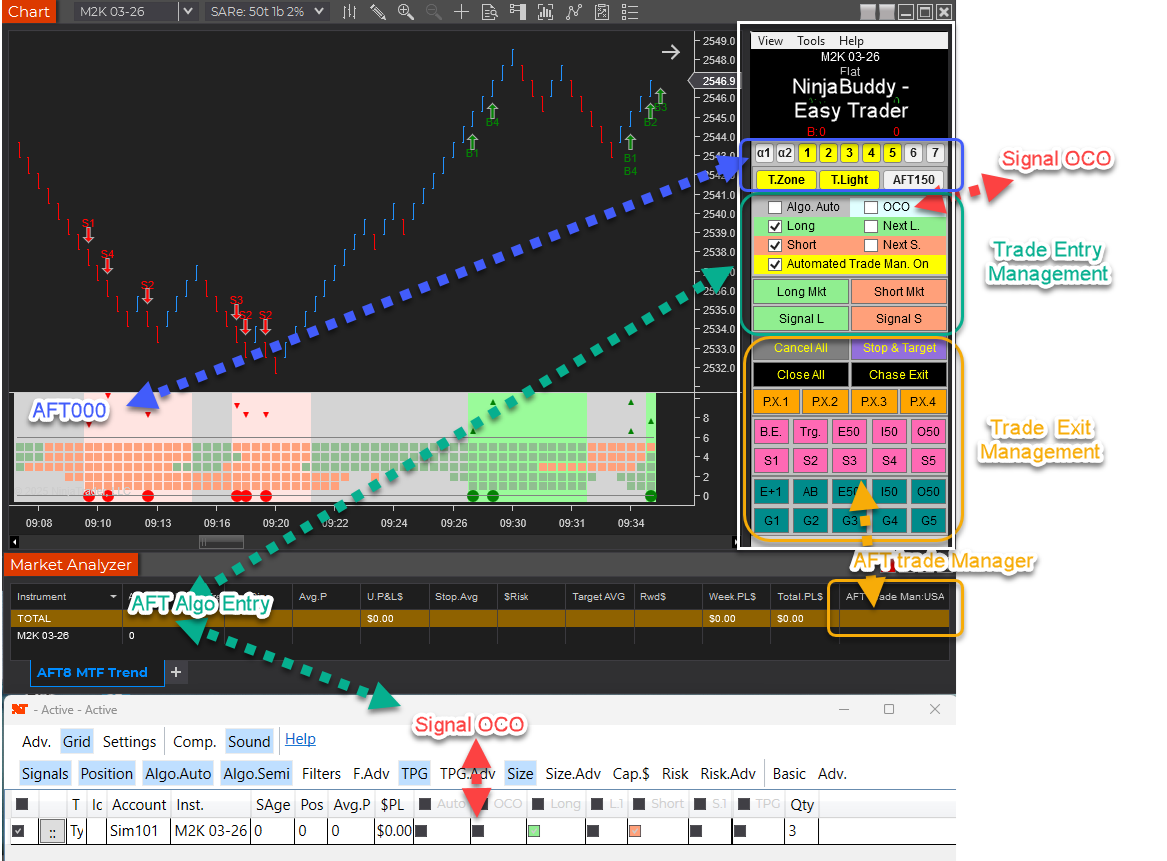
  • Algo Entry Mode – 13 – AFT000 Hybrid Algo Trader signals

Indicators

  • AFT000 Hybrid Algo Chart Trader
    • Programmable Signals 1 to 7
    • Alpha Signals 1 to 2
    • Traffic light filters
    • Pending the Easy Trader NinjaBuddy GUI

Features availability  and Licensing

  • AFT000 access:
    • requires AFT or ATS Essentials/Premium/Ultimate  monthly, annual, or  lifetime current and lifetime renewal
    • Subscriptions & Lifetime renewals are available in ‘My Pricing’ in the ATS universal account
  • AFT000 features:
    • Turnkey Workspaces
    • Easy Trader NinjaBuddy GUI

Filed Under: AFT8, automated futures trading, ninjatrader algorithmic trading, ninjatrader automated trading Tagged With: AFT8 update, AFT8Update, NinjaTrader 8

AFT8 Releasd version 2025.10.3.1 for NinjaTrader 8 – Short Trail Trigger Fix + Intelli-Stop Enhancements

October 3, 2025 by AFT

aft intellistop min distance to price governor

AFT 2025.10.3.1 — Short Trail Trigger Fix + IntelliStop Enhancements

Release date: 3 Oct 2025 • Version: 2025.10.3.1

This update fixes a rare trailing-stop issue in choppy/fast markets and upgrades IntelliStop so profitable runners can breathe past 100% of the Session Fib Grid and reach 150–200% on strong moves.

Quick Summary

  • Short Trail Trigger: Fixed. Prior behavior could “chase” price and miss the trigger around the T2 (~50%) zone when USAR bands skewed wider in fast markets. Also applies to longs.
  • IntelliStop: Minimum % margin corrected and behavior refined. Trails engage noticeably above ~75% profit of a 100%-equivalent move and hold up to a ~20% offset, avoiding premature stop-ins.
  • Outcome: More consistent trails and better probability of capturing extended moves beyond 100% (e.g., 150–200% runs).
aft8 short trail last optimized triggers
aft intellistop min distance to price governor

What Was Fixed

In earlier builds, the stop trail reference included the full width of the dynamic USAR band. During choppy/fast conditions, the band could expand, causing the trail trigger to drift from the intended target area. Practically, this showed up around the T2 target (~50%) region stretching out toward 60%+, so the trail often didn’t trigger in time. This behavior affected both short and long positions. The new logic decouples the trigger from that skew so it fires reliably.

IntelliStop: Smarter Trailing Behavior

  • Minimum % Margin Fix: Ensures the trail doesn’t crash into price when profit accelerates.
  • Engages Above ~75% Profit: On a 100% Fib Grid–equivalent move, the IntelliStop now trails in noticeably above ~75%, not earlier.
  • Holds a ~20% Offset: The trail will maintain up to ~20% distance from current price, allowing healthy continuation through 100% and into 150–200% extensions when momentum persists.
Why this matters: Early, overly tight trails frequently cut winners short. This refinement keeps risk contained while letting strong trends do the work.

Trader Impact

  • Consistency: Trails trigger as expected in volatile/choppy phases.
  • Profit Capture: Higher odds of catching extended runs beyond the 100% level.
  • Smoother Management: Less micromanagement needed during fast markets.

Behavior Example

Before: In a fast, two-sided session, the USAR band widens. The short trail “chases” the expanding band near T2 (~50%), drifting toward 60%+ and failing to arm the trail in time.

Now: The trigger is stable. Once profit reaches ~75% of a 100% move, IntelliStop begins to trail with breathing room (up to ~20% offset), often letting the position push through 100% and into 150–200% when trend pressure continues.

Changelog (2025.10.3.1)

  • Fix: Short trail trigger corrected for dynamic USAR band skew (also improves longs).
  • Fix: IntelliStop minimum % margin and trail engagement logic refined.
  • Improve: Trailing offset behavior capped (~20%) to avoid price collision while preserving extension potential.

Update Notes

  • Recommended: Restart NinjaTrader after installing the update.
  • Best practice: Verify your stop/target templates and instrument tick sizes are correct for your account and prop-firm rules.
  • Reminder: Settings and methods are for educational purposes. Markets carry risk; trade your plan.

Disclaimer

Trading futures and derivatives involves substantial risk and is not suitable for every investor. Performance is not guaranteed. Examples are for illustration only and are not financial advice. Use proper risk controls and follow your prop firm or broker rules.

Filed Under: AFT8, automated futures trading, fully automated trading system, NinjaTrader 8 Tagged With: AFT8, AFT8 Release, AFT8 update, aft8release, AFT8Update, ninjatrader automated trading systems

  • « Previous Page
  • 1
  • 2
  • 3
  • 4
  • Next Page »
  • NinjaTrader Automated Trading
  • automated futures trading
  • automated trading systems
  • Day Trading Futures
  • Get Started Day Trading Futures
  • VIP Trading Group Live Market Trade Along
  • Secret to Day trading futures success
  • AFT8 for NinjaTrader 8
  • Futures Algo Trading Systems
  • Market News
  • NinjaTrader Free Trading Platform
  • Legal Notices
  • AFT Legal Info
  • Terms
  • FULL RISK DISCLOSURE
  • Privacy Policy
  • Cookie Usage
  • About AlgoFuturesTrader
  • Connect to AFT
  • Blog
  • Videos
  • Support
  • Contact
  • My account
  • Sitemap
  • Affiliates

Ninja Futures Trading
Algo Futures Trader Copyright Algo Trading Systems© 2026 ¡
AlgoFuturesTrader.com is owned & operated by Algo Trading Systems LLC. By using this website or products & services, you are bound by our Terms & subject to US legal jurisdiction only. Errors & omissions excluded.
AFT made in England, powered by MicroTrends NinjaTrader development

Disclaimer: Trading & investment carry a high level of risk. AlgoFuturesTrader does not make recommendations for buying or selling any financial instruments, nor do we offer trading or investment advice. We are a software company, and we only provide educational information on ways to use our sophisticated Algo Futures trading tools. It is up to our customers & readers to make their own trading & investment decisions, or consult with a registered investment advisor.

Risk Disclosure: Futures, CFDs, & forex trading carry substantial risk and are not suitable for every investor. An investor could potentially lose all or more than the initial investment. Risk capital is money that can be lost without jeopardizing one's financial security or lifestyle. Only risk capital should be used for trading, and only those with sufficient risk capital should consider trading. Past performance is not necessarily indicative of future results. Please read the full risk disclosure here.

Hypothetical performance results have many inherent limitations, some of which are described below. No representation is made that any account will or is likely to achieve profits or losses similar to those shown. In fact, there are frequently sharp differences between hypothetical performance results and the actual results subsequently achieved by any particular trading program. One of the limitations of hypothetical performance results is that they are generally prepared with the benefit of hindsight. In addition, hypothetical trading does not involve financial risk, and no hypothetical trading record can completely account for the impact of financial risk in actual trading. For example, the ability to withstand losses or adhere to a particular trading program despite trading losses are material points that can adversely affect actual trading results. Numerous other factors related to the markets or the implementation of any specific trading program cannot be fully accounted for in the preparation of hypothetical performance results and can adversely affect trading results.

Testimonials appearing on this website may not be representative of other clients or customers and are not a guarantee of future performance or success.

NinjaTraderÂŽ is a registered trademark of NinjaTrader Group, LLC. No NinjaTrader company has any affiliation with the owner, developer, or provider of the products or services described herein, nor do they endorse, recommend, or approve any such product or service.

We use cookies on our website to give you the most relevant experience by remembering your preferences and repeat visits. By clicking “Accept All”, you consent to the use of ALL the cookies. However, you may visit "Cookie Settings" to provide a controlled consent.
Cookie SettingsAccept All
Manage consent

Privacy Overview

This website uses cookies to improve your experience while you navigate through the website. Out of these, the cookies that are categorized as necessary are stored on your browser as they are essential for the working of basic functionalities of the website. We also use third-party cookies that help us analyze and understand how you use this website. These cookies will be stored in your browser only with your consent. You also have the option to opt-out of these cookies. But opting out of some of these cookies may affect your browsing experience.
Necessary
Always Enabled
Necessary cookies are absolutely essential for the website to function properly. These cookies ensure basic functionalities and security features of the website, anonymously.
CookieDurationDescription
cookielawinfo-checkbox-analytics11 monthsThis cookie is set by GDPR Cookie Consent plugin. The cookie is used to store the user consent for the cookies in the category "Analytics".
cookielawinfo-checkbox-functional11 monthsThe cookie is set by GDPR cookie consent to record the user consent for the cookies in the category "Functional".
cookielawinfo-checkbox-necessary11 monthsThis cookie is set by GDPR Cookie Consent plugin. The cookies is used to store the user consent for the cookies in the category "Necessary".
cookielawinfo-checkbox-others11 monthsThis cookie is set by GDPR Cookie Consent plugin. The cookie is used to store the user consent for the cookies in the category "Other.
cookielawinfo-checkbox-performance11 monthsThis cookie is set by GDPR Cookie Consent plugin. The cookie is used to store the user consent for the cookies in the category "Performance".
viewed_cookie_policy11 monthsThe cookie is set by the GDPR Cookie Consent plugin and is used to store whether or not user has consented to the use of cookies. It does not store any personal data.
Functional
Functional cookies help to perform certain functionalities like sharing the content of the website on social media platforms, collect feedbacks, and other third-party features.
Performance
Performance cookies are used to understand and analyze the key performance indexes of the website which helps in delivering a better user experience for the visitors.
Analytics
Analytical cookies are used to understand how visitors interact with the website. These cookies help provide information on metrics the number of visitors, bounce rate, traffic source, etc.
Advertisement
Advertisement cookies are used to provide visitors with relevant ads and marketing campaigns. These cookies track visitors across websites and collect information to provide customized ads.
Others
Other uncategorized cookies are those that are being analyzed and have not been classified into a category as yet.
SAVE & ACCEPT