NinjaTrader Automated Trading by Algo Futures Trader

hybrid algorithmic automated futures trading for prop firm traders, day & swing traders

🚀 Get Started 🔴LIVE
  • 🚀Get Started
  • NinjaTrader
  • Get Funded
  • Trading Servers
  • Pricing
  • blog
  • Help

AFT8 Performance Tweaks for NinjaTrader 8.1.7

May 22, 2026 by AFT

⚡ AFT8 Performance Tweaks for NinjaTrader 8.1.7 for the optimal trading experience with the best trading platform! 
If you’re running AFT8 on NinjaTrader 8.1.7, a few simple optimization and housekeeping steps can help you achieve the best possible performance, responsiveness, and trading experience during active market conditions. These are the same best-practice recommendations we use ourselves every day in the VIP Trading Group during live market sessions from 8:15 AM CT onwards, Monday through Friday.

  • âś… Start NT8 using the ATS NT8 BootStrapper for higher process priority.
  • âś… Remove unnecessary sounds (Tools > Settings > General). During busy sessions, NT8 can stack sounds, causing echo effects and unnecessary overhead.
  • âś… Enable Enforce Immediate Fills and disable Partial Fills (Tools > Settings > Trading), especially when using ATS Trade Copier from a SIM account to mirrored accounts.
  • âś… Remove unused charts, indicators, Market Analyzer columns, and instruments. Keep your workspace lean and focused on your trade plan.
  • âś… Use AWT Desktop and AWT Web as a trade copilot for technicals, signals, correlations, market radar, and confirmation tools instead of loading additional charts and indicators into NT8.
  • âś… Reset your SIM database regularly and remove old prop firm evaluation/performance accounts to reduce database clutter and chart load times, and overall memory and efficiency.
  • âś… Refresh historical data periodically to eliminate gaps, backfill missing ticks, and maintain chart accuracy -we do this every day, then open the workspaces.

The fastest NinjaTrader workspace is usually the simplest one.

đź“– Full article below:
NinjaTrader 8.1.7 is the best version of NinjaTrader 8 yet, offering an improved feature set, greater stability, and enhanced connectivity. For traders running multiple charts, indicators, workspaces, Market Analyzer windows, and active trading sessions, a few simple maintenance steps can help keep NinjaTrader performing at its best so you get optimal responsiveness, cleaner chart rendering, and reduced data lag during busy tick storms and fast market conditions.

Use the ATS NT8 BootStrapper

Start NinjaTrader using the ATS NT8 BootStrapper whenever possible. The BootStrapper launches NinjaTrader with a higher Windows operating system process priority, helping provide better responsiveness during busy trading periods. This can be especially beneficial when running multiple charts, Market Analyzer windows, indicators, automated strategies, and AFT8 components at the same time. Download in ATS Desktop Apps:

Remove All Unnecessary Sounds in NT8

During heavy market activity, NinjaTrader 8.1.7 may stack alert sounds and play them sequentially, creating an echo effect rather than cancelling previous sounds and playing only the latest alert. In a busy trading session, this can become distracting, fall behind real-time activity, and may contribute to additional system load and therefore slippage.

Navigate to Control Center > Tools > Settings > General and remove unnecessary sounds by clicking the X next to each sound setting. Many traders choose to keep only critical connection-related alerts and remove the rest. If you do not need a sound for trading decisions, remove it and reduce unnecessary overhead on the PC and platform.

Optimize Simulation Fill Settings

For the best simulation trading experience, especially when using ATS Trade Copier from a simulation account to a mirrored account, review the NinjaTrader simulation fill settings.

Navigate to Control Center > Tools > Settings > Trading and enable Enforce Immediate Fills while disabling Partial Fills.

These settings help ensure simulation fills occur consistently and reduce differences between source and mirrored accounts when using trade copier workflows.

Remove Unnecessary Charts, Indicators, Columns, and Instruments

Every chart, indicator, Market Analyzer column, and instrument consumes CPU, memory, chart rendering, and market data processing resources. Over time, traders often accumulate charts, indicators, workspaces, and instruments that are no longer actively used.

Remove all superfluous charts, indicators, Market Analyzer columns, and instrument subscriptions that are not directly contributing to your trading decisions.

  • Close unused charts.
  • Remove indicators that are not actively used.
  • Delete unused Market Analyzer columns.
  • Remove unnecessary instruments from charts.
  • Remove unnecessary instruments from Market Analyzer windows.
  • Reduce workspace complexity wherever possible.

Keeping NinjaTrader lean and focused only on the tools required for your trade plan can significantly improve responsiveness, especially during busy market conditions.

Use AWT Desktop and AWT Web as Your Trading Copilot

Alpha Web Trader (AWT) Desktop and AWT Web are designed to provide instant access to technical analysis, signals, market correlations, market radar, gaps, economic events, and confirmation tools without placing additional charting load on NinjaTrader.

AWT Desktop and AWT Web utilize ATS fast binary transmission technology to deliver low-latency market intelligence and correlations with minimal system overhead. Rather than loading additional charts, indicators, and analysis tools into NinjaTrader, use AWT as a dedicated trading copilot.

This allows NinjaTrader to focus on charting, execution, and trade management while AWT provides the broader technicals, signals, correlations, and market confirmation workflow.

Reset the Sim Database Regularly

Simulation account data continuously grows over time and can negatively impact performance. Keeping the simulation database lean and clean is a good practice for active traders.

For the fastest and most reliable trading experience, many traders reset the Sim database daily or at least weekly. This helps reduce old order history, unnecessary account data, memory usage, chart rendering issues, and platform clutter. For active day trading, one day or one week of order history is often enough before resetting. For intermediate or longer-term simulation trading, use care and make sure any required records are saved before resetting.

See here for more details: NinjaTrader 8 reset database – remove old and duplicate accounts – remove old orders.

Remove Old Prop Firm Accounts

For prop trading, it is common to accumulate multiple evaluation and performance accounts over time, including failed, inactive, or blown accounts. Removing old accounts and unnecessary data helps keep the platform organized and reduces database overhead.

The simplest approach is often to close NinjaTrader and remove the relevant database file before allowing the platform to recreate a clean database. This can help remove old accounts and reduce clutter inside NinjaTrader and AFT8 account lists.

For removing old or blown prop firm accounts, see: How to remove old blown or unused accounts from a prop firm or brokerage in NT8.

If old accounts still appear inside AFT8 or NT8, these articles may also help: AFT8 lists too many accounts from NT8 old and current accounts and AFT8 Multi Shot Troubleshooting removal of old accounts and replacement with new.

Maintain Historical Data

Historical market data can develop gaps, missing ticks, or incomplete backfills over time. Periodically refreshing historical data helps maintain chart accuracy, self-optimizing bars, and indicator calculations.

Many traders choose to download fresh historical data regularly to ensure charts remain synchronized and complete.

  • Remove historical data gaps.
  • Backfill missing tick data.
  • Improve chart consistency.
  • Maintain indicator accuracy.
  • Reduce issues caused by corrupted or incomplete data.

See here for more details: How to get the best view of charts for self optimizing bars daily and weekly routines.

If you are troubleshooting self-optimizing bar display issues, this may also help: AFT8 Bars are not displaying correctly trouble shooting self optimizing bars.

For background on adaptive bars, see: What are Self-Optimizing Bars – Adaptive Bars?.

Keep It Lean and Mean

The fastest NinjaTrader workspace is usually the simplest one. Remove what you do not need, maintain clean databases, refresh historical data, use the ATS NT8 BootStrapper, and leverage AWT Desktop and AWT Web as your low-latency trading copilot.

By keeping NinjaTrader focused on execution and trade management while using AWT for technicals, signals, correlations, and market intelligence, traders can achieve a faster, cleaner, and more responsive trading environment.

For AFT8 performance, latency, and resource-usage guidance, these are the most relevant docs:

  • Trading Computers and servers for NinjaTrader and AFT latency and reliability
  • Why does AFT8 use Optional Recommended Settings Central Timezone?

Filed Under: AFT8, NinjaTrader 8, ninjatrader automated trading Tagged With: AFT8, aft8 performance


🚀 Get Started 100% FREE!

What Algos Are Included in AFT8? Complete Guide to Signals, Hybrid Trading & Automation

May 5, 2026 by AFT

AFT8 (Algo Futures Trader for NinjaTrader 8) provides a powerful algo trading framework designed for futures traders who want flexibility, control, and scalability. Rather than offering a single fixed system, AFT8 delivers a complete framework with billions of possible combinations of signals, filters, entries, and trade management rules.

In simple terms, an algo is an instruction that generates a long or short trade signal. These signals appear directly on the chart with visual, audio, and voice alerts, allowing traders to act manually, semi-automatically, or fully automatically.

This flexibility is what makes AFT8 suitable for hybrid trading — combining human decision-making with automated execution and trade management.


Core Algo Signal Components in AFT8

AFT8 provides three primary signal components that form the foundation of the framework:

  • AFT000 Hybrid – Algo Chart Trader — the main hybrid trading control layer
  • AFT001 – Algo Signals Combo — combines multiple signal conditions into structured logic
  • AFT002 – Signals Generics — provides reusable signal building blocks and conditions

These components allow traders to orchestrate signals, filters, confirmations, and entry logic into a structured trading approach.

AFT8 algo signal components

Once configured, signals can be connected to the AFT8 Algo Trade Entry Module, which handles execution, while the Trade Manager manages stops, targets, breakeven, and trailing logic.

AFT8 trade entry module


Hybrid Trading with Turnkey Workspaces

To simplify the learning curve, AFT8 includes turnkey workspaces based on proven day trading methods. These are designed specifically for hybrid trading — often referred to as “man and machine” trading.

The most commonly used trading approaches include:

  • Session Breakout Trading
  • Trend Scalper (Reversal + Continuation)
  • Combined Multi-Strategy Workflows

These workspaces provide a structured starting point and are actively supported through the ATS Discord group and Help Desk. Most traders begin here and progressively refine their approach through real market experience.

Learn more about the approach here:
Hybrid Trading vs Fully Automated Trading


Fully Automated Baseline Algos

AFT8 also includes a smaller set of baseline algos available in advanced workspaces (Stage 5). These include:

  • DSFG
  • DSFG Gap
  • WSFG
  • Additional derived variations

These baseline algos are designed for:

  • Market phase analysis
  • System behaviour observation
  • Strategy experimentation and optimisation
  • Simulation-based learning

They are not turnkey “plug-and-play” automated systems for live trading. Instead, they serve as a foundation for advanced traders who want to explore automation in a controlled and structured way.

Due to the vast flexibility of AFT8, it is not practical to showcase every possible configuration. For this reason, ATS focuses on hybrid trading workflows through the Zero to Hero progression model.

More on automation:
AFT8 Fully Automated Trading Route


Custom Algo Development (Advanced)

For advanced users and developers, AFT8 supports custom-coded trading logic. Traders can create their own signals in the NinjaTrader code editor and integrate them directly into the AFT8 framework.

This allows full use of AFT8’s execution and trade management systems while running proprietary strategies.

Developer features include:

  • Custom signal injection
  • Integration with trade entry and exit systems
  • Use of DLL references and code templates

Access to developer resources and templates is available upon request via ATS support.


Do ATS Creators Use These Algos?

Yes — ATS creators actively use AFT8 within VIP hybrid trading workspaces and share real-time insights, workflows, and observations inside the Discord community.

Examples of internally used automated concepts include:

  • DSFG-Gap strategies

    • Common instruments: FDAX, RTY
  • WSFG-based systems

    • Common instruments: CL, RTY, ZC, SPI, FDAX, occasional GC
  • Higher timeframe systems (120min / 720min)

    • Diversified across indices, metals, bonds, and grains

These approaches are typically traded with strict trade plans, controlled exposure, and disciplined execution — often limiting the number of concurrent trades.


Key Takeaways

  • AFT8 is a flexible algo trading framework — not a single system
  • Hybrid trading (manual + automation) is the primary focus
  • Turnkey workspaces provide the fastest path to getting started
  • Baseline algos are for advanced experimentation and analysis
  • Custom coding allows full strategy development for experienced users

Final Notes

AFT8 provides the tools, structure, and flexibility to build and execute your own trading approach. However, all trading decisions, risk management, and account performance remain the responsibility of the trader.

This content is for educational purposes only and does not constitute financial or trading advice.

Filed Under: automated futures trading, ninjatrader automated trading Tagged With: AFT8, AFT8 Algos, AFT8 Automated Trading, Hybrid Automated Trading Systems


🚀 Get Started 100% FREE!

How to get started with AFT8 Automated Trading for NinjaTrader 8

March 5, 2026 by Tom Leeson

How to Get Started with AFT8 Automated Trading for NinjaTrader 8 (Day Traders & Prop Traders)

AFT8 is built for hybrid trading (man + machine) and can also be used for
fully automated execution. Unlike classic NinjaTrader “strategies” you attach to charts,
AFT8’s hybrid algorithms run primarily through Market Analyzer columns plus dedicated
Algo Controllers. This means your “control surface” is the workspace, Market Analyzer rows/columns,
and controller state—not a strategy list.

This guide is a practical, day-trader and prop-trader focused walkthrough to get you up and running safely,
avoid the most common first-week failures, and understand the key AFT8 concepts that matter when money and rules
are on the line.

What You Need Before You Start

  • NinjaTrader 8 installed and running.
  • AFT8.NinjaTrader installed (AFT8 add-in for NT8).
  • AFT.Desktop installed and logged in (required to sync licenses, updated files, and settings to your PC).
  • ATS Desktop Apps (recommended all-in-one installer path that includes Workspaces 1 as part of the install bundle).
  • Correct workspace stage for your goal (manual → hybrid → automated).

Download the official installers from the ATS downloads hub and then install in a clean sequence:

  1. Install/Update NinjaTrader 8 (follow NinjaTrader’s official installer flow).
  2. Install ATS Desktop Apps (recommended for default installs).
  3. Install AFT8.NinjaTrader.
  4. Install and run AFT.Desktop to sync licenses/workspaces/settings.
  5. Install additional Workspaces 2–5 if your access level includes them.

Tip: If Windows Defender SmartScreen blocks a newly updated workspace installer, verify the installer path
and proceed only if it’s the official installer from the ATS downloads source.

AFT8 Architecture (Why Market Analyzer Matters)

AFT8 hybrid algos are designed to operate inside NinjaTrader via Market Analyzer.
You control and configure behavior using:

  • Market Analyzer columns (AFT Algo Entry and AFT Trade Manager modules)
  • Market Analyzer templates and saved workspaces
  • Algo Controllers (the control panel that commands the rows/columns)

This is the reason many “classic strategy expectations” don’t apply. Your first job is to ensure the workspace
loads the correct Market Analyzer components and the controllers are visible and populated.

The Two Settings That Break Most Automated Trading Setups

Most automation issues come from time settings and contract symbology.
Fix these early so your sessions, filters, and instrument lookups behave correctly.

1) Time / Region Settings

  • Windows: Region = United States, Language = English (United States).
  • TimeZone: Central US is commonly recommended; some traders use Eastern if troubleshooting date-time issues.
  • NinjaTrader: Language = English, TimeZone = Central (or Eastern if required for your environment).

2) Contract Symbology (Critical)

In NinjaTrader, set Symbology: Numeric. This is called out as critical for AFT8 compatibility.

Choose the Right Workspace Stage

AFT8 workspaces are staged so you can progress from manual skill-building to hybrid and then to more advanced modes.
The key practical rule for automation is:
automated entry requires Workspace 2 or higher (or an equivalent workspace that includes the AFT Algo module).

  • Workspace 1: Manual entry with automated exits (best for day traders learning trade management).
  • Workspace 2: Hybrid automated entry + exits (common starting point for day traders and prop evals).
  • Workspaces 3–4: Additional hybrid variants (including MTF in Workspace 4).
  • Workspace 5: VIP baselines for pure automated trading plus hybrid chart algos.

Best practice: Start in Workspace 1 to validate platform stability and exits, then move to Workspace 2+ once you
can confidently control AutoStart, account selection, and controller state.

First Run Checklist (Day Trader Friendly)

Step 1 — Confirm the AFT8 Control Surface Is Loaded

  • Open a turnkey workspace (Workspace 1 for training, Workspace 2 for automated entry).
  • Confirm Market Analyzer includes the AFT columns/modules.
  • Confirm the Algo Controllers are visible and populated with rows.

Step 2 — Use AutoStart as a Safety Switch

Turnkey workspaces can auto-start and can trade automatically once NinjaTrader is connected.
Before you go live, learn how to control AutoStart.

  1. Open the workspace.
  2. In Market Analyzer, right-click → Columns.
  3. Select the AFT Algo Column.
  4. Find TradeEntryAutoStart and set it:
    • OFF while you validate instruments, accounts, filters, and session timing.
    • ON only when you are ready to allow automated entries.
  5. Save the template under a new name and save the workspace under a new name (so updates don’t overwrite your changes).

Step 3 — Paper Trade / Sim First

Run your first sessions in Sim (or demo) to confirm:

  • Signals appear as expected
  • Trades place when conditions are valid
  • Exits and trade management work correctly
  • Time filters and max trade limits behave the way you expect

Prop Trader Setup (Evaluation & Funded Accounts)

Step 1 — License & Sync (Non-Negotiable)

For live or prop firm trading, you must have the correct AFT8 license and your PC must be synced.
Keep AFT.Desktop logged in and confirm you accepted the EULA inside AFT.Desktop so NinjaTrader can see your license.

Step 2 — Account Hygiene (Avoid the #1 Prop Mistake)

Many workspaces default to Sim101. Before you trade evaluation/live:

  • Open Market Analyzer and change the account in all relevant columns/modules to your evaluation/funded account.
  • Save the workspace under a new name.
  • Confirm the controller state is set intentionally (don’t let auto-start surprise you).

Step 3 — Controller State = Your “Kill Switch”

AFT8 can start with NinjaTrader and trade automatically if you don’t set the Algo Entry Controller to a safe state.
Make it a habit: connect → verify → then enable trading.

10-Second Quick Check (Most Issues Are Solved Here)

If AFT8 is running but no trades are being taken, these are the most common causes:

  • Wrong workspace stage: automated entry generally needs Workspace 2+.
  • AFT Algo module missing from the workspace/Market Analyzer template.
  • AutoStart / Long / Short states are OFF, or semi-auto “one shot” has stopped trading.
  • Max trades/session reached (common for day and prop traders).
  • Time/session filters are blocking entries or exits.
  • Contract rollover/expiry protection is preventing trading (roll your contracts forward in NT8 database management).
  • Wrong account selected (Sim101 vs evaluation vs funded).
  • Wrong license for live trading or license not synced (AFT.Desktop not logged in / EULA not accepted).
  • Data lag filter is detected and trading is paused.
  • Prerequisites not applied (timezone/region/symbology).

If you’re stuck, the fastest recovery method is:
close the workspace → open Workspace 2 or 3 → confirm it trades with filters off → add filters back one-by-one.

Best Practices for Day Traders & Prop Traders

1) Treat AFT.Desktop Sync as Pre-Flight

Before every session: open AFT.Desktop, confirm you’re logged in, confirm EULA accepted, and confirm licenses synced.
If NinjaTrader was already running, refresh/restart after syncing if needed.

2) Use “Automation Level” as a Risk Control

Start conservative (AutoStart OFF, controller paused), then increase automation only when the session context,
account selection, and filters are verified.

3) Don’t Assume Classic Strategy Analyzer Workflow

AFT8 hybrid algos are Market Analyzer-based. For hybrid systems, official guidance emphasizes replay/paper/live
operation for statistics rather than classic Strategy Analyzer optimization.

Official Resources

  • ATS Downloads hub (AFT.Desktop, AFT8.NinjaTrader, ATS Desktop Apps)
  • AFT8 prerequisites & recommended settings (timezone/region + Numeric symbology)
  • AFT.Desktop login & license sync steps
  • Workspaces 1–5 installers and stage descriptions
  • Enable live/prop trading checklist
  • AutoStart setup procedure
  • No trades taken diagnostic guide

Risk Disclaimer: Futures trading involves substantial risk of loss and is not suitable for all investors. This article is for educational purposes only and does not constitute financial advice.

Filed Under: AFT8, automated futures trading, ninjatrader automated trading Tagged With: AFT8, automated futures trading, fully automated trading system


🚀 Get Started 100% FREE!

AFT8 Releasd version 2025.10.3.1 for NinjaTrader 8 – Short Trail Trigger Fix + Intelli-Stop Enhancements

October 3, 2025 by AFT

aft intellistop min distance to price governor

AFT 2025.10.3.1 — Short Trail Trigger Fix + IntelliStop Enhancements

Release date: 3 Oct 2025 • Version: 2025.10.3.1

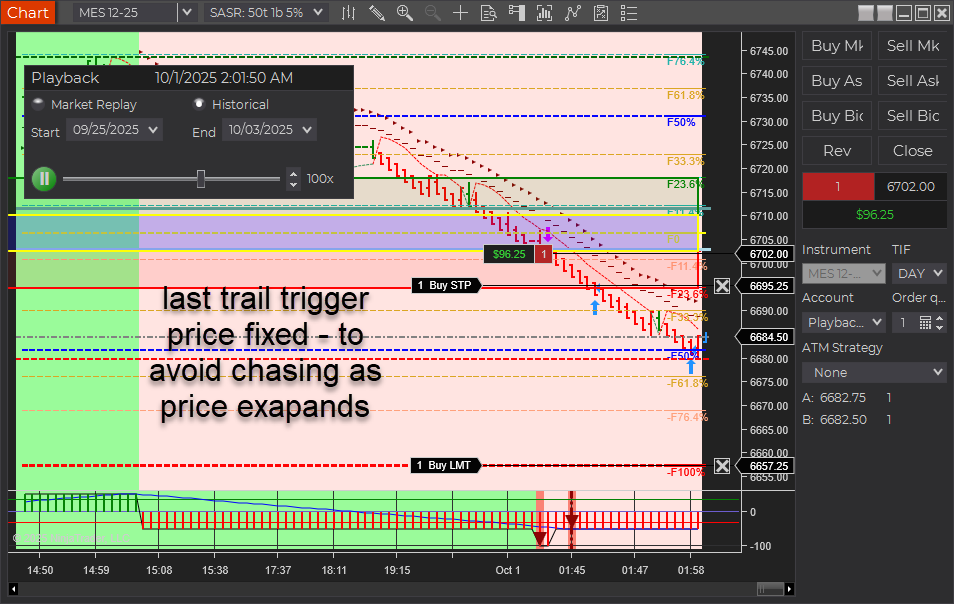
This update fixes a rare trailing-stop issue in choppy/fast markets and upgrades IntelliStop so profitable runners can breathe past 100% of the Session Fib Grid and reach 150–200% on strong moves.

Quick Summary

  • Short Trail Trigger: Fixed. Prior behavior could “chase” price and miss the trigger around the T2 (~50%) zone when USAR bands skewed wider in fast markets. Also applies to longs.
  • IntelliStop: Minimum % margin corrected and behavior refined. Trails engage noticeably above ~75% profit of a 100%-equivalent move and hold up to a ~20% offset, avoiding premature stop-ins.
  • Outcome: More consistent trails and better probability of capturing extended moves beyond 100% (e.g., 150–200% runs).
aft8 short trail last optimized triggers
aft intellistop min distance to price governor

What Was Fixed

In earlier builds, the stop trail reference included the full width of the dynamic USAR band. During choppy/fast conditions, the band could expand, causing the trail trigger to drift from the intended target area. Practically, this showed up around the T2 target (~50%) region stretching out toward 60%+, so the trail often didn’t trigger in time. This behavior affected both short and long positions. The new logic decouples the trigger from that skew so it fires reliably.

IntelliStop: Smarter Trailing Behavior

  • Minimum % Margin Fix: Ensures the trail doesn’t crash into price when profit accelerates.
  • Engages Above ~75% Profit: On a 100% Fib Grid–equivalent move, the IntelliStop now trails in noticeably above ~75%, not earlier.
  • Holds a ~20% Offset: The trail will maintain up to ~20% distance from current price, allowing healthy continuation through 100% and into 150–200% extensions when momentum persists.
Why this matters: Early, overly tight trails frequently cut winners short. This refinement keeps risk contained while letting strong trends do the work.

Trader Impact

  • Consistency: Trails trigger as expected in volatile/choppy phases.
  • Profit Capture: Higher odds of catching extended runs beyond the 100% level.
  • Smoother Management: Less micromanagement needed during fast markets.

Behavior Example

Before: In a fast, two-sided session, the USAR band widens. The short trail “chases” the expanding band near T2 (~50%), drifting toward 60%+ and failing to arm the trail in time.

Now: The trigger is stable. Once profit reaches ~75% of a 100% move, IntelliStop begins to trail with breathing room (up to ~20% offset), often letting the position push through 100% and into 150–200% when trend pressure continues.

Changelog (2025.10.3.1)

  • Fix: Short trail trigger corrected for dynamic USAR band skew (also improves longs).
  • Fix: IntelliStop minimum % margin and trail engagement logic refined.
  • Improve: Trailing offset behavior capped (~20%) to avoid price collision while preserving extension potential.

Update Notes

  • Recommended: Restart NinjaTrader after installing the update.
  • Best practice: Verify your stop/target templates and instrument tick sizes are correct for your account and prop-firm rules.
  • Reminder: Settings and methods are for educational purposes. Markets carry risk; trade your plan.

Disclaimer

Trading futures and derivatives involves substantial risk and is not suitable for every investor. Performance is not guaranteed. Examples are for illustration only and are not financial advice. Use proper risk controls and follow your prop firm or broker rules.

Filed Under: AFT8, automated futures trading, fully automated trading system, NinjaTrader 8 Tagged With: AFT8, AFT8 Release, AFT8 update, aft8release, AFT8Update, ninjatrader automated trading systems


🚀 Get Started 100% FREE!

Does ATS Offer Prop Trading Systems?

August 16, 2025 by Tom Leeson

Does ATS Offer Prop Trading Systems, which settings are best for trading prop, which package to buy?

Short answer: Yes. ATS delivers proprietary, proven hybrid automated trading systems that are purpose-built for prop trading—created by real-deal traders for real-deal traders.

Why ATS is suitable for Prop Trading.

  • Minimal drawdown: Protect funded accounts with risk-aware tools.
  • Maximum profit potential: Systems engineered to capture high-quality setups.
  • Reduced emotion: Rule-based automation enforces discipline and consistency.
  • Proprietary technology: ATS is built on unique, field-tested systems not available anywhere else.
  • Trader community: Meet and learn from successful, proven performers in the VIP Group with AI Co-Pilot support.

The hybrid approach lets you combine manual discretion with automation for entries and management—ideal for navigating prop firm rules while maintaining control and accuracy.

Recommended Path & Settings for Prop Trading.

The best way to dial in settings is to join the Zero to Hero group and progress in live markets through three stages:

  1. Manual: Learn signal recognition and clean execution.
  2. Semi-Automated: Use assisted entries to boost consistency.
  3. Automated: Apply trade management and scaling rules systematically.

Once you grasp the workflow—signal → entry → management—you can tweak the turnkey baseline settings to fit your personal trade plan and prop firm constraints.

VIP Traders receive direct settings assistance and benefit from connecting with proven traders who are already performing successfully.

Best ATS Package for Prop Trading.

  • Trading E-Mini Micro Futures → ATS Premium Universal.
    Includes everything needed to trade micro contracts in a prop environment.
  • Trading E-Mini Futures → ATS Ultimate Universal.
    Full suite of proprietary tools, licensed for use on up to 2 PCs.
  • Get a 7-day full trial to start with and decide if it resonates for you!

Payment options: Monthly, annual, or one-time lifetime license. See AFT Pricing for details

Key Notes for Prop Traders

  • Proven proprietary systems: ATS is designed and battle-tested by real traders, for real traders.
  • Hybrid is king: Combine human oversight with automation for the best balance of control and accuracy.
  • Baseline → Personalization: Start with turnkey baselines, then adapt to your risk model and prop rules.
  • Trader community advantage: VIP members gain insights and support directly from consistently performing traders.

Get Started

Ready to trade with discipline and consistency? Join the Zero to Hero group, connect with the VIP Trading Group of successful, proven performers, and choose the ATS package that matches your instrument size.

In short: ATS is a proprietary, proven system built by real traders for real traders. With hybrid automation, VIP mentorship, and tailored packages, it’s an excellent choice for prop trading success.

Filed Under: AFT8, ninjatrader automated trading, prop firm trading Tagged With: AFT8, automated futures trading, best automated futures trading software, Hybrid Automated Trading Systems


🚀 Get Started 100% FREE!

AFT8 version 2025.2.4.1 update released prior AFT8 versions expire in 7 days

February 3, 2025 by AFT

AFT8 version 2025.2.4.1 installer

AFT8 Version 2025.2.4.1 Update Released

Please note:

  • This is an emergency release to resolve some threading issues with the AWT API link. The loading of historical data affected some machines, but not all.
  • The AWT 150 indicator is disabled in this version.
  • License rules now enforced

Prior Version 2024.6

  • If you are still on the old version 2024.6, this version adds new functions and features and is slicker and smoother.
  • The prior version will expire on Sunday, 9th, and will auto shutdown NT8 on startup to install the new version.

More details will be released and available in the Discord group.

1) Upgrade from Your Existing Downloads

  1. Close down NinjaTrader.
  2. Go to your downloads folder: “Downloads\AlgoTradingSystems”.
  3. Locate and run the setup installer: AlgoFuturesTrader8-Installer-Setup.
  4. This will get the latest version from the cloud and install it correctly, as long as your NinjaTrader path has not changed.
  5. Start NT8 and open the workspace as usual.

2) ATS Account Downloads

  • Log in to your account and view downloads here: https://account.algotradingsystems.net/Secure/Downloads
  • Download and run the primary installer: AlgoFuturesTrader8-Installer-Setup.

3) AFT8 Update Pop-Up

  • Wait for a pop-up and click install.

Any Issues? Please Contact Us at the Help Desk!

  • https://algotradingsystems.net/Help

Subscription Upgrades!

  • Buy Now, Pay Later: ATS works with Affirm and Klarna, offering interest-free installment payment plans—available on annual and one-time lifetime licenses.
  • Limited Slots Available: Subscribers affected are invited to upgrade and get a discounted slot to become a VIP Full Member.

Trader Success Team!
To get more information on pricing and payment methods, simply book a FREE pricing discovery meeting with Trader Success VIP with no obligation to purchase!
👉 TO Book Your Spot CLICK HERE!

Filed Under: Algo Futures Trader, NinjaTrader 8 Tagged With: AFT8, AFT8 update, AFT8Update


🚀 Get Started 100% FREE!

  • 1
  • 2
  • 3
  • 4
  • Next Page »

Help & Information

  • ninjatrader automated trading
  • Automated Trading Systems
  • Support Center
  • Help Desk Articles
  • Trading Group & Forum
  • Videos

Recent Posts

  • A Guide to Trading a $50K Futures Prop-Firm Account
  • The Best Path to Getting Funded Trading Futures
  • AFT8 Performance Tweaks for NinjaTrader 8.1.7
  • AFT Lifetime (One-Time Purchase) License Terms Updated
  • ATS Futures Trading Group Rebooted!
  • Facebook
  • RSS
  • Twitter
  • YouTube


  • NinjaTrader Automated Trading
  • automated futures trading
  • automated trading systems
  • Day Trading Futures
  • Get Started Day Trading Futures
  • VIP Trading Group Live Market Trade Along
  • Secret to Day trading futures success
  • AFT8 for NinjaTrader 8
  • Futures Algo Trading Systems
  • Market News
  • NinjaTrader Free Trading Platform
  • Legal Notices
  • AFT Legal Info
  • Terms
  • FULL RISK DISCLOSURE
  • Privacy Policy
  • Cookie Usage
  • About AlgoFuturesTrader
  • Connect to AFT
  • Blog
  • Videos
  • Support
  • Contact
  • My account
  • Sitemap
  • Affiliates

Ninja Futures Trading
Algo Futures Trader Copyright Algo Trading Systems© 2026 ·
AlgoFuturesTrader.com is owned & operated by Algo Trading Systems LLC. By using this website or products & services, you are bound by our Terms & subject to US legal jurisdiction only. Errors & omissions excluded.
AFT made in England, powered by MicroTrends NinjaTrader development

Disclaimer: Trading & investment carry a high level of risk. AlgoFuturesTrader does not make recommendations for buying or selling any financial instruments, nor do we offer trading or investment advice. We are a software company, and we only provide educational information on ways to use our sophisticated Algo Futures trading tools. It is up to our customers & readers to make their own trading & investment decisions, or consult with a registered investment advisor.

Risk Disclosure: Futures, CFDs, & forex trading carry substantial risk and are not suitable for every investor. An investor could potentially lose all or more than the initial investment. Risk capital is money that can be lost without jeopardizing one's financial security or lifestyle. Only risk capital should be used for trading, and only those with sufficient risk capital should consider trading. Past performance is not necessarily indicative of future results. Please read the full risk disclosure here.

Hypothetical performance results have many inherent limitations, some of which are described below. No representation is made that any account will or is likely to achieve profits or losses similar to those shown. In fact, there are frequently sharp differences between hypothetical performance results and the actual results subsequently achieved by any particular trading program. One of the limitations of hypothetical performance results is that they are generally prepared with the benefit of hindsight. In addition, hypothetical trading does not involve financial risk, and no hypothetical trading record can completely account for the impact of financial risk in actual trading. For example, the ability to withstand losses or adhere to a particular trading program despite trading losses are material points that can adversely affect actual trading results. Numerous other factors related to the markets or the implementation of any specific trading program cannot be fully accounted for in the preparation of hypothetical performance results and can adversely affect trading results.

Testimonials appearing on this website may not be representative of other clients or customers and are not a guarantee of future performance or success.

NinjaTrader® is a registered trademark of NinjaTrader Group, LLC. No NinjaTrader company has any affiliation with the owner, developer, or provider of the products or services described herein, nor do they endorse, recommend, or approve any such product or service.

We use cookies on our website to give you the most relevant experience by remembering your preferences and repeat visits. By clicking “Accept All”, you consent to the use of ALL the cookies. However, you may visit "Cookie Settings" to provide a controlled consent.
Cookie SettingsAccept All
Manage consent

Privacy Overview

This website uses cookies to improve your experience while you navigate through the website. Out of these, the cookies that are categorized as necessary are stored on your browser as they are essential for the working of basic functionalities of the website. We also use third-party cookies that help us analyze and understand how you use this website. These cookies will be stored in your browser only with your consent. You also have the option to opt-out of these cookies. But opting out of some of these cookies may affect your browsing experience.
Necessary
Always Enabled
Necessary cookies are absolutely essential for the website to function properly. These cookies ensure basic functionalities and security features of the website, anonymously.
CookieDurationDescription
cookielawinfo-checkbox-analytics11 monthsThis cookie is set by GDPR Cookie Consent plugin. The cookie is used to store the user consent for the cookies in the category "Analytics".
cookielawinfo-checkbox-functional11 monthsThe cookie is set by GDPR cookie consent to record the user consent for the cookies in the category "Functional".
cookielawinfo-checkbox-necessary11 monthsThis cookie is set by GDPR Cookie Consent plugin. The cookies is used to store the user consent for the cookies in the category "Necessary".
cookielawinfo-checkbox-others11 monthsThis cookie is set by GDPR Cookie Consent plugin. The cookie is used to store the user consent for the cookies in the category "Other.
cookielawinfo-checkbox-performance11 monthsThis cookie is set by GDPR Cookie Consent plugin. The cookie is used to store the user consent for the cookies in the category "Performance".
viewed_cookie_policy11 monthsThe cookie is set by the GDPR Cookie Consent plugin and is used to store whether or not user has consented to the use of cookies. It does not store any personal data.
Functional
Functional cookies help to perform certain functionalities like sharing the content of the website on social media platforms, collect feedbacks, and other third-party features.
Performance
Performance cookies are used to understand and analyze the key performance indexes of the website which helps in delivering a better user experience for the visitors.
Analytics
Analytical cookies are used to understand how visitors interact with the website. These cookies help provide information on metrics the number of visitors, bounce rate, traffic source, etc.
Advertisement
Advertisement cookies are used to provide visitors with relevant ads and marketing campaigns. These cookies track visitors across websites and collect information to provide customized ads.
Others
Other uncategorized cookies are those that are being analyzed and have not been classified into a category as yet.
SAVE & ACCEPT