NinjaTrader Automated Trading by Algo Futures Trader

hybrid algorithmic automated futures trading for prop firm traders, day & swing traders

🚀 Get Started 🔴LIVE
  • 🚀Get Started
  • NinjaTrader
  • Get Funded
  • Trading Servers
  • Pricing
  • blog
  • Help

AFT8 Update release v20230524

May 24, 2023 by AFT

Algo Trading System AFT8 automated day trading and swing trading server
Algo Trading Systems AFT8

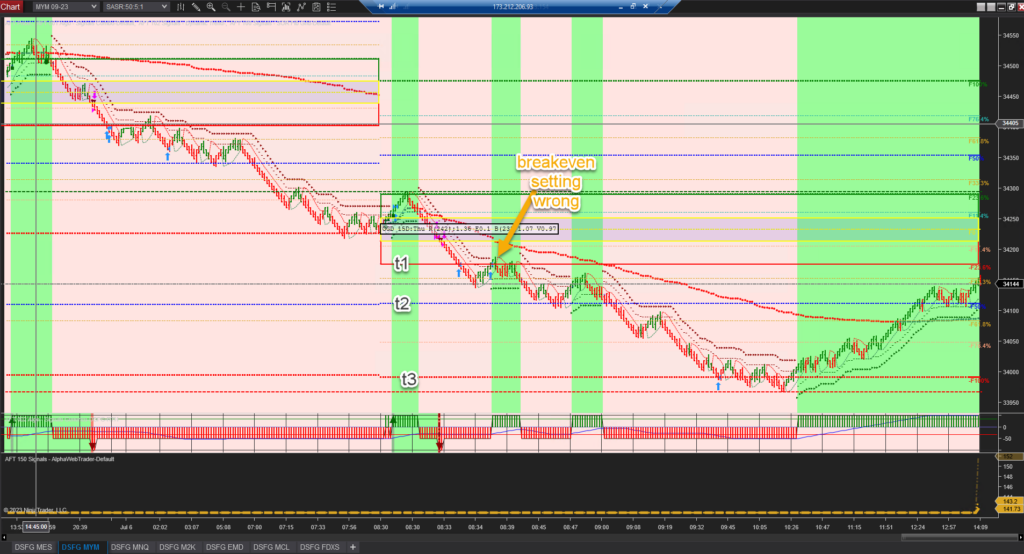
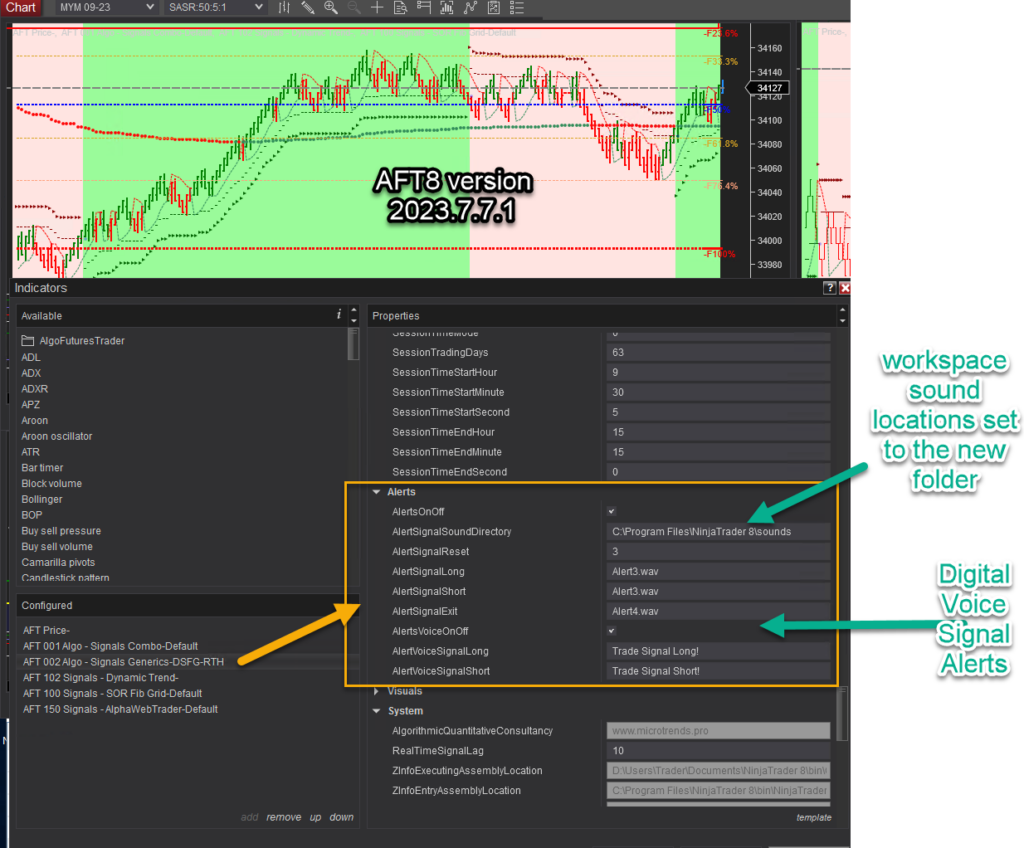
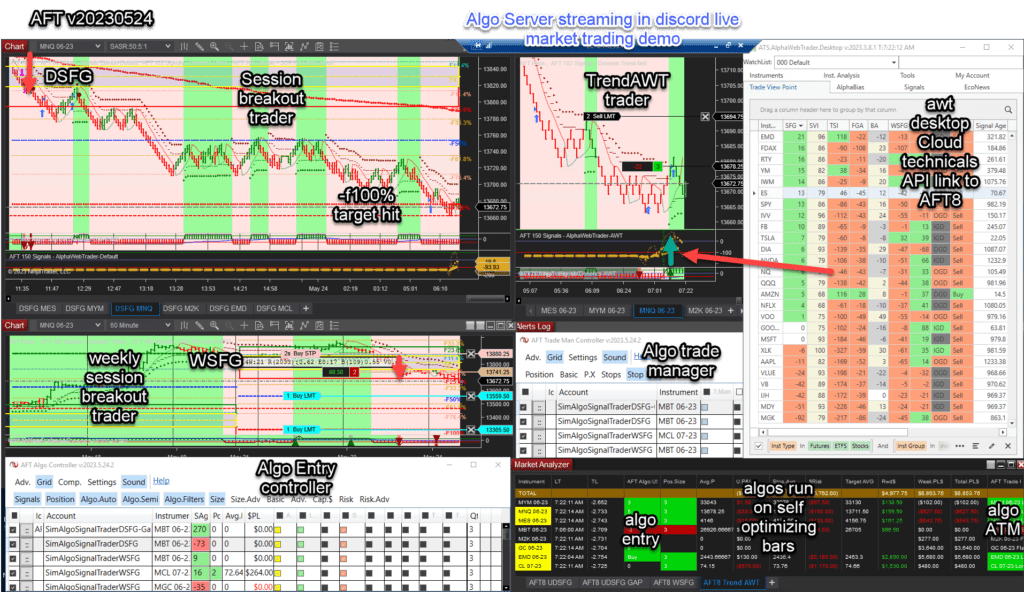
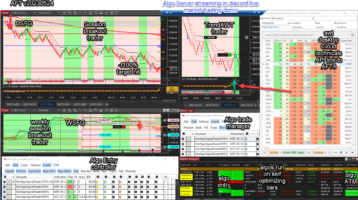
AFT8 Update Released: AFT8 Version 2023.5.24.2 This version is running on the algo server in soak test mode—no filters, all signals 100% fully active with a variety of modes. It is operating in the live market as shown in the attached image in the futures trading group.

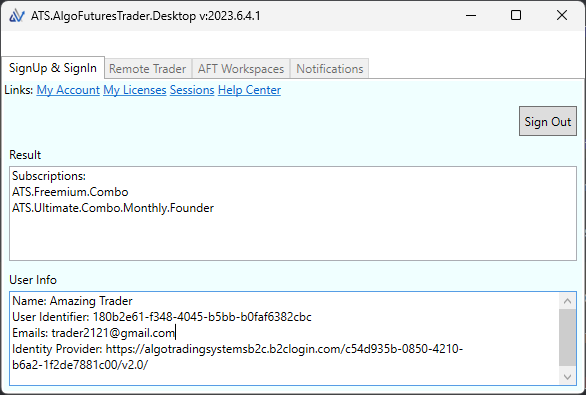
Note on Version Info: This is the last planned release before the official release. We need to assess feedback from users prior to rolling out the official RC1 version. So far, we are moving forward unless someone provides feedback with a showstopper. The RC1 update, likely to follow this release next week, will include a login and ATS Desktop Control Center. The plan is to combine all the AFT, AWT, and AST into one control center, replacing the AWT Desktop. This will allow one login for both web and desktop applications.

Updating: You can simply run the same installer in your downloads folder or get it again from the trading system downloads page. This installer never changes; its job is to get the latest AFT8 version from the cloud and install it. Once you have it, you don’t need to download it again. AFT8 App updates will also pop up a notification and allow in-place installation on your PC, assuming there is no overzealous antivirus running to block it.

Notes:
System Turnkey Workspaces will be overwritten.
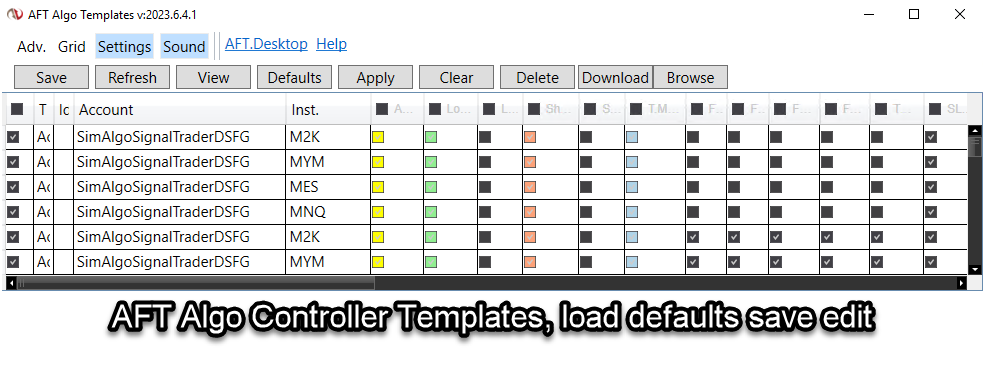
System Settings and templates.
N.B: This is why you need to rename your templates/workspaces to preserve your settings.

AFT8 Changes

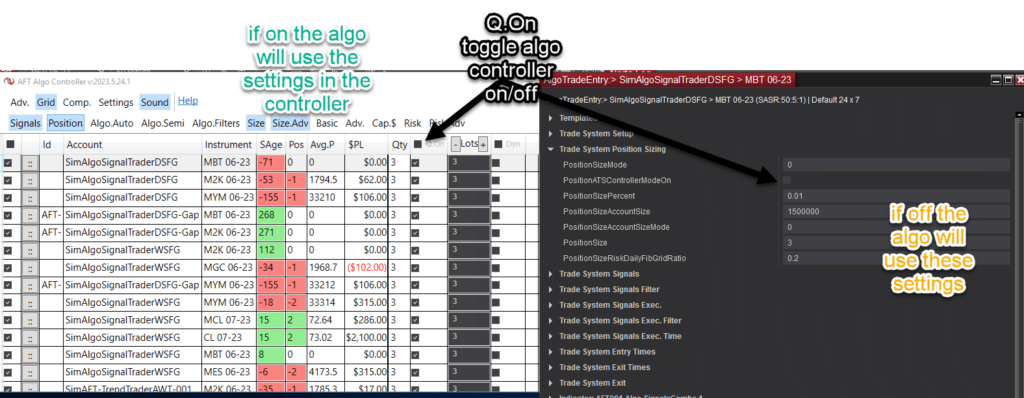
AFT8 Algo Trade Entry Position Sizer
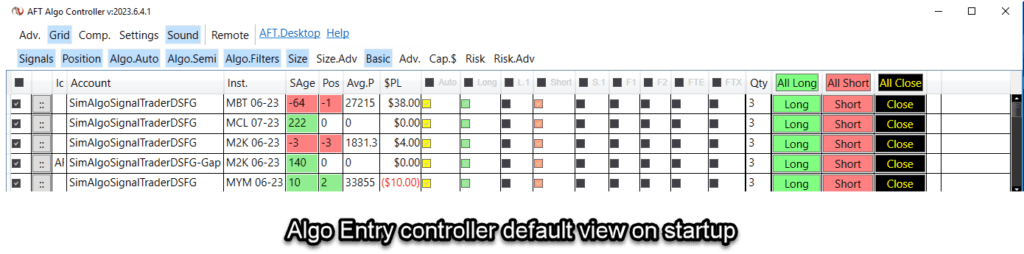
Inline CheckBox for Algo Entry module controller for Position Sizing toggle On/Off for real-time settings.
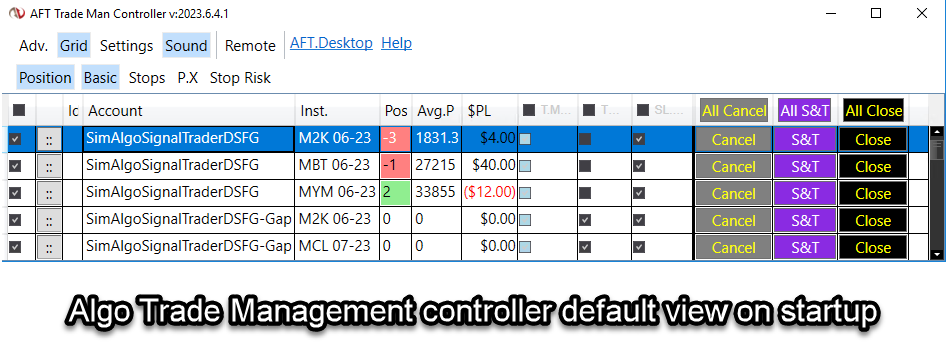
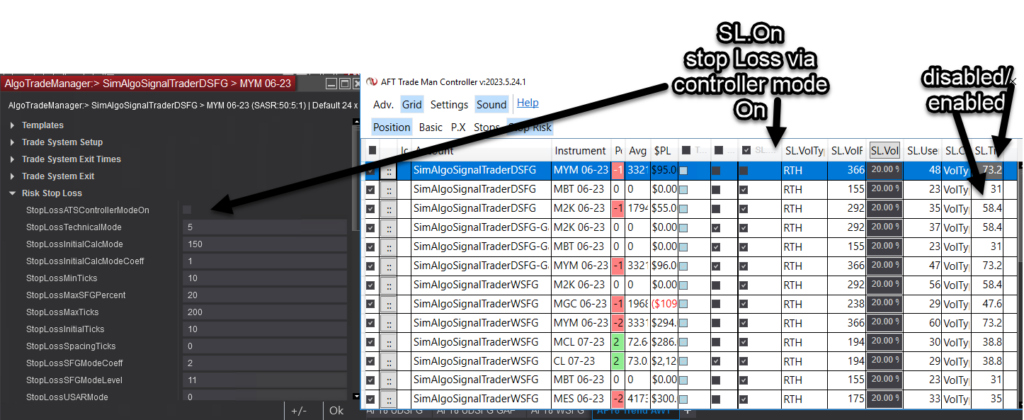
AFT8 Algo Trade Manager Stop Risk Control
Trade Management Control Center – Control for stops and position size quantity. On for Controller, off for algo module control as configured.
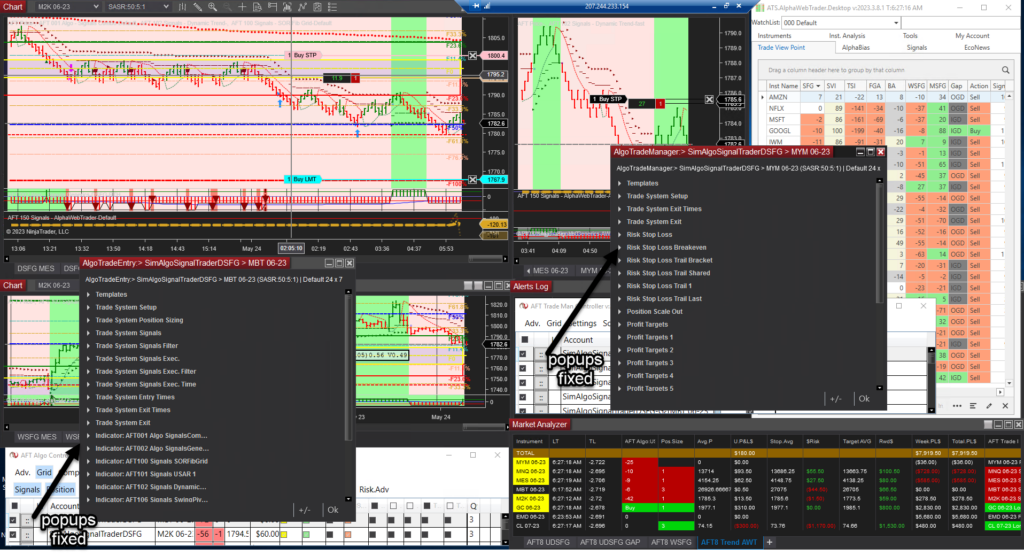
AFT Algo Controller Settings Popup
Popup fixes for settings from inline control center—caveats: it will go where the OS wants it.

Filed Under: AFT8, Algo Futures Trader, NinjaTrader 8 Tagged With: AFT8 Release, AFT8 update, aft8release, AFT8Update, Release, Updates


🚀 Get Started 100% FREE!

AFT8 Update release v20230522

May 22, 2023 by AFT

Automated trading system controllers

AFT8 Update Released: AFT8 Version 2023.5.22.1.
This is the last planned release before the official release. We need to assess feedback from users prior to rolling out the official RC1 version. Download AFT8 here

AFT8 Update Screenshot

Notes:
1) Workspaces were pruned down to make it easier, and templates are “lite” by default via removal of high-intensity CPU memory market grid for trendometer. The two tested working turnkey workspaces are: Turnkey Workspaces – semi/fully modes can be implemented.
Baseline versions for manual, semi-auto hybrid trading, and fully automated testing/tweaking to your tailor-fitted versions.
a) AFT8-SFG Breakout Trader-0000A – multi-time frame view, one instrument.
b) AFT8-SFG Breakout Trader-0000B – most popular four instrument view.
c) AFT8-Trend-Scalper-1000A – Proof of Concept version requires manual semi/auto hybrid use only, multi-time frame – this would probably benefit from the AWT API link in time.

AFT8 Workspace Screenshot

2) Algo entry and Algo trade manager were split into two parts – this allows one or many algos on the same account and instrument, and one or many trade managers on one account instrument, allowing quick switching of modes of use or blending combinations and rules.

Algo Entry and Trade Manager

3) The Keltner FibGrid – we evolved a classic by combining our proprietary “Fib Grid” into a Keltner band so the grid is moving and anchored to the mid band. This can be seen in workspace “AFT8-Trend-Scalper-1000A”. For those traders experienced with divergence, you can see some setups at the extremes as well as other patterns and trend bias filtering.

Keltner FibGrid Screenshot

4) Trade Manager – the trailing stops have been reworked so that lastTrailstop has the same parameters available as the initial trailing stop. Also, the layout and grouping have been reworked, plus additional functions for exits and filter control from the algo controller GUI in real-time.

Filed Under: AFT8, Algo Futures Trader, NinjaTrader 8 Tagged With: AFT8 Release, AFT8 update, aft8release, AFT8Update, Release, Updates


🚀 Get Started 100% FREE!

Session Fib Grid Trend Power bias and Signal Age explained

October 21, 2022 by AFT

USAR Trend Bias and Signal Age

So, what are these numbers and where do they come from?

AFT8 TrendOmeter Grid
AFT8 TrendOmeter Grid for the NinjaTrader desktop trading platform – multi-session, multi-timeframe technicals, and trend correlations.
  • Fib Grid is a map/contextual view of the market, with price normalized as a percentage. This is an adaptive formula computed at the session start. Price moves within the grid, which is static all session. 0% is the open, F100% is the projected high, and -F100% is the projected low.
  • Trend Bias Power is a non-lagging real-time expression of the current trend/force. It is a volatility dynamic calculation on each market data change. Price moves within the grid of bands during the bar – 0% is the band, 100% is the outer volatility bands.
  • Signal Age marks when the trend began and if it’s valid or invalid, also known as a “black hole.”

TrendOmeter runs in the NT8 market analyzer and is aimed at high-spec, low-latency gaming desktop PCs and laptops, as it will lag up NinjaTrader 8 and slow down data processing on the system. AFT comes with lite workspaces to avoid this issue, and users can also use the AWT TrendOmeter system, which is lag-free and is a far more sophisticated system for web, desktop, and mobile. AFT8 will link via an API to AWT to allow filtering and signals off AWT.

Alpha Web Trader - TrendOmeter
Alpha Web Trader – TrendOmeter provides a lag-free aggregated instrument and multi-timeframe vertical and horizontal view of the market.
AlphaBias
https://alphawebtrader.com/alphabias shows the trend bias power and the Signal Age view in one screen.

AWT Advanced TrendOmeter is lag-free and will not slow down the PC or NinjaTrader. https://alphawebtrader.com/trendometer TrendOmeter here is showing 13 timeframes using Trend Bias Power. These timeframes are actually aggregations of related instruments and other timeframes combined from around 25 time series and different measurement studies. It is a pivot of the AlphaBias view: https://alphawebtrader.com/alphabias. AWT aggregates instruments such as SPY, VOO, IVV into one stream and aggregates the technicals for TrendOmeter and AlphaBias, so it would use the parent instrument, e.g., SPY, as the display. ES, SP, MES, for example. AWT also uses its own data stream and analytics engine, so it’s roughly equivalent to what you can see in AFT but never exact. AWT shows us breadth and depth based on correlations.

Trend Bias Power and Signal Age
Trend Bias Power and Signal Age provide a 2D view of the trend. The signal age shows trend start and when the trend is invalid as a black hole.

Trend Bias Power % In the chart of the 720min with the USAR indicator, we can see the mid-band is 0%, the upper band 1 is +100%, and the lower band 1 is -100%. Price moves from the mid-band out, so we can normalize price as a percentage. The bands are volatility intervals from the band, so it moves and adapts with the market price cycles of range. TSI/TA comes from this. Trend Bias Power is similar to the Fib Grid in some parts based on volatility and the relation of price within, but it is calculated and moves with the market on each bar. The Trend Bias Power % band could be any number of technical studies. Some examples typically for Moving Averages we use 20, 21, 34, 55 SMA, EMA, WMA with a 1 ATR band to define the 100% above and below -100%. For USAR, we use 1ATR, 1.25, 1.5, and 2.0 with a 1ATR volatility band to define the 100% zone. AFT8 focuses on USAR, Keltner wave, and MA Bands in the AFT8 indicators. Our measurements TA% and TSI come from Trend Bias Power.
Signal Age measures when the trend started and how old it is. SA% comes from this, etc. A black hole is where the signal, for example, is short when the trend first began, but if the trend is contra trend signal direction and it is losing, then it is an invalid trend and marked as a black hole. It could mean the system is transitioning and reversing or in a pullback. So we can focus on the confluence of winning valid trends and ignore or wait for the black holes to go green or red. A mixed view would be green, black, and red. A significant trend direction would be all one color.

Session Fib Grid
Session Fib Grid is a map of the monthly, weekly, or daily sessions with price normalized as a percentage, calculated at the start of each session and fixed.

Fib Grid is a map of the market with price normalized as a percentage, computed at the session start. Price moves within the grid. Fib Grid’s 0% stays static, whereas the Trend Bias’s 0% moves as the anchor point, typically some kind of band average moves with price. SFG uses the daily, weekly, monthly typical ranges usually above and below, but it can use different. So 0 is the open, +100 is the projected high, and -100 is the projected low. Other fib numbers are put in as intervals and no trade zone, and the rest is just statistical.

Trend Bias Power, Signal Age, and Session Fib Grid combined give a good view of the session price position and the trend flow, etc. So now we can move away from the old, stuck-in-the-mud classical lagging systems and start to build a 3D view, especially with other related instruments and order/speed, and so on. Get started 100% free until you decide with AFT Trading System.

Filed Under: AFT8, Algo Futures Trader, NinjaTrader 8 Tagged With: Session Fib Grid, Signal Age, Trend Bias Power


🚀 Get Started 100% FREE!

The fast route to start day trading micro futures

July 24, 2021 by AFT

Whether you are a free or premium user, you still need to read the guides, blogs, and videos and attend the room to understand, become conversant, and make the most of any coaching or self-learning. All the topics are covered in the guides, blog, and videos. If not, send us a question.

Start here to find the relevant information and get oriented

https://algofuturestrader.com/support/aft-quick-start-guidance/

AFT: Where to start, what to learn?

NYSE Session Breakout
Start out and focus on the session breakout system workspace. It is a perfect match for US indices futures trading 1 to 3 hours per day.

Do less, achieve more—actually learn how to trade and leverage technology like a trader and hybrid algo/Pilot and Plane relationship.

  • Learn good habits
  • Understand the price cycles and news cycles
  • Apply good risk management
  • Make a trade plan
  • Do not overtrade.
  • Select 1 to 2 instruments to trade
  • Use other instruments for correlations
  • Attend the AFT Trade Group daily for trading tips and examples with AFT Trader John

Turnkey Workspaces

  • Session Breakout rules are explained—take signals above or below the NTZ within the trade zone.
  • Trend Trading/Scalping—take signals wherever they occur, long or short, at any time your rules apply.
  • Session breakout is focused on—all other system workspaces are not supported for free and newcomers, so we will not be answering or providing guidance for them for traders in the early phases. These are only for traders who understand what they are, are proficient, and can self-assist and use them—Trend Trader/Trend Scalper, etc. Once you have mastered the basics of the AFT7 system and one methodology, you can consider the other methods and use the trading group channels to see how people are using them, etc.

Step by Step

  • Learn how to trade and learn how to leverage the different levels of automation
  • Learn when to use the system or not and to what degree of automation on which instruments.
  • Get a routine and make it a habit—retrospect, plan, execute, and evaluate

The 5-Step Basic Day Trading Approach for NYSE Session Breakout

1) Get to the desk before the open… 9 am EST or so—check news
2) Check the 4 main indices and see what happened prior… look to see what gaps are forming
3) Armed with that, if the gaps are all different or all the same, for example… GapBias
4) Look at the AlphaBias… etc. Understand the strength of the instruments going into the open to make a selection of what to trade
5) Trading 9:30 EST to around 11:30 EST, 1 to 3 signals per day—Signal + filters

Trade Entry

  • Multiple algo signals and filters—manual, semi-auto, fully auto

Trade Exits

  • Trade Man Settings
  • All settings are adaptive—use the guide to alter if desired

Testing

  • Test in replay or walk forwards real-time
  • 100% free, unlimited, risk-free on the sim or evaluation accounts

AFT8

  • Work in progress and not supported as yet

AFT7 Online Help Guides 24/7:

  • NinjaTrader 7 AFT7 Day Trading Futures System Overview of Components
  • AFT7 Session Open Breakout Trading Basics
  • AFT7 TrendOmeter Basics
  • AFT7 Stop Loss and Risk Setup
  • AFT7 How to View, Change Account, Settings and Save Your Own Templates and Workspaces
  • AFT7 How to Change the Position Lot Size
  • AFT7 Trade Management Examples

Videos:

  • https://algofuturestrader.com/algo-futures-trader-videos/

Check the Blog for Articles:

  • https://algofuturestrader.com/blog/
  • https://algofuturestrader.com/how-to-place-stop-loss-and-targets-for-day-trading-futures-with-ninjatrader-8-and-aft8/
  • https://algofuturestrader.com/automated-futures-day-trader-trend-scalper-turnkey-workspace-for-aft7/

Use the AFT Trading Group:

AFT Intro:

Please Note the AFT Support Model

  • As a free user, you will need to use the self-assisted help guides
  • As a premium user, you have a different support level

For more details, view the AFT Support Model

ATS/AFT Trading Group – for additional resources

  • Note: All users, free and premium, are welcome to the Online Trading Community Trading Group where you will also have support and education resources as well as live market trading systems, trade signals, news, and fundamentals.
  • Simply visit us here at our ATS/AFT Discord Group during NYSE trading hours.

Premium 1 to 1 Assistance
If you are struggling with the self-assisted support model, that’s fine. We offer premium packages.
For example, if you want live 1 to 1 assistance as a free user NT & Setup, then we offer these packages:
https://algofuturestrader.com/product/remote-assistance-support/
https://algofuturestrader.com/product/aft-get-started-trading/

Filed Under: Algo Futures Trader, ATS Trading Community, NinjaTrader 7, NinjaTrader 8 Tagged With: AFT, day trading micro futures


🚀 Get Started 100% FREE!

AFT memorial day sale 25% off lifetime licenses for AFT7 and AFT8

May 31, 2021 by AFT

Simply enter this coupon MDAY25% at checkout, and you will receive 25% off the Premium or Ultimate lifetime deals. Please note the offer lasts for two weeks and expires on April 11th. Both the Premium and Ultimate packages include AFT7 for NinjaTrader 7 and AFT8 for NinjaTrader 8. You can lock in a discount now for a lifetime license, which includes the full versions of AFT7 and AFT8 when they are released in stages this year. Compare pricing for more details and view the license information for free, Premium & Ultimate versions of AFT.

[products tag=”AFT Lifetime License”]

Plug and Trade – Turnkey Trading Systems for day trading futures

Simply Install, Connect. Learn and practice with ready to use turnkey settings and workspaces for Session Open Breakout trading and Trend Trading reversal and pullback continuation trading. Start NinjaTrader, connect to a futures data feed & open an AFT Turnkey workspace, the trading systems will appear on chart and are ready for simulator trading micro equity Index futures.
  1. Get NinjaTrader & a datafeed
  2. Download & install AFT
  3. Get started day trading with AFT
 

Filed Under: Algo Futures Trader, NinjaTrader 7, NinjaTrader 8 Tagged With: AFT Lifetime License Sale, AFT7, AFT8


🚀 Get Started 100% FREE!

What’s next with the AFT8 update?

April 23, 2021 by AFT

USAR WSFG swing trade fully automated no manual trading interaction ES

With regret, as the sole creator and developer of AFT8, I have to inform you that I was out for the count for two weeks with a fever and a throaty cough. I’m not sure if it was COVID or the flu, so I made no progress at all on the AFT8 update since the last version in mid-March. However, I am glad to say I am pretty much recovered, except for lingering lethargy, and have been coding again.

AFT8 is still in beta and has a long way to go before all the planned features are released. It will be worth the wait; it needs to be as it’s going to be my main retail account trader. There will be updates to the AFT8 system starting next week, including fixing a bug to save settings on the main signals indicator, an ease-of-use feature for configuration, and some inclusions of swing trading/weekly fib grid trading features in the turnkey workspaces. Here’s why.

The AFT retail day trading version of the software came from a much larger swing trading multi-server, client/server n-tier, SOA, cloud-based system with NT8 at its core, providing the awesome technicals, execution, and trade management. AFT contains a small subset of the functionality but exactly enough for the algo premise and capability for day trading and some swing trading, with user interactivity for many of the tasks. The hedge fund system will cost you 50K USD plus fees and data server overheads per annum to use. AFT retail starts at free. The following will give you some idea about the two versions.

During my absence, the CPC/AFT Hedge fund systems continued to work even though the developer algo trader was not in attendance. The servers restarted each weekend via Windows Task Scheduler and updated themselves. NT8 is then started, and historical data is downloaded each week and replicated out from a main server to other servers to negate the need to download again.

With the full hedge fund version, there is no need for a user at all, except for rollovers and in emergencies or system selection. It is 100% fully automated trading in the real sense, and I am not allowed, even if I want to, to intervene. Not allowed to enter or close a trade, move a target, or trail a stop, so we get a pure dataset of stats. Sometimes it means there were trades I would not have done, but sometimes it does incredible trades that were far better than me. Over time, it works, and that is the goal.

A hedge fund’s performance has to be measurable to something tangible and risk control also, so removing all humans is the ideal way to do it, as a human is hard to backtest and benchmark. They get sick too or move jobs. So when I’m talking fully automated, it’s big trade accounts and no fiddling or making it up as you go. All the systems that make it to live from the thousands that don’t go through system selection, board approval, and compliance for annual auditing—no pressure 🙂

AFT retail traders benefit from a hybrid feature set to allow fully as well as manual/semi-automated trading, which is really very important for retail day trading as it is less forgiving than swing trading. AFT benefits from many years and many hundreds of thousands of USD of research and development and real trading of the systems professionally in automated swing trading. They end up as much as possible as turnkey for day trading with minimal tweaking required.

CPC/AFT algos for the hedge fund start on a Sunday. The week begins, the Windows Task Scheduler process will start NT8 in time to trade the CME open for indices, connecting to various data feeds in turn for each exchange and feed. Then it loads the workspaces and loads the algos and starts them, a mix of sim and live. For each system, each algo will inspect orders and remove any anomalies within NinjaTrader, then process the positions and orders, risk, and technical context, and continue trading where it left off, adapting to any changes and implementing fault tolerance and safety.

Technically, the CPC/AFT algos are part of a greater system—a signals framework, execution management system (EMS), order management system (OMS), position and trade management, rollover liquidation, data acquisition, automated web stats collation and reporting system, and automatic trade safety system and more besides—evolved in NinjaTrader and .NET, .NET Core, ASP.NET Core, MSSQL, and Azure Service Bus, created over a four-year period.

It is quite incredible what we have achieved with the technology directly due to the amazing work of the NinjaTrader development team to allow us access to all areas to create what we want, limited by imagination and skill only. So in short, even though the developer was away and useless, the system continued onwards fully automated regardless, so no trades were missed and no one goofed things up with under-par irrational decision-making.

In my absence, here is a pretty good trade example of the CPC/AFT Weekly Swing trading algo, which took up to the high last week, 2021-April-16. Now reversed and closed into a small short this week—10K per lot was the MFE trading Emini S&P—just with a 4 lot trade of about 5K to $7500 risk on that volatility. It could have been a lot more based on the past and recent times, but it’s still a respect-worthy demonstration of what we can achieve with the toolset.

USAR WSFG swing trade fully automated no manual trading interaction ES

We will provide this WSFG weekly setup as part of AFT8 turnkey settings for micro indices and Emini so that traders can use it as a guide for intraday or indeed take the weekly SFG Signals.

As you can see, yes, this is a live trade. Note that the chart trader is black and the account does not begin with Sim. We really do trade, and we really do use these tools. The AFT day trading system is a version built for small account trading based on the professional hedge fund trading for which it was originally created. So the day trading version is basically a daily session breakout instead of weekly for swing trading. You can also see the power of the risk-reward in action on this type of system and the staying in trend-following method.

AFT8 is available in the shop as a free product AFT8 Free Trading System or available from the AFT download page. Articles and videos will follow on installation but should be very simple if you can use a mouse and PC and get around any AV warnings, etc. Please visit the support and help desk.

Plug and Trade – Turnkey Trading Systems for day trading futures

Simply Install, Connect. Learn and practice with ready to use turnkey settings and workspaces for Session Open Breakout trading and Trend Trading reversal and pullback continuation trading. Start NinjaTrader, connect to a futures data feed & open an AFT Turnkey workspace, the trading systems will appear on chart and are ready for simulator trading micro equity Index futures.

  1. Get NinjaTrader & a datafeed
  2. Download & install AFT
  3. Get started day trading with AFT


Filed Under: AFT8, Algo Futures Trader, NinjaTrader 8 Tagged With: AFT8, AFT8 update, NinjaTrader 8


🚀 Get Started 100% FREE!

  • « Previous Page
  • 1
  • …
  • 7
  • 8
  • 9
  • 10
  • Next Page »

Help & Information

  • ninjatrader automated trading
  • Automated Trading Systems
  • Support Center
  • Help Desk Articles
  • Trading Group & Forum
  • Videos

Recent Posts

  • A Guide to Trading a $50K Futures Prop-Firm Account
  • The Best Path to Getting Funded Trading Futures
  • AFT8 Performance Tweaks for NinjaTrader 8.1.7
  • AFT Lifetime (One-Time Purchase) License Terms Updated
  • ATS Futures Trading Group Rebooted!
  • Facebook
  • RSS
  • Twitter
  • YouTube


  • NinjaTrader Automated Trading
  • automated futures trading
  • automated trading systems
  • Day Trading Futures
  • Get Started Day Trading Futures
  • VIP Trading Group Live Market Trade Along
  • Secret to Day trading futures success
  • AFT8 for NinjaTrader 8
  • Futures Algo Trading Systems
  • Market News
  • NinjaTrader Free Trading Platform
  • Legal Notices
  • AFT Legal Info
  • Terms
  • FULL RISK DISCLOSURE
  • Privacy Policy
  • Cookie Usage
  • About AlgoFuturesTrader
  • Connect to AFT
  • Blog
  • Videos
  • Support
  • Contact
  • My account
  • Sitemap
  • Affiliates

Ninja Futures Trading
Algo Futures Trader Copyright Algo Trading Systems© 2026 ·
AlgoFuturesTrader.com is owned & operated by Algo Trading Systems LLC. By using this website or products & services, you are bound by our Terms & subject to US legal jurisdiction only. Errors & omissions excluded.
AFT made in England, powered by MicroTrends NinjaTrader development

Disclaimer: Trading & investment carry a high level of risk. AlgoFuturesTrader does not make recommendations for buying or selling any financial instruments, nor do we offer trading or investment advice. We are a software company, and we only provide educational information on ways to use our sophisticated Algo Futures trading tools. It is up to our customers & readers to make their own trading & investment decisions, or consult with a registered investment advisor.

Risk Disclosure: Futures, CFDs, & forex trading carry substantial risk and are not suitable for every investor. An investor could potentially lose all or more than the initial investment. Risk capital is money that can be lost without jeopardizing one's financial security or lifestyle. Only risk capital should be used for trading, and only those with sufficient risk capital should consider trading. Past performance is not necessarily indicative of future results. Please read the full risk disclosure here.

Hypothetical performance results have many inherent limitations, some of which are described below. No representation is made that any account will or is likely to achieve profits or losses similar to those shown. In fact, there are frequently sharp differences between hypothetical performance results and the actual results subsequently achieved by any particular trading program. One of the limitations of hypothetical performance results is that they are generally prepared with the benefit of hindsight. In addition, hypothetical trading does not involve financial risk, and no hypothetical trading record can completely account for the impact of financial risk in actual trading. For example, the ability to withstand losses or adhere to a particular trading program despite trading losses are material points that can adversely affect actual trading results. Numerous other factors related to the markets or the implementation of any specific trading program cannot be fully accounted for in the preparation of hypothetical performance results and can adversely affect trading results.

Testimonials appearing on this website may not be representative of other clients or customers and are not a guarantee of future performance or success.

NinjaTrader® is a registered trademark of NinjaTrader Group, LLC. No NinjaTrader company has any affiliation with the owner, developer, or provider of the products or services described herein, nor do they endorse, recommend, or approve any such product or service.

We use cookies on our website to give you the most relevant experience by remembering your preferences and repeat visits. By clicking “Accept All”, you consent to the use of ALL the cookies. However, you may visit "Cookie Settings" to provide a controlled consent.
Cookie SettingsAccept All
Manage consent

Privacy Overview

This website uses cookies to improve your experience while you navigate through the website. Out of these, the cookies that are categorized as necessary are stored on your browser as they are essential for the working of basic functionalities of the website. We also use third-party cookies that help us analyze and understand how you use this website. These cookies will be stored in your browser only with your consent. You also have the option to opt-out of these cookies. But opting out of some of these cookies may affect your browsing experience.
Necessary
Always Enabled
Necessary cookies are absolutely essential for the website to function properly. These cookies ensure basic functionalities and security features of the website, anonymously.
CookieDurationDescription
cookielawinfo-checkbox-analytics11 monthsThis cookie is set by GDPR Cookie Consent plugin. The cookie is used to store the user consent for the cookies in the category "Analytics".
cookielawinfo-checkbox-functional11 monthsThe cookie is set by GDPR cookie consent to record the user consent for the cookies in the category "Functional".
cookielawinfo-checkbox-necessary11 monthsThis cookie is set by GDPR Cookie Consent plugin. The cookies is used to store the user consent for the cookies in the category "Necessary".
cookielawinfo-checkbox-others11 monthsThis cookie is set by GDPR Cookie Consent plugin. The cookie is used to store the user consent for the cookies in the category "Other.
cookielawinfo-checkbox-performance11 monthsThis cookie is set by GDPR Cookie Consent plugin. The cookie is used to store the user consent for the cookies in the category "Performance".
viewed_cookie_policy11 monthsThe cookie is set by the GDPR Cookie Consent plugin and is used to store whether or not user has consented to the use of cookies. It does not store any personal data.
Functional
Functional cookies help to perform certain functionalities like sharing the content of the website on social media platforms, collect feedbacks, and other third-party features.
Performance
Performance cookies are used to understand and analyze the key performance indexes of the website which helps in delivering a better user experience for the visitors.
Analytics
Analytical cookies are used to understand how visitors interact with the website. These cookies help provide information on metrics the number of visitors, bounce rate, traffic source, etc.
Advertisement
Advertisement cookies are used to provide visitors with relevant ads and marketing campaigns. These cookies track visitors across websites and collect information to provide customized ads.
Others
Other uncategorized cookies are those that are being analyzed and have not been classified into a category as yet.
SAVE & ACCEPT