- AFT8 version 2023.7.20.1 maintenance release is now ready to install.
- This version moves all AFT8 info tracing/error traces to the folder NinjaTrader 8/trace/.
- Removes all debug output from the NT8 output window.
- Rollover of energy contracts in workspaces.
- Handling of a folder file permissions error bug fix.
- Internal optimizations for performance and speed enhancements.
- Regional datetime culture serialization format handling.
- Still ongoing work, such as:
- GUI Easy Trader/NinjaBuddy.
- Remote Trading Module – Web to NT8 trade/algo control.
- Algo goals: wins/losing trades, cash, percentage drawdown, win rate.
- Implementation of backtester and strategy open source.
- And more!
AFT version 2023771 released
AFT8 Version 2023.7.7.1 Released
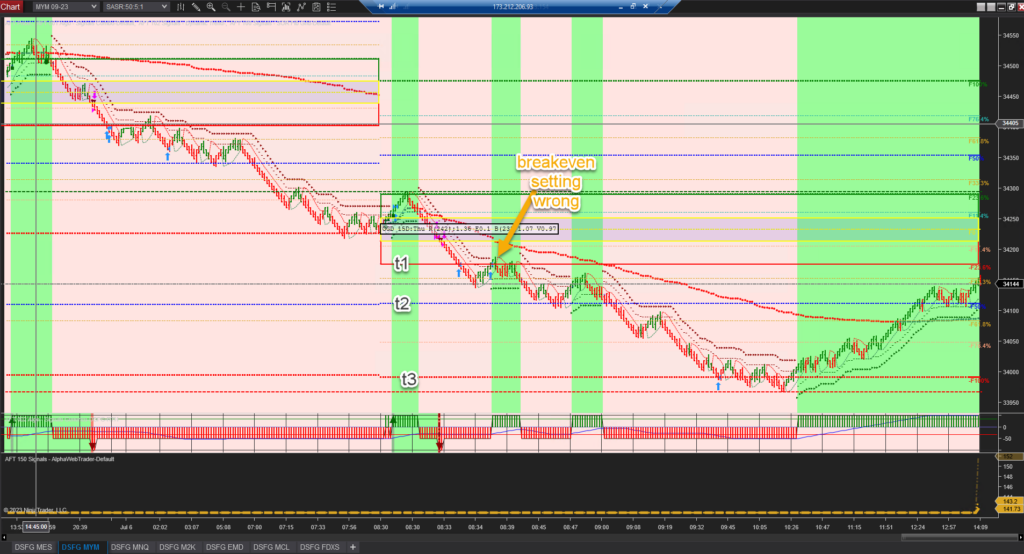
Trade Manager Breakeven Trail Settings Fixed in Turnkey Workspaces
Breakeven Examples
Lock in 25% Profit of Target 1
StopLossBreakEven1OffsetCalcMode=16
StopLossBreakEven1OffsetCalcModeCoeff=0.25
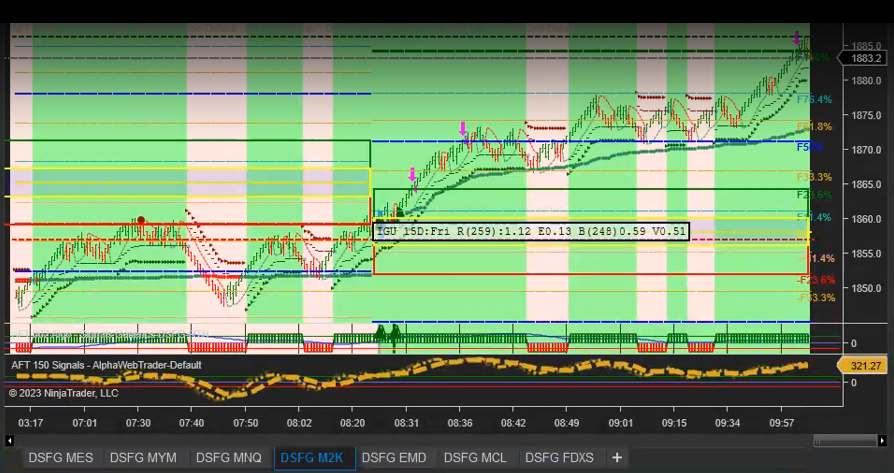
Reduce Risk by 50%
StopLossBreakEven1OffsetCalcMode=8
StopLossBreakEven1OffsetCalcModeCoeff=0.5
Alerts Sound and Digital Voice
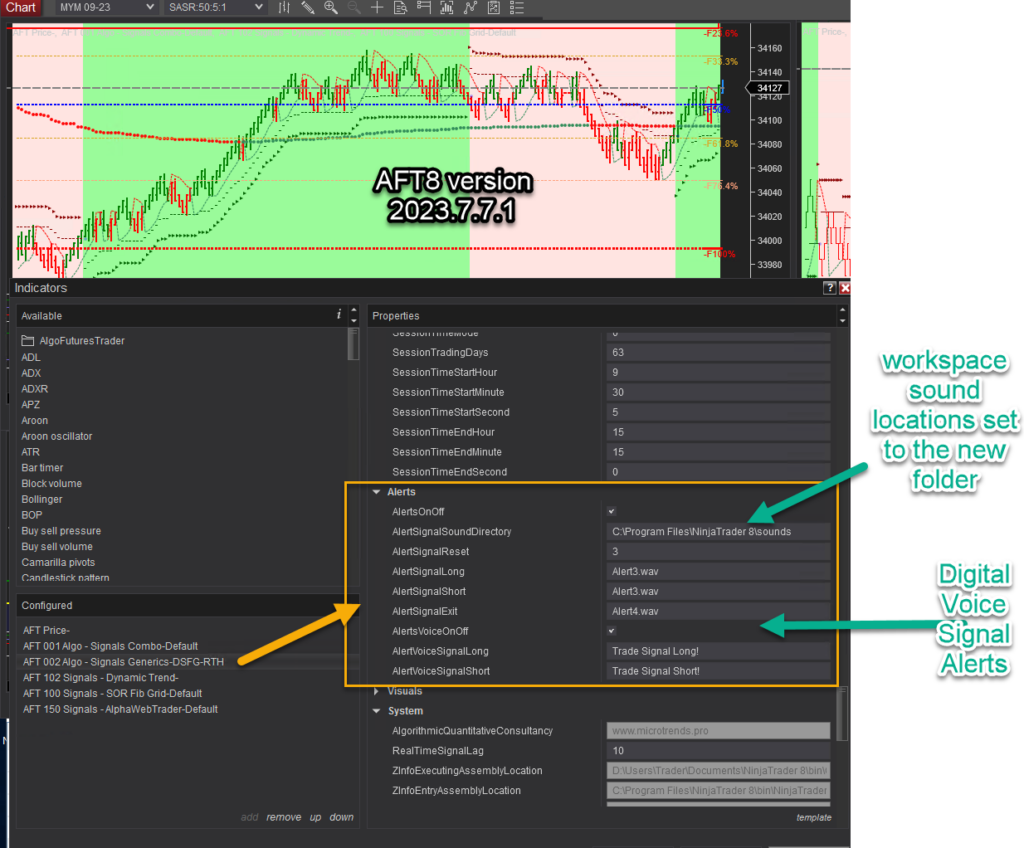
NT8 sound location fixes in all workspaces and templates.
Note: Sound alerts are now active. There may be too many; please provide feedback and let us know. Alternatively, edit the workspaces and save as a new one with alerts off, etc.
Voice digital alerts are also now released.
They can be activated on the chart.
AFT8 Hybrid Algo Trading System official release
Current ATS Desktop Apps Prerequisite: .NET 8 Desktop Runtime
ATS Windows desktop apps require Microsoft .NET 8 Desktop Runtime (x64). Install the current serviced .NET 8 Desktop Runtime from the ATS download instructions or Microsoft’s .NET 8 download page, choosing Windows Desktop Runtime — Windows x64. Downloading the file alone does not install it: open the installer, complete installation and reopen the ATS app.
.NET Desktop Runtime is different from .NET Framework, the SDK and ASP.NET Core Runtime. A later major runtime should not be assumed to replace the .NET 8 runtime required by the app. If a current app still asks for another runtime, report the app name and exact message to ATS support.
Choose Self-Assisted or One-to-One Assisted Setup
If installation is difficult or you prefer someone to guide you, there are two routes. Self-assisted: follow the ATS Desktop Apps installation guide, one step at a time, with ATS Help Bot and technical support for supported issues. Get assisted: explore optional paid one-to-one onboarding and setup from independent ATS Ecosystem providers.
Ecosystem providers may help with ATS account onboarding, NinjaTrader and ATS installation, connections, licence sync and workspace setup. Review services, pricing and booking options through the ATS Ecosystem. Providers set their own terms; personal setup sessions are not automatically included with an AFT Essentials purchase. You can be experienced in trading and still choose personal help with the technology.
The NinjaTrader Best Trading System is Now Officially Released
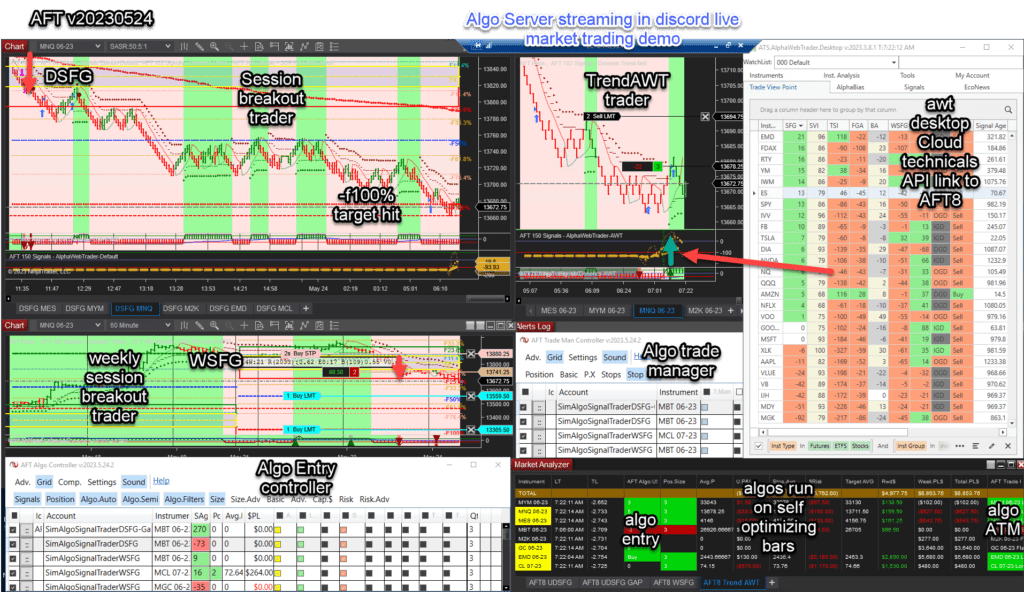
The AFT8 hybrid automated trading system’s official public release is out, with more updates and features to come. For now, this is the minimum feature set for fully automated, hybrid semi-automated, and manual entry modes with fault-tolerant adaptive trade management, algo entry controller, algo trade manager controller, and multiple algo systems with baseline turnkey workspaces.
- Historical 2023 release access; current intraday simulation, replay, evaluation and live use requires the applicable trial or paid licence.
- AFT8 will display an update message for the new version.
- Download and get started with AFT8 for free
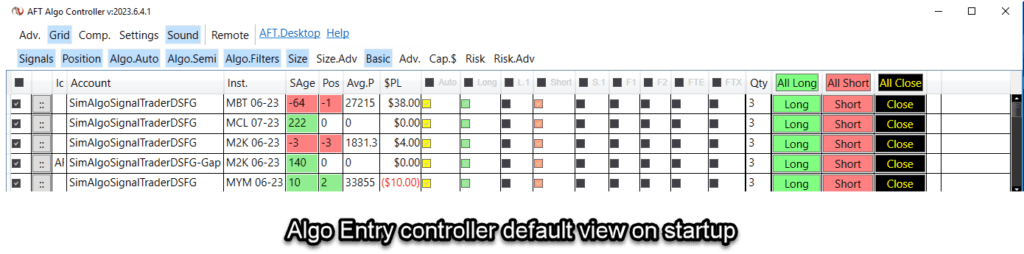
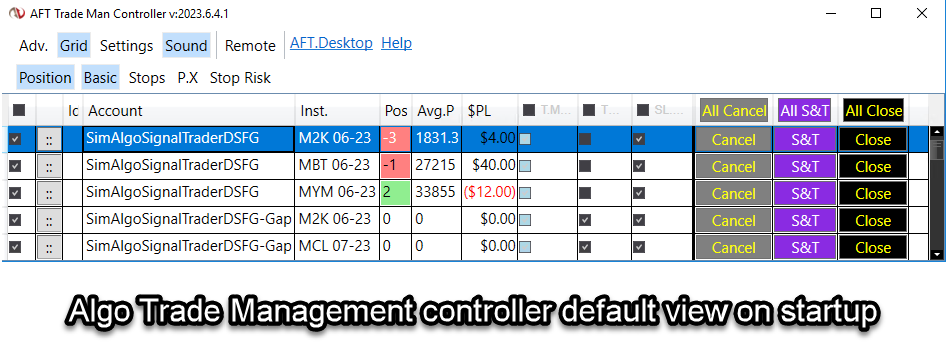
New Improved Algo Controllers Default Starting View
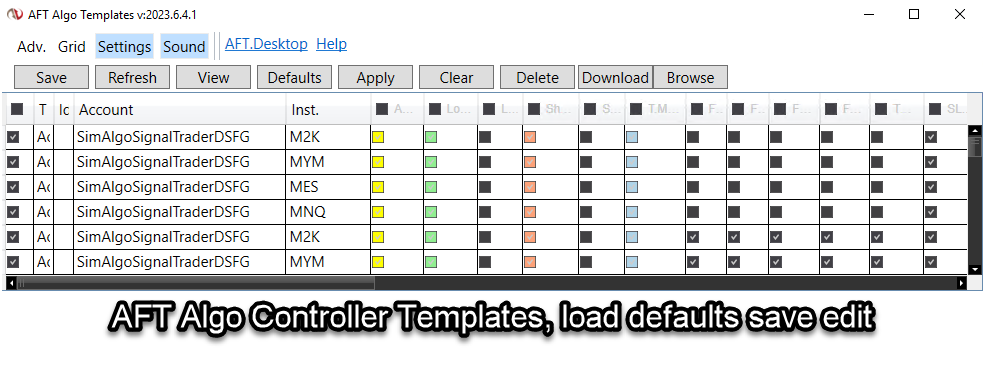
New Baseline Turnkey Workspace
- AFT8-SFG Breakout Trader-0000C-Mix
- Includes indices, oil, FDAX, gold, etc.
What Will Happen to the AFT8 Beta Version and Licenses
- Licenses will expire in 5 days.
- All prior versions of AFT8 Beta will cease to function.
- Simply upgrade to the new version and use it.
- Temporary full-feature live trading licenses will be granted.
- Over the next 2 weeks, licenses will start to lock down features.
Why Should I Upgrade from AFT8 Beta to the AFT8 Official Release?
- AFT8 Beta will expire.
- Grace period for full licenses.
- New features are being released all the time.
- Prior versions will expire after a period.
- Why is AFT8 the most advanced and best trading system for NinjaTrader?
Trader Education Training and ATS Trading Discord Group
- More features are to come, so all focus will go into coding and rolling out the updates.
- Videos, articles, and educational material will be worked on after the dust settles.
- For interactive support from 6 AM CT to 12 PM CT, join us in the ATS Discord Group.
Introducing the ATS.AlgoFuturesTrader.Desktop App
- Trading licenses, if any, will be downloaded from http://account.algotradingsystems.net/
- A new desktop app will work alongside AFT8 NinjaTrader: ATS.AlgoFutures.Desktop
- Providing auto-login, license sync, remote trading control, remote workspaces, and more.
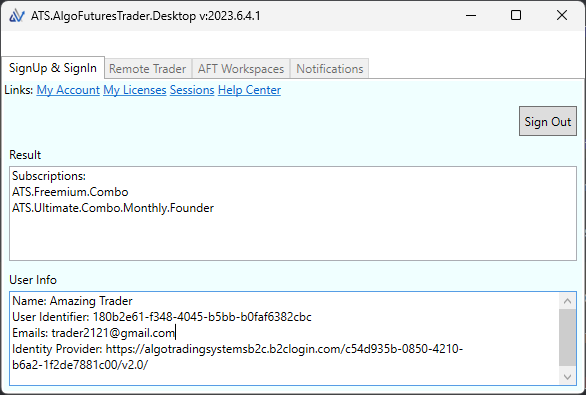
This should ideally be installed before AFT8RC1 is installed. AFT8 will attempt to install and require your permission to install. Install from here: https://algotradingsystems.s3.amazonaws.com/aft-desktop/Publish.html. The following prerequisites are required: .NET 8 Desktop Runtime (x64). Direct link here: https://dotnet.microsoft.com/en-us/download/dotnet/8.0
AFT Licenses for Live Trading Modes
The AFT8 live licensing is being enforced tentatively as we don’t want to disrupt evaluations and live trading. The system will appraise how NT8 is being used, e.g., in Sim mode or live mode/eval mode, and then check your ATS licenses. If it can’t reconcile a license to allow live account trading or eval trading, it will display a message that can be saved and sent to support to work out a plan. This approach will disable features after a timeout period, allowing time for organization. Please join us in the ATS Trading Discord Group for interactive support and Q&A.
AFT8 the best and most advanced automated trading system for NinjaTrader
AFT7 has been retired. Please upgrade to AFT8.
All AFT7 traders should upgrade to AFT8, available with freemium access and a full-featured free trial. Get AFT8 here for NinjaTrader.
Some claim! Yes, you heard it all before, and you should be skeptical. Use evidence-based decision-making, not emotion. Let us substantiate the facts below.
- Firstly, get a pedigree of who we are. View About Algo Trading Systems. This is about real traders with real systems designed, invented, and developed in-house using decades of professional trading and institutional-grade quantitative development and knowledge.
- Secondly, this is not a one-trick pony. It has many algorithms and billions of permutations for all different styles of trading: real swing, intermediate position trading, and day trading. Fully auto, semi-auto, and manual with automated exits, fault-tolerant, and even better, this is brought to retail so you may try them out free forever and decide if it’s for you or not.
- Thirdly, let’s look at the technical specs and understand why NinjaTrader’s open architecture allows us to create the best and most advanced system for retail trading. Check out the developer, our sister company MicroTrends Ltd across the pond – the pioneer and inventor of hybrid trading with a quick history of NinjaTrader algorithmic trading systems. See how they put the other vendors in top place with their white-label systems, but this one is only available direct from the source!
10 Quick Points of the Best Trading System Features
AFT8 resolves all the challenges for automated trading, fully and semi-auto hybrid, which the other systems in retail cannot do.
AFT8 Proprietary Trade Engine Features
- Manual, semi, or fully automated trading system
- Interactive real-time controls to set algorithms
- On/Off
- Long/Short set bias
- Semi-auto one trade and stop
- Fully auto trade as per configured rules
- Trader override and guidance and interaction with algo/trade management controller UI
- Stop and start NT – the system will auto-start when the workspace is opened and data is connected.
- Can start waiting for the trader to put on for auto
- Can start in fully auto mode
- Allows position compounding – adding to the same position or taking off. The system will adjust the stops and targets as required.
- Allows trader to close positions and cancel orders without stopping the system
- Allows restart of the NT system – will continue and work with orders and positions
- Fault tolerance allows the system to detangle orders and positions on a restart or in a fast market. If all orders are canceled, it will put the order back on, not leaving an unguarded position.
- True day trading, swing, and intermediate swing trading over the weekend for up to 3 months of a position. No matter how long you stop and start it, AFT8 will wake up and know what to do and continue onwards with your trading as long as there is a valid connection.
- Memory-persisted state between stops and starts so that the system can keep track of trades per day, per session, and money management goals. This is a vital element which other systems do not do, meaning you could blow your trade plan rules. AFT8 won’t let you. You can bypass the fail-safes and reset the memory – transparent data folder access or controls.
- Automatic data lag control will detect when the market is too fast and NT8 is lagging behind real-time data and prevent trading signals and executions of signal entries to prevent loss on slippage – news times, distance latency, and so on. Data lagging will be flagged visually in the market analyzers and can be set to 0.25s to 30s sensitivity. This is a vital element to stop trading during price shocks, news releases, and other scenarios which would enter with bad slippage and could blow your account. AFT8 safeguards trading against slippage and price shocks.
Plug and Play Turnkey Workspaces for Day Trading and Swing Trading
- Turnkey baseline systems are made available for install, connect, and trading on sim
- Designed for hybrid trading modes, man and machine, for real-time interaction
- Baselines can be traded in fully automated mode to test and tweak to suit a trader
- Session Breakout/Day trading/Swing
- Trend Trading/Scalping
- Range Trading/Mean Reversion
- Off-Piste, a trader can use their imagination and experiment and build their own rules using the algo building blocks inside the system and even code their own in too!
Unrivaled Trading Flexibility
- Multi-Time Frame, Multi-Algo
- Multiple algorithms on the same account
- Multiple Advanced Trade Managers on the same account
- Asymmetrical bars for entry and exits
- Can combine or pause and enable with real-time controls to suit the conditions on the day
Cloud Multi-Time Frame Filter System – AlphaWebTrader Trendometer API
- Futures, Stocks, ETF aggregated amalgamated horizontal and vertical trend correlations
- Cloud API Non-Lagging for CPU, disk, and data. NT8 will not go down and data lag/render delay
- Aggregated data is read by AFT8 from the AWT.Desktop in real-time with no lagging or overhead
- Vertical trend correlation up to 24 time frames per instrument
- Horizontal trend correlation futures, Stock, ETF for bias
- Group strength and weakness
- Order flow by market ATR speed, volume, and trend efficiency
- Signal Flow – order flow is good, but signal flow is a step above history and real-time
- HTF Structure, gaps, levels, and more.
- See AlphaWebTrader for more details
Battle-Tested Trading Systems on Real Money with a Real Fund
AFT8 Desktop comes from real live money trading of a $5 million hedge fund account from 2017 onwards to 2022 on trade sizes up to 1% or $50K USD stop loss risk. Clear Point Capital. In 2023, due to a lack of time and development obligations to the fund, we decided to release it to retail and cut it down from swing to day trade and make a desktop version of it for NT8, to allow the most advanced system for NT8 ever. We chose that route instead of migrating AFT7, but AFT7 parts and components are being added in over time.
Not a One-Trick Pony
- Time-Testing Approaches – Evolved
- Session Breakout – daily, weekly, monthly – custom breakout
- Trend Trading – USAR/Dynamic trend
- Range Trading – Mean Reversion fibGrid Bands
- News Trader – pending needs AWT API
- Multi-Time Frame Trend systems – AWT API Trendo etc.
- Many programmable systems available or even can add own code rules and compile into the system and use your rules and algo with the full off-the-shelf features
Build Your Own – Bring Your Own Algo
ATS & NT8 allows you to build your own and test for strategies and also for integration into AFT8 algos and leverage all the off-the-shelf features.
AFT8 Versus Traditional NT8 Strategies
NT Strategies do not provide this level of interaction and flexibility and cannot swing trade or self-recover. They require manual resolution of positions and orders to make safer before starting. AFT can start and resolve it all itself. NT Strategies don’t allow a trader to close positions and cancel orders without halting the strategy. AFT will also ship in the future with a strategy for backtesting, optimizing, and if preferred for trading, the most advanced ever built for NinjaTrader 8 Powered by ATS QuadroBase. This will be open source in the strategy to allow you to combine third-party and create your own algos combined with AFT8 sealed indicator components, with script development support in the Discord Trading Group.
Money Management – Challenges
Static or fixed fractional position sizing based on volatility stop-loss – fixed fractional or professional mode fund of funds position sizing and money management.
- Off a user’s defined amount
- Off the account
- Or weighted balanced per asset stream – different values
Systematic Trading Systems – Trade Signal Generation & Execution
The system does all you need for manual, semi, or fully automated signal execution
- Entry signal types
- Exits
- Stops and targets
Web Algo Trading Remote Control
- On/Off of algorithms
- Long/Short bias
- Monitor and interact
There’s a lot more to come, and we don’t want to give it all away before we roll it out.
Note: Unlike our other white-label technologies used by well-known vendors in the ecosystem, we don’t license this to anyone else to resell!
AFT8 Update release v20230524
AFT8 Update Released: AFT8 Version 2023.5.24.2 This version is running on the algo server in soak test mode—no filters, all signals 100% fully active with a variety of modes. It is operating in the live market as shown in the attached image in the futures trading group.
Note on Version Info: This is the last planned release before the official release. We need to assess feedback from users prior to rolling out the official RC1 version. So far, we are moving forward unless someone provides feedback with a showstopper. The RC1 update, likely to follow this release next week, will include a login and ATS Desktop Control Center. The plan is to combine all the AFT, AWT, and AST into one control center, replacing the AWT Desktop. This will allow one login for both web and desktop applications.
Updating: You can simply run the same installer in your downloads folder or get it again from the trading system downloads page. This installer never changes; its job is to get the latest AFT8 version from the cloud and install it. Once you have it, you don’t need to download it again. AFT8 App updates will also pop up a notification and allow in-place installation on your PC, assuming there is no overzealous antivirus running to block it.
Notes:
System Turnkey Workspaces will be overwritten.
System Settings and templates.
N.B: This is why you need to rename your templates/workspaces to preserve your settings.
AFT8 Changes
AFT8 Update release v20230522
AFT8 Update Released: AFT8 Version 2023.5.22.1.
This is the last planned release before the official release. We need to assess feedback from users prior to rolling out the official RC1 version. Download AFT8 here
Notes:
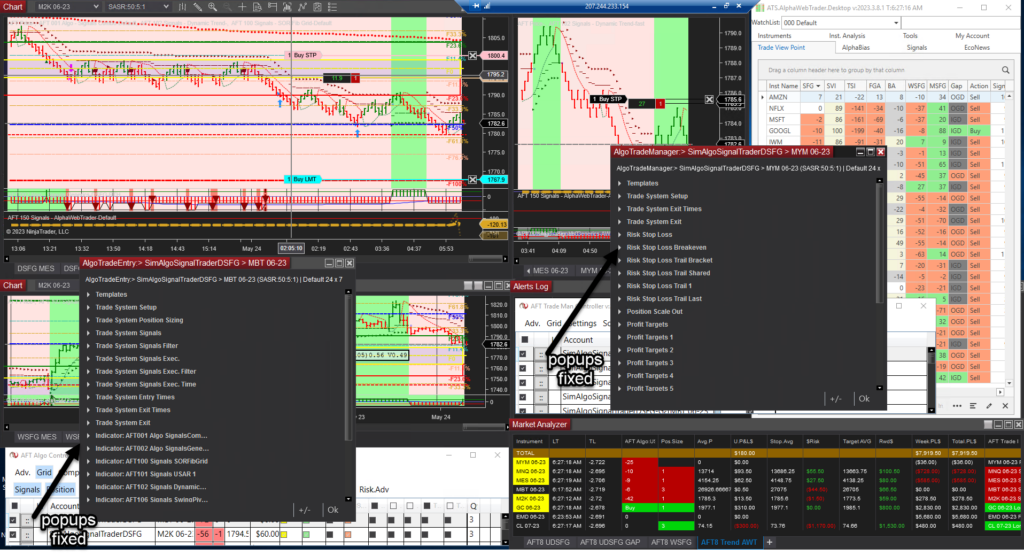
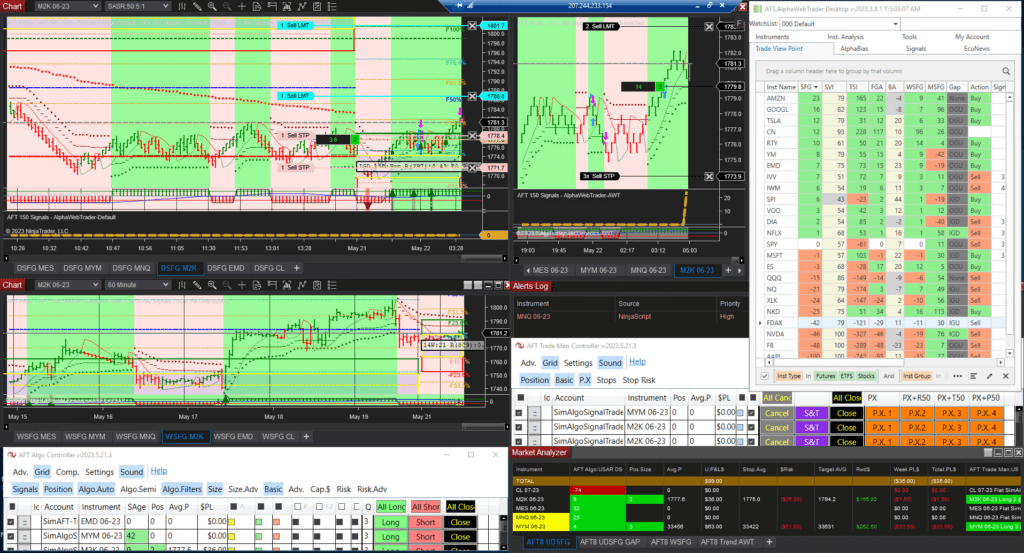
1) Workspaces were pruned down to make it easier, and templates are “lite” by default via removal of high-intensity CPU memory market grid for trendometer. The two tested working turnkey workspaces are: Turnkey Workspaces – semi/fully modes can be implemented.
Baseline versions for manual, semi-auto hybrid trading, and fully automated testing/tweaking to your tailor-fitted versions.
a) AFT8-SFG Breakout Trader-0000A – multi-time frame view, one instrument.
b) AFT8-SFG Breakout Trader-0000B – most popular four instrument view.
c) AFT8-Trend-Scalper-1000A – Proof of Concept version requires manual semi/auto hybrid use only, multi-time frame – this would probably benefit from the AWT API link in time.
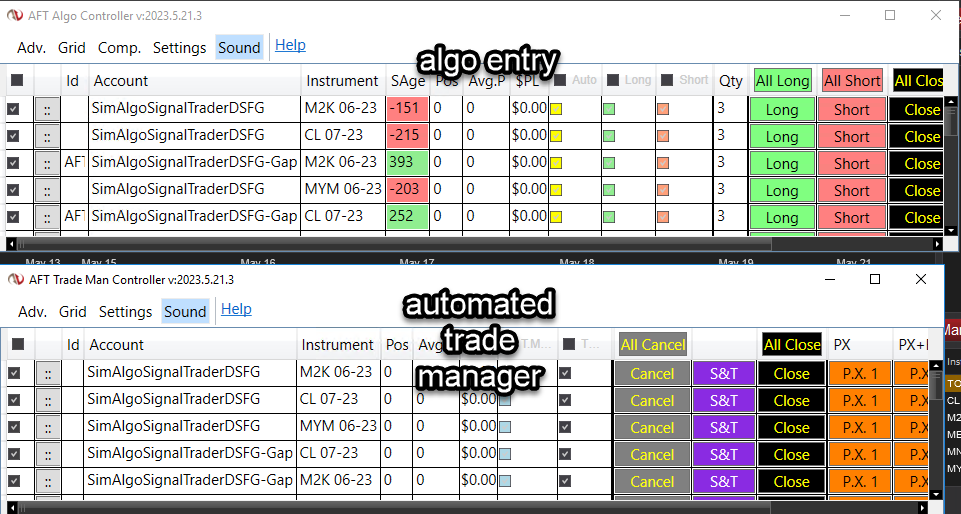
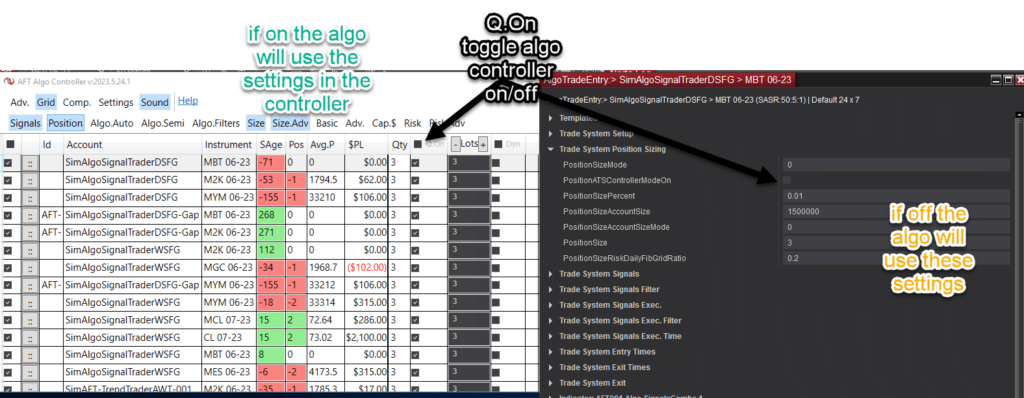
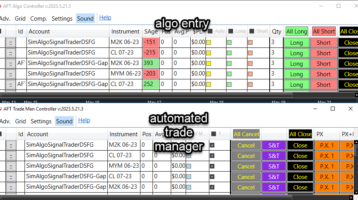
2) Algo entry and Algo trade manager were split into two parts – this allows one or many algos on the same account and instrument, and one or many trade managers on one account instrument, allowing quick switching of modes of use or blending combinations and rules.
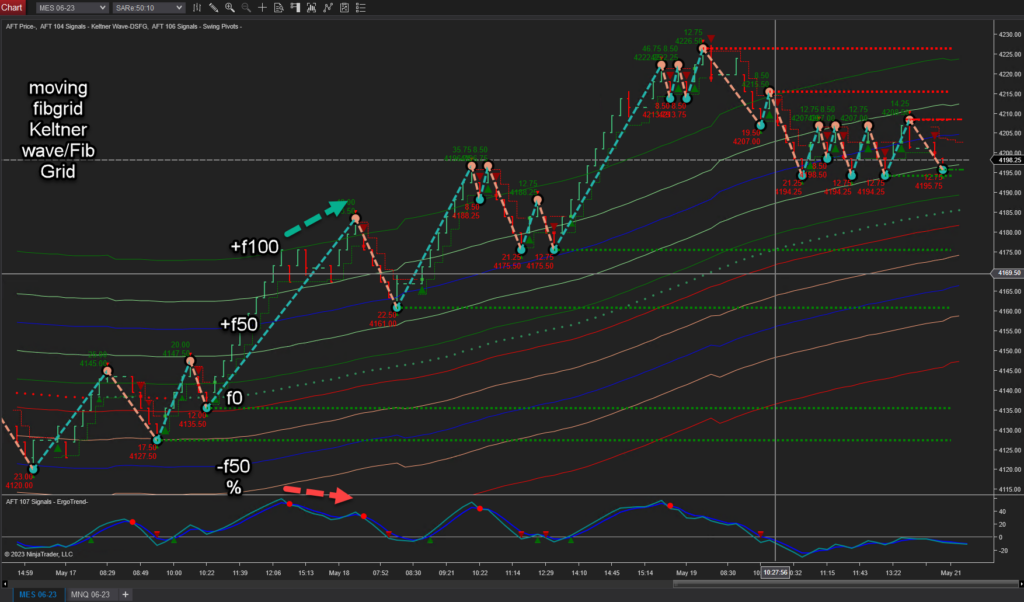
3) The Keltner FibGrid – we evolved a classic by combining our proprietary “Fib Grid” into a Keltner band so the grid is moving and anchored to the mid band. This can be seen in workspace “AFT8-Trend-Scalper-1000A”. For those traders experienced with divergence, you can see some setups at the extremes as well as other patterns and trend bias filtering.
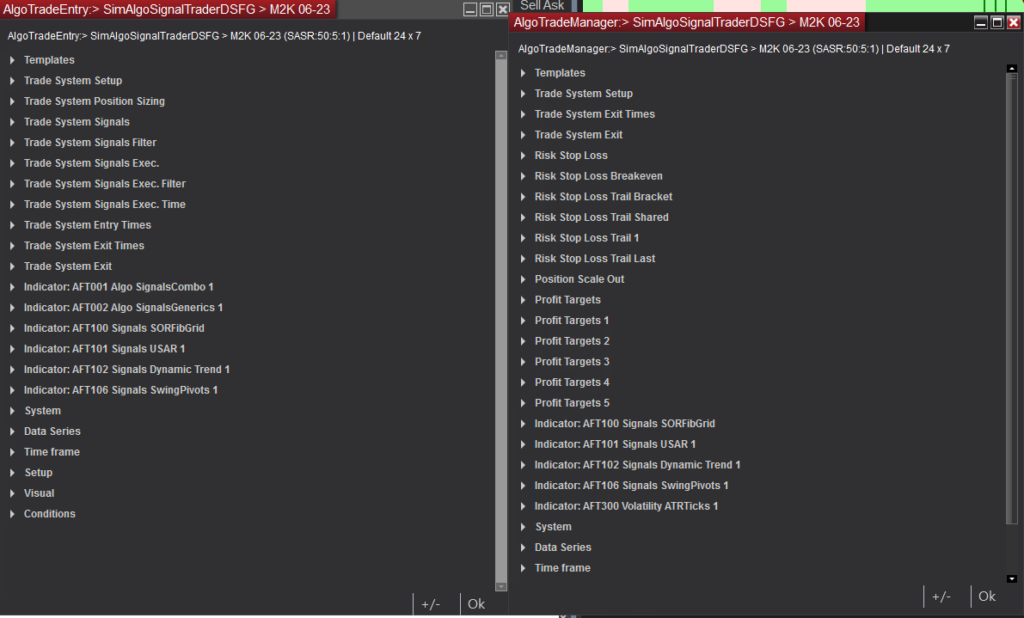
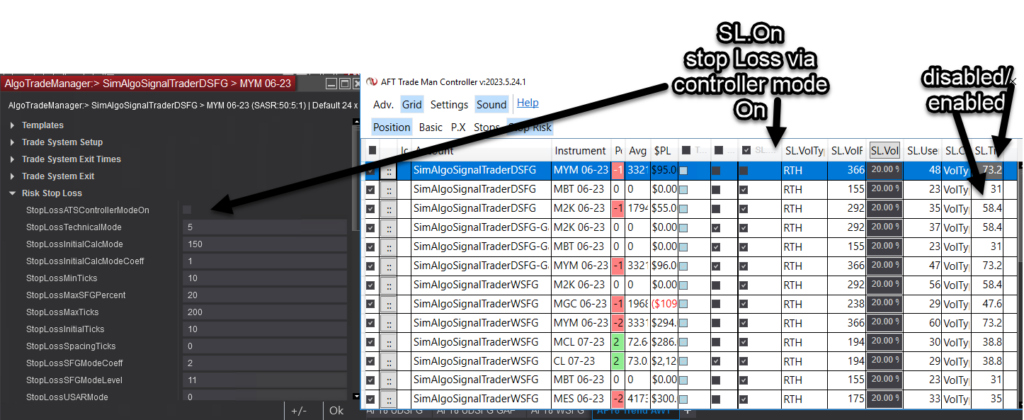
4) Trade Manager – the trailing stops have been reworked so that lastTrailstop has the same parameters available as the initial trailing stop. Also, the layout and grouping have been reworked, plus additional functions for exits and filter control from the algo controller GUI in real-time.