NinjaTrader Automated Trading by Algo Futures Trader

hybrid algorithmic automated futures trading for prop firm traders, day & swing traders

🚀 Get Started 🔴LIVE
  • 🚀Get Started
  • NinjaTrader
  • Get Funded
  • Trading Servers
  • Pricing
  • blog
  • Help

AFT memorial day sale 25% off lifetime licenses for AFT7 and AFT8

May 31, 2021 by AFT

Simply enter this coupon MDAY25% at checkout, and you will receive 25% off the Premium or Ultimate lifetime deals. Please note the offer lasts for two weeks and expires on April 11th. Both the Premium and Ultimate packages include AFT7 for NinjaTrader 7 and AFT8 for NinjaTrader 8. You can lock in a discount now for a lifetime license, which includes the full versions of AFT7 and AFT8 when they are released in stages this year. Compare pricing for more details and view the license information for free, Premium & Ultimate versions of AFT.

[products tag=”AFT Lifetime License”]

Plug and Trade – Turnkey Trading Systems for day trading futures

Simply Install, Connect. Learn and practice with ready to use turnkey settings and workspaces for Session Open Breakout trading and Trend Trading reversal and pullback continuation trading. Start NinjaTrader, connect to a futures data feed & open an AFT Turnkey workspace, the trading systems will appear on chart and are ready for simulator trading micro equity Index futures.
  1. Get NinjaTrader & a datafeed
  2. Download & install AFT
  3. Get started day trading with AFT
 

Filed Under: Algo Futures Trader, NinjaTrader 7, NinjaTrader 8 Tagged With: AFT Lifetime License Sale, AFT7, AFT8


🚀 Get Started 100% FREE!

What’s next with the AFT8 update?

April 23, 2021 by AFT

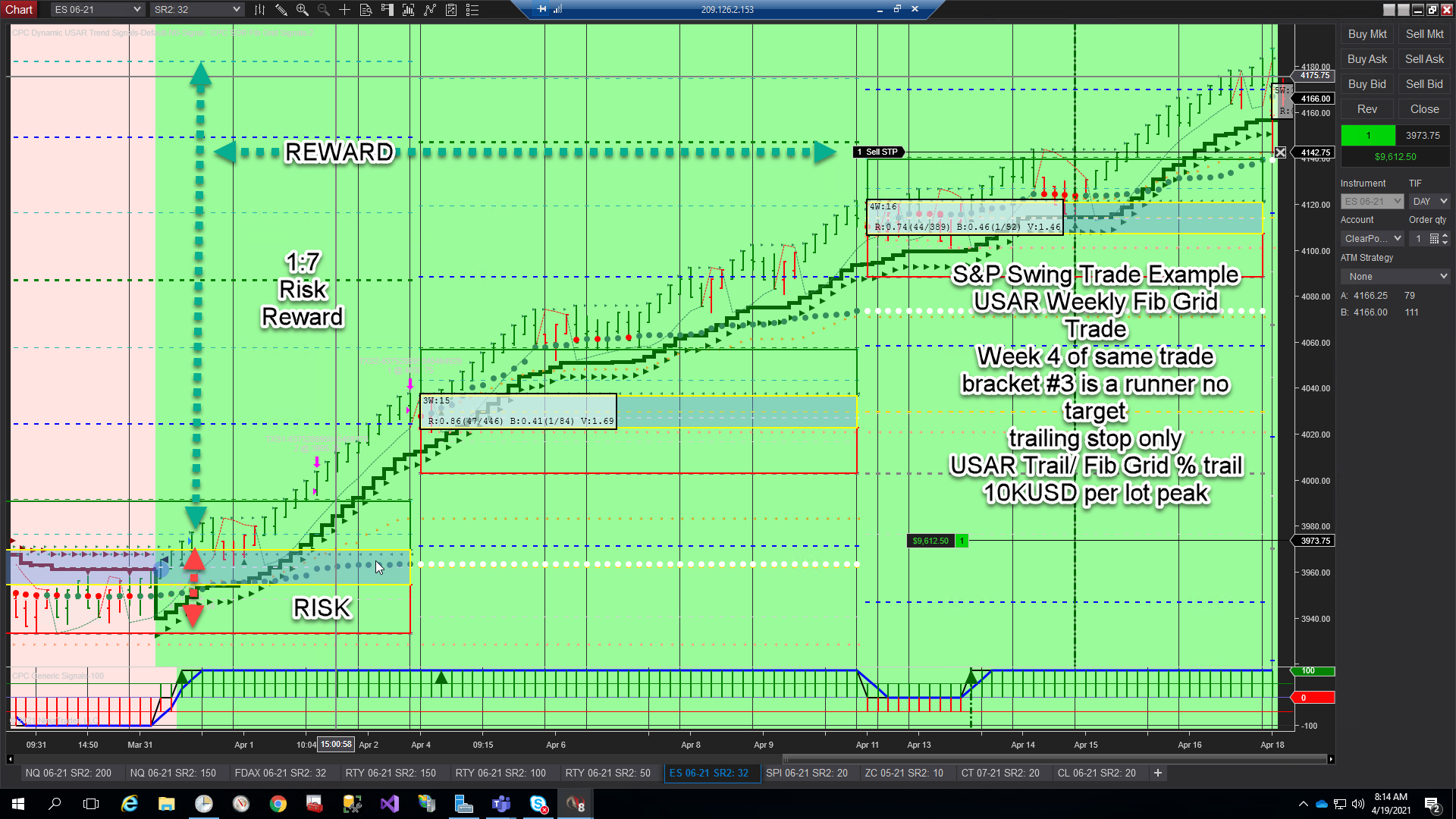
USAR WSFG swing trade fully automated no manual trading interaction ES

With regret, as the sole creator and developer of AFT8, I have to inform you that I was out for the count for two weeks with a fever and a throaty cough. I’m not sure if it was COVID or the flu, so I made no progress at all on the AFT8 update since the last version in mid-March. However, I am glad to say I am pretty much recovered, except for lingering lethargy, and have been coding again.

AFT8 is still in beta and has a long way to go before all the planned features are released. It will be worth the wait; it needs to be as it’s going to be my main retail account trader. There will be updates to the AFT8 system starting next week, including fixing a bug to save settings on the main signals indicator, an ease-of-use feature for configuration, and some inclusions of swing trading/weekly fib grid trading features in the turnkey workspaces. Here’s why.

The AFT retail day trading version of the software came from a much larger swing trading multi-server, client/server n-tier, SOA, cloud-based system with NT8 at its core, providing the awesome technicals, execution, and trade management. AFT contains a small subset of the functionality but exactly enough for the algo premise and capability for day trading and some swing trading, with user interactivity for many of the tasks. The hedge fund system will cost you 50K USD plus fees and data server overheads per annum to use. AFT retail starts at free. The following will give you some idea about the two versions.

During my absence, the CPC/AFT Hedge fund systems continued to work even though the developer algo trader was not in attendance. The servers restarted each weekend via Windows Task Scheduler and updated themselves. NT8 is then started, and historical data is downloaded each week and replicated out from a main server to other servers to negate the need to download again.

With the full hedge fund version, there is no need for a user at all, except for rollovers and in emergencies or system selection. It is 100% fully automated trading in the real sense, and I am not allowed, even if I want to, to intervene. Not allowed to enter or close a trade, move a target, or trail a stop, so we get a pure dataset of stats. Sometimes it means there were trades I would not have done, but sometimes it does incredible trades that were far better than me. Over time, it works, and that is the goal.

A hedge fund’s performance has to be measurable to something tangible and risk control also, so removing all humans is the ideal way to do it, as a human is hard to backtest and benchmark. They get sick too or move jobs. So when I’m talking fully automated, it’s big trade accounts and no fiddling or making it up as you go. All the systems that make it to live from the thousands that don’t go through system selection, board approval, and compliance for annual auditing—no pressure 🙂

AFT retail traders benefit from a hybrid feature set to allow fully as well as manual/semi-automated trading, which is really very important for retail day trading as it is less forgiving than swing trading. AFT benefits from many years and many hundreds of thousands of USD of research and development and real trading of the systems professionally in automated swing trading. They end up as much as possible as turnkey for day trading with minimal tweaking required.

CPC/AFT algos for the hedge fund start on a Sunday. The week begins, the Windows Task Scheduler process will start NT8 in time to trade the CME open for indices, connecting to various data feeds in turn for each exchange and feed. Then it loads the workspaces and loads the algos and starts them, a mix of sim and live. For each system, each algo will inspect orders and remove any anomalies within NinjaTrader, then process the positions and orders, risk, and technical context, and continue trading where it left off, adapting to any changes and implementing fault tolerance and safety.

Technically, the CPC/AFT algos are part of a greater system—a signals framework, execution management system (EMS), order management system (OMS), position and trade management, rollover liquidation, data acquisition, automated web stats collation and reporting system, and automatic trade safety system and more besides—evolved in NinjaTrader and .NET, .NET Core, ASP.NET Core, MSSQL, and Azure Service Bus, created over a four-year period.

It is quite incredible what we have achieved with the technology directly due to the amazing work of the NinjaTrader development team to allow us access to all areas to create what we want, limited by imagination and skill only. So in short, even though the developer was away and useless, the system continued onwards fully automated regardless, so no trades were missed and no one goofed things up with under-par irrational decision-making.

In my absence, here is a pretty good trade example of the CPC/AFT Weekly Swing trading algo, which took up to the high last week, 2021-April-16. Now reversed and closed into a small short this week—10K per lot was the MFE trading Emini S&P—just with a 4 lot trade of about 5K to $7500 risk on that volatility. It could have been a lot more based on the past and recent times, but it’s still a respect-worthy demonstration of what we can achieve with the toolset.

USAR WSFG swing trade fully automated no manual trading interaction ES

We will provide this WSFG weekly setup as part of AFT8 turnkey settings for micro indices and Emini so that traders can use it as a guide for intraday or indeed take the weekly SFG Signals.

As you can see, yes, this is a live trade. Note that the chart trader is black and the account does not begin with Sim. We really do trade, and we really do use these tools. The AFT day trading system is a version built for small account trading based on the professional hedge fund trading for which it was originally created. So the day trading version is basically a daily session breakout instead of weekly for swing trading. You can also see the power of the risk-reward in action on this type of system and the staying in trend-following method.

AFT8 is available in the shop as a free product AFT8 Free Trading System or available from the AFT download page. Articles and videos will follow on installation but should be very simple if you can use a mouse and PC and get around any AV warnings, etc. Please visit the support and help desk.

Plug and Trade – Turnkey Trading Systems for day trading futures

Simply Install, Connect. Learn and practice with ready to use turnkey settings and workspaces for Session Open Breakout trading and Trend Trading reversal and pullback continuation trading. Start NinjaTrader, connect to a futures data feed & open an AFT Turnkey workspace, the trading systems will appear on chart and are ready for simulator trading micro equity Index futures.

  1. Get NinjaTrader & a datafeed
  2. Download & install AFT
  3. Get started day trading with AFT


Filed Under: AFT8, Algo Futures Trader, NinjaTrader 8 Tagged With: AFT8, AFT8 update, NinjaTrader 8


🚀 Get Started 100% FREE!

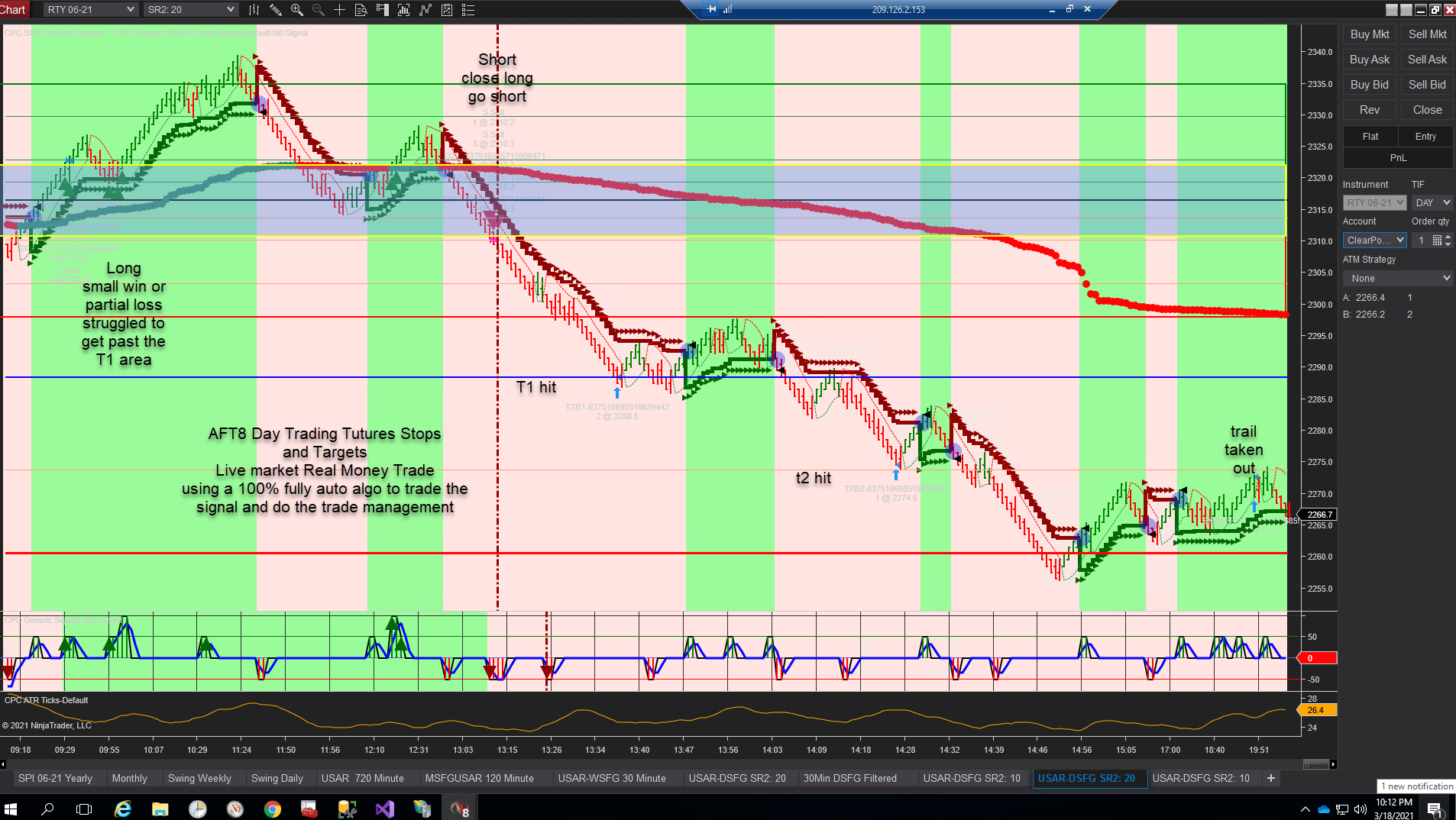
how to place stop loss and targets for day trading futures with NinjaTrader 8 and AFT8

March 19, 2021 by AFT

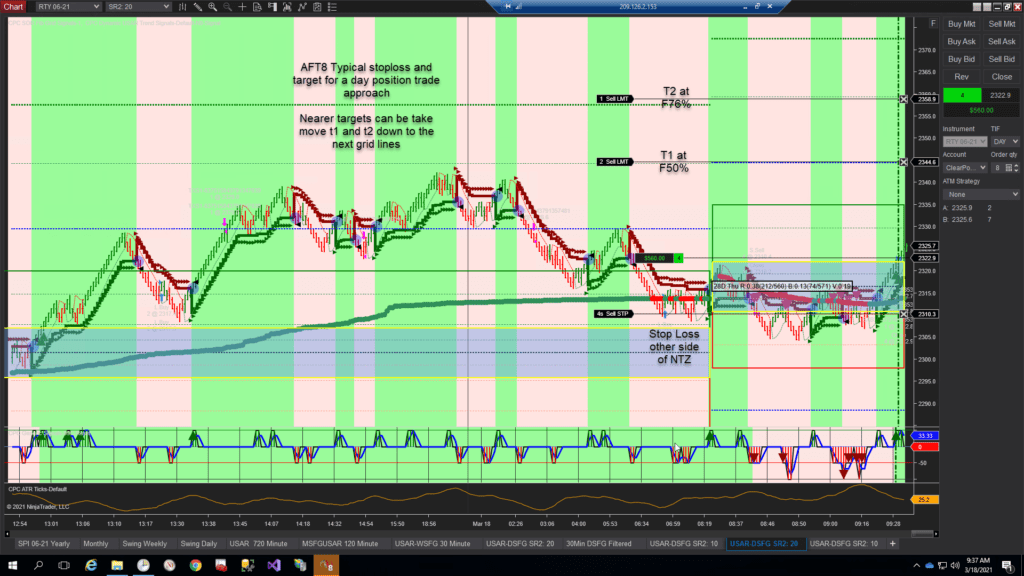
AFT8 Day trading futures stops and targets with chart trader position and order visualization

There are two main methods for the placement of stop-loss orders and profit limit orders: “Static,” using a fixed distance, and “Adaptive,” using a non-fixed amount, in this case at a technical stop/target placement setting stop and target orders to various technical levels on the chart.

You can trade with a loose approach or a tighter approach when using exits to control risk/stop loss and profit points. Trading with closer targets provides a higher win ratio, and a far target approach will result in a smaller win ratio but a greater risk-reward average. By using multiple targets, it is possible to scale out and implement sophisticated trade management techniques to take profit and lock in profit with stop-loss trails as well as run for trend breakout days. A tighter stop-loss will cause a lower win ratio but a larger risk-reward; however, if it’s too tight, your system expectancy will be negative. What we aim to do is keep trading frequency lower—1 to 3 trades per session is a good amount if required—the first might be the only one you need. So we have a wide stop-loss and let the system breathe and run—this actually increases the risk but also increases the win ratio and probability of the system.

Much of that choice is down to the preference of the trader; however, the usage can be governed by inside and outside gap days and range/trend price cycles and market structure and order flow on the day, to decide to have a nearer tighter game or a more loose game or use a hybrid combination good in all weather to take profit off the table as soon as possible and still allow a good run to capture as much as possible as 100% of the daily move.

For proven and advanced traders, a quick note about variable position sizing based on high probability conditional trade setup versus a more arbitrary entry, etc. In addition to target and stop-loss arrangement, you can also consider half clip and full clip trades. For example, you might want to trade with 8 lots on a micro futures, but if you are not sure on a trade but you might miss a runner if you stay out, then you can go half clip with 4 lots, and when the market is clearer, less mixed, more directional across all indices and the conditional setup pattern and time, you might go full clip with 8 lots, which would need to be within your max % per trade. Up to 1% is way enough for a beginner—you could conceivably add to a half clip position also in a pullback, for example, but this is not recommended for beginners as it can lead to doubling down and a random off-the-hip trading style, abandoning the systematic approach and ultimate failure.

Static ATM Defined Stop-Loss and Profit Target Orders

Pending the AFT8 Easy Trader/NinjaBuddy GUI, you can use the NinjaTrader Chart Trader and ATM to automatically place exit stop-loss and profit targets and interact with them on a chart in real-time.

  • NinjaTrader 8 Help Guide/Video Training
    • Chart Trader
    • Advanced Trade Management (ATM)
  • Related Essential Training with NinjaTrader 8
    • Charts
    • Workspaces
    • Visit the NinjaTrader 8 video library

The following can easily be created in the NinjaTrader ATM. Additionally, you can add break-even stop-loss strategies, such as at T1 move to breakeven or move in by 50% of the risk, for example.

  • Static Stop-loss and Targets examples for educational use
    • ES/MES
      • Stop Loss: 28 ticks
      • Target 1: 10 ticks
      • Target 2: 16 ticks
      • Target 3: 100 ticks
    • NQ/MNQ
      • Stop Loss: 35 ticks
      • Target 1: 20 ticks
      • Target 2: 30 ticks
      • Target 3: 100 ticks

Technical Stop-Loss and Targets Using the Fib Grid Levels

Stop-loss and profit targets are placed at Fib Grid Levels and are therefore adaptive advanced intelligent trade management, which can be applied to any market/instrument.

I prefer this method always. Imagine that I have to sometimes test and elect to trade on a universe of some 65 futures markets. Trying to find out what static ticks would be best would take up thousands of hours of ongoing testing to re-optimize and guide as the market phases and ranges change, making life unbearably hard work. So, in fact, that’s not required at all or best. Instead, simply use my Fib grid levels to adapt to the market and range as it changes and save all that brain ache. Of course, with the correct pending AFT8 technology, you can couple that with a volatility-adjusted stop-loss fixed fractional position size and add in scaling out, and now you have a professional setup. Meantime, with manual adjustment, as long as your stop-loss risk is within acceptable parameters and a sensible price, you are good to go.

Loose Setup – Low Win Ratio High Risk Reward

  • Stop Loss Technical position is behind the No Trade Zone (NTZ) yellow rectangle
  • Target 1 – 2 lots at the 50% regions on the grid
  • Target 2 – 1 lot at the 76% region
  • Target 3 is a runner or 100% grid line

AFT8 Day trading futures stops and targets with chart trader position and order visualization

Technical Stop-Loss Trail

Example Stepping Fib Grid Trail: When price moves and closes above the 50% blue line, move the stop-loss to the far side of the Fib grid price grid line -25% grid trail, or alternatively follow the USAR…look for the trailing triangles.

So how did that trade pan out?
T1 and T2 acquired – 3rd bracket was trailed down and taken out at -f61%

Technical Stop-Loss Trail Visualization

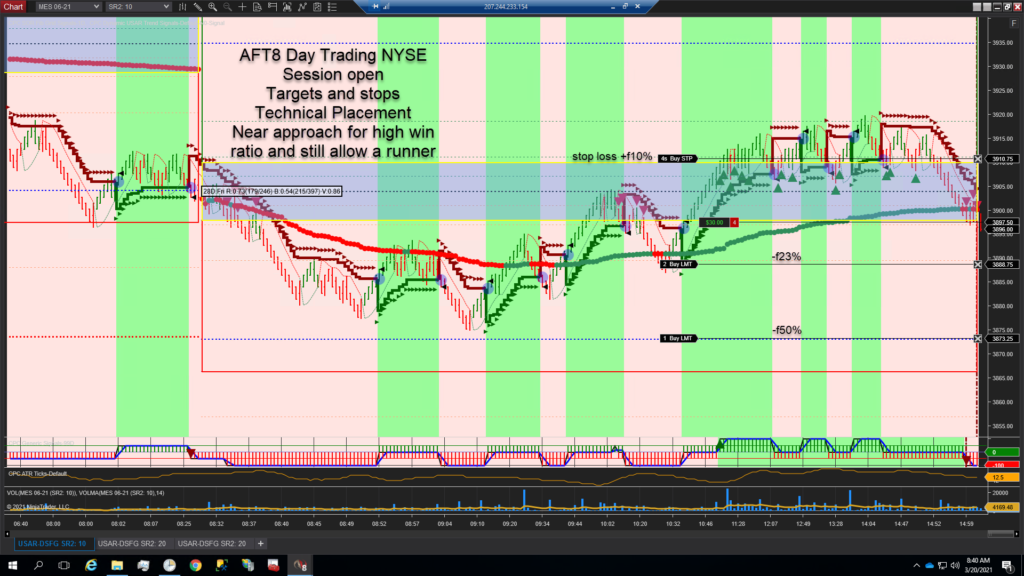
Tighter Setup High Win Ratio & Medium Risk Reward

  • Stop Loss Technical position is behind the No Trade Zone (NTZ) yellow rectangle
  • Target 1 – 2 lots at the 23% regions on the grid (could also be 33%)
  • Target 2 – 1 lot at the 50% region
  • Target 3 is a runner or 100% grid line

AFT8 Near Targets Semi Trend Scalping Trading Approach
AFT8 Near Targets Semi Trend Scalping Trading Approach to take profit early but still allow a runner and positive risk reward

ATM Automatic Stop-Loss and Target Placement with Manual Adjustment
You can configure and use the ATM to place the stops and targets and then simply use the mouse on the chart to move the orders to the various Fib grid positions. Please visit the AFT help guides also for articles on day trading futures stop loss and targets.

Please note this article is for educational use only. This is not investment or trading advice—you need to test out and make your own decision based on statistical evidence.

Plug and Trade – Turnkey Trading Systems for day trading futures

Simply Install, Connect. Learn and practice with ready to use turnkey settings and workspaces for Session Open Breakout trading and Trend Trading reversal and pullback continuation trading. Start NinjaTrader, connect to a futures data feed & open an AFT Turnkey workspace, the trading systems will appear on chart and are ready for simulator trading micro equity Index futures.

  1. Get NinjaTrader & a datafeed
  2. Download & install AFT
  3. Get started day trading with AFT


Filed Under: Algo Futures Trader Tagged With: AFT8, day trading futures, NinjaTrader 8


🚀 Get Started 100% FREE!

AFT8 workspace update fibgrid trend % correlations

March 16, 2021 by AFT

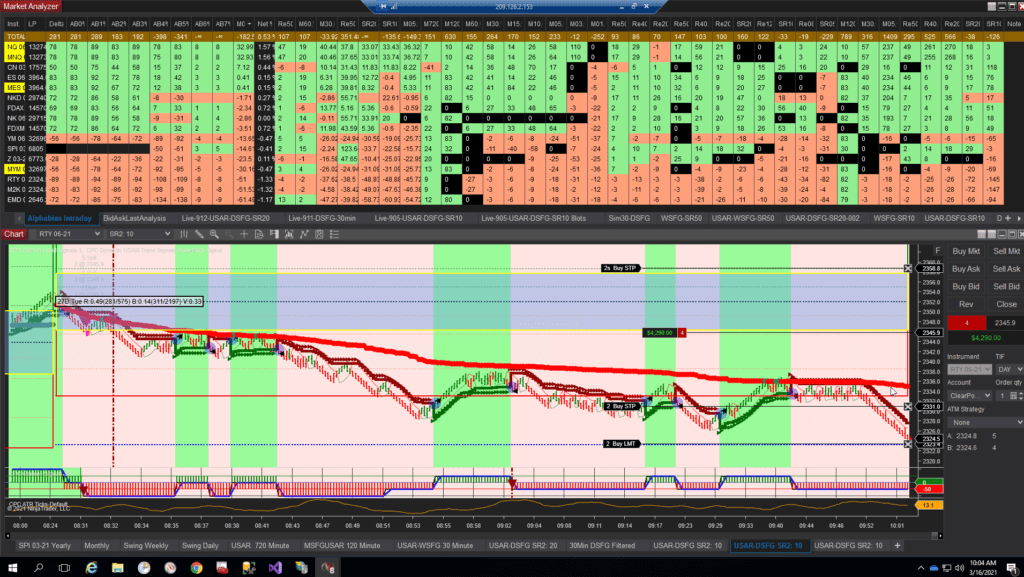
AFT8 daily session fib grid day trading russell 2000 futures fully automated

The featured post image showcases a fully automated algo trading system for the Russell 2000, utilizing the Alpha Bias intraday near and medium-term trend correlation module. This is just one component of the comprehensive system of futures indices I employ for my hedge fund trading. Some features are being integrated into the AT8 system to include a subset of the hedge fund futures portfolio trading system. Traders, we truly trade professionally with this technology. I don’t intend to entice by displaying a real trade with real cash—it’s just another trade picture. However, it illustrates a NYSE daily session breakout fib grid SFG daily short signal taken and traded, using the grid for targets and stops, and the full version of the Alpha Bias Trendometer from which AFT8 is derived. This is a matured trading technology, now being released after years of use and battle-tested in live hedge fund trading with millions of USD in risk capital, utilizing advanced servers and technologies costing around $100K USD annually. Now, it’s being offered in a small form factor for desktop retail trading, allowing you to get started day trading futures with real trading tools for NinjaTrader 8. Trade like a pro with an edge from real trading systems and methodologies—AFT8 will lead the way as the best trading system for NinjaTrader from the MicroTrends hall of fame of trading systems.

AFT8 daily session fib grid day trading Russell 2000 futures fully automated

Yes, AFT8 will have a similar shape, form, and function, but with more lightweight interactive features, allowing it to be fully or semi-automated. The hedge fund system is 100% algo, which is not suitable for 99% of retail account sizes and preferences. Don’t worry, AFT8 is a smaller, more controllable piece, offered at a small price and free unless you live trade with it. As the original architect and pioneer of hybrid algo trading systems, we will provide features to facilitate easy trading and management of day trading size/small accounts. However, we need time to code and release step by step. The next step is to add the trend correlations as outlined below.

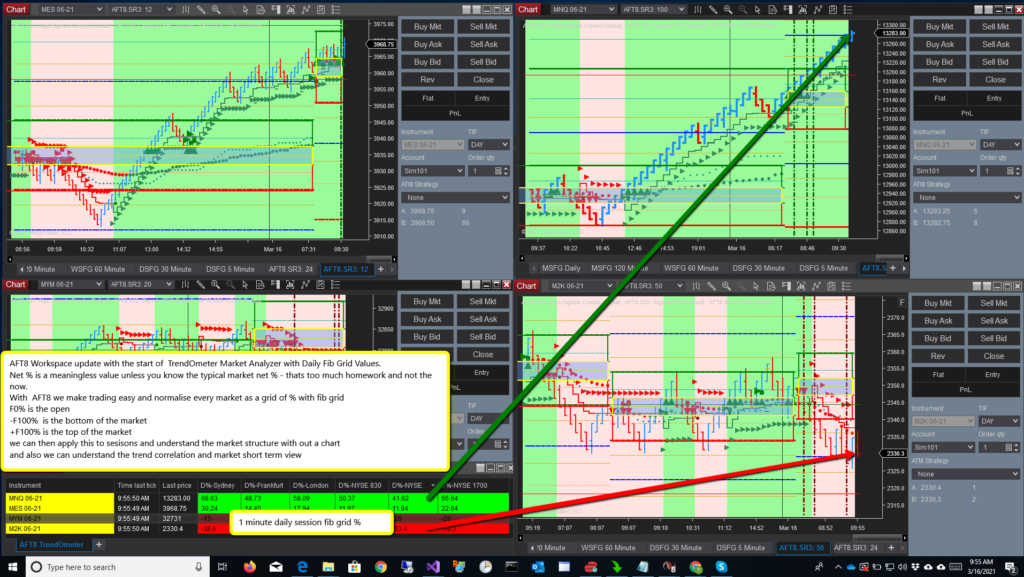
The latest AFT8 Workspace update includes the start of the TrendOmeter Market Analyzer with Daily Fib Grid Values. Net % is meaningless unless you know the typical market net %, which is too much homework and not relevant now—it’s yesterday’s news. We want to see today and the current real-time situation in the live market. With AFT8, we simplify trading and normalize every market as a grid of % with the fib grid. F0% is the open, -F100% is the market bottom, and +F100% is the market top.

By viewing the price as a %, we eliminate the need for the actual price, which is meaningless without knowledge of price levels. The current Fib grid % is key to understanding the market view from a particular session start at 0%. We can apply this to sessions to comprehend the market structure without a chart, understanding the market story from the prior session to now or further back at a glance. Critically, we can grasp the trend correlation and market short-term view—is it a mixed-up, jumbled market, or a moving, trending, directional market with a decisive trend up or down? Identifying these conditions and knowing how to trade them, or when to sit on the sidelines, is crucial to trading a trend from beginning to end. The trend is your friend until the end; let winners run. These clichés are timeless and truly effective.

AFT8 Fib grid TrendOmeter workspace

To get the latest code, it should automatically update after you restart NinjaTrader 8 within one day. However, if you want to manually get the update, you can simply run your installer from your PC again, and it will grab the latest code and installer workspaces. Please visit the Algo Futures Trader downloads page for details.

Traders, all the best with your trading. Drop us a line at support for any feedback or to let us know how it’s going.
Many thanks, Tom.

Plug and Trade – Turnkey Trading Systems for day trading futures

Simply Install, Connect. Learn and practice with ready to use turnkey settings and workspaces for Session Open Breakout trading and Trend Trading reversal and pullback continuation trading. Start NinjaTrader, connect to a futures data feed & open an AFT Turnkey workspace, the trading systems will appear on chart and are ready for simulator trading micro equity Index futures.

  1. Get NinjaTrader & a datafeed
  2. Download & install AFT
  3. Get started day trading with AFT


Filed Under: AFT8, Algo Futures Trader, NinjaTrader 8 Tagged With: AFT8, Alpha Bias, Fib Grid, Trend Correlation, US Indices Trend correlation


🚀 Get Started 100% FREE!

AFT8 for NinjaTrader 8 beta released

March 12, 2021 by AFT

AFT8 SFG Breakout Trader Turnkey workspace

AFT8 version 20221.3.12.4 is now available for all traders for all futures for free!

As promised, this week we have released AFT8 for beta. Only some of the core indicators are available, and there is much work to do. Over time, we will fix any issues from your feedback regarding bugs and glitches and add any features that make sense for all traders to have.

Going forward, we will have weekly releases, if not daily, and add features. Typically, if all goes well, updates will occur after you close down NinjaTrader 8. AFT8 will update itself and add any factory default workspaces and template modifications.

AFT8 is available in the shop as a free product AFT8 Free Trading System or available from the AFT download page. Articles and videos will follow on installation, but it should be very simple if you can use a mouse and PC and get around any AV warnings, etc. Please visit the support and help desk.

The installer is so new that all antivirus software will be moaning and asking to check and quarantine it. This is something we cannot avoid. All the code installers are code signed with MicroTrends Digicert Code signing. When the installer has earned a reputation by enough downloads, AV will become less bothersome.

AFT8 is a beta, so it might have some issues we can’t test internally, but we have tested it on a small selection of users already prior to this release.

The AFT8 installer will download the latest code and templates/workspaces and install them into your documents NinjaTrader location. It will expect a default NinjaTrader installation.

Please note the AFT8 version 20221.3.12.4 only provides, at this time, trade charting indicators, systematic trading signals, alerts, and speech. No automated trading features are available yet. We will update and release these features in the coming weeks.

Getting Started with AFT8
After you install AFT8 from the AFT8 download page, start NinjaTrader 8. Then open one of the turnkey workspaces. There are two workspaces installed, which both provide turnkey systematic day trading signals for manual order placement for day trading micro futures MES, MNQ, MYM, M2K.

  • AFT8 – Beta
    • 4 charts with no tabs MES, MNQ, MYM, M2K
    • Trading time frame charts DSFG USAR combo
  • AFT8-SFG Breakout Trader-0000A
    • Multi-time frame tabbed charts higher time frame to trading time frame charts
    • Enable download of COT data in your NinjaTrader 8 options market data for the COT indicator to function in the workspace
    • Your version of NT8 needs to support tabbed charts – contact [email protected] if you are unsure.

  • AFT8 SFG Breakout Trader
  • AFT8 Beta

  • AFT8 Daily SFG USAR Combo NASDAQ Futures
    AFT8 Daily SFG USAR Combo NASDAQ Futures
  • AFT8 Weekly SFG USAR 60-minute NASDAQ Futures
    AFT8 Weekly SFG, USAR, Swing Pivots and TrendX on a 60-minute NASDAQ micro futures chart
  • AFT8 Monthly SFG USAR Swing Pivots Volume COT EOD NASDAQ Futures
    AFT8 Monthly SFG USAR Swing Pivots Volume COT EOD NASDAQ Futures
  • AFT8 Monthly SFG USAR Swing Pivots 120-minute NASDAQ Futures
    AFT8 Monthly SFG USAR Swing Pivots 120-minute NASDAQ Futures
  • AFT8 Daily SFG USAR Swing Pivots 30-minute NASDAQ Futures
    AFT8 Daily SFG USAR Swing Pivots 30-minute NASDAQ Futures
  • AFT8 Daily SFG USAR Combo 5-minute NASDAQ Futures
    AFT8 Daily SFG USAR Combo 5-minute NASDAQ Futures

Plug and Trade – Turnkey Trading Systems for day trading futures

Simply Install, Connect. Learn and practice with ready to use turnkey settings and workspaces for Session Open Breakout trading and Trend Trading reversal and pullback continuation trading. Start NinjaTrader, connect to a futures data feed & open an AFT Turnkey workspace, the trading systems will appear on chart and are ready for simulator trading micro equity Index futures.

  1. Get NinjaTrader & a datafeed
  2. Download & install AFT
  3. Get started day trading with AFT


Filed Under: AFT8, Algo Futures Trader, NinjaTrader 8 Tagged With: 100% Free for Sim Demo Trading, AFT8, Algo Futures Trader 8, NinjaTrfader 8


🚀 Get Started 100% FREE!

NinjaTrader 8 AFT version status as of Feb 2021

February 2, 2021 by AFT

The long-awaited NT8 version is still a work in progress.

There are many challenges and workarounds with migrating from NT7 to NT8. The “WPF” technology is a significant hurdle and offers, in some ways, less capability but in most ways far better than its predecessor, “Windows Forms.” WinForms was lightning quick to use and develop in but was discontinued, hence NinjaTrader had no alternative but to switch to WPF, which is very slow, ponderous, and laborious to develop applications with in comparison.

The good news is that NT8 is light years ahead of NT7 and allows us to create unimaginable features and methods compared to prior versions. The trading is faster, the data is faster, and the presentation is even better. All in all, the wait will be very worthwhile, so the only downside is really development time.

NT8 does allow the up-to-date .NET Microsoft framework 4.8, but the caveat is the WPF layer it uses is of older versions. This means we are limited and restricted and not able to use the full gamut of tools and components from our development kits. It means there is a lot of rework and dead ends, and a lot of time-consuming effort, weeks and months spent, until we find a workaround to resolve the hurdles. That is the norm in development—nothing worth doing is easy, and then we have to do it all again for NinjaTrader 9 down the road, but it will be far easier, we expect.

Due to delays and developer obligations to hedge fund algo trading, the only way we are going to get a release out is to do it in stages. So in February, the indicators will be rolled out and released, followed by the Trading System automated Easy Trader and NinjaTrader 8 strategy back-tester, etc.

The Alpha Bias and Trendometer may also be complemented with or replaced by a remote API version due to the performance overhead this has on some machines, but time will tell.

There will be ongoing updates and releases over time. The project will easily continue over a 6-month period as new features are released also.

Please help us use our time wisely, and do not weigh down resources by asking the help desk for support regarding when the AFT8 is going to arrive. Please keep a check on social media and newsletters. February will see the first indicators as the plan goes.

Filed Under: AFT8, Algo Futures Trader, NinjaTrader 8 Tagged With: AFT8, NinjaTrader 8


🚀 Get Started 100% FREE!

  • « Previous Page
  • 1
  • 2
  • 3
  • 4
  • Next Page »

Help & Information

  • ninjatrader automated trading
  • Automated Trading Systems
  • Support Center
  • Help Desk Articles
  • Trading Group & Forum
  • Videos

Recent Posts

  • A Guide to Trading a $50K Futures Prop-Firm Account
  • The Best Path to Getting Funded Trading Futures
  • AFT8 Performance Tweaks for NinjaTrader 8.1.7
  • AFT Lifetime (One-Time Purchase) License Terms Updated
  • ATS Futures Trading Group Rebooted!
  • Facebook
  • RSS
  • Twitter
  • YouTube


  • NinjaTrader Automated Trading
  • automated futures trading
  • automated trading systems
  • Day Trading Futures
  • Get Started Day Trading Futures
  • VIP Trading Group Live Market Trade Along
  • Secret to Day trading futures success
  • AFT8 for NinjaTrader 8
  • Futures Algo Trading Systems
  • Market News
  • NinjaTrader Free Trading Platform
  • Legal Notices
  • AFT Legal Info
  • Terms
  • FULL RISK DISCLOSURE
  • Privacy Policy
  • Cookie Usage
  • About AlgoFuturesTrader
  • Connect to AFT
  • Blog
  • Videos
  • Support
  • Contact
  • My account
  • Sitemap
  • Affiliates

Ninja Futures Trading
Algo Futures Trader Copyright Algo Trading Systems© 2026 ·
AlgoFuturesTrader.com is owned & operated by Algo Trading Systems LLC. By using this website or products & services, you are bound by our Terms & subject to US legal jurisdiction only. Errors & omissions excluded.
AFT made in England, powered by MicroTrends NinjaTrader development

Disclaimer: Trading & investment carry a high level of risk. AlgoFuturesTrader does not make recommendations for buying or selling any financial instruments, nor do we offer trading or investment advice. We are a software company, and we only provide educational information on ways to use our sophisticated Algo Futures trading tools. It is up to our customers & readers to make their own trading & investment decisions, or consult with a registered investment advisor.

Risk Disclosure: Futures, CFDs, & forex trading carry substantial risk and are not suitable for every investor. An investor could potentially lose all or more than the initial investment. Risk capital is money that can be lost without jeopardizing one's financial security or lifestyle. Only risk capital should be used for trading, and only those with sufficient risk capital should consider trading. Past performance is not necessarily indicative of future results. Please read the full risk disclosure here.

Hypothetical performance results have many inherent limitations, some of which are described below. No representation is made that any account will or is likely to achieve profits or losses similar to those shown. In fact, there are frequently sharp differences between hypothetical performance results and the actual results subsequently achieved by any particular trading program. One of the limitations of hypothetical performance results is that they are generally prepared with the benefit of hindsight. In addition, hypothetical trading does not involve financial risk, and no hypothetical trading record can completely account for the impact of financial risk in actual trading. For example, the ability to withstand losses or adhere to a particular trading program despite trading losses are material points that can adversely affect actual trading results. Numerous other factors related to the markets or the implementation of any specific trading program cannot be fully accounted for in the preparation of hypothetical performance results and can adversely affect trading results.

Testimonials appearing on this website may not be representative of other clients or customers and are not a guarantee of future performance or success.

NinjaTrader® is a registered trademark of NinjaTrader Group, LLC. No NinjaTrader company has any affiliation with the owner, developer, or provider of the products or services described herein, nor do they endorse, recommend, or approve any such product or service.

We use cookies on our website to give you the most relevant experience by remembering your preferences and repeat visits. By clicking “Accept All”, you consent to the use of ALL the cookies. However, you may visit "Cookie Settings" to provide a controlled consent.
Cookie SettingsAccept All
Manage consent

Privacy Overview

This website uses cookies to improve your experience while you navigate through the website. Out of these, the cookies that are categorized as necessary are stored on your browser as they are essential for the working of basic functionalities of the website. We also use third-party cookies that help us analyze and understand how you use this website. These cookies will be stored in your browser only with your consent. You also have the option to opt-out of these cookies. But opting out of some of these cookies may affect your browsing experience.
Necessary
Always Enabled
Necessary cookies are absolutely essential for the website to function properly. These cookies ensure basic functionalities and security features of the website, anonymously.
CookieDurationDescription
cookielawinfo-checkbox-analytics11 monthsThis cookie is set by GDPR Cookie Consent plugin. The cookie is used to store the user consent for the cookies in the category "Analytics".
cookielawinfo-checkbox-functional11 monthsThe cookie is set by GDPR cookie consent to record the user consent for the cookies in the category "Functional".
cookielawinfo-checkbox-necessary11 monthsThis cookie is set by GDPR Cookie Consent plugin. The cookies is used to store the user consent for the cookies in the category "Necessary".
cookielawinfo-checkbox-others11 monthsThis cookie is set by GDPR Cookie Consent plugin. The cookie is used to store the user consent for the cookies in the category "Other.
cookielawinfo-checkbox-performance11 monthsThis cookie is set by GDPR Cookie Consent plugin. The cookie is used to store the user consent for the cookies in the category "Performance".
viewed_cookie_policy11 monthsThe cookie is set by the GDPR Cookie Consent plugin and is used to store whether or not user has consented to the use of cookies. It does not store any personal data.
Functional
Functional cookies help to perform certain functionalities like sharing the content of the website on social media platforms, collect feedbacks, and other third-party features.
Performance
Performance cookies are used to understand and analyze the key performance indexes of the website which helps in delivering a better user experience for the visitors.
Analytics
Analytical cookies are used to understand how visitors interact with the website. These cookies help provide information on metrics the number of visitors, bounce rate, traffic source, etc.
Advertisement
Advertisement cookies are used to provide visitors with relevant ads and marketing campaigns. These cookies track visitors across websites and collect information to provide customized ads.
Others
Other uncategorized cookies are those that are being analyzed and have not been classified into a category as yet.
SAVE & ACCEPT