AFT 2025.10.3.1 — Short Trail Trigger Fix + IntelliStop Enhancements
Release date: 3 Oct 2025 • Version: 2025.10.3.1
This update fixes a rare trailing-stop issue in choppy/fast markets and upgrades IntelliStop so profitable runners can breathe past 100% of the Session Fib Grid and reach 150–200% on strong moves.
Quick Summary
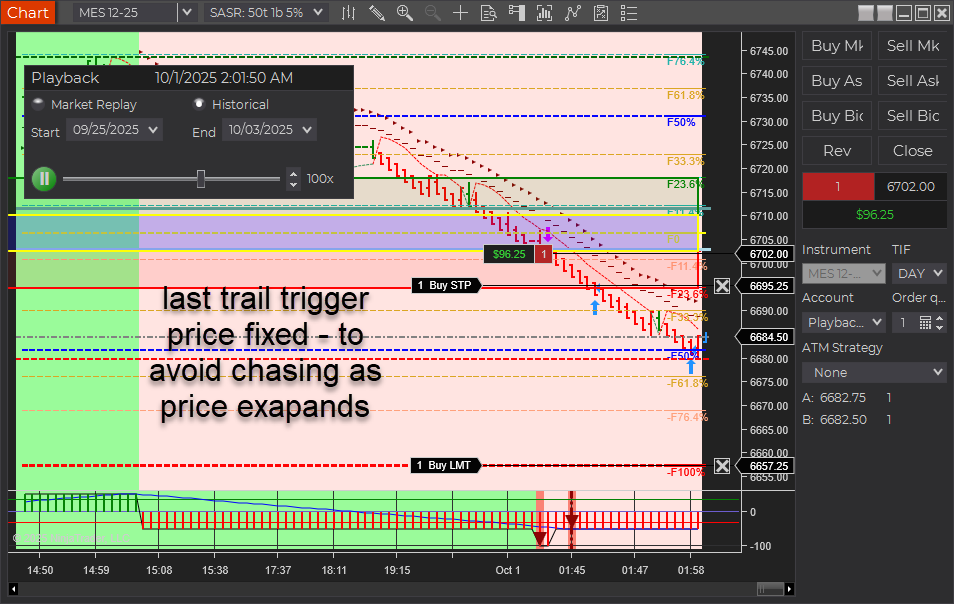
- Short Trail Trigger: Fixed. Prior behavior could “chase” price and miss the trigger around the T2 (~50%) zone when USAR bands skewed wider in fast markets. Also applies to longs.
- IntelliStop: Minimum % margin corrected and behavior refined. Trails engage noticeably above ~75% profit of a 100%-equivalent move and hold up to a ~20% offset, avoiding premature stop-ins.
- Outcome: More consistent trails and better probability of capturing extended moves beyond 100% (e.g., 150–200% runs).

What Was Fixed
In earlier builds, the stop trail reference included the full width of the dynamic USAR band. During choppy/fast conditions, the band could expand, causing the trail trigger to drift from the intended target area. Practically, this showed up around the T2 target (~50%) region stretching out toward 60%+, so the trail often didn’t trigger in time. This behavior affected both short and long positions. The new logic decouples the trigger from that skew so it fires reliably.
IntelliStop: Smarter Trailing Behavior
- Minimum % Margin Fix: Ensures the trail doesn’t crash into price when profit accelerates.
- Engages Above ~75% Profit: On a 100% Fib Grid–equivalent move, the IntelliStop now trails in noticeably above ~75%, not earlier.
- Holds a ~20% Offset: The trail will maintain up to ~20% distance from current price, allowing healthy continuation through 100% and into 150–200% extensions when momentum persists.
Trader Impact
- Consistency: Trails trigger as expected in volatile/choppy phases.
- Profit Capture: Higher odds of catching extended runs beyond the 100% level.
- Smoother Management: Less micromanagement needed during fast markets.
Behavior Example
Before: In a fast, two-sided session, the USAR band widens. The short trail “chases” the expanding band near T2 (~50%), drifting toward 60%+ and failing to arm the trail in time.
Now: The trigger is stable. Once profit reaches ~75% of a 100% move, IntelliStop begins to trail with breathing room (up to ~20% offset), often letting the position push through 100% and into 150–200% when trend pressure continues.
Changelog (2025.10.3.1)
- Fix: Short trail trigger corrected for dynamic USAR band skew (also improves longs).
- Fix: IntelliStop minimum % margin and trail engagement logic refined.
- Improve: Trailing offset behavior capped (~20%) to avoid price collision while preserving extension potential.
Update Notes
- Recommended: Restart NinjaTrader after installing the update.
- Best practice: Verify your stop/target templates and instrument tick sizes are correct for your account and prop-firm rules.
- Reminder: Settings and methods are for educational purposes. Markets carry risk; trade your plan.