NinjaTrader Automated Trading by Algo Futures Trader

hybrid algorithmic automated futures trading for prop firm traders, day & swing traders

🚀 Get Started
  • 🚀Get Started
  • NinjaTrader
  • Get Funded
  • Trading Servers
  • Pricing
  • blog
  • Help

NinjaTrader Fully Automated Futures Trading for Prop Firm Accounts

July 27, 2026 by AFT

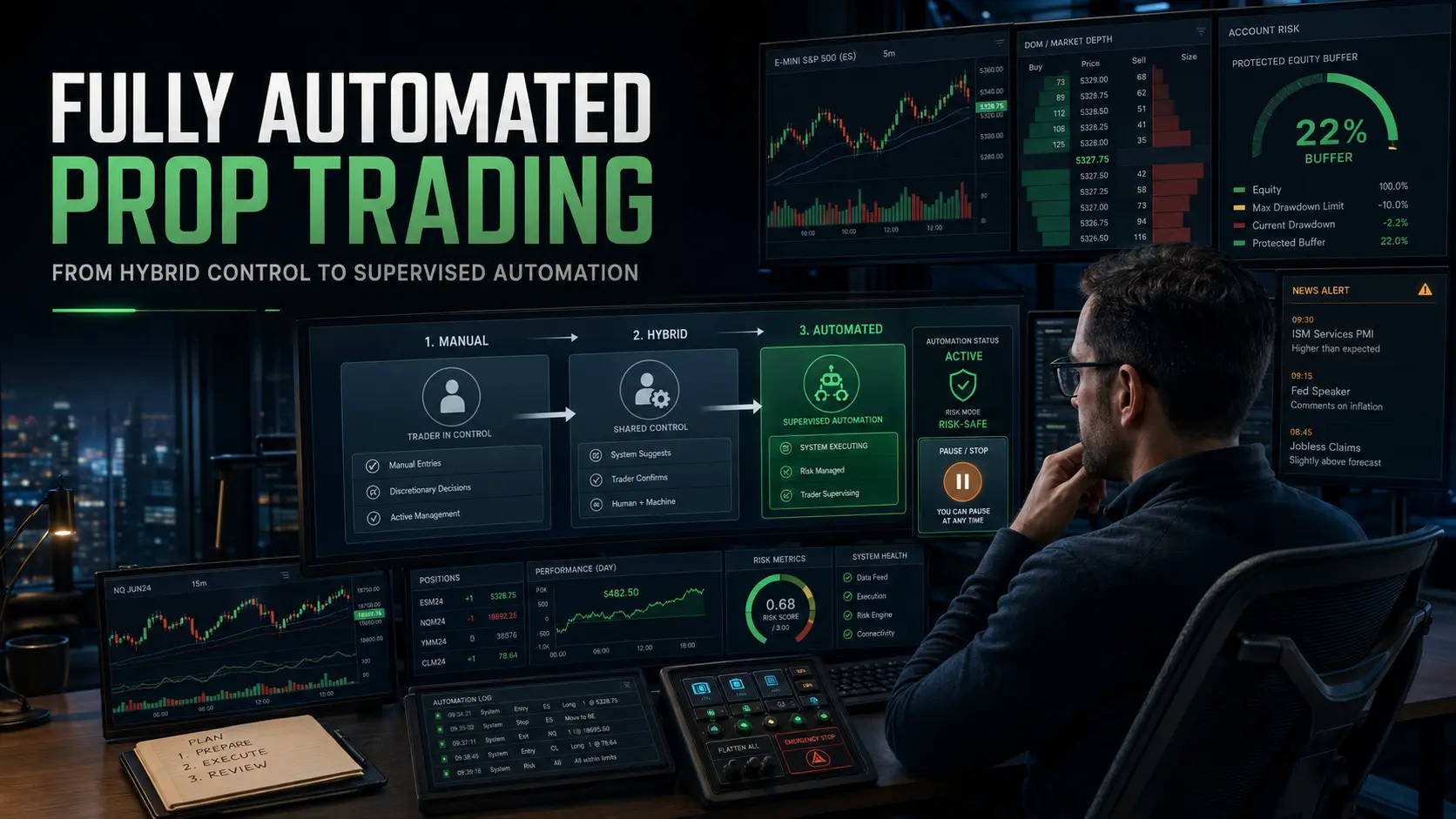
Fully automated prop-firm trading progressing from manual through hybrid control to supervised AFT automation
Progress from manual and Hybrid Algo Trading to supervised AFT automation with account-buffer protection, market alerts and operator risk controls.

Fully Automated Trading Prop Firm Accounts: How to Progress from Hybrid to Full Automation

Fully automated trading for prop firm accounts is possible with Algo Futures Trader (AFT), but the professional pathway is not to activate a universal trading robot and hope it survives. The safer and more adaptable approach is to begin with Hybrid Algo Trading, validate each element of the trading process and progressively increase automation until you reach the level appropriate for your prop firm, account rules, instrument and risk tolerance.

Can ATS Be Used for Fully Automated Prop-Firm Trading?

Yes. ATS provides purpose-built automated systems and risk controls for prop-firm evaluations, simulated-funded accounts, funded accounts and live brokerage trading. However, every deployment must be configured around the selected prop firm, account type, drawdown allowance, consistency rules, permitted automation, instrument, position size and trading session.

The objective is not uncontrolled set-and-forget trading. A professionally operated AFT system may automate approximately 90% to 95% of the practical trading process while retaining the operator controls needed to pause, restrict or exit trading when market or account conditions become unsuitable.

Automation should be earned in small, measurable steps. Begin with Hybrid Algo Trading and increase automation only after each stage has been tested, understood and validated.

Why Prop-Firm Accounts Require a Different Approach

A prop account may advertise a large nominal account size, but the amount that matters is the permitted drawdown. In practical risk terms, the drawdown allowance is the real account.

A trading system can be profitable over a long period and still breach a prop-firm account during an ordinary losing sequence. Trailing drawdown, daily loss limits, consistency rules, restricted trading periods and maximum contract limits can prevent a system from remaining active long enough for its statistical edge to develop.

Successful automated prop-firm trading therefore requires more than profitable signals. It requires a complete operating framework covering:

  • Prop-firm rules and permitted automation.
  • Maximum daily and total account risk.
  • Position sizing and contract limits.
  • Expected and worst observed drawdown.
  • Trading-session and instrument selection.
  • News, volatility and liquidity controls.
  • Contract rollover procedures.
  • Platform, connection and order monitoring.
  • Clear pause, exit and emergency-stop rules.

The Progressive Path from Hybrid to Fully Automated Trading

Step 1: Define the Prop-Firm Operating Rules

Begin by documenting the exact rules for the intended evaluation or funded account. Confirm whether automated trading, trade copying and unattended operation are permitted. Record the drawdown calculation, daily loss limit, consistency requirement, maximum position size, restricted news periods and any rules covering overnight or weekend positions.

Prop-firm policies can change, so these conditions should be verified directly with the firm before deployment and reviewed regularly.

Step 2: Start with an Official ATS Baseline

AFT provides turnkey systems and official baseline settings that can be assessed in Simulation, Market Replay and walk-forward operation. ATS automated Workspace 5 includes baseline models such as DSFG USAR, DSFG USAR GAP and WSFG USAR.

A baseline is a professional starting point, not a guaranteed universal configuration. It must be measured against the intended instrument, session, account rules and current market phase before it is considered for prop-firm deployment.

Step 3: Use Manual Entry with Automated Trade Management

The first practical stage is normally manual trade permission combined with automated order and exit management. The trader decides whether the setup and market conditions are suitable, while AFT controls the stop loss, profit targets, partial exits, trailing logic and other repetitive trade-management tasks.

This stage allows the trader to learn the signals and observe how the system behaves without surrendering control of trade selection.

Step 4: Progress to Hybrid Automated Entry and Exit

Once the trader understands the system, automated entry can be introduced under controlled conditions. The operator can enable long-only, short-only or two-way trading according to market direction, session structure and higher-timeframe bias.

AFT handles execution with machine speed and consistency, while the trader retains authority over when the system is permitted to trade. This removes much of the emotional and mechanical workload without removing human adaptability.

Step 5: Add Multi-Timeframe and Market-Context Controls

The next stage combines AFT automation with multi-timeframe confirmation, AlphaWebTrader market intelligence and AI Copilot support. The system can manage individual trades automatically while the operator assesses the wider trading environment.

At this stage, the trader should maintain statistics for each instrument, direction, setup, session and market phase. Automation should only be increased when the measured results remain compatible with the prop account’s limited drawdown allowance.

Step 6: Build an Account Buffer Before Increasing Automation

A profitable evaluation or funded account should not automatically trigger larger position sizes or less supervision. The first priority is to build a buffer between the current account equity and the applicable breach threshold.

This buffer gives the system more capacity to absorb normal losing trades, slippage and changing market conditions. It does not make the account safe or eliminate the possibility of failure. The required buffer must be based on the firm’s rules, the system’s observed drawdown, the position size and the operator’s risk limits—not an arbitrary percentage or fixed dollar target.

Until a suitable buffer exists, the trader may choose to maintain smaller size, restrict trade frequency and continue using hybrid approval rather than enabling wider automated operation.

Step 7: Increase Automation One Control at a Time

Automation can now be expanded progressively. The operator might first automate entries during one defined session, then automate directional selection, trade limits or additional approved setups. Only one material change should be introduced at a time so its effect can be measured.

If the equity curve, drawdown or execution begins to deviate materially from the validated baseline, automation should be reduced and the system returned to Simulation or hybrid control for review.

Step 8: Operate at 90% to 95% Automation with Human Oversight

The advanced objective is not necessarily 100% unattended trading. ATS can automate approximately 90% to 95% of the practical process while preserving a critical operator layer for market, account and technical risk.

The software can identify signals, place orders, manage positions, enforce trade limits and execute exits. The operator remains responsible for activating the correct system, confirming the market environment, supervising connectivity and intervening when conditions fall outside the validated operating plan.

When Should an Automated Prop Trading System Be Paused?

A fully automated futures trading system should not continue merely because the platform is running. The operator must be ready to pause new entries, reduce risk or exit positions when predefined conditions occur.

  • Abnormal price skew: Price movement, volatility, spreads or liquidity no longer resemble the conditions used to validate the system.
  • Major scheduled news: High-impact economic releases, central-bank decisions or other events can generate gaps, slippage and rapid reversals.
  • Unexpected geopolitical news: Breaking geopolitical developments can change correlations, liquidity and directional behavior without warning.
  • Exchange holidays: Shortened sessions and reduced participation can produce irregular volume and price action.
  • Contract rollovers: Volume migration between futures contracts can affect liquidity, indicators, signals and execution.
  • Technical events: Data interruptions, connection instability, platform problems, rejected orders or account synchronization errors require immediate attention.
  • Risk-limit proximity: Automation should be restricted or stopped before the account reaches its daily or total loss boundary.
  • Equity-curve deviation: Results that move materially outside the expected range may indicate a changed market phase, configuration problem or declining system edge.

Price-skew alerts, news intelligence and automated risk controls help identify these conditions, but the operator remains responsible for the final decision to continue, pause or exit.

Hybrid Algo Trading Is the Fastest Route to Higher Automation

It may appear faster to begin with full automation, but traders often progress more effectively by learning the system through controlled Hybrid Algo Trading. This reveals how signals, entries, exits and risk controls interact in live market conditions before the account depends on them completely.

The ATS model combines three complementary strengths:

  • Trader judgment: Determines market suitability, direction, risk and permission to trade.
  • AFT machine execution: Provides speed, precision, consistency and emotion-free order management.
  • AI Copilot intelligence: Supports analysis of market context, alerts, news, risk conditions and operating decisions.

Automation can then be increased according to demonstrated competence and measured results. Some traders may remain at 50% to 80% automation because that provides their preferred balance of control and efficiency. Others may progress toward 90% to 95% automation with active supervision.

A Practical Automated Prop-Firm Trading Checklist

  1. Confirm that the prop firm permits the intended form of automation.
  2. Calculate the effective drawdown allowance rather than relying on the advertised account size.
  3. Select one instrument, one trading session and one official ATS baseline.
  4. Configure daily loss, position-size, trade-frequency and account-level limits.
  5. Test in Simulation, Market Replay and walk-forward market conditions.
  6. Begin with manual permission and automated trade management.
  7. Introduce automated entries only after understanding the signals and exits.
  8. Measure win rate, risk-reward, drawdown, losing sequences, slippage and equity-curve deviation.
  9. Use conservative size when progressing into an evaluation or funded account.
  10. Build an account buffer before expanding position size or automation.
  11. Define rules for price skew, news, geopolitical events, holidays and rollovers.
  12. Monitor platform, connection, orders and account synchronization.
  13. Pause or reduce automation whenever results move outside the validated operating range.

Frequently Asked Questions

Can AFT trade a prop-firm account automatically?

Yes. AFT supports automated entry, automated trade management and fully automated trading modes. The configuration must match the selected prop firm’s rules, instrument, account limits and permitted automation conditions.

Is fully automated prop trading completely unattended?

It should not be treated as unattended set-and-forget trading. ATS may automate approximately 90% to 95% of the practical process, but an operator should remain available to supervise risk, news, market conditions, contract rollovers and technical events.

Should I begin with fully automated trading?

The preferred ATS pathway is to begin with Hybrid Algo Trading and increase automation through small, measurable steps. This allows you to understand the system, establish your own statistics and identify problems before they threaten a prop account.

How large should the prop-account buffer be?

There is no universal figure. The required buffer depends on the prop firm’s rules, the system’s observed drawdown, position size, trade frequency and the trader’s risk limits. A buffer reduces immediate pressure but cannot guarantee that an account will survive future losses.

Can automation guarantee an evaluation pass or payout?

No. Automated and hybrid trading systems can lose money, and no software can guarantee an evaluation pass, funded account or payout. Results depend on market conditions, system configuration, risk control, execution and operator decisions.

How to Get Started with Automated Prop-Firm Trading

The most adaptable route is to start with AFT turnkey workspaces, learn the ATS Hybrid Algo Trading Methodology and progressively increase automation as your experience, statistics and account buffer develop.

Review the complete answer to Can ATS be used for fully automated prop-firm trading?, or explore the ATS trading pathways for assisted onboarding, full-featured AFT access, Zero-to-Hero orientation and the tools required to develop your own hybrid or automated prop-firm trading operation.

Filed Under: AFT8, Algo Futures Trader, automated futures trading, ninjatrader algorithmic trading, ninjatrader automated trading, prop firm trading Tagged With: AFT, algo futures trader, Fully Automated Trading, Futures Trading Automation, hybrid algo trading, ninjatrader automated trading systems, Prop Firm Accounts, risk management

AFT8 Workspaces Simplification for AFT v202051004 onwards

October 5, 2025 by AFT

AFT8 Workspace Naming Update

Release date:
October 5, 2025

The AFT8 Workspace installers will continue to ship as
Installers 1–5. What’s changing is the
workspace file naming to align with the installer number
and the Zero to Hero stages (1–4) for simpler setup and support.

At a glance

  • Installers remain: 01 → 05
  • Workspace names now include their installer number (e.g., AFT8-01-…)
  • Backwards-friendly names to reduce confusion
  • Old workspaces are removed automatically by the new installers

Legacy AFT8 workspace naming (being replaced)

Examples from NinjaTrader 8\workspaces\:

  • AFT8-SFG Breakout Trader-Basic-001.xml
  • AFT8-SFG Breakout Trader-Basic-002.xml
  • AFT8-SFG Breakout Trader-Basic-003.xml
  • AFT8-SFG Breakout Trader-Basic-004.xml
  • AFT8-SFG Breakout Trader-0000A.xml
  • AFT8-SFG Breakout Trader-0000B.xml
  • AFT8-Trend-Scalper-Basic-001.xml
  • AFT8-Trend-Scalper-Basic-002.xml
  • AFT8-Trend-Scalper-Basic-003.xml
  • AFT8-Trend-Scalper-Basic-004.xml
  • AFT8-Trend-Scalper-1000A.xml
  • …etc

These mixed patterns made it harder to discover which files belonged to installers 4–5 and the
corresponding Zero to Hero stage. The new scheme fixes that.

New AFT8 workspace naming (by installer)

AFT Workspaces 01

  • Manual Trade Entry via NinjaTrader Chart Trader + ATM
    • NinjaTrader 8\workspaces\AFT8-01-Freemium-Session-Breakout.xml
    • NinjaTrader 8\workspaces\AFT8-01-Freemium-Trend-Scalper.xml
  • Manual Trade Entry via NinjaTrader Chart Trader + AFT8 TradeManager Automated Exits
    • NinjaTrader 8\workspaces\AFT8-01-SFG Breakout Trader-Basic-001a.xml
    • NinjaTrader 8\workspaces\AFT8-01-SFG Breakout Trader-Basic-001b.xml
    • NinjaTrader 8\workspaces\AFT8-01-SFG Breakout Trader-Basic-001c.xml
    • NinjaTrader 8\workspaces\AFT8-01-Trend-Scalper-Basic-001a.xml
    • NinjaTrader 8\workspaces\AFT8-01-Trend-Scalper-Basic-001b.xml
    • NinjaTrader 8\workspaces\AFT8-01-Trend-Scalper-Basic-001c.xml

AFT Workspaces 02

  • AFT8 Hybrid Automated Trade Entry + AFT8 TradeManager Automated Exits
    • NinjaTrader 8\workspaces\AFT8-02-SFG Breakout Trader-Basic-002a.xml
    • NinjaTrader 8\workspaces\AFT8-02-SFG Breakout Trader-Basic-002b.xml
    • NinjaTrader 8\workspaces\AFT8-02-SFG Breakout Trader-Basic-002c.xml
    • NinjaTrader 8\workspaces\AFT8-02-Trend-Scalper-Basic-002a.xml
    • NinjaTrader 8\workspaces\AFT8-02-Trend-Scalper-Basic-002b.xml
    • NinjaTrader 8\workspaces\AFT8-02-Trend-Scalper-Basic-002c.xml

AFT Workspaces 03

  • AFT8 Hybrid Automated Trade Entry + AFT8 TradeManager Automated Exits + MTF
    • NinjaTrader 8\workspaces\AFT8-03-SFG Breakout Trader-Basic-003a.xml
    • NinjaTrader 8\workspaces\AFT8-03-Trend-Scalper-Basic-003a.xml

AFT Workspaces 04

  • AFT8 Hybrid Automated Trade Entry + AFT8 TradeManager Automated Exits + MTF + AWT
    • NinjaTrader 8\workspaces\AFT8-04-SFG Breakout Trader-Basic-004a.xml
    • NinjaTrader 8\workspaces\AFT8-04-SFG Breakout Trader-MTF-104a.xml
    • NinjaTrader 8\workspaces\AFT8-04-SFG Breakout Trader-MTF-104b.xml
    • NinjaTrader 8\workspaces\AFT8-04-Trend-Scalper-Basic-004a.xml
    • NinjaTrader 8\workspaces\AFT8-04-Trend-Scalper-MTF-104a.xml
    • NinjaTrader 8\workspaces\AFT8-04-View-MTF-204a.xml

AFT Workspaces 05

  • AFT8 NinjaTrader Automated Trading pure baseline Algos for optimization/comparison
    • NinjaTrader 8\workspaces\AFT8-05-Algos-BaseLine-001.xml
    • NinjaTrader 8\workspaces\AFT8-05-Algos-BaseLine-002.xml
    • NinjaTrader 8\workspaces\AFT8-05-Algos-BaseLine-003.xml
    • NinjaTrader 8\workspaces\AFT8-05-Algos-BaseLine-004.xml
    • NinjaTrader 8\workspaces\AFT8-05-TrendTraderAWT-001.xml

Impact

  • Smoother “Zero to Hero” onboarding: Stages 1–4 (plus 5) are now easily identifiable by installer and filename.
  • Automatic cleanup: Old workspaces are uninstalled/removed when you run the new installers.

FAQ

Where to download and install?

  • Visit your ATS Universal Account → Trader Launch Pad → My Downloads:
  • View more info on AFT8 Workspaces
Will my existing layouts break?
  • If you rely on the legacy workspace names, you’ll see them removed during install.
  • Use the new, installer-aligned names going forward (e.g., AFT8-04-… for Installer 04).
  • Your own labelled workspaces/settings/templates will not be removed
Where do the files live?
  • NinjaTrader 8\workspaces\ on your NinjaTrader installation.

Filed Under: AFT8, aft8 turnkey workspaces, NinjaTrader 8 Tagged With: AFT8 Release, AFT8 update, aft8release, AFT8Update, ninjatrader automated trading systems

AFT8 Releasd version 2025.10.3.1 for NinjaTrader 8 – Short Trail Trigger Fix + Intelli-Stop Enhancements

October 3, 2025 by AFT

aft intellistop min distance to price governor

AFT 2025.10.3.1 — Short Trail Trigger Fix + IntelliStop Enhancements

Release date: 3 Oct 2025 • Version: 2025.10.3.1

This update fixes a rare trailing-stop issue in choppy/fast markets and upgrades IntelliStop so profitable runners can breathe past 100% of the Session Fib Grid and reach 150–200% on strong moves.

Quick Summary

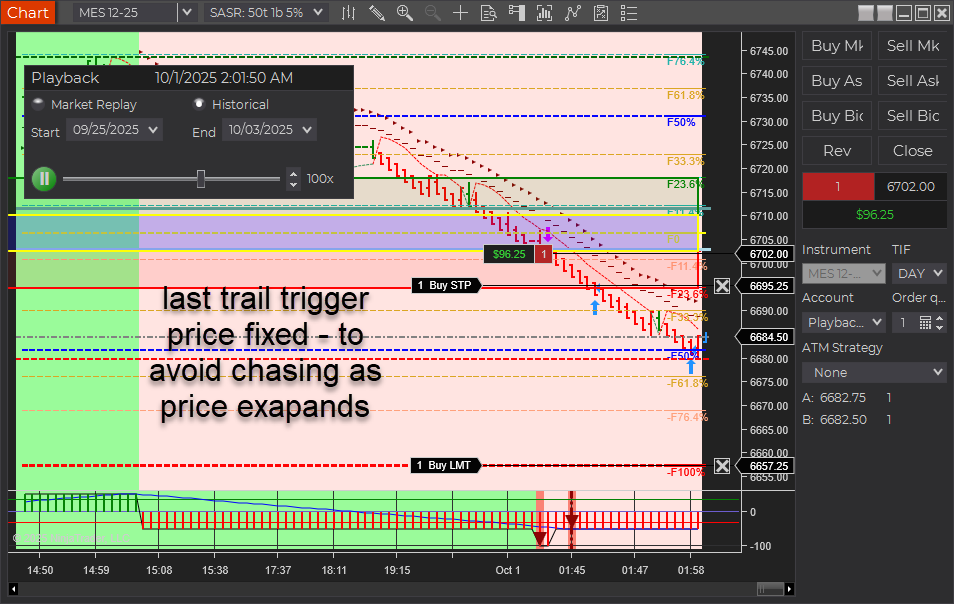
  • Short Trail Trigger: Fixed. Prior behavior could “chase” price and miss the trigger around the T2 (~50%) zone when USAR bands skewed wider in fast markets. Also applies to longs.
  • IntelliStop: Minimum % margin corrected and behavior refined. Trails engage noticeably above ~75% profit of a 100%-equivalent move and hold up to a ~20% offset, avoiding premature stop-ins.
  • Outcome: More consistent trails and better probability of capturing extended moves beyond 100% (e.g., 150–200% runs).
aft8 short trail last optimized triggers
aft intellistop min distance to price governor

What Was Fixed

In earlier builds, the stop trail reference included the full width of the dynamic USAR band. During choppy/fast conditions, the band could expand, causing the trail trigger to drift from the intended target area. Practically, this showed up around the T2 target (~50%) region stretching out toward 60%+, so the trail often didn’t trigger in time. This behavior affected both short and long positions. The new logic decouples the trigger from that skew so it fires reliably.

IntelliStop: Smarter Trailing Behavior

  • Minimum % Margin Fix: Ensures the trail doesn’t crash into price when profit accelerates.
  • Engages Above ~75% Profit: On a 100% Fib Grid–equivalent move, the IntelliStop now trails in noticeably above ~75%, not earlier.
  • Holds a ~20% Offset: The trail will maintain up to ~20% distance from current price, allowing healthy continuation through 100% and into 150–200% extensions when momentum persists.
Why this matters: Early, overly tight trails frequently cut winners short. This refinement keeps risk contained while letting strong trends do the work.

Trader Impact

  • Consistency: Trails trigger as expected in volatile/choppy phases.
  • Profit Capture: Higher odds of catching extended runs beyond the 100% level.
  • Smoother Management: Less micromanagement needed during fast markets.

Behavior Example

Before: In a fast, two-sided session, the USAR band widens. The short trail “chases” the expanding band near T2 (~50%), drifting toward 60%+ and failing to arm the trail in time.

Now: The trigger is stable. Once profit reaches ~75% of a 100% move, IntelliStop begins to trail with breathing room (up to ~20% offset), often letting the position push through 100% and into 150–200% when trend pressure continues.

Changelog (2025.10.3.1)

  • Fix: Short trail trigger corrected for dynamic USAR band skew (also improves longs).
  • Fix: IntelliStop minimum % margin and trail engagement logic refined.
  • Improve: Trailing offset behavior capped (~20%) to avoid price collision while preserving extension potential.

Update Notes

  • Recommended: Restart NinjaTrader after installing the update.
  • Best practice: Verify your stop/target templates and instrument tick sizes are correct for your account and prop-firm rules.
  • Reminder: Settings and methods are for educational purposes. Markets carry risk; trade your plan.

Disclaimer

Trading futures and derivatives involves substantial risk and is not suitable for every investor. Performance is not guaranteed. Examples are for illustration only and are not financial advice. Use proper risk controls and follow your prop firm or broker rules.

Filed Under: AFT8, automated futures trading, fully automated trading system, NinjaTrader 8 Tagged With: AFT8, AFT8 Release, AFT8 update, aft8release, AFT8Update, ninjatrader automated trading systems

Does the AFT8 Full Feature FREE Trial Allow Trading of Sim, Ninja Demo, Prop Evaluation, Prop Live, and Live Brokerage Accounts?

September 30, 2025 by AFT

Free means free — and full feature means you get the complete set of tools to explore AFT8 in any trading environment.

The AFT8 free trial is more than just a basic demo. It’s the complete system unlocked for a full month, giving traders the chance to experience all the features without entering a credit card or personal details. That means you can truly put the software to the test — whether on simulation, prop evaluation, or even your own live brokerage account.

Account Types Supported During the Trial

During the trial, you can connect to and trade on:

  • Sim101 (NinjaTrader simulated account)
  • NinjaTrader Demo (NinjaTrader demo account)
  • Prop Evaluation accounts
  • Prop Live funded accounts
  • Brokerage Live accounts

In short, the free trial license is identical in capability to a paid license — so you can test AFT8 where it matters most.

Full Flexibility

  • Switch between account types at any time.
  • Trade any supported futures instrument — ES, MES, NQ, MNQ, CL, GC, YM, and more.
  • Adjust position sizes, stops, and targets to fit your style.
  • Explore manual, semi-auto, or fully automated entries with AFT8’s trade algo entry and trade manager handling exits.

Zero to Hero Stages

To guide you, the trial includes turnkey workspaces that walk you through a progressive “Zero to Hero” journey:

  1. Stage 1: Manual entries with automated exits.
  2. Stage 2: Hybrid entries (semi-auto or auto) with automated trade management.
  3. Stage 3: Multi-timeframe confirmation for higher-probability trades.
  4. Stage 4: Advanced hybrid trading with AWT (Alpha WebTrader) integration.

This structure helps new users build confidence step-by-step, while still allowing experienced traders to dive directly into advanced setups.

FAQ

Q: Can I change instruments or settings?
Yes. Instruments, contract size, and settings are fully configurable.

Q: Is fully automated trading allowed with prop firms?
Most prop firms require hybrid (supervised) trading. AFT8 is designed for this man-and-machine approach.

Q: What happens when the trial ends?
After 7 days, the trial expires. You can continue with Sim Mode on Freemium, or upgrade to a paid plan to access live and prop trading features.

Resources

  • ATS Help Center
  • Zero to Hero Guides
  • Prop Trading Articles

Filed Under: AFT8, aft8 turnkey workspaces, ninjatrader automated trading Tagged With: automated futures trading, ninjatrader automated trading, ninjatrader automated trading systems

How to Use AFT8 for Automated Trading on NinjaTrader 8 (Zero-to-Hero Guide)

September 23, 2025 by AFT

AFT8 Automated Trading Zero-to-Hero Guide

Audience: Intermediate–Advanced • Platform: NinjaTrader 8 (Windows) • Product: Algo Futures Trader 8 (AFT8)

  1. Prerequisites
  2. Step 1 — Sign up & link up
  3. Step 2 — Install ATS Desktop Apps & AFT8
  4. Step 3 — Zero-to-Hero stages & turnkey workspaces
    1. Stage 1 — Manual entry + automated trade management
    2. Stage 2 — Hybrid (semi-auto/full-auto entry) + automated exits
    3. Stage 3 — Hybrid + multi-timeframe confirmation
    4. Stage 4 — Hybrid + AWT integration (advanced optional)
    5. Stage 5 — Going live (prop/live) & next steps
  5. Key takeaways
  6. Helpful links

Prerequisites

  • NinjaTrader 8 installed (Windows PC). AFT8 works only with NT8.
  • Market data/broker connection set up in NT8 for realtime or historical data.
  • ATS Universal Account (free) to access downloads/licenses.
  • Experience level: Intermediate to advanced with NT8 basics (charts, Chart Trader/DOM, connections).
  • Stable internet + up-to-date Windows. (Recommended: US English locale/time settings in NT8 to avoid formatting issues.)

Trial note: AFT8 can be used free in SIM during the trial. Live/prop usage requires a license.

Step 1 — Sign up & link up

  1. Create your ATS Universal Account. This unlocks downloads, licenses, and support access.
  2. Log in to the ATS site with your new account.
  3. (Optional) Link Discord to join the Zero-to-Hero/VIP channels for Q&A and community support.

Step 2 — Install ATS Desktop Apps & AFT8

  1. Download “ATS Desktop Apps”. From your ATS account’s Downloads page.
  2. Run the installer. Accept defaults; it will:
    • Install Algo Futures Trader (AFT) Desktop and Alpha Web Trader (AWT) Desktop.
    • Deploy AFT8 components (strategies/indicators/workspaces) into NinjaTrader 8.
    • Install any prerequisites if prompted (.NET runtime, NT8 bootstrapper, etc.).
  3. Launch NinjaTrader 8. Approve the AFT8 add-on if prompted; verify AFT8 workspaces/strategies are available.

Tip: Keep NT8 updated. After install, restart NT8 once to ensure all components load cleanly.

Step 3 — Zero-to-Hero stages & turnkey workspaces

AFT8 onboards you via turnkey NinjaTrader workspaces that unlock automation step-by-step. Progress at your own pace; each stage adds capability without overwhelming you.

Stage 1 — Manual entry + automated trade management

  • You enter trades manually (Chart Trader/DOM) using AFT8’s chart signals for guidance.
  • AFT Algo Trade Manager automates exits: stop, targets, trailing, partials.
  • Goal: Learn signal-driven discretionary entries and the Algo Trade Manager control set.
  • Recommended workspace: Session Breakout (or Trend Scalper) with visual buy/sell signals.

Why this first? You build trust by seeing how the algo manages risk/profit while you retain the entry decision.

Stage 2 — Hybrid (semi-auto/full-auto entry) + automated exits

  • Enable the AFT Algo Entry module:
    • Semi-auto: Arm next signal (often with long/short bias).
    • Full-auto: Continuous entries on qualified signals.
  • Exits remain automated under Algo Trade Manager.
  • Goal: Operate in “man + machine” mode. You supervise high-level bias and session timing; the system executes.
  • Note: Fully unattended trading is not recommended; keep the pilot in the loop.

Stage 3 — Hybrid + multi-timeframe confirmation

  • Add MTF filters (e.g., confirm a 5-min signal with a 15-min trend).
  • Fewer, higher-quality entries while still using hybrid/auto entries and automated exits.
  • Goal: Improve selectivity and alignment with broader trend context.

Stage 4 — Hybrid + AWT integration (advanced)

  • Integrate Alpha Web Trader (AWT) for market radar, sentiment, and news-aware behavior.
  • Use additional timeframes (MTF/TTF) and advanced filters in the turnkey workspace.
  • Goal: Operate a professional “pilot & plane” cockpit with richer context and smarter automation.
  • Heads-up: Trial users get a preview of VIP-grade layouts; keep supervision active.

Stage 5 — Going live (prop/live) & next steps

  • Keep practicing in SIM if needed; the system supports extended simulation learning.
  • Choose a license for live or prop evaluation when ready.
  • Unlock VIP & AWT full features for advanced workspaces, support, and community.
  • Pathways: Continue hybrid trading, or explore fully automated baselines (with caution and oversight).

Key takeaways

  • NT8-only: AFT8 is built for NinjaTrader 8 on Windows.
  • Hybrid first: Manual → Hybrid → (optional) Automation, with the trader supervising.
  • Turnkey workspaces: Progress through stages to add capability without overload.
  • Trial in SIM: Use the free trial to build skill, stats, and confidence before going live.
  • Community & docs: Use the Getting Started and AFT categories plus Discord for faster wins.

Helpful links

  • ATS Help Center — Getting Started
  • ATS Help Center — Algo Futures Trader (AFT)

Support tip: If the AFT controllers aren’t visible after install, open the supplied AFT workspaces in NT8 and ensure panels aren’t minimized or behind charts. Restart NT8 after first install.

Filed Under: AFT8, Algo Futures Trader, automated futures trading system, NinjaTrader 8 Tagged With: ninjatrader automated trading, ninjatrader automated trading systems, ninjatrader trading bot

Mastering Trader Psychology and NLP: A Book List for Trading Success

January 13, 2025 by AFT


Mastering Trader Psychology and NLP


Mastering Trader Psychology and NLP

Trading is as much about mastering your mind as it is about analyzing markets. To thrive, traders need to overcome emotional hurdles, maintain discipline, and develop a winning mindset. This blog explores how trader psychology and Neuro-Linguistic Programming (NLP) can transform your approach—and provides a curated book list to guide you.


Why Psychology and NLP Matter in Trading

  1. The Psychological Battle
    • Fear, greed, and overconfidence derail even the best strategies.
    • Maintaining discipline in volatile markets requires mental resilience.
  2. The Role of NLP in Trading
    • NLP helps rewire thought patterns to eliminate self-sabotaging behaviors.
    • Techniques like visualization and affirmations enhance focus and confidence.

Top Books on Trader Psychology

1. “Trading in the Zone” by Mark Douglas

This classic explores the mental framework behind consistent trading success. Douglas emphasizes understanding probabilities, managing emotions, and cultivating a winning mindset.

  • Key Takeaway: Develop a belief system that aligns with market realities.

2. “The Disciplined Trader” by Mark Douglas

Another masterpiece by Douglas, this book focuses on self-control and overcoming the psychological barriers that hinder profitability.

  • Key Takeaway: Discipline is the cornerstone of successful trading.

3. “Thinking, Fast and Slow” by Daniel Kahneman

While not trading-specific, this book by a Nobel laureate delves into cognitive biases and decision-making processes that are crucial for traders.

  • Key Takeaway: Recognize and mitigate cognitive biases for better decisions.

4. “Mindset: The New Psychology of Success” by Carol S. Dweck

Dweck’s exploration of the growth mindset applies directly to trading, encouraging traders to view challenges and losses as opportunities to grow.

  • Key Takeaway: Embrace a mindset of learning and adaptability.

5. “Atomic Habits” by James Clear

Clear’s strategies for habit formation can help traders establish routines that foster consistent performance.

  • Key Takeaway: Small changes in habits lead to significant improvements.

6. “The Psychology of Trading” by Brett N. Steenbarger

This book combines trading psychology with practical techniques for improving performance. Steenbarger offers insights into managing stress and staying focused.

  • Key Takeaway: Treat trading as a performance activity and train accordingly.

Top Books on NLP for Traders

1. “NLP: The Essential Guide to Neuro-Linguistic Programming” by Tom Hoobyar, Tom Dotz, and Susan Sanders

This comprehensive guide explains how NLP techniques can reprogram your thought patterns and behaviors for success.

  • Key Takeaway: Use NLP to build confidence and eliminate fear in trading.

2. “Unlimited Power” by Tony Robbins

Robbins explores NLP techniques for achieving personal mastery. His teachings on focus, visualization, and anchoring are invaluable for traders.

  • Key Takeaway: Master your mental state to perform under pressure.

3. “Frogs into Princes” by Richard Bandler and John Grinder

Written by the co-founders of NLP, this book introduces the foundational principles of the discipline.

  • Key Takeaway: Change your internal dialogue to achieve peak performance.

4. “NLP for Beginners: An Idiot-Proof Guide to Neuro-Linguistic Programming” by Shlomo Vaknin

This beginner-friendly book is perfect for traders new to NLP. It explains practical tools to improve focus, confidence, and decision-making.

  • Key Takeaway: Simple NLP techniques can create powerful mental shifts.

5. “The Secrets of Successful Trading: The Behavioral Edge” by Branden Lee

A unique blend of trading psychology and NLP, this book helps traders align their subconscious behaviors with their goals.

  • Key Takeaway: Behavioral alignment is key to trading success.

Applying Psychology and NLP in Trading

  1. Develop Subconscious Competence
    • Repetition and structured drills transform conscious strategies into automatic responses.
  2. Master Emotional Regulation
    • Use mindfulness techniques and NLP tools like anchoring to stay calm under pressure.
  3. Adopt a Growth Mindset
    • View losses as opportunities to refine your approach, not as failures.
  4. Create and Reinforce Habits
    • Establish daily routines that support disciplined trading.

The ATS Edge: Neuro Linguistic Trading

Our Zero to Hero Program incorporates trading psychology and NLP principles into a 360-degree framework called Neuro Linguistic Trading (NLT). By combining structured repetition, automated systems, and tailored mentorship, ATS helps traders:

  • Build mental resilience.
  • Internalize effective habits.
  • Achieve subconscious competence for faster, instinctive decisions.

Conclusion

Mastering trader psychology and NLP is essential for consistent trading success. Whether you’re battling emotional swings or striving for peak performance, the books listed here offer invaluable insights and tools. Combine these lessons with ATS’s Neuro Linguistic Trading approach, and you’ll be well on your way to transforming your trading journey.


Filed Under: AFT8, Algo Futures Trader, automated futures trading, automated trading ninjatrader, ninjatrader automated trading Tagged With: automated futures trading, automated futures trading software, automated futures trading strategies, automated futures trading system, automated futures trading systems, Automated Trading NinjaTrader, automated trading with ninjatrader, best automated futures trading software, fully automated trading system, futures algo trading, futures algorithmic trading, futures automated trading, futures trading algorithms, ninjatrader algorithmic trading, ninjatrader automated trading, ninjatrader automated trading systems, ninjatrader trading bot, ninjatrader trading systems

  • 1
  • 2
  • 3
  • …
  • 7
  • Next Page »
  • NinjaTrader Automated Trading
  • automated futures trading
  • automated trading systems
  • Day Trading Futures
  • Get Started Day Trading Futures
  • VIP Trading Group Live Market Trade Along
  • Secret to Day trading futures success
  • AFT8 for NinjaTrader 8
  • Futures Algo Trading Systems
  • Market News
  • NinjaTrader Free Trading Platform
  • Legal Notices
  • AFT Legal Info
  • Terms
  • FULL RISK DISCLOSURE
  • Privacy Policy
  • Cookie Usage
  • About AlgoFuturesTrader
  • Connect to AFT
  • Blog
  • Videos
  • Support
  • Contact
  • My account
  • Sitemap
  • Affiliates

Ninja Futures Trading
Algo Futures Trader Copyright Algo Trading Systems© 2026 ·
AlgoFuturesTrader.com is owned & operated by Algo Trading Systems LLC. By using this website or products & services, you are bound by our Terms & subject to US legal jurisdiction only. Errors & omissions excluded.
AFT made in England, powered by MicroTrends NinjaTrader development

Disclaimer: Trading & investment carry a high level of risk. AlgoFuturesTrader does not make recommendations for buying or selling any financial instruments, nor do we offer trading or investment advice. We are a software company, and we only provide educational information on ways to use our sophisticated Algo Futures trading tools. It is up to our customers & readers to make their own trading & investment decisions, or consult with a registered investment advisor.

Risk Disclosure: Futures, CFDs, & forex trading carry substantial risk and are not suitable for every investor. An investor could potentially lose all or more than the initial investment. Risk capital is money that can be lost without jeopardizing one's financial security or lifestyle. Only risk capital should be used for trading, and only those with sufficient risk capital should consider trading. Past performance is not necessarily indicative of future results. Please read the full risk disclosure here.

Hypothetical performance results have many inherent limitations, some of which are described below. No representation is made that any account will or is likely to achieve profits or losses similar to those shown. In fact, there are frequently sharp differences between hypothetical performance results and the actual results subsequently achieved by any particular trading program. One of the limitations of hypothetical performance results is that they are generally prepared with the benefit of hindsight. In addition, hypothetical trading does not involve financial risk, and no hypothetical trading record can completely account for the impact of financial risk in actual trading. For example, the ability to withstand losses or adhere to a particular trading program despite trading losses are material points that can adversely affect actual trading results. Numerous other factors related to the markets or the implementation of any specific trading program cannot be fully accounted for in the preparation of hypothetical performance results and can adversely affect trading results.

Testimonials appearing on this website may not be representative of other clients or customers and are not a guarantee of future performance or success.

NinjaTrader® is a registered trademark of NinjaTrader Group, LLC. No NinjaTrader company has any affiliation with the owner, developer, or provider of the products or services described herein, nor do they endorse, recommend, or approve any such product or service.

We use cookies on our website to give you the most relevant experience by remembering your preferences and repeat visits. By clicking “Accept All”, you consent to the use of ALL the cookies. However, you may visit "Cookie Settings" to provide a controlled consent.
Cookie SettingsAccept All
Manage consent

Privacy Overview

This website uses cookies to improve your experience while you navigate through the website. Out of these, the cookies that are categorized as necessary are stored on your browser as they are essential for the working of basic functionalities of the website. We also use third-party cookies that help us analyze and understand how you use this website. These cookies will be stored in your browser only with your consent. You also have the option to opt-out of these cookies. But opting out of some of these cookies may affect your browsing experience.
Necessary
Always Enabled
Necessary cookies are absolutely essential for the website to function properly. These cookies ensure basic functionalities and security features of the website, anonymously.
CookieDurationDescription
cookielawinfo-checkbox-analytics11 monthsThis cookie is set by GDPR Cookie Consent plugin. The cookie is used to store the user consent for the cookies in the category "Analytics".
cookielawinfo-checkbox-functional11 monthsThe cookie is set by GDPR cookie consent to record the user consent for the cookies in the category "Functional".
cookielawinfo-checkbox-necessary11 monthsThis cookie is set by GDPR Cookie Consent plugin. The cookies is used to store the user consent for the cookies in the category "Necessary".
cookielawinfo-checkbox-others11 monthsThis cookie is set by GDPR Cookie Consent plugin. The cookie is used to store the user consent for the cookies in the category "Other.
cookielawinfo-checkbox-performance11 monthsThis cookie is set by GDPR Cookie Consent plugin. The cookie is used to store the user consent for the cookies in the category "Performance".
viewed_cookie_policy11 monthsThe cookie is set by the GDPR Cookie Consent plugin and is used to store whether or not user has consented to the use of cookies. It does not store any personal data.
Functional
Functional cookies help to perform certain functionalities like sharing the content of the website on social media platforms, collect feedbacks, and other third-party features.
Performance
Performance cookies are used to understand and analyze the key performance indexes of the website which helps in delivering a better user experience for the visitors.
Analytics
Analytical cookies are used to understand how visitors interact with the website. These cookies help provide information on metrics the number of visitors, bounce rate, traffic source, etc.
Advertisement
Advertisement cookies are used to provide visitors with relevant ads and marketing campaigns. These cookies track visitors across websites and collect information to provide customized ads.
Others
Other uncategorized cookies are those that are being analyzed and have not been classified into a category as yet.
SAVE & ACCEPT