NinjaTrader Automated Trading by Algo Futures Trader

hybrid algorithmic automated futures trading for prop firm traders, day & swing traders

  • 🚀Get Started
  • NinjaTrader
  • Get Funded
  • Trading Servers
  • Pricing
  • blog
  • Help

AFT8 Update version 20251024 released new indicator and algo entry module

October 25, 2025 by AFT

AFT8 update version 20251024 has been released for NinjaTrader 8

Installers

  • ATS Desktop installers are upgraded to support all Windows OS 64Bit, and Arm64-bit CPU chipsets, such as Surface Pro 2025 Arm64 support Windows 11 Home.

Algos – Automated trading Systems

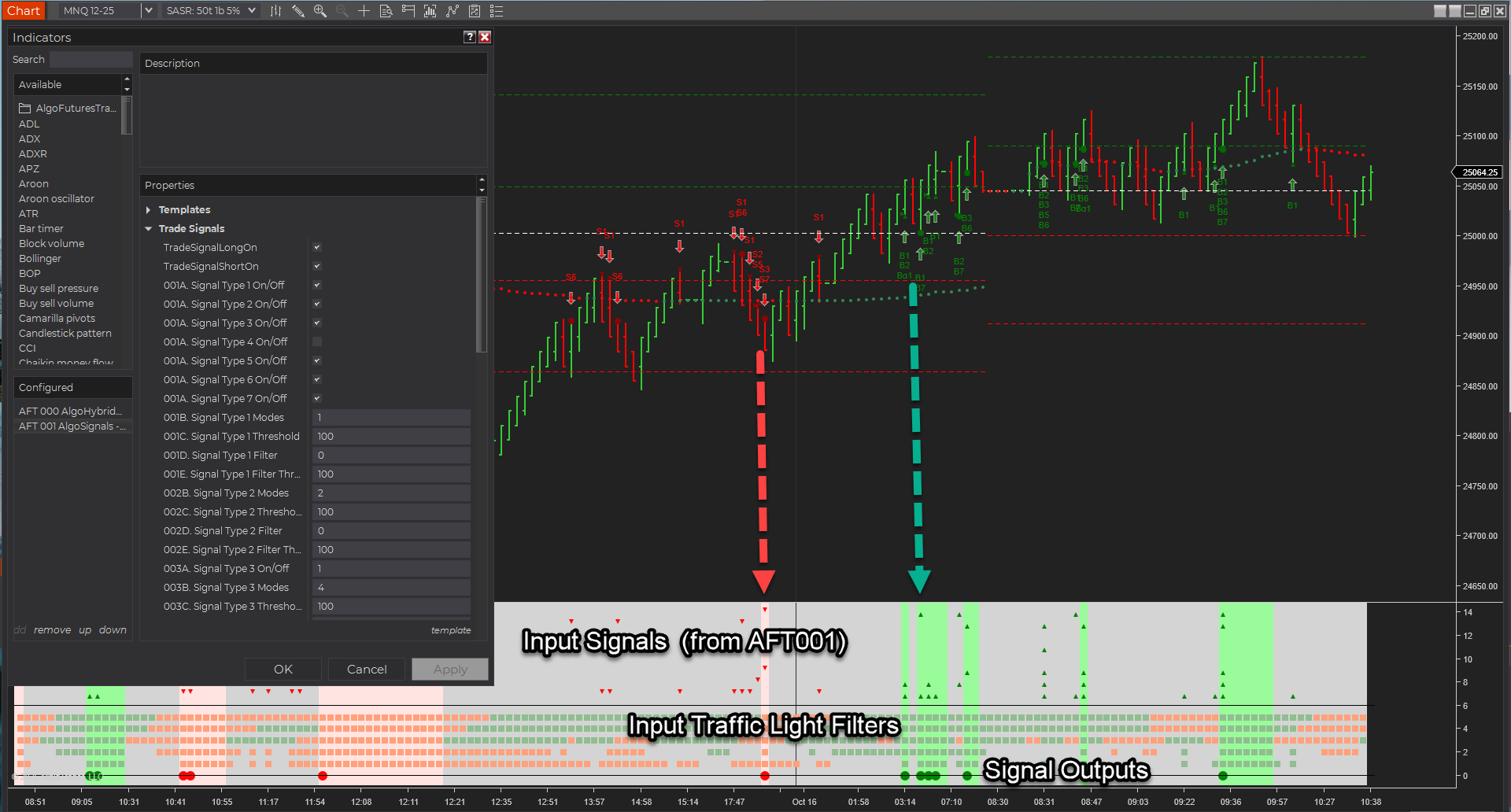
  • Algo Entry Mode – 13 – AFT000 Hybrid Algo Trader signals
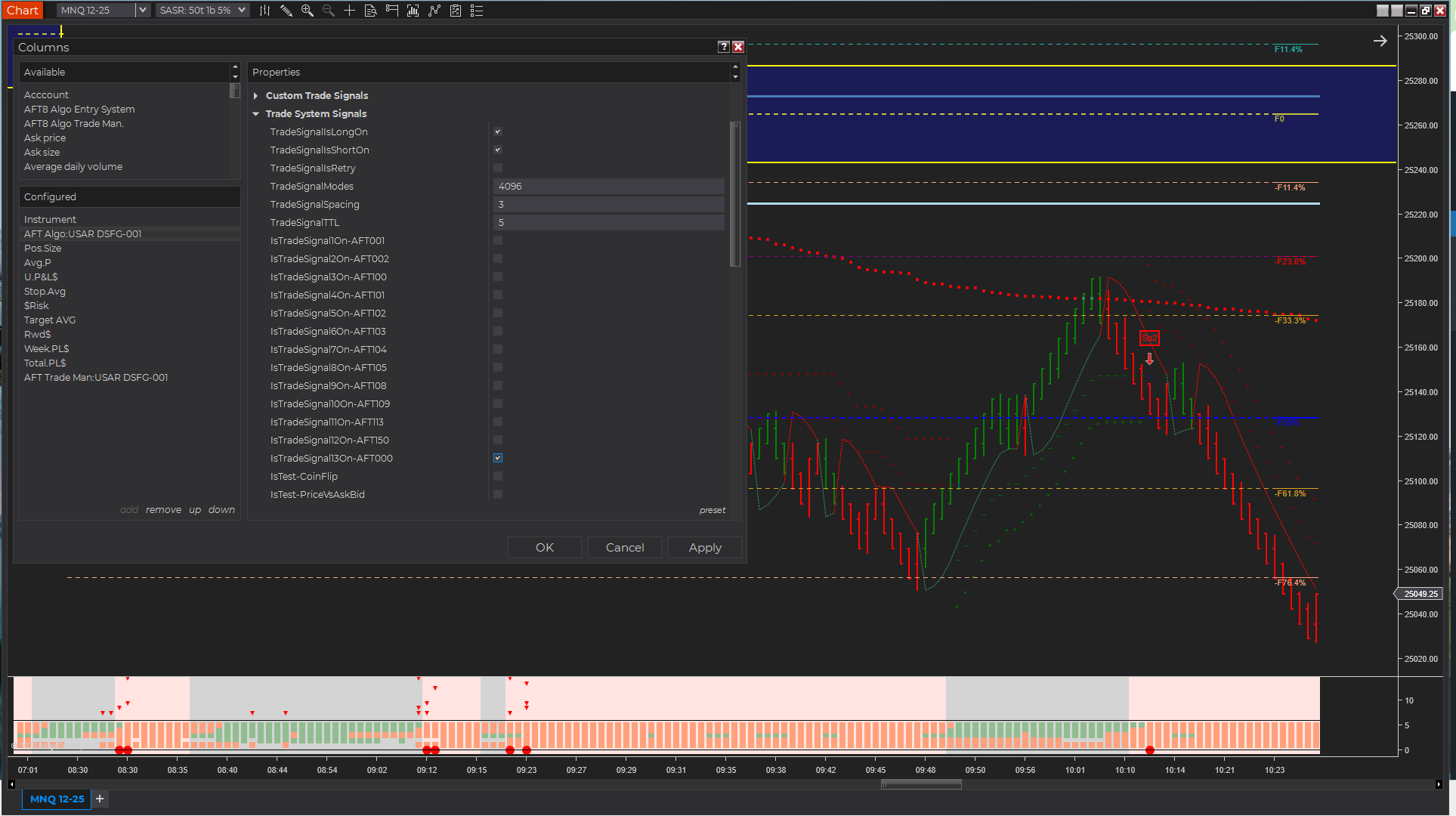
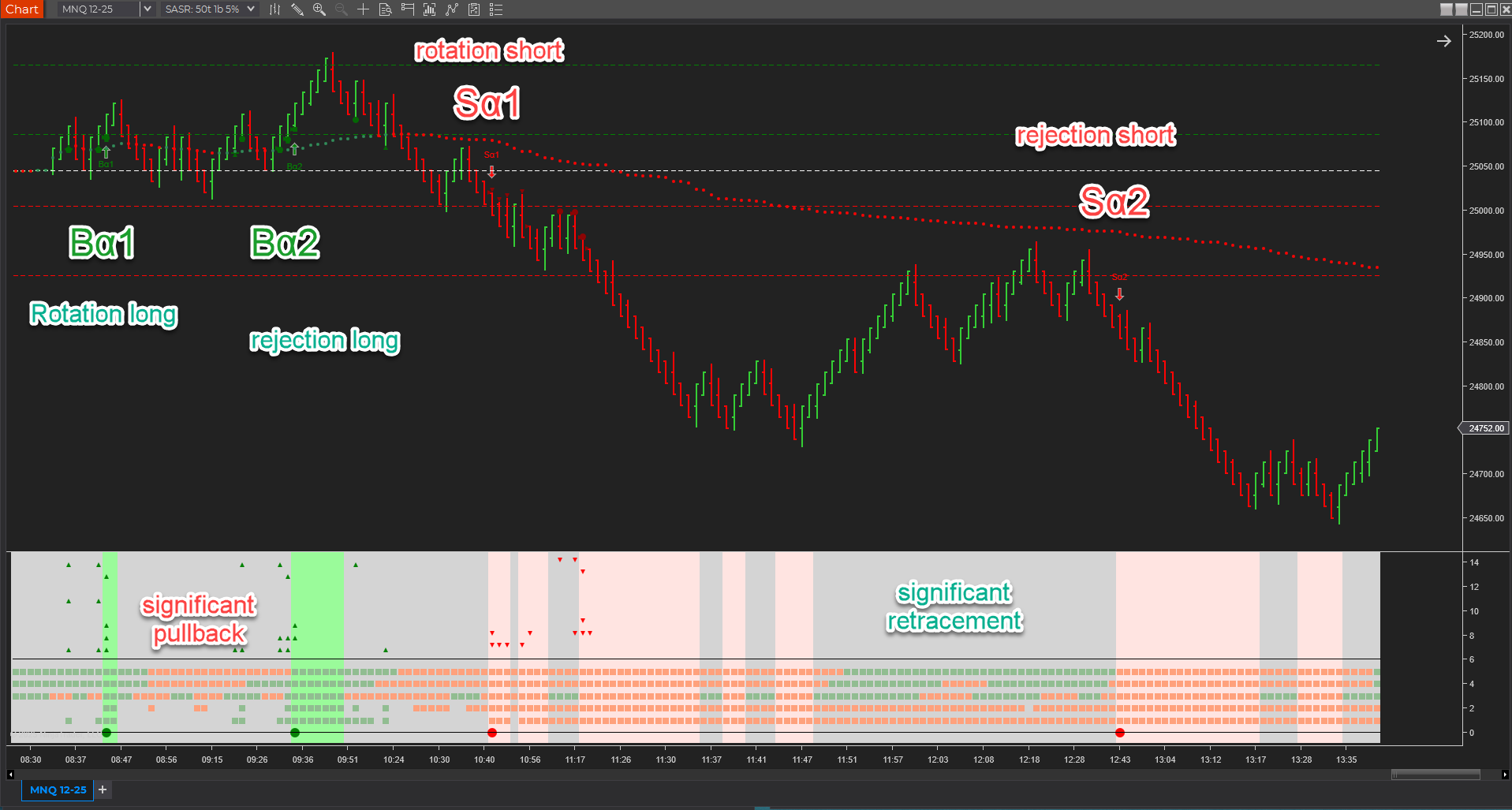
Indicators

  • AFT000 Hybrid Algo Chart Trader
    • Programmable Signals 1 to 7
    • Alpha Signals 1 to 2
    • Traffic light filters
    • Pending the Easy Trader NinjaBuddy GUI
Features availability  and Licensing

  • AFT000 access:
    • requires AFT or ATS Essentials/Premium/Ultimate  monthly, annual, or  lifetime current and lifetime renewal
    • Subscriptions & Lifetime renewals are available in ‘My Pricing’ in the ATS universal account
  • AFT000 features:
    • Turnkey Workspaces
    • Easy Trader NinjaBuddy GUI

Filed Under: AFT8, automated futures trading, ninjatrader algorithmic trading, ninjatrader automated trading Tagged With: AFT8 update, AFT8Update, NinjaTrader 8


🚀 Get Started 100% FREE!

AFT8 Workspaces Simplification for AFT v202051004 onwards

October 5, 2025 by AFT

AFT8 Workspace Naming Update

Release date:
October 5, 2025

The AFT8 Workspace installers will continue to ship as
Installers 1–5. What’s changing is the
workspace file naming to align with the installer number
and the Zero to Hero stages (1–4) for simpler setup and support.

At a glance

  • Installers remain: 01 → 05
  • Workspace names now include their installer number (e.g., AFT8-01-…)
  • Backwards-friendly names to reduce confusion
  • Old workspaces are removed automatically by the new installers

Legacy AFT8 workspace naming (being replaced)

Examples from NinjaTrader 8\workspaces\:

  • AFT8-SFG Breakout Trader-Basic-001.xml
  • AFT8-SFG Breakout Trader-Basic-002.xml
  • AFT8-SFG Breakout Trader-Basic-003.xml
  • AFT8-SFG Breakout Trader-Basic-004.xml
  • AFT8-SFG Breakout Trader-0000A.xml
  • AFT8-SFG Breakout Trader-0000B.xml
  • AFT8-Trend-Scalper-Basic-001.xml
  • AFT8-Trend-Scalper-Basic-002.xml
  • AFT8-Trend-Scalper-Basic-003.xml
  • AFT8-Trend-Scalper-Basic-004.xml
  • AFT8-Trend-Scalper-1000A.xml
  • …etc

These mixed patterns made it harder to discover which files belonged to installers 4–5 and the
corresponding Zero to Hero stage. The new scheme fixes that.

New AFT8 workspace naming (by installer)

AFT Workspaces 01

  • Manual Trade Entry via NinjaTrader Chart Trader + ATM
    • NinjaTrader 8\workspaces\AFT8-01-Freemium-Session-Breakout.xml
    • NinjaTrader 8\workspaces\AFT8-01-Freemium-Trend-Scalper.xml
  • Manual Trade Entry via NinjaTrader Chart Trader + AFT8 TradeManager Automated Exits
    • NinjaTrader 8\workspaces\AFT8-01-SFG Breakout Trader-Basic-001a.xml
    • NinjaTrader 8\workspaces\AFT8-01-SFG Breakout Trader-Basic-001b.xml
    • NinjaTrader 8\workspaces\AFT8-01-SFG Breakout Trader-Basic-001c.xml
    • NinjaTrader 8\workspaces\AFT8-01-Trend-Scalper-Basic-001a.xml
    • NinjaTrader 8\workspaces\AFT8-01-Trend-Scalper-Basic-001b.xml
    • NinjaTrader 8\workspaces\AFT8-01-Trend-Scalper-Basic-001c.xml

AFT Workspaces 02

  • AFT8 Hybrid Automated Trade Entry + AFT8 TradeManager Automated Exits
    • NinjaTrader 8\workspaces\AFT8-02-SFG Breakout Trader-Basic-002a.xml
    • NinjaTrader 8\workspaces\AFT8-02-SFG Breakout Trader-Basic-002b.xml
    • NinjaTrader 8\workspaces\AFT8-02-SFG Breakout Trader-Basic-002c.xml
    • NinjaTrader 8\workspaces\AFT8-02-Trend-Scalper-Basic-002a.xml
    • NinjaTrader 8\workspaces\AFT8-02-Trend-Scalper-Basic-002b.xml
    • NinjaTrader 8\workspaces\AFT8-02-Trend-Scalper-Basic-002c.xml

AFT Workspaces 03

  • AFT8 Hybrid Automated Trade Entry + AFT8 TradeManager Automated Exits + MTF
    • NinjaTrader 8\workspaces\AFT8-03-SFG Breakout Trader-Basic-003a.xml
    • NinjaTrader 8\workspaces\AFT8-03-Trend-Scalper-Basic-003a.xml

AFT Workspaces 04

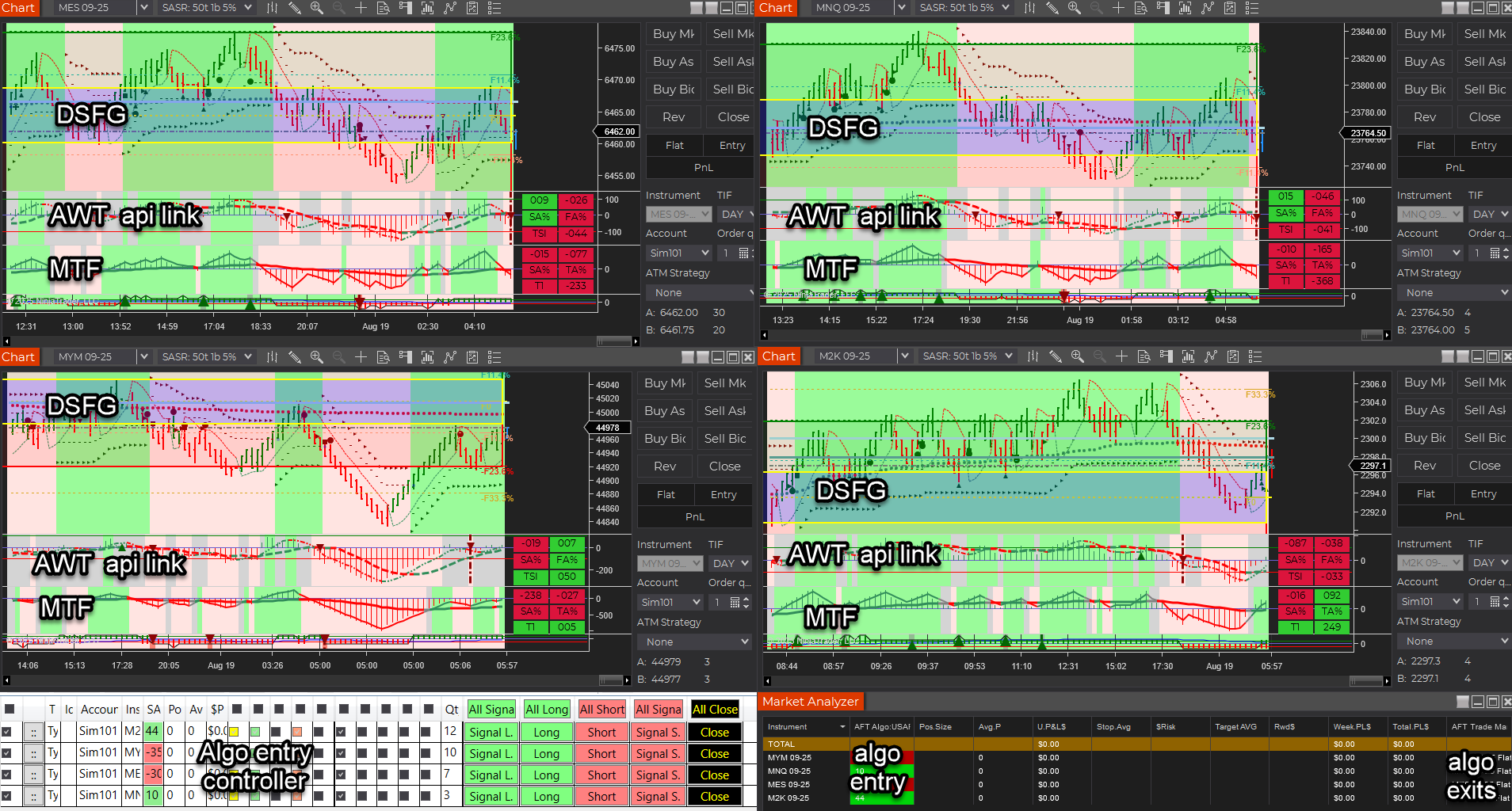
  • AFT8 Hybrid Automated Trade Entry + AFT8 TradeManager Automated Exits + MTF + AWT
    • NinjaTrader 8\workspaces\AFT8-04-SFG Breakout Trader-Basic-004a.xml
    • NinjaTrader 8\workspaces\AFT8-04-SFG Breakout Trader-MTF-104a.xml
    • NinjaTrader 8\workspaces\AFT8-04-SFG Breakout Trader-MTF-104b.xml
    • NinjaTrader 8\workspaces\AFT8-04-Trend-Scalper-Basic-004a.xml
    • NinjaTrader 8\workspaces\AFT8-04-Trend-Scalper-MTF-104a.xml
    • NinjaTrader 8\workspaces\AFT8-04-View-MTF-204a.xml

AFT Workspaces 05

  • AFT8 NinjaTrader Automated Trading pure baseline Algos for optimization/comparison
    • NinjaTrader 8\workspaces\AFT8-05-Algos-BaseLine-001.xml
    • NinjaTrader 8\workspaces\AFT8-05-Algos-BaseLine-002.xml
    • NinjaTrader 8\workspaces\AFT8-05-Algos-BaseLine-003.xml
    • NinjaTrader 8\workspaces\AFT8-05-Algos-BaseLine-004.xml
    • NinjaTrader 8\workspaces\AFT8-05-TrendTraderAWT-001.xml

Impact

  • Smoother “Zero to Hero” onboarding: Stages 1–4 (plus 5) are now easily identifiable by installer and filename.
  • Automatic cleanup: Old workspaces are uninstalled/removed when you run the new installers.

FAQ

Where to download and install?

  • Visit your ATS Universal Account → Trader Launch Pad → My Downloads:
  • View more info on AFT8 Workspaces
Will my existing layouts break?
  • If you rely on the legacy workspace names, you’ll see them removed during install.
  • Use the new, installer-aligned names going forward (e.g., AFT8-04-… for Installer 04).
  • Your own labelled workspaces/settings/templates will not be removed
Where do the files live?
  • NinjaTrader 8\workspaces\ on your NinjaTrader installation.

Filed Under: AFT8, aft8 turnkey workspaces, NinjaTrader 8 Tagged With: AFT8 Release, AFT8 update, aft8release, AFT8Update, ninjatrader automated trading systems


🚀 Get Started 100% FREE!

AFT8 Releasd version 2025.10.3.1 for NinjaTrader 8 – Short Trail Trigger Fix + Intelli-Stop Enhancements

October 3, 2025 by AFT

aft intellistop min distance to price governor

AFT 2025.10.3.1 — Short Trail Trigger Fix + IntelliStop Enhancements

Release date: 3 Oct 2025 • Version: 2025.10.3.1

This update fixes a rare trailing-stop issue in choppy/fast markets and upgrades IntelliStop so profitable runners can breathe past 100% of the Session Fib Grid and reach 150–200% on strong moves.

Quick Summary

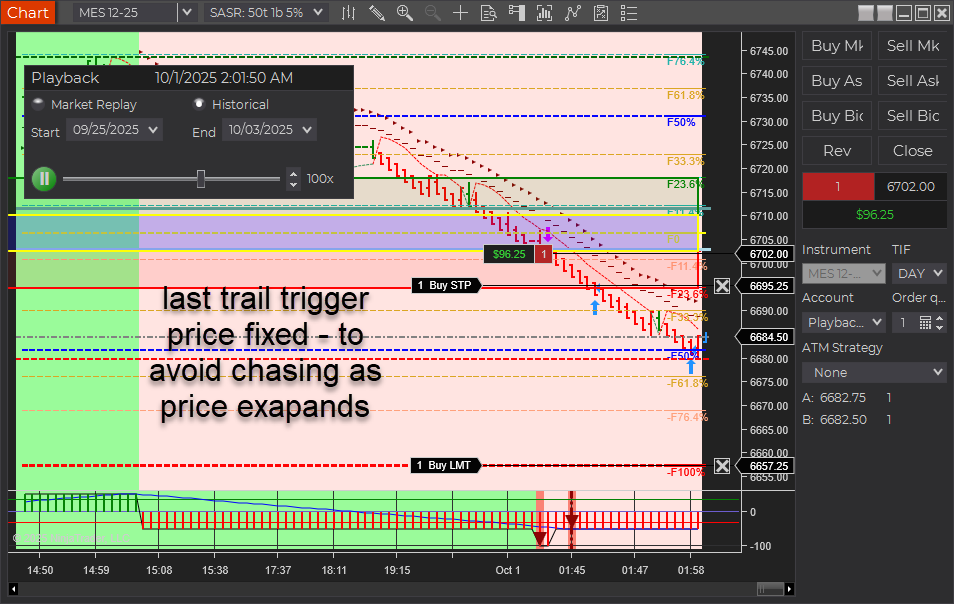
  • Short Trail Trigger: Fixed. Prior behavior could “chase” price and miss the trigger around the T2 (~50%) zone when USAR bands skewed wider in fast markets. Also applies to longs.
  • IntelliStop: Minimum % margin corrected and behavior refined. Trails engage noticeably above ~75% profit of a 100%-equivalent move and hold up to a ~20% offset, avoiding premature stop-ins.
  • Outcome: More consistent trails and better probability of capturing extended moves beyond 100% (e.g., 150–200% runs).
aft8 short trail last optimized triggers
aft intellistop min distance to price governor

What Was Fixed

In earlier builds, the stop trail reference included the full width of the dynamic USAR band. During choppy/fast conditions, the band could expand, causing the trail trigger to drift from the intended target area. Practically, this showed up around the T2 target (~50%) region stretching out toward 60%+, so the trail often didn’t trigger in time. This behavior affected both short and long positions. The new logic decouples the trigger from that skew so it fires reliably.

IntelliStop: Smarter Trailing Behavior

  • Minimum % Margin Fix: Ensures the trail doesn’t crash into price when profit accelerates.
  • Engages Above ~75% Profit: On a 100% Fib Grid–equivalent move, the IntelliStop now trails in noticeably above ~75%, not earlier.
  • Holds a ~20% Offset: The trail will maintain up to ~20% distance from current price, allowing healthy continuation through 100% and into 150–200% extensions when momentum persists.
Why this matters: Early, overly tight trails frequently cut winners short. This refinement keeps risk contained while letting strong trends do the work.

Trader Impact

  • Consistency: Trails trigger as expected in volatile/choppy phases.
  • Profit Capture: Higher odds of catching extended runs beyond the 100% level.
  • Smoother Management: Less micromanagement needed during fast markets.

Behavior Example

Before: In a fast, two-sided session, the USAR band widens. The short trail “chases” the expanding band near T2 (~50%), drifting toward 60%+ and failing to arm the trail in time.

Now: The trigger is stable. Once profit reaches ~75% of a 100% move, IntelliStop begins to trail with breathing room (up to ~20% offset), often letting the position push through 100% and into 150–200% when trend pressure continues.

Changelog (2025.10.3.1)

  • Fix: Short trail trigger corrected for dynamic USAR band skew (also improves longs).
  • Fix: IntelliStop minimum % margin and trail engagement logic refined.
  • Improve: Trailing offset behavior capped (~20%) to avoid price collision while preserving extension potential.

Update Notes

  • Recommended: Restart NinjaTrader after installing the update.
  • Best practice: Verify your stop/target templates and instrument tick sizes are correct for your account and prop-firm rules.
  • Reminder: Settings and methods are for educational purposes. Markets carry risk; trade your plan.

Disclaimer

Trading futures and derivatives involves substantial risk and is not suitable for every investor. Performance is not guaranteed. Examples are for illustration only and are not financial advice. Use proper risk controls and follow your prop firm or broker rules.

Filed Under: AFT8, automated futures trading, fully automated trading system, NinjaTrader 8 Tagged With: AFT8, AFT8 Release, AFT8 update, aft8release, AFT8Update, ninjatrader automated trading systems


🚀 Get Started 100% FREE!

AFT8 Update released version 20251013 for NinjaTrader 8

October 1, 2025 by AFT

AFT8 Update released version 20251013 includes a service maintenance update:
– async threading optimizations in bars to prevent thread pool starvation during heavy tick storms,
– ‘MultiShotTradeCopier’ optimizations also on long running os threads and token isolation
– Compiled against the latest version of NinjaTrader 8.16 for the latest features and support of NT8.
– Tweak fix to the way it handles and attaches accounts with rithmic prop/eval account connections
– Tweak to optimize dispatcher usage in indicators AFT120SignalsTrendTTF,AFT120SignalsTrendLTF, and AFT120SignalsTrendHTF

To get the latest Update NinjaTrader to version 8.16 and then download the AFT8 Secondary installer or wait for AFT8 will display an update notification.
Or simple run the “\Downloads\AlgoTradingSystems\AlgoFuturesTrader8-Installer-Setup” program and it will get the latest version.

Filed Under: AFT8, NinjaTrader 8 Tagged With: AFT8 Release, AFT8 update, aft8release, AFT8Update, automated futures trading, fully automated trading system


🚀 Get Started 100% FREE!

Announcing AFT8 Update Release version 20250919

September 21, 2025 by AFT

aft gold intelli stop trail stop

AFT8 Update Release – Freemium Workspaces, Smarter Trails, and Next-Level Stability

Audience: All traders • Applies to: AFT8 (NinjaTrader 8)

Quick Summary

We’re excited to announce a major AFT8 update, bringing new Freemium Workspaces, re-tuned settings for tighter and more responsive turnkey trails, and several under-the-hood improvements that push NinjaTrader performance to new levels. This release continues our mission: making advanced, professional-grade futures trading accessible to all traders.

What’s New

  • Freemium Workspaces: New setups that highlight tighter trading nuances, with T1/T2 trails (variants B and C) designed to show more precise stop behavior. Other workspaces give trades room to breathe, allowing traders to see both tight and loose trail management in action.
  • Trail Offsets Reworked: Default distances have been tightened, moving away from swing-trading artifacts and aligning instead with prop/day-trading defaults.
  • Bidirectional Entry/Exit Orchestration: Round-robin, fine-grain locks coordinate both directions — Trade Manager ↔ Algo Entry — so the active side finishes first. This works in 1:1 and many:many topologies across multiple algos and exit managers, preventing jams, thread-pool starvation, and tick-churn/render delay.
  • Asymmetric Threading Model: Our long-running thread design avoids clogging NT8’s thread pool, keeping NinjaTrader responsive under heavy load – something 99.9% of vendor systems cannot claim.
  • Reploshed Bars & Tick Aggregation: A new adaptive bars engine removes the need for tick purging on NT lag/render delays. Instead, we aggregate ticks in parallel with up to 5Ă— compression, preserving all price/time information while keeping NT8 smooth during news events, market opens, and heavy volume sessions. Another original MicroTrends Ltd invention.
  • NT8 Maintenance Modes: Built-in recovery tools to free stuck orders and improve fault tolerance. OCO entry mode now uses a 5% margin up/down (10% total) by default.
  • Multi-Shot Entry & Exits: Available for AFT8 Lifetime (year 1) users or traders who have renewed their maintenance or lease plans.
  • IntelliStop Migration: The AFT7 invention has been fully integrated into AFT8. IntelliStop is a trailing stop that adapts based on profit as a % of the expected Fib Grid range, with linear and parabolic modes.
    • For example, in a day-trading breakout with a typical 100% range, IntelliStop begins trailing at 50% profit and will close out at 100%.
    • Traders can cap the maximum tightening (e.g., 80%), leaving a final 20% buffer to let winners run.
aft gold intelli stop trail stop
AFT gold intelli-stop trail stop -locking into 100% level with a margin

Innovation Credits

This release includes several proprietary inventions and IP owned by ATS, including: the Fib Grid, USAR methods, Apaptive Bars, and the Intelli-Stop system – both designed to help traders manage risk and profits more intelligently under real-world trading conditions.

Get Started

AFT8 will automatically announce this update via a popup on your next usage.
You can also download the update directly from your ATS account:
ATS User Account › Downloads.

Freemium workspaces are available now. Existing AFT8 Lifetime and maintenance/lease users can access Multi-Shot and IntelliStop features immediately. Update today and experience the new responsive trails, smarter stops, and improved NT8 performance under load.

AFT8 Update – Key Highlights

Quick Summary

  • Freemium Workspaces: New turnkey trails (T1/T2 B & C) show tighter trading nuances, while other workspaces allow trades more breathing room.
  • Trail Offsets: Defaults adjusted from swing-style to prop/day-trading responsive settings.
  • Entry/Exit Orchestration: Round-robin, fine-grain locks coordinate Trade Manager ↔ Algo Entry (1:1 or many:many), preventing jams, thread-pool starvation, and tick-churn/render delay.
  • Performance Boost: Adaptive bars with parallel tick aggregation (up to 5Ă— compression) keep NT8 smooth during news/opens and heavy volume.
  • Maintenance & Recovery: New modes to free stuck orders; OCO entry margins adjusted.
  • Multi-Shot & IntelliStop: Available to AFT8 Lifetime (year 1) and renewed users; IntelliStop provides linear & parabolic adaptive trailing stops based on Fib Grid range.

How to Update: AFT8 will announce the update via popup on next usage. You can also download it from your ATS account here:
ATS User Account › Downloads.

Note

These updates include proprietary innovations AFT8 methods and technology including: hybrid automation trade engine, Adaptive bars, Fib Grids, USAR, MultiShot trade copier, Intelli-Stop trail system + more.

Filed Under: AFT8, automated futures trading systems, ninjatrader automated trading Tagged With: AFT8 update, aft8release, AFT8Update, automated futures trading, Automated Trading NinjaTrader


🚀 Get Started 100% FREE!

AFT8 Update Release v2025.8.19.1 fast memory handling for AWT API Link and hotfixes

August 19, 2025 by Tom Leeson

AFT v20205081901 binary file list
AFT8 Workspaces 4 Session Breakout MTF AWT

AFT8 Workspaces 4 Session Breakout Multiple Time Frame (MTF) bias filter TTF and  Alpha Web Trader (AWT) Bias Filter indicator linked to historical and real-time AWT cloud data – lag-free technicals.We’re pleased to announce a new release of AFT8 (Algo Futures Trader for NinjaTrader 8) and AWT (Alpha Web Trader), focused on performance, reliability, and a cleaner link between platforms.

Key Updates

  • Old account migration issue removed (cases where old accounts were sometimes moved incorrectly).
  • AWT Link to AFT8 — rewritten to use binary DAT file MMF producer/consumer IPC, replacing the former “named pipes” implementation.
    • Optimized memory handling to prevent a large system memory footprint.
    • Lightweight and faster by an order of magnitude using low-level OS kernel techniques across different .NET and OS versions.
    • No bottlenecks or growing memory issues; fast load on chart render for AWT indicators.
  • AFT + AWT combo showcased in AFT8 Workspaces 4 — Session Breakout and Trend Scalper.
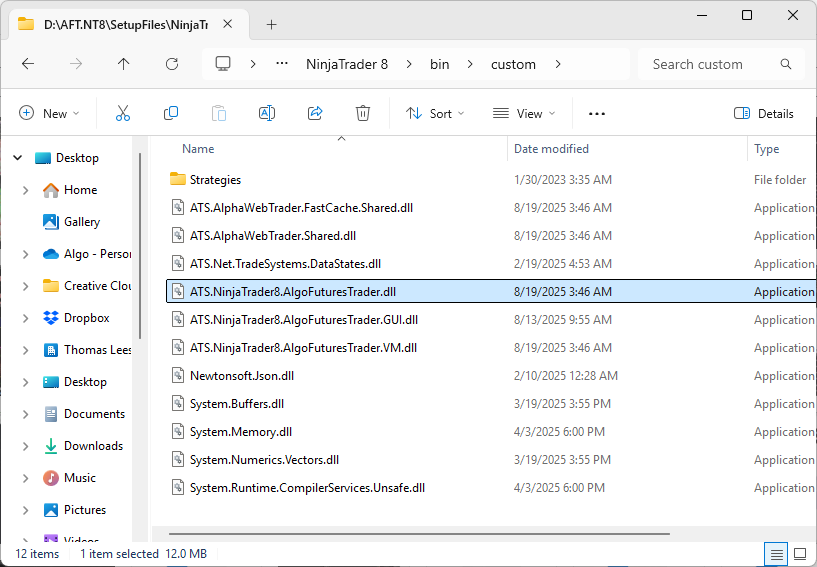
  • AFT8 binary files listing for installer:
AFT v20205081901 binary file list

AFT v20205081901 binary file list
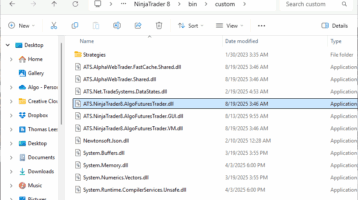
  • ATS.NinjaTrader8.AlgoFuturesTrader.dll
  • ATS.NinjaTrader8.AlgoFuturesTrader.GUI.dll
  • ATS.NinjaTrader8.AlgoFuturesTrader.VM.dll
  • ATS.AlphaWebTrader.FastCache.Shared.dll
  • ATS.AlphaWebTrader.Shared.dll
  • ATS.Net.TradeSystems.DataStates.dll
  • Newtonsoft.Json.dll
  • System.Buffers.dll
  • System.Memory.dll
  • System.Numerics.Vectors.dll
  • System.Runtime.CompilerServices.Unsafe.dll

AWT Desktop was also updated as part of this release: 2025.8.19.1.

Filed Under: AFT8, NinjaTrader 8, ninjatrader automated trading, ninjatrader trading bot Tagged With: AFT8 update, aft8release, AFT8Update


🚀 Get Started 100% FREE!

  • « Previous Page
  • 1
  • 2
  • 3
  • 4
  • …
  • 6
  • Next Page »

Recent Posts

  • Why ATS Does Not Recommend Fully Unattended Automated Trading for Prop Firms
  • A Guide to Trading a $50K Futures Prop-Firm Account
  • The Best Path to Getting Funded Trading Futures
  • AFT8 Performance Tweaks for NinjaTrader 8.1.7
  • AFT Lifetime (One-Time Purchase) License Terms Updated
  • Facebook
  • RSS
  • Twitter
  • YouTube


  • NinjaTrader Automated Trading
  • automated futures trading
  • automated trading systems
  • Day Trading Futures
  • Get Started Day Trading Futures
  • VIP Trading Group Live Market Trade Along
  • Secret to Day trading futures success
  • AFT8 for NinjaTrader 8
  • Futures Algo Trading Systems
  • Market News
  • NinjaTrader Free Trading Platform
  • Legal Notices
  • AFT Legal Info
  • Terms
  • FULL RISK DISCLOSURE
  • Privacy Policy
  • Cookie Usage
  • About AlgoFuturesTrader
  • Connect to AFT
  • Blog
  • Videos
  • Support
  • Contact
  • My account
  • Sitemap
  • Affiliates

Ninja Futures Trading
Algo Futures Trader Copyright Algo Trading Systems© 2026 ·
AlgoFuturesTrader.com is owned & operated by Algo Trading Systems LLC. By using this website or products & services, you are bound by our Terms & subject to US legal jurisdiction only. Errors & omissions excluded.
AFT made in England, powered by MicroTrends NinjaTrader development

Disclaimer: Trading & investment carry a high level of risk. AlgoFuturesTrader does not make recommendations for buying or selling any financial instruments, nor do we offer trading or investment advice. We are a software company, and we only provide educational information on ways to use our sophisticated Algo Futures trading tools. It is up to our customers & readers to make their own trading & investment decisions, or consult with a registered investment advisor.

Risk Disclosure: Futures, CFDs, & forex trading carry substantial risk and are not suitable for every investor. An investor could potentially lose all or more than the initial investment. Risk capital is money that can be lost without jeopardizing one's financial security or lifestyle. Only risk capital should be used for trading, and only those with sufficient risk capital should consider trading. Past performance is not necessarily indicative of future results. Please read the full risk disclosure here.

Hypothetical performance results have many inherent limitations, some of which are described below. No representation is made that any account will or is likely to achieve profits or losses similar to those shown. In fact, there are frequently sharp differences between hypothetical performance results and the actual results subsequently achieved by any particular trading program. One of the limitations of hypothetical performance results is that they are generally prepared with the benefit of hindsight. In addition, hypothetical trading does not involve financial risk, and no hypothetical trading record can completely account for the impact of financial risk in actual trading. For example, the ability to withstand losses or adhere to a particular trading program despite trading losses are material points that can adversely affect actual trading results. Numerous other factors related to the markets or the implementation of any specific trading program cannot be fully accounted for in the preparation of hypothetical performance results and can adversely affect trading results.

Testimonials appearing on this website may not be representative of other clients or customers and are not a guarantee of future performance or success.

NinjaTrader® is a registered trademark of NinjaTrader Group, LLC. No NinjaTrader company has any affiliation with the owner, developer, or provider of the products or services described herein, nor do they endorse, recommend, or approve any such product or service.

We use cookies on our website to give you the most relevant experience by remembering your preferences and repeat visits. By clicking “Accept All”, you consent to the use of ALL the cookies. However, you may visit "Cookie Settings" to provide a controlled consent.
Cookie SettingsAccept All
Manage consent

Privacy Overview

This website uses cookies to improve your experience while you navigate through the website. Out of these, the cookies that are categorized as necessary are stored on your browser as they are essential for the working of basic functionalities of the website. We also use third-party cookies that help us analyze and understand how you use this website. These cookies will be stored in your browser only with your consent. You also have the option to opt-out of these cookies. But opting out of some of these cookies may affect your browsing experience.
Necessary
Always Enabled
Necessary cookies are absolutely essential for the website to function properly. These cookies ensure basic functionalities and security features of the website, anonymously.
CookieDurationDescription
cookielawinfo-checkbox-analytics11 monthsThis cookie is set by GDPR Cookie Consent plugin. The cookie is used to store the user consent for the cookies in the category "Analytics".
cookielawinfo-checkbox-functional11 monthsThe cookie is set by GDPR cookie consent to record the user consent for the cookies in the category "Functional".
cookielawinfo-checkbox-necessary11 monthsThis cookie is set by GDPR Cookie Consent plugin. The cookies is used to store the user consent for the cookies in the category "Necessary".
cookielawinfo-checkbox-others11 monthsThis cookie is set by GDPR Cookie Consent plugin. The cookie is used to store the user consent for the cookies in the category "Other.
cookielawinfo-checkbox-performance11 monthsThis cookie is set by GDPR Cookie Consent plugin. The cookie is used to store the user consent for the cookies in the category "Performance".
viewed_cookie_policy11 monthsThe cookie is set by the GDPR Cookie Consent plugin and is used to store whether or not user has consented to the use of cookies. It does not store any personal data.
Functional
Functional cookies help to perform certain functionalities like sharing the content of the website on social media platforms, collect feedbacks, and other third-party features.
Performance
Performance cookies are used to understand and analyze the key performance indexes of the website which helps in delivering a better user experience for the visitors.
Analytics
Analytical cookies are used to understand how visitors interact with the website. These cookies help provide information on metrics the number of visitors, bounce rate, traffic source, etc.
Advertisement
Advertisement cookies are used to provide visitors with relevant ads and marketing campaigns. These cookies track visitors across websites and collect information to provide customized ads.
Others
Other uncategorized cookies are those that are being analyzed and have not been classified into a category as yet.
SAVE & ACCEPT