NinjaTrader Automated Trading by Algo Futures Trader

hybrid algorithmic automated futures trading for prop firm traders, day & swing traders

🚀 Get Started FREE
  • 🚀Get Started FREE
  • NinjaTrader
  • Get Funded
  • Trading Servers
  • Pricing
  • blog
  • Help

How to Use AFT8 for Automated Trading on NinjaTrader 8 (Zero-to-Hero Guide)

September 23, 2025 by AFT

Current ATS Desktop Apps Prerequisite: .NET 8 Desktop Runtime

ATS Windows desktop apps require Microsoft .NET 8 Desktop Runtime (x64). Install the current serviced .NET 8 Desktop Runtime from the ATS download instructions or Microsoft’s .NET 8 download page, choosing Windows Desktop Runtime — Windows x64. Downloading the file alone does not install it: open the installer, complete installation and reopen the ATS app.

.NET Desktop Runtime is different from .NET Framework, the SDK and ASP.NET Core Runtime. A later major runtime should not be assumed to replace the .NET 8 runtime required by the app. If a current app still asks for another runtime, report the app name and exact message to ATS support.

14-Day Trial, Zero to Hero and Paid-Plan Access

The ATS full-feature free trial lasts 14 days. Week 1: work through Zero-to-Hero Stages 1–5 across five trading days. Week 2: focus on your written trade plan and practise with the VIP workspaces and eligible trading-group resources. Zero to Hero is the first-week learning pathway within this trial; it is not a separate standalone free one-week course.

Start through your Trader Launch Pad, complete onboarding, request the trial if eligible and confirm the activation email. Purchasing AFT Essentials does not activate the full-feature trial or include all ATS Ultimate/VIP benefits. Check the licences and benefits assigned to your account before expecting access to trial or VIP resources. If you bought before activating a trial and need help with access, contact ATS support for an account review. Any support-granted extension or upgrade is specific to that account.

Choose Self-Assisted or One-to-One Assisted Setup

If installation is difficult or you prefer someone to guide you, there are two routes. Self-assisted: follow the ATS Desktop Apps installation guide, one step at a time, with ATS Help Bot and technical support for supported issues. Get assisted: explore optional paid one-to-one onboarding and setup from independent ATS Ecosystem providers.

Ecosystem providers may help with ATS account onboarding, NinjaTrader and ATS installation, connections, licence sync and workspace setup. Review services, pricing and booking options through the ATS Ecosystem. Providers set their own terms; personal setup sessions are not automatically included with an AFT Essentials purchase. You can be experienced in trading and still choose personal help with the technology.

AFT8 Automated Trading Zero-to-Hero Guide

Audience: Intermediate–Advanced • Platform: NinjaTrader 8 (Windows) • Product: Algo Futures Trader 8 (AFT8)

  1. Prerequisites
  2. Step 1 — Sign up & link up
  3. Step 2 — Install ATS Desktop Apps & AFT8
  4. Step 3 — Zero-to-Hero stages & turnkey workspaces
    1. Stage 1 — Manual entry + automated trade management
    2. Stage 2 — Hybrid (semi-auto/full-auto entry) + automated exits
    3. Stage 3 — Hybrid + multi-timeframe confirmation
    4. Stage 4 — Hybrid + AWT integration (advanced optional)
    5. Stage 5 — Going live (prop/live) & next steps
  5. Key takeaways
  6. Helpful links

Prerequisites

  • NinjaTrader 8 installed (Windows PC). AFT8 works only with NT8.
  • Market data/broker connection set up in NT8 for realtime or historical data.
  • ATS Universal Account (free) to access downloads/licenses.
  • Experience level: Intermediate to advanced with NT8 basics (charts, Chart Trader/DOM, connections).
  • Stable internet + up-to-date Windows. (Recommended: US English locale/time settings in NT8 to avoid formatting issues.)

Trial note: AFT8 can be used free in SIM during the trial. Live/prop usage requires a license.

Step 1 — Sign up & link up

  1. Create your ATS Universal Account. This unlocks downloads, licenses, and support access.
  2. Log in to the ATS site with your new account.
  3. (Optional) Link Discord to join the Zero-to-Hero/VIP channels for Q&A and community support.

Step 2 — Install ATS Desktop Apps & AFT8

  1. Download “ATS Desktop Apps”. From your ATS account’s Downloads page.
  2. Run the installer. Accept defaults; it will:
    • Install Algo Futures Trader (AFT) Desktop and Alpha Web Trader (AWT) Desktop.
    • Deploy AFT8 components (strategies/indicators/workspaces) into NinjaTrader 8.
    • Install any prerequisites if prompted (.NET runtime, NT8 bootstrapper, etc.).
  3. Launch NinjaTrader 8. Approve the AFT8 add-on if prompted; verify AFT8 workspaces/strategies are available.

Tip: Keep NT8 updated. After install, restart NT8 once to ensure all components load cleanly.

Step 3 — Zero-to-Hero stages & turnkey workspaces

AFT8 onboards you via turnkey NinjaTrader workspaces that unlock automation step-by-step. Progress at your own pace; each stage adds capability without overwhelming you.

Stage 1 — Manual entry + automated trade management

  • You enter trades manually (Chart Trader/DOM) using AFT8’s chart signals for guidance.
  • AFT Algo Trade Manager automates exits: stop, targets, trailing, partials.
  • Goal: Learn signal-driven discretionary entries and the Algo Trade Manager control set.
  • Recommended workspace: Session Breakout (or Trend Scalper) with visual buy/sell signals.

Why this first? You build trust by seeing how the algo manages risk/profit while you retain the entry decision.

Stage 2 — Hybrid (semi-auto/full-auto entry) + automated exits

  • Enable the AFT Algo Entry module:
    • Semi-auto: Arm next signal (often with long/short bias).
    • Full-auto: Continuous entries on qualified signals.
  • Exits remain automated under Algo Trade Manager.
  • Goal: Operate in “man + machine” mode. You supervise high-level bias and session timing; the system executes.
  • Note: Fully unattended trading is not recommended; keep the pilot in the loop.

Stage 3 — Hybrid + multi-timeframe confirmation

  • Add MTF filters (e.g., confirm a 5-min signal with a 15-min trend).
  • Fewer, higher-quality entries while still using hybrid/auto entries and automated exits.
  • Goal: Improve selectivity and alignment with broader trend context.

Stage 4 — Hybrid + AWT integration (advanced)

  • Integrate Alpha Web Trader (AWT) for market radar, sentiment, and news-aware behavior.
  • Use additional timeframes (MTF/TTF) and advanced filters in the turnkey workspace.
  • Goal: Operate a professional “pilot & plane” cockpit with richer context and smarter automation.
  • Heads-up: Trial users get a preview of VIP-grade layouts; keep supervision active.

Stage 5 — Going live (prop/live) & next steps

  • Keep practicing in SIM if needed; the system supports extended simulation learning.
  • Choose a license for live or prop evaluation when ready.
  • Unlock VIP & AWT full features for advanced workspaces, support, and community.
  • Pathways: Continue hybrid trading, or explore fully automated baselines (with caution and oversight).

Key takeaways

  • NT8-only: AFT8 is built for NinjaTrader 8 on Windows.
  • Hybrid first: Manual → Hybrid → (optional) Automation, with the trader supervising.
  • Turnkey workspaces: Progress through stages to add capability without overload.
  • Trial in SIM: Use the free trial to build skill, stats, and confidence before going live.
  • Community & docs: Use the Getting Started and AFT categories plus Discord for faster wins.
Helpful links

  • ATS Help Center — Getting Started
  • ATS Help Center — Algo Futures Trader (AFT)

Support tip: If the AFT controllers aren’t visible after install, open the supplied AFT workspaces in NT8 and ensure panels aren’t minimized or behind charts. Restart NT8 after first install.

Filed Under: AFT8, Algo Futures Trader, automated futures trading, NinjaTrader 8 Tagged With: ninjatrader automated trading, ninjatrader automated trading systems, ninjatrader trading bot

Announcing AFT8 Update Release version 20250919

September 21, 2025 by AFT

aft gold intelli stop trail stop
AFT7 has been retired. Please upgrade to AFT8.

All AFT7 traders should upgrade to AFT8, available with freemium access and a full-featured free trial. Get AFT8 here for NinjaTrader.

AFT8 Update Release – Freemium Workspaces, Smarter Trails, and Next-Level Stability

Audience: All traders • Applies to: AFT8 (NinjaTrader 8)

Quick Summary

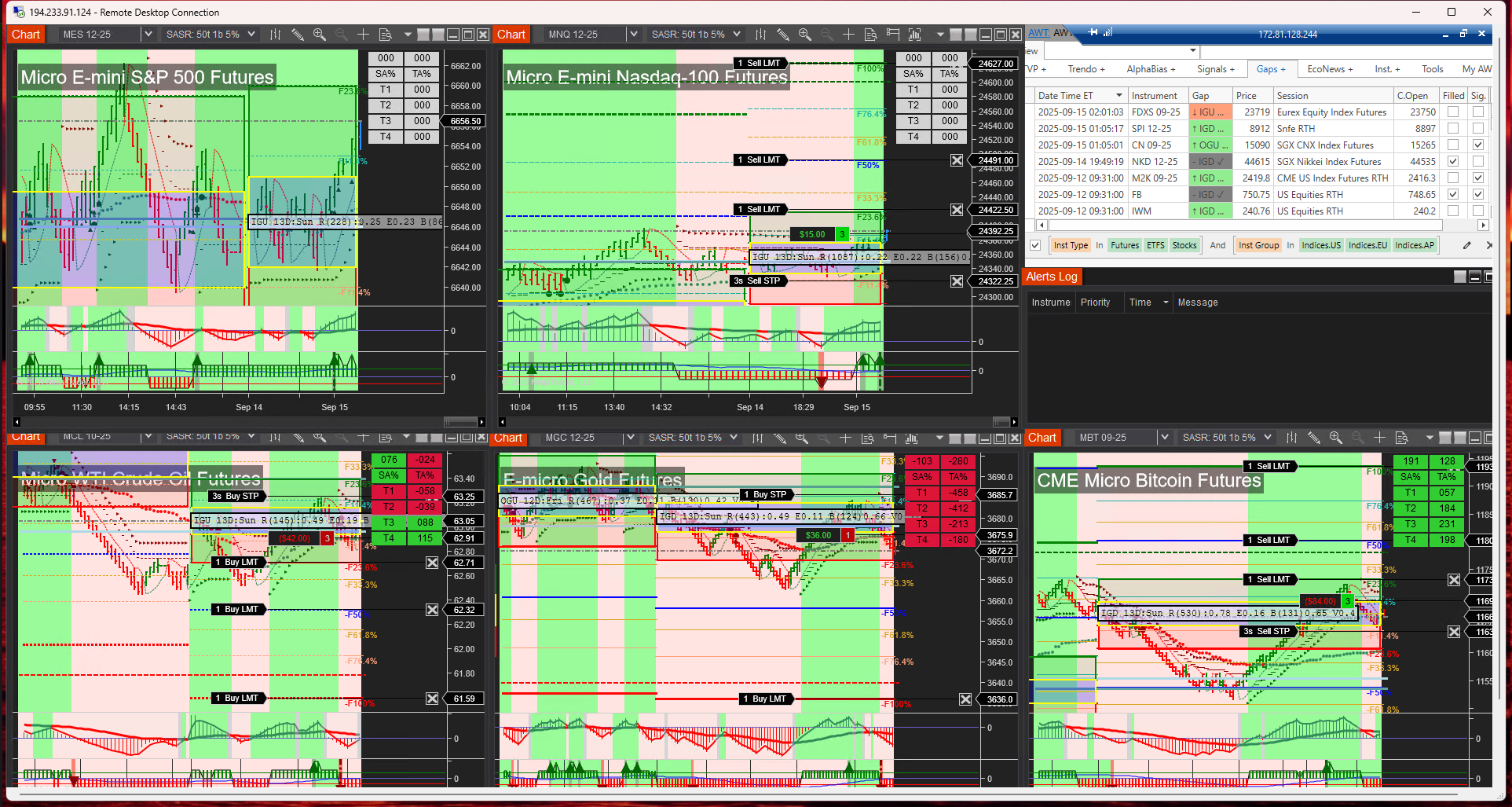
We’re excited to announce a major AFT8 update, bringing new Freemium Workspaces, re-tuned settings for tighter and more responsive turnkey trails, and several under-the-hood improvements that push NinjaTrader performance to new levels. This release continues our mission: making advanced, professional-grade futures trading accessible to all traders.

What’s New

  • Freemium Workspaces: New setups that highlight tighter trading nuances, with T1/T2 trails (variants B and C) designed to show more precise stop behavior. Other workspaces give trades room to breathe, allowing traders to see both tight and loose trail management in action.
  • Trail Offsets Reworked: Default distances have been tightened, moving away from swing-trading artifacts and aligning instead with prop/day-trading defaults.
  • Bidirectional Entry/Exit Orchestration: Round-robin, fine-grain locks coordinate both directions — Trade Manager ↔ Algo Entry — so the active side finishes first. This works in 1:1 and many:many topologies across multiple algos and exit managers, preventing jams, thread-pool starvation, and tick-churn/render delay.
  • Asymmetric Threading Model: Our long-running thread design avoids clogging NT8’s thread pool, keeping NinjaTrader responsive under heavy load – something 99.9% of vendor systems cannot claim.
  • Reploshed Bars & Tick Aggregation: A new adaptive bars engine removes the need for tick purging on NT lag/render delays. Instead, we aggregate ticks in parallel with up to 5× compression, preserving all price/time information while keeping NT8 smooth during news events, market opens, and heavy volume sessions. Another original MicroTrends Ltd invention.
  • NT8 Maintenance Modes: Built-in recovery tools to free stuck orders and improve fault tolerance. OCO entry mode now uses a 5% margin up/down (10% total) by default.
  • Multi-Shot Entry & Exits: Available for AFT8 Lifetime (year 1) users or traders who have renewed their maintenance or lease plans.
  • IntelliStop Migration: The AFT7 invention has been fully integrated into AFT8. IntelliStop is a trailing stop that adapts based on profit as a % of the expected Fib Grid range, with linear and parabolic modes.
    • For example, in a day-trading breakout with a typical 100% range, IntelliStop begins trailing at 50% profit and will close out at 100%.
    • Traders can cap the maximum tightening (e.g., 80%), leaving a final 20% buffer to let winners run.
aft gold intelli stop trail stop
AFT gold intelli-stop trail stop -locking into 100% level with a margin

Innovation Credits

This release includes several proprietary inventions and IP owned by ATS, including: the Fib Grid, USAR methods, Apaptive Bars, and the Intelli-Stop system – both designed to help traders manage risk and profits more intelligently under real-world trading conditions.

Get Started

AFT8 will automatically announce this update via a popup on your next usage.
You can also download the update directly from your ATS account:
ATS User Account › Downloads.

Freemium workspaces are available now. Existing AFT8 Lifetime and maintenance/lease users can access Multi-Shot and IntelliStop features immediately. Update today and experience the new responsive trails, smarter stops, and improved NT8 performance under load.

AFT8 Update – Key Highlights

Quick Summary

  • Freemium Workspaces: New turnkey trails (T1/T2 B & C) show tighter trading nuances, while other workspaces allow trades more breathing room.
  • Trail Offsets: Defaults adjusted from swing-style to prop/day-trading responsive settings.
  • Entry/Exit Orchestration: Round-robin, fine-grain locks coordinate Trade Manager ↔ Algo Entry (1:1 or many:many), preventing jams, thread-pool starvation, and tick-churn/render delay.
  • Performance Boost: Adaptive bars with parallel tick aggregation (up to 5× compression) keep NT8 smooth during news/opens and heavy volume.
  • Maintenance & Recovery: New modes to free stuck orders; OCO entry margins adjusted.
  • Multi-Shot & IntelliStop: Available to AFT8 Lifetime (year 1) and renewed users; IntelliStop provides linear & parabolic adaptive trailing stops based on Fib Grid range.

How to Update: AFT8 will announce the update via popup on next usage. You can also download it from your ATS account here:
ATS User Account › Downloads.

Note

These updates include proprietary innovations AFT8 methods and technology including: hybrid automation trade engine, Adaptive bars, Fib Grids, USAR, MultiShot trade copier, Intelli-Stop trail system + more.

Filed Under: AFT8, automated futures trading, ninjatrader automated trading Tagged With: AFT8 Release, AFT8 update, automated futures trading, Automated Trading NinjaTrader

Emini Indices Futures Rollover for period 202512 – beware AFT8 will filter and close out expiry contracts within the algo systems

September 15, 2025 by AFT

The E-mini indices (ES, NQ, YM, RTY) are rolling over on September 15, 2025 into the new December 2025 (12-25) contracts.

E-mini Indices Rollover – September 15, 2025

The E-mini indices (ES, NQ, YM, RTY) are rolling over on September 15, 2025 into the new December 2025 (12-25) contracts.

⚠️ Important Notice for AFT Traders

If you are using the AFT Algo Entry module, please be aware:

  • The system may filter out new trades on the expiring September 2025 (09-25) contract.
  • Trades could be closed automatically by the AFT Algo Trade Manager if rollover is flagged in NT8 for ES, NQ, and other E-mini futures.

📊 Tip: Keep Historical Data Updated

For the most accurate results with self-adapting charts, make sure to download historical data regularly:

  • Shortcut: Select a chart and press Ctrl + Shift + R.
  • Best Practice: Use the Historical Data module to download tick, minute, and daily data.
  • Recommendation: Refresh 7–7 days of history weekly (e.g., Sunday/Monday session start).
  • Pro Tip: Download 2 days of data daily to keep your charts consistent and error-free.

Staying on top of data downloads ensures that your adaptive indicators and AFT modules perform at their best during contract rollovers.

Filed Under: AFT8, automated futures trading, fully automated trading system, ninjatrader automated trading Tagged With: automated futures trading, Futures rollover

AFT8 Update Release v2025.8.19.1 fast memory handling for AWT API Link and hotfixes

August 19, 2025 by Tom Leeson

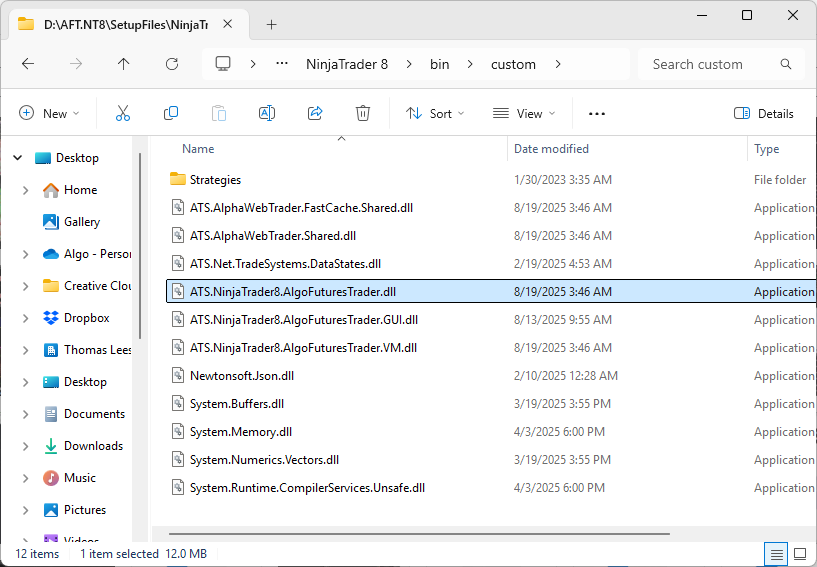
AFT v20205081901 binary file list
AFT8 Workspaces 4 Session Breakout MTF AWT

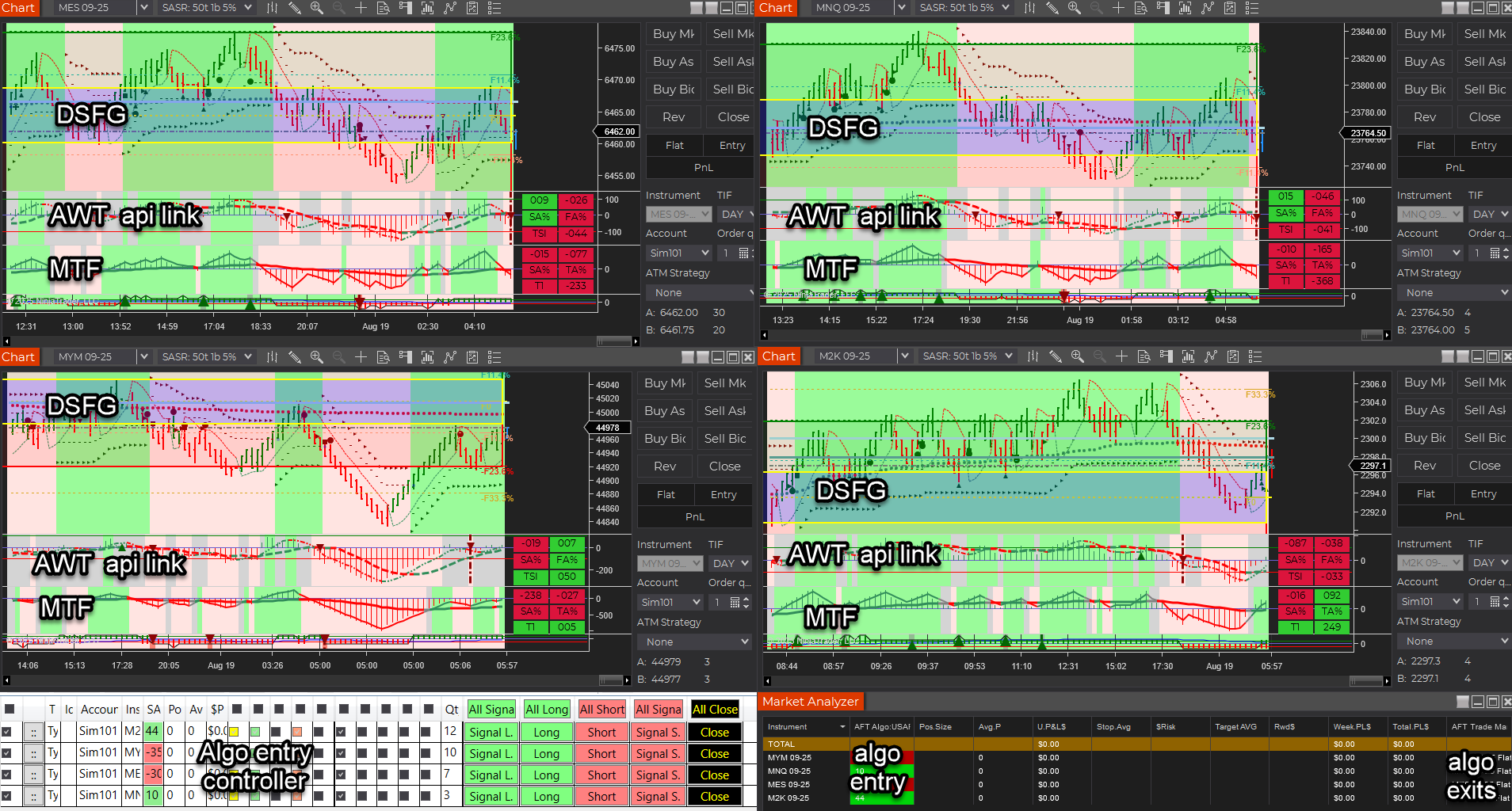
AFT8 Workspaces 4 Session Breakout Multiple Time Frame (MTF) bias filter TTF and  Alpha Web Trader (AWT) Bias Filter indicator linked to historical and real-time AWT cloud data – lag-free technicals.We’re pleased to announce a new release of AFT8 (Algo Futures Trader for NinjaTrader 8) and AWT (Alpha Web Trader), focused on performance, reliability, and a cleaner link between platforms.

Key Updates

  • Old account migration issue removed (cases where old accounts were sometimes moved incorrectly).
  • AWT Link to AFT8 — rewritten to use binary DAT file MMF producer/consumer IPC, replacing the former “named pipes” implementation.
    • Optimized memory handling to prevent a large system memory footprint.
    • Lightweight and faster by an order of magnitude using low-level OS kernel techniques across different .NET and OS versions.
    • No bottlenecks or growing memory issues; fast load on chart render for AWT indicators.
  • AFT + AWT combo showcased in AFT8 Workspaces 4 — Session Breakout and Trend Scalper.
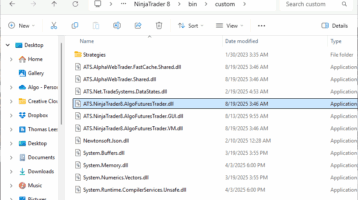
  • AFT8 binary files listing for installer:
AFT v20205081901 binary file list

AFT v20205081901 binary file list
  • ATS.NinjaTrader8.AlgoFuturesTrader.dll
  • ATS.NinjaTrader8.AlgoFuturesTrader.GUI.dll
  • ATS.NinjaTrader8.AlgoFuturesTrader.VM.dll
  • ATS.AlphaWebTrader.FastCache.Shared.dll
  • ATS.AlphaWebTrader.Shared.dll
  • ATS.Net.TradeSystems.DataStates.dll
  • Newtonsoft.Json.dll
  • System.Buffers.dll
  • System.Memory.dll
  • System.Numerics.Vectors.dll
  • System.Runtime.CompilerServices.Unsafe.dll

AWT Desktop was also updated as part of this release: 2025.8.19.1.

Filed Under: AFT8, NinjaTrader 8, ninjatrader automated trading Tagged With: AFT8 Release, AFT8 update

Does ATS Offer Prop Trading Systems?

August 16, 2025 by Tom Leeson

Does ATS Offer Prop Trading Systems, which settings are best for trading prop, which package to buy?

Short answer: Yes. ATS delivers proprietary, proven hybrid automated trading systems that are purpose-built for prop trading—created by real-deal traders for real-deal traders.

Why ATS is suitable for Prop Trading.

  • Minimal drawdown: Protect funded accounts with risk-aware tools.
  • Maximum profit potential: Systems engineered to capture high-quality setups.
  • Reduced emotion: Rule-based automation enforces discipline and consistency.
  • Proprietary technology: ATS is built on unique, field-tested systems not available anywhere else.
  • Trader community: Meet and learn from successful, proven performers in the VIP Group with AI Co-Pilot support.

The hybrid approach lets you combine manual discretion with automation for entries and management—ideal for navigating prop firm rules while maintaining control and accuracy.

Recommended Path & Settings for Prop Trading.

The best way to dial in settings is to join the Zero to Hero group and progress in live markets through three stages:

  1. Manual: Learn signal recognition and clean execution.
  2. Semi-Automated: Use assisted entries to boost consistency.
  3. Automated: Apply trade management and scaling rules systematically.

Once you grasp the workflow—signal → entry → management—you can tweak the turnkey baseline settings to fit your personal trade plan and prop firm constraints.

VIP Traders receive direct settings assistance and benefit from connecting with proven traders who are already performing successfully.

Best ATS Package for Prop Trading.

  • Trading E-Mini Micro Futures → ATS Premium Universal.
    Includes everything needed to trade micro contracts in a prop environment.
  • Trading E-Mini Futures → ATS Ultimate Universal.
    Full suite of proprietary tools, licensed for use on up to 2 PCs.
  • Get a 14-day full-feature trial to explore ATS. After completing Zero to Hero in Week 1, use Week 2 to focus on your trade plan and VIP workspaces. Attend the Trade Zone when available and work toward your goals in sim/demo or, where eligible and permitted, an evaluation, funded sim or live account.

Payment options: Monthly, annual, or one-time lifetime license. See AFT Pricing for details

Key Notes for Prop Traders

  • Proven proprietary systems: ATS is designed and battle-tested by real traders, for real traders.
  • Hybrid is king: Combine human oversight with automation for the best balance of control and accuracy.
  • Baseline → Personalization: Start with turnkey baselines, then adapt to your risk model and prop rules.
  • Trader community advantage: VIP members gain insights and support directly from consistently performing traders.

Get Started

Ready to trade with discipline and consistency? Join the Zero to Hero group, connect with the VIP Trading Group of successful, proven performers, and choose the ATS package that matches your instrument size.

In short: ATS is a proprietary, proven system built by real traders for real traders. With hybrid automation, VIP mentorship, and tailored packages, it’s an excellent choice for prop trading success.

Filed Under: AFT8, ninjatrader automated trading, prop firm trading Tagged With: AFT8, automated futures trading, best automated futures trading software, Hybrid Automated Trading Systems

Introducing Alpha Trader news free market news radar eco finance system service

August 4, 2025 by AFT

Introducing Alpha Trader News (ATN)

Fellow ATS traders and valued customers, we’re excited to unveil Alpha Trader News – a free daily service that brings every market-moving cue you need onto one clean page, ready before the opening bell.

Why You’ll Love ATN

no need to go through several websites and services to get your information for the trading day, get it all in one place in a daily market trader radar -Sunday week ahead, pre market, and daily market roundup gets you in the trading zone!

  • Trader Market Radar – a 360° dashboard covering SPY, QQQ, major ETFs, MAG7, holiday schedule, earnings calendar, eco-data, news sentiment and higher-time-frame futures analysis.
  • Eco-Fin Articles – bias-free deep dives that explain what the mainstream press leaves out, grounding each trading week in big-picture context and cyclical forces.
  • One-click access on web, Facebook and (starting this week) a concise daily email straight to your inbox.
  • to opt out the email simply set your preferences in the email footer

Quick Links

  • Website 🌐 – alphatradernews.com
  • Facebook 📣 – facebook.com/alphatradernews
  • Latest Radar 📰 – August 03 2025 Sunday Market Radar
  • Featured Analysis 🧩 – MAG7 Earnings Divergence (31 Jul 2025)

What’s Next?

Bookmark ATN, follow us on Facebook, and look out for the launch of our daily email briefing next week. As always, no paywalls, no agenda – just the raw numbers, translated for actionable clarity.

See you on the radar!

Filed Under: ATS Trading Community Tagged With: Alpha Trader news

  • « Previous Page
  • 1
  • …
  • 9
  • 10
  • 11
  • 12
  • 13
  • …
  • 38
  • Next Page »

AFT Blog & ATS News to Inbox


Hybrid Algo Futures Trading

ATS Hybrid Algo Trading combining human judgment, machine automation and an AI Copilot
Get Started Trading Futures with ATS Hybrid Algo Trading
Top One Futures funded-trader program
Get Funded to Trade Futures — Risk-Free with Top One Futures
Download NinjaTrader for futures trading

Get Started Trading Futures — NinjaTrader Automated Trading

Recent Posts

  • AFT8 Update 202610: A Major Update — Let’s See Inside the Box October 9, 2026
  • How to Avoid Choppy Markets: AFT8 Futures Trading Guide October 9, 2026
  • What Is Cumulative Volume Delta and Cumulative Tick Delta in Order Flow Trading? October 9, 2026
  • NinjaTrader Order Flow Indicators: AFT401 and OFA Dashboard for AFT8 October 7, 2026
  • Benefits of Order Flow for Futures Day Trading and Prop Traders October 6, 2026
  • New AFT8 Help Desk Guides: Indicators, Market Analyzer Columns and Bar Types September 26, 2026
  • Trader Success VIP Joins the ATS Ecosystem: One-to-One Help for Futures Traders September 23, 2026
  • Protect Your Trade Zone: Set Up Do Not Disturb Before Trading September 23, 2026
  • AFT8 Stopped Taking Automated Trades? September 22, 2026
  • ATS Restarts All Self-Assisted Free Trials Following the New Launchpad and Onboarding Relaunch August 20, 2026

Tags

AFT AFT7 AFT8 AFT8 Release AFT8 update algo futures trader algorithmic trading Algo Trading Futures Alpha Web Trader automated futures trading automated futures trading software automated futures trading strategies automated futures trading system automated futures trading systems Automated Trading NinjaTrader automated trading with ninjatrader AWT best automated futures trading software day trading futures day trading micro futures Emini Futures Fully Automated Trading fully automated trading system futures algorithmic trading futures algo trading futures automated trading futures trading futures trading algorithms hybrid algo trading Hybrid Automated Trading Systems Micro E-Mini Equity Index Futures Micro Futures ninjaTrader NinjaTrader 7 NinjaTrader8 ninjatrader algorithmic trading ninjatrader automated trading ninjatrader automated trading systems ninjatrader trading bot ninjatrader trading systems prop firm trading prop trading Release risk management Updates

Categories

  • AFT Trading Videos
  • AFT7 Turnkey Workspaces
  • AFT8
  • aft8 turnkey workspaces
  • Algo Futures Trader
  • Alpha Web Trader
  • AlphaBias
  • ATS News & Policy Updates
  • ATS Trading Community
  • automate trading groups
  • automated futures trading
  • automated trade entry
  • automated trade management
  • best automated futures trading software
  • Concierge Services
  • fully automated trading system
  • futures trading
  • get funded trading
  • Hybrid Algo Trading
  • Micro EMini Equity Futures
  • NinjaTrader 7
  • NinjaTrader 8
  • ninjatrader automated trading
  • NinjaTrader Order Flow
  • prop firm trading
  • Trade Mastery
  • TrendOmeter
  • White Glove Services

Archives

  • October 2026
  • September 2026
  • August 2026
  • July 2026
  • June 2026
  • May 2026
  • April 2026
  • March 2026
  • February 2026
  • January 2026
  • December 2025
  • November 2025
  • October 2025
  • September 2025
  • August 2025
  • July 2025
  • June 2025
  • February 2025
  • January 2025
  • December 2024
  • November 2024
  • October 2024
  • August 2024
  • June 2024
  • May 2024
  • April 2024
  • March 2024
  • February 2024
  • September 2023
  • August 2023
  • July 2023
  • June 2023
  • May 2023
  • October 2022
  • September 2022
  • August 2022
  • October 2021
  • August 2021
  • July 2021
  • June 2021
  • May 2021
  • April 2021
  • March 2021
  • February 2021
  • December 2020
  • November 2020
  • October 2020
  • September 2020
  • July 2020
  • June 2020
  • May 2020
  • April 2020
  • April 2018
  • NinjaTrader Automated Trading
  • automated futures trading
  • automated trading systems
  • Day Trading Futures
  • Get Started Day Trading Futures
  • VIP Trading Group Live Market Trade Along
  • Secret to Day trading futures success
  • AFT8 for NinjaTrader 8
  • Futures Algo Trading Systems
  • Market News
  • NinjaTrader Free Trading Platform
  • Legal Notices
  • AFT Legal Info
  • Terms
  • FULL RISK DISCLOSURE
  • Privacy Policy
  • Cookie Usage
  • About AlgoFuturesTrader
  • Connect to AFT
  • Blog
  • Videos
  • Support
  • Contact
  • My account
  • Sitemap
  • Affiliates

Ninja Futures Trading
Algo Futures Trader Copyright Algo Trading Systems© 2026 ·
AlgoFuturesTrader.com is owned & operated by Algo Trading Systems LLC. By using this website or products & services, you are bound by our Terms & subject to US legal jurisdiction only. Errors & omissions excluded.
AFT made in England, powered by MicroTrends NinjaTrader development

Disclaimer: Trading & investment carry a high level of risk. AlgoFuturesTrader does not make recommendations for buying or selling any financial instruments, nor do we offer trading or investment advice. We are a software company, and we only provide educational information on ways to use our sophisticated Algo Futures trading tools. It is up to our customers & readers to make their own trading & investment decisions, or consult with a registered investment advisor.

Risk Disclosure: Futures, CFDs, & forex trading carry substantial risk and are not suitable for every investor. An investor could potentially lose all or more than the initial investment. Risk capital is money that can be lost without jeopardizing one's financial security or lifestyle. Only risk capital should be used for trading, and only those with sufficient risk capital should consider trading. Past performance is not necessarily indicative of future results. Please read the full risk disclosure here.

Hypothetical performance results have many inherent limitations, some of which are described below. No representation is made that any account will or is likely to achieve profits or losses similar to those shown. In fact, there are frequently sharp differences between hypothetical performance results and the actual results subsequently achieved by any particular trading program. One of the limitations of hypothetical performance results is that they are generally prepared with the benefit of hindsight. In addition, hypothetical trading does not involve financial risk, and no hypothetical trading record can completely account for the impact of financial risk in actual trading. For example, the ability to withstand losses or adhere to a particular trading program despite trading losses are material points that can adversely affect actual trading results. Numerous other factors related to the markets or the implementation of any specific trading program cannot be fully accounted for in the preparation of hypothetical performance results and can adversely affect trading results.

Testimonials appearing on this website may not be representative of other clients or customers and are not a guarantee of future performance or success.

NinjaTrader® is a registered trademark of NinjaTrader Group, LLC. No NinjaTrader company has any affiliation with the owner, developer, or provider of the products or services described herein, nor do they endorse, recommend, or approve any such product or service.

We use cookies on our website to give you the most relevant experience by remembering your preferences and repeat visits. By clicking “Accept”, you consent to the use of ALL the cookies.
Do not sell my personal information.
Cookie SettingsAccept
Manage consent

Privacy Overview

This website uses cookies to improve your experience while you navigate through the website. Out of these, the cookies that are categorized as necessary are stored on your browser as they are essential for the working of basic functionalities of the website. We also use third-party cookies that help us analyze and understand how you use this website. These cookies will be stored in your browser only with your consent. You also have the option to opt-out of these cookies. But opting out of some of these cookies may affect your browsing experience.
Necessary
Always Enabled
Necessary cookies are absolutely essential for the website to function properly. These cookies ensure basic functionalities and security features of the website, anonymously.
CookieDurationDescription
cookielawinfo-checkbox-analytics11 monthsThis cookie is set by GDPR Cookie Consent plugin. The cookie is used to store the user consent for the cookies in the category "Analytics".
cookielawinfo-checkbox-functional11 monthsThe cookie is set by GDPR cookie consent to record the user consent for the cookies in the category "Functional".
cookielawinfo-checkbox-necessary11 monthsThis cookie is set by GDPR Cookie Consent plugin. The cookies is used to store the user consent for the cookies in the category "Necessary".
cookielawinfo-checkbox-others11 monthsThis cookie is set by GDPR Cookie Consent plugin. The cookie is used to store the user consent for the cookies in the category "Other.
cookielawinfo-checkbox-performance11 monthsThis cookie is set by GDPR Cookie Consent plugin. The cookie is used to store the user consent for the cookies in the category "Performance".
viewed_cookie_policy11 monthsThe cookie is set by the GDPR Cookie Consent plugin and is used to store whether or not user has consented to the use of cookies. It does not store any personal data.
Functional
Functional cookies help to perform certain functionalities like sharing the content of the website on social media platforms, collect feedbacks, and other third-party features.
Performance
Performance cookies are used to understand and analyze the key performance indexes of the website which helps in delivering a better user experience for the visitors.
Analytics
Analytical cookies are used to understand how visitors interact with the website. These cookies help provide information on metrics the number of visitors, bounce rate, traffic source, etc.
Advertisement
Advertisement cookies are used to provide visitors with relevant ads and marketing campaigns. These cookies track visitors across websites and collect information to provide customized ads.
Others
Other uncategorized cookies are those that are being analyzed and have not been classified into a category as yet.
SAVE & ACCEPT